וויכטיק סאַפעטי אינסטרוקציעס
Please read these instructions carefully before operating your ONKYO A-912 Integrated Ampליפיער. האַלטן דעם מאַנואַל פֿאַר צוקונפֿט רעפֿערענץ.
- מאַכט מקור: Connect the unit only to an AC power source of the voltagE אנגעוויזן אויף די דערציען טאַפליע.
- ווענטילאַטיאָן: זיכערט גענוג ווענטילאציע. בלאקירט נישט די ווענטילאציע עפענונגען. לאזט גענוג פלאץ ארום דעם איינהייט פאר געהעריגן לופט שטראם.
- וואַסער און נעץ: שטעלט נישט אויס דעם אַפּאַראַט צו רעגן, פייכטקייט, טראָפּן, אדער שפּריצן. שטעלט נישט קיין זאכן אָנגעפילט מיט פליסיקייטן, ווי וואַזעס, אויף דעם אַפּאַראַט.
- היץ: שטעלט נישט דעם אַפּאַראַט לעבן היץ־קוואַלן ווי ראַדיאַטאָרן, היץ־רעגיסטערס, אויוון, אדער אַנדערע אַפּאַראַטן (אַרייַנגערעכנט ampליפיערס) וואָס פּראָדוצירן היץ.
- סערוויס: דו זאלסט נישט פּרווון צו דינען דעם פּראָדוקט זיך. קאָנטאַקט אַלע קוואַלאַפייד סערוויס פּערסאַנעל.
- רייניקונג: נעמט ארויס דעם אַפּאַראַט פֿון דער וואַנט־ווענטיל איידער איר רייניגט. ניצט אַ טרוקענעם שטאָף פֿאַר רייניגן.
פּעקל אינהאַלט
באַשטעטיקן אַז דיין פּעקל כּולל די פאלגענדע זאכן:
- אָנקיאָ A-912 אינטעגרירט Ampליפיער אַפּאַראַט
- אַק מאַכט שנור
- באַניצער מאַנואַל (דעם דאָקומענט)
פראָנט פּאַנעל קאָנטראָלס
The front panel provides access to essential controls for operating your ampליפער.

בילד: פראָנט view of the ONKYO A-912 Integrated Amplifier. This image displays the power button, input selector, volume control, tone adjustments, and headphone jack.
- מאַכט קנעפּל: טורנס די ampליפער אויף אָדער אַוועק.
- איינגאבע סעלעקטאר: Allows you to choose the audio source (e.g., CD, Tuner, Line, Phono).
- באַנד קאָנטראָל: אַדזשאַסטירט די אַלגעמיינע אַרויסגאַנג באַנד.
- באַס/טרעבל קאָנטראָלס: אַדזשאַסטירט די נידעריקע און הויך פרעקווענץ רעאַקציע.
- וואָג קאָנטראָל: אַדזשאַסטירט די לינקס/רעכט קאַנאַל וואָג.
- כעדפאָון דזשאַק: פֿאַר קאַנעקטינג כעדפאָונז.
דערציען פּאַנעל קאַנעקשאַנז
The rear panel houses all input and output terminals for connecting your audio components.
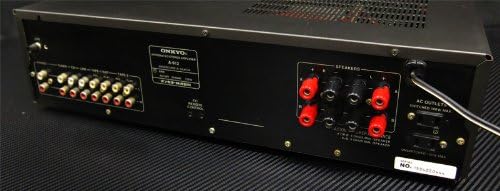
בילד: הינטערשטע view of the ONKYO A-912 Integrated Amplifier. This image shows the speaker terminals, various RCA input jacks (CD, Tuner, Line, Phono), and the AC power inlet.
- ספּיקער טערמינאַלס: Connect your passive speakers here. Ensure correct polarity (+ to + and - to -).
- Input Jacks (CD, Tuner, Line, Phono): Connect your audio source components using RCA cables. The Phono input is specifically for turntables.
- ערד טערמינאַל: For connecting the ground wire from a turntable, if applicable.
- AC אַרייַנשרייַב: פֿאַרבינדט דאָ דעם צוגעשטעלטן AC מאַכט שנור.
סעטאַפּ גייד
1. רעדנער קאַנעקשאַן
Connect your speakers to the speaker terminals on the rear panel. Ensure that the positive (+) terminal on the amplifier connects to the positive (+) terminal on the speaker, and the negative (-) terminal on the amplifier connects to the negative (-) terminal on the speaker. Use high-quality speaker wire for optimal sound.
2. Audio Component Connection
Connect your audio source components (e.g., CD player, tuner, turntable) to the corresponding input jacks on the rear panel using RCA audio cables. For a turntable, connect it to the 'Phono' input and ensure the ground wire (if present) is connected to the ampלעפיער'ס גראַונד טערמינאַל.
3. מאַכט קאַנעקשאַן
Once all audio connections are made, connect the supplied AC power cord to the AC inlet on the amplifier's rear panel, then plug the other end into a wall outlet.
אַפּערייטינג ינסטראַקשאַנז
מאַכט אויף / אַוועק
Press the Power button on the front panel to turn the amplifier on or off. The power indicator will illuminate when the unit is on.
סעלעקטינג אַן אַרייַנשרייַב מקור
Rotate the Input Selector knob on the front panel to choose the desired audio source (e.g., CD, Tuner, Line, Phono) that you have connected.
אַדזשאַסטינג באַנד
Turn the large Volume control knob clockwise to increase the volume and counter-clockwise to decrease it.
ניצן טאָן קאָנטראָלס
Use the Bass and Treble knobs to fine-tune the low and high frequencies of the audio output to your preference. The Balance knob adjusts the relative volume between the left and right speakers.
כעדפאָון נוצן
Plug your headphones into the Headphone Jack on the front panel. This will typically mute the main speaker output.
זאָרגן און וישאַלט
- רייניקונג: ווישט אָפּ דעם אַפּאַראַט מיט אַ ווייכן, טרוקענעם שטאָף. ניצט נישט קיין שרײַבנדיקע רייניגער, וואַקסן אָדער סאָלווענטן.
- ווענטילאַטיאָן: Ensure that the ventilation openings are not blocked by dust or debris. Periodically clean them if necessary.
- סטאָרידזש: If storing the unit for an extended period, unplug it from the power outlet and cover it to protect against dust.
טראָובלעשאָאָטינג
אויב איר דערפאַרונג פּראָבלעמס מיט דיין amplifier, refer to the following table for possible causes and solutions.
| פּראָבלעם | מעגלעך סיבה | לייזונג |
|---|---|---|
| קיין מאַכט | שטראָם קאַבל נישט פארבונדן; וואַנט אַוטלעט נישט אַקטיוו | Ensure power cord is securely plugged in; Check wall outlet with another device. |
| קיין געזונט | Incorrect input selected; Speaker wires loose; Volume too low; Headphones connected | Select correct input source; Check speaker connections; Increase volume; Disconnect headphones. |
| פאַרקרימט געזונט | Source component issue; Speaker impedance mismatch; Volume too high | Check source component; Ensure speakers match amplifier impedance; Reduce volume. |
| כאַמינג ראַש | Ground loop; Loose connections; Nearby interference | Ensure proper grounding for turntable; Check all cable connections; Move unit away from other electronic devices. |
ספּעסאַפאַקיישאַנז
- סאָרט: אָנקיאָ
- מאָדעל: א-912
- פאַבריקאַנט: אָנקיאָ
- פּעקל דימענשאַנז: 45.5 X 35 X 14.9 סענטימעטער
- נומער וואָג: 7.19 קג
- באַטעריז פארלאנגט: ניין
- ASIN: B00FRBU74G
- ערשטער פאַראַנען דאַטע: אקטאבער 10, 2013
וואָראַנטי און קונה שטיצן
For warranty information or technical assistance, please refer to the warranty card included with your product or visit the official Onkyo webזייטל. האַלט אייער קויף קוויטל ווי אַ באַווייַז פון קויפן פֿאַר וואָראַנטי קליימז.


