הקדמה
This manual provides essential instructions for the safe and efficient use of your ONKYO RC-1000M Audio Remote Control. Please read this manual thoroughly before using the product and retain it for future reference.
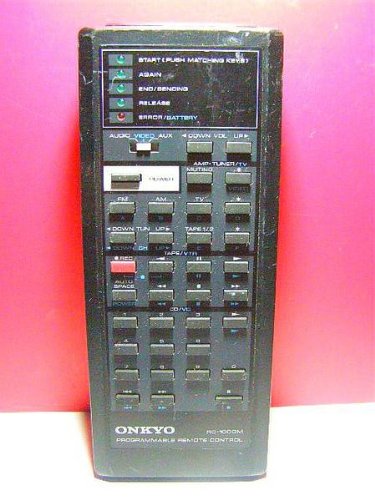
Image: The ONKYO RC-1000M Audio Remote Control, a black rectangular device with various control buttons.
סעטאַפּ
1. באַטאַרייע ייַנמאָנטירונג
- געפֿינען די דעקן פון די באַטאַרייע אָפּטייל אויף די צוריק פון די ווייַט קאָנטראָל.
- שלעפּט דעם דעקל אַראָפּ אָדער דריק דעם לאַטש צו עס עפֿענען.
- Insert two AAA batteries (not included), ensuring the positive (+) and negative (-) terminals align with the indicators inside the compartment.
- לייג צוריק דעם דעקל פונעם באַטעריע־אָפּטייל, און זאָרג אַז עס קליקט זיכער אַרײַן.
באַמערקונג: ניצט שטענדיק נייע באַטעריעס און טוישט ביידע באַטעריעס אין דער זעלבער צייט. מישט נישט אַלטע און נייע באַטעריעס אדער פאַרשידענע טייפּס באַטעריעס.
2. ערשטע פּאָרינג (אויב אָנווענדלעך)
The ONKYO RC-1000M is typically pre-programmed for compatible ONKYO audio devices. No manual pairing is usually required. If the remote does not respond, ensure your audio device is powered on and within range. Refer to your ONKYO audio component's manual for specific remote control compatibility and setup instructions if issues persist.
אַפּערייטינג ינסטראַקשאַנז
The RC-1000M remote control provides comprehensive control over your ONKYO audio system. Point the remote control directly at the main unit's remote sensor.
- מאַכט: Press to turn the audio component on or off.
- INPUT סעלעקטאָר: Use dedicated buttons (e.g., CD, TUNER, DVD) to switch between audio input sources.
- VOLUME +/-: אַדזשאַסטירט דעם הויפּט באַנד לעוועל.
- שטיל: Temporarily silences the audio output. Press again to restore sound.
- PLAY/PAUSE/STOP/SKIP: Control playback functions for compatible media players (e.g., CD player, network player).
- MENU/ENTER/NAVIGATION: Access and navigate on-screen menus of your ONKYO audio component.
For detailed functions of specific buttons, refer to the instruction manual of the ONKYO audio component you are controlling.
וישאַלט
רייניקונג
Wipe the remote control with a soft, dry cloth. Do not use abrasive cleaners, waxes, or solvents. Avoid spraying liquids directly onto the remote control.
באַטערי פאַרבייַט
If the remote control's range decreases or it becomes unresponsive, replace the batteries as described in the "Battery Installation" section. Dispose of used batteries according to local regulations.
סטאָרידזש
When storing the remote control for extended periods, remove the batteries to prevent leakage and potential damage to the unit.
טראָובלעשאָאָטינג
| פּראָבלעם | מעגלעך סיבה | לייזונג |
|---|---|---|
| Remote control does not operate. |
|
|
| Remote control operates intermittently. |
|
|
ספּעסאַפאַקיישאַנז
- מאָדעל: RC-1000M
- סאָרט: ONKYO
- מאַכט צושטעלן: DC 3V (AAA batteries x 2)
- אַפּערייטינג קייט: Approximately 7 meters (23 feet) under normal conditions.
- דימענשאַנז (בעערעך): Not specified in product data.
- וואָג (בעערעך): Not specified in product data.
ספּעסאַפאַקיישאַנז זענען אונטערטעניק צו טוישן אָן באַמערקן פֿאַר פֿאַרבעסערונג.
וואָראַנטי און שטיצן
For warranty information, technical support, or service inquiries, please refer to the documentation included with your ONKYO audio component or visit the official ONKYO webזייטל. האַלט אייער קויף קוויטל ווי אַ באַווייַז פון קויפן פֿאַר וואָראַנטי קליימז.
אפיציעלע אָנקיאָ Webפּלאַץ: www.onkyo.com


