הקדמה
This manual provides essential information for operating your Sony Cyber-shot DSC-RX100 II digital camera. The DSC-RX100 II is a premium compact digital camera featuring a 20.2 MP 1-inch Exmor R CMOS sensor, an F1.8 Carl Zeiss Vario-Sonnar T* lens, and a tiltable LCD screen. It is designed for high-quality photography and Full HD video recording in a portable form factor.
וואָס איז אין די קעסטל
Verify that all the following items are included with your Sony Cyber-shot DSC-RX100 II:
- Sony Cyber-shot DSC-RX100 II Digital Camera
- NP-BX1 Rechargeable Lithium-Ion Battery Pack (3.6V, 1240mAh)
- AC Adapter AC-UB10
- מיקראָ וסב קאַבלע
- האַנטגעלענק רימען
- Shoulder Strap Adapter
- וואָראַנטי קאַרד
קאַמעראַ איבערview
The Sony Cyber-shot DSC-RX100 II is designed for intuitive operation while offering advanced controls. Familiarize yourself with the main components and controls of your camera.

פיגורע 1: פראָנט View of the Sony RX100 II. This image shows the front of the camera, highlighting the Carl Zeiss Vario-Sonnar T* lens, the Sony logo, and the compact body design.
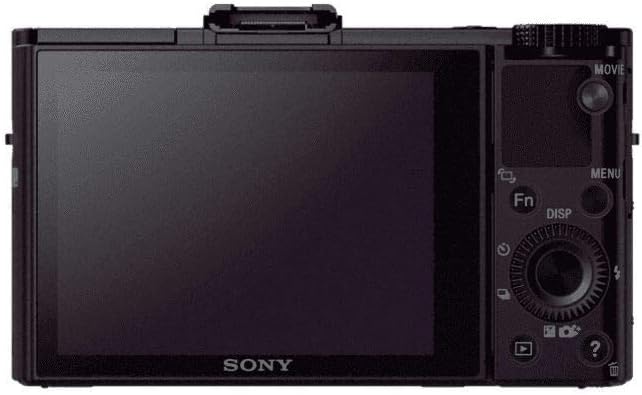
פיגורע 2: דערציען View of the Sony RX100 II. This image displays the back of the camera, featuring the 3.0-inch LCD screen, control dial, and various function buttons for navigation and settings adjustment.

Figure 3: Sony RX100 II with Tilted LCD Screen. This image illustrates the camera with its LCD screen tilted upwards, demonstrating its flexibility for shooting from various angles, including low-angle shots or over crowds.
סעטאַפּ
1. טשאַרדזשינג די באַטערי
- Insert the NP-BX1 battery pack into the camera.
- Connect the camera to the AC Adapter AC-UB10 using the Micro USB Cable.
- Plug the AC adapter into a wall outlet. The charging indicator will light up.
- טשאַרדזשינג איז גאַנץ ווען די גראדן ליכט טורנס אַוועק.
2. אַרייַנלייגן אַ זכּרון קאָרט
- עפֿנט דעם באַטעריע/זכּרון קאַרטל דעקל אויף דער אונטערשטער טייל פֿון דער קאַמעראַ.
- Insert a compatible SD/SDHC/SDXC or Memory Stick Duo/Pro Duo/Pro-HG Duo card with the notched corner facing the correct direction until it clicks into place.
- פאַרמאַכן די דעקל סיקיורלי.
3. ערשט סעטטינגס
Upon first power-on, the camera will prompt you to set the date, time, and area. Follow the on-screen instructions to configure these basic settings.
אַפּערייטינג די אַפּאַראַט
1. מאַכט אויף / אויסגעלאשן
דרוק די ON/OFF קנעפּל וואָס געפינט זיך אויף דער שפּיץ פון דער קאַמעראַ צו עס אָנצינדן אָדער אויסלעשן.
2. גענומען פאָטאָס
- Turn the mode dial to your desired shooting mode (e.g., Intelligent Auto, Program Auto, Aperture Priority, Shutter Priority, Manual).
- ראַמען דיין שאָס מיטן LCD עקראַן.
- דריק דעם שאטער קנעפל האלבוועגס אראפ צו פאקוסירן. דער פאקוס ראם וועט ווערן גרין ווען פאקוס איז דערגרייכט.
- דריק דעם שאטער קנעפל אינגאנצן אראפ צו כאפן דאס בילד.
3. רעקאָרדינג ווידיאס
- צו אָנהייבן רעקאָרדינג, דריקן די MOVIE button located on the rear of the camera.
- צו האַלטן רעקאָרדינג, דריקן די MOVIE קנעפּל ווידער.
- The camera supports Full HD 1920x1080 video recording at 60p/60i/24p.
4. Using the Control Ring and Dial
The control ring around the lens can be customized to adjust various settings such as zoom, aperture, or shutter speed. The rear control dial provides quick access to menu navigation and parameter adjustments.
אַוואַנסירטע פֿעיִקייטן
Exmor R CMOS Sensor
The 20.2 MP 1-inch Exmor R CMOS sensor with back-illumination technology enhances light collection efficiency, resulting in extremely high sensitivity and remarkably low noise, especially in low-light conditions.
Carl Zeiss Vario-Sonnar T* Lens
Equipped with a large-aperture F1.8 Carl Zeiss Vario-Sonnar T* lens, the camera offers powerful 3.6x optical zoom (28-100mm equivalent) and a seven-blade diaphragm for beautiful background defocusing.
Wi-Fi און NFC קאַנעקטיוויטי
Instantly connect to compatible Android smartphones or tablets via Wi-Fi or NFC. This allows for remote control of the camera's shutter release and instant transfer of captured images.
מולטי צובינד שוך
Expand your shooting options by attaching various accessories such as an electronic viewfinder, external flash unit, or stereo microphone to the Multi Interface Shoe.
Tiltable LCD Screen
The 3.0-inch, 1,229k-dot Xtra Fine monitor can be tilted up to 45° downward or 84° upward, providing clear viewing for diverse shooting angles, even in bright sunlight.
High-Speed Auto Focus
The camera features a high-speed autofocus system that can focus in as little as 0.13 seconds, ensuring sharp images even with moving subjects.
RAW/JPEG Recording
Capture images in either compact JPEG files, ultra-high quality RAW files, or both simultaneously, offering maximum flexibility for post-processing.
אָפּטיש סטעאַדישאָט
Optical SteadyShot image stabilization reduces camera shake and blur in both horizontal and vertical directions, ensuring clearer photos and videos.
וישאַלט
רייניקונג די אַפּאַראַט
- ניצט אַ ווייכן, טרוקענעם שטאָף צו רייניקן דעם קאַמעראַ קערפּער.
- For the lens, use a lens brush to remove dust, then gently wipe with a lens cleaning cloth. Avoid touching the lens surface with your fingers.
- רייניקט דעם LCD עקראַן מיט אַ ווייכן, לינט-פֿרייע שטאָף.
סטאָרידזש
האַלט די קאַמעראַ אין אַ קיל, טרוקן אָרט אַוועק פון דירעקט זונשייַן און עקסטרעמע טעמפּעראַטורן. אַרויסנעמען די באַטאַרייע אויב די קאַמעראַ וועט נישט ווערן גענוצט פֿאַר אַ לענגערע צייט.
טראָובלעשאָאָטינג
קאַמעראַ טוט זיך נישט אָן:
- זיכער מאַכן אַז די באַטאַרייע איז גאָר אויפגעלאָדן און ריכטיק אַרײַנגעשטעלט.
- קוק אויב די באַטעריע טערמינאַלן זענען ריין.
בילדער זענען פארשוואומען:
- Verify that the lens is clean and free from smudges.
- Ensure the camera is properly focused before taking the shot.
- Use Optical SteadyShot in low light or when shooting handheld.
Cannot transfer images to smartphone:
- Confirm that Wi-Fi and NFC are enabled on both the camera and your smartphone.
- Ensure the PlayMemories Mobile app is installed on your smartphone.
- Check network settings and ensure proper pairing.
ספּעסאַפאַקיישאַנז
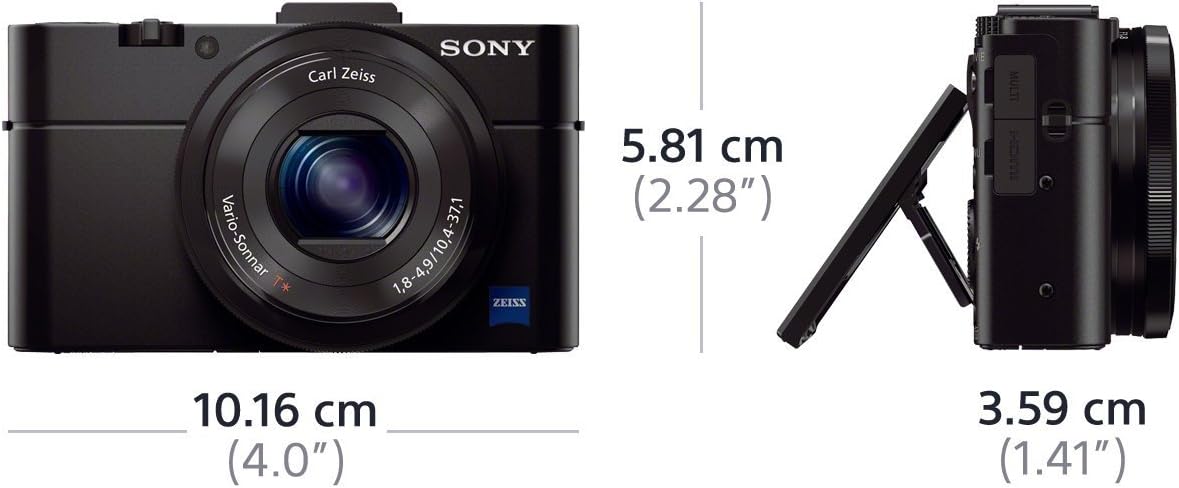
Figure 4: Sony RX100 II Dimensions. This image provides a visual representation of the camera's compact dimensions, showing its length, height, and depth.
| שטריך | דעטאַל |
|---|---|
| מאָדעל נאָמען | Sony DSCRX100M2 |
| סענסאָר טיפּ | 20.2 MP 1-inch Exmor R BSI CMOS Sensor |
| לענס | Carl Zeiss Vario-Sonnar T* (3.6x Optical Zoom, F1.8-4.9) |
| בילד סטאַביליזאַטיאָן | אָפּטיש סטעאַדישאָט |
| ווייַז | 3.0-inch Tiltable TFT LCD (1,229k dots) |
| ווידעא האַכלאָטע | Full HD 1080p (60p/60i/24p) |
| קאַנעקטיוויטי | Wi-Fi, NFC, Micro HDMI, Multi/Micro USB Terminal |
| ISO קייט | 160-12800 (Expandable to 100/125) |
| קעסיידערדיק שיסערייַ | אַרויף צו 10 FPS |
| דימענשאַנז (ב x ה x ד) | 101.6 X 58.1 X 38.3 מם (בעערעך 4.0 X 2.28 X 1.51 אינטשעס) |
| וואָג | Approx. 281g (9.92 oz) with battery and memory card |
וואָראַנטי און שטיצן
וואָראַנטי אינפֿאָרמאַציע
Your Sony Cyber-shot DSC-RX100 II comes with a 1-year warranty covering both parts and labor. Please refer to the included warranty card for full terms and conditions.
קונה שטיצן
פֿאַר ווייטערדיקע הילף, טעכנישע שטיצע, אָדער סערוויס פֿראַגעס, ביטע באַזוכט די אָפֿיציעלע סאָני שטיצע website or contact your local Sony customer service center.
אפיציעלע פּראָדוקט ווידיאס
Sony Cybershot RX100 II Overview
דעם ווידעא גיט אַ פולשטענדיק איבערview of the Sony Cyber-shot RX100 II, showcasing its design, key features, and user interface. It highlights the camera's capabilities for both photography and videography.
Sony RX100 II Product Features
This video delves into the specific product features of the Sony RX100 II, including its 20.2 MP sensor, Carl Zeiss lens, and Multi-Interface Shoe, demonstrating how these components contribute to its premium performance.
RX100M II Official Product Video
An official product video for the RX100M II, highlighting its compact design, advanced imaging capabilities, and user-friendly features for capturing high-quality photos and videos.
RX Series Live Stream Recording
This video demonstrates the live stream recording capabilities of the RX series, providing insights into how the camera can be used for extended video sessions and content creation.


