הקדמה
This manual provides essential instructions for the proper setup, operation, and maintenance of your Vivitar VX137-BLK 12.1MP Digital Touch Screen Camera. Please read this manual thoroughly before using your camera to ensure optimal performance and longevity.
פּראָדוקט איבערview
The Vivitar VX137-BLK is a compact 12.1-megapixel digital camera featuring a 2.4-inch touchscreen display. It includes a 4x digital zoom and an anti-shake feature to assist in capturing clear images. This camera is designed for ease of use and portability.

פיגורע 1: פראָנט view of the Vivitar VX137-BLK Digital Camera.
קאַמעראַ קאַמפּאָונאַנץ
- לענס: כאַפּט בילדער.
- פלאַש: גיט באַלויכטונג אין נידעריק-ליכט באדינגונגען.
- מאַכט קנעפּל: טוט אָן אָדער אויסלעשן די קאַמעראַ.
- לאָדן קנעפּל: נעמט פאָטאָס.
- 2.4-inch Touch Screen Display: פֿאַר viewing images, navigating menus, and controlling camera functions.
- היים קנעפּל: קערט צוריק צום הויפּט מעניו אָדער היים עקראַן.
- באַטערי אָפּטייל: האלט 3 AAA באַטעריעס.
- זכּרון קאָרט שפּעלטל: For inserting an SD or compatible memory card.
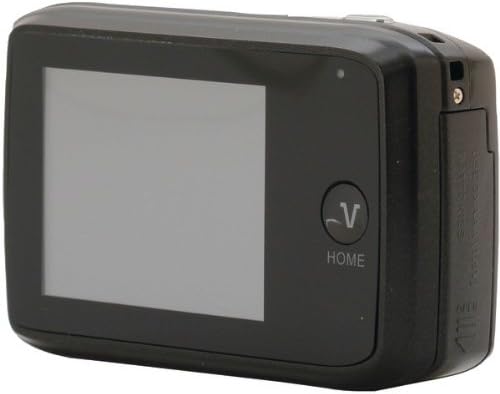
פיגורע 2: צוריק view of the Vivitar VX137-BLK Digital Camera, showing the touchscreen and Home button.
סעטאַפּ
1. באַטאַרייע ייַנמאָנטירונג
- Locate the battery compartment door on the side or bottom of the camera.
- שלעפּט דעם לאַטש צו עפֿענען דעם אָפּטייל.
- Insert three (3) AAA batteries, ensuring correct polarity (+/-) as indicated inside the compartment.
- Close the battery compartment door securely until it latches.
באַמערקונג: באַטעריעס זענען נישט אַרייַנגערעכנט און מוזן זיין געקויפט באַזונדער.
2. זכּרון קאַרטל ינסטאַלירונג
- געפינט דעם זכּרון קאַרטל שפּאַלט, טיפּיש לעבן דעם באַטאַרייע אָפּטייל.
- עפענען די זיקאָרן קאָרט שפּעלטל דעקן.
- Insert a compatible SD or memory card into the slot with the metal contacts facing the correct direction, usually downwards or towards the front of the camera. Push gently until it clicks into place.
- נאָענט די זיקאָרן קאָרט שפּעלטל דעקן.
Note: A memory card is not included and is highly recommended for storing photos and videos.
אַפּערייטינג די אַפּאַראַט
1. מאַכט אויף / אויסגעלאשן
- צו אנצינדן: דריק און האלט די מאַכט קנעפּל until the screen illuminates.
- צו אויסלעשן: דריק און האלט די מאַכט קנעפּל ווידער ביז דער עקראַן שליסט זיך אויס.
2. גענומען פאָטאָס
- Turn on the camera. The camera will typically start in photo capture mode.
- Frame your shot using the 2.4-inch touchscreen display.
- To zoom in or out, use the digital zoom controls on the touchscreen.
- דרוק די לאָדן קנעפּל halfway to focus, then press it fully to capture the image.
- The anti-shake feature will automatically engage to help reduce blur.
3. ווידעא רעקאָרדינג
- From the main screen, tap the video icon on the touchscreen to switch to video recording mode.
- דרוק די לאָדן קנעפּל to start recording. A timer or indicator will appear on the screen.
- דרוק די לאָדן קנעפּל ווידער צו האַלטן רעקאָרדינג.
4. פּלייבאַק מאָדע
- From the main screen, tap the playback icon (usually an arrow in a rectangle) to enter playback mode.
- Swipe left or right on the touchscreen to browse through your captured photos and videos.
- דריקט אויף אַ פאָטאָ אָדער ווידעאָ צו view עס אין פול פאַרשטעלן.
- To exit playback mode, tap the היים קנעפּל or the appropriate icon on the screen.
5. ריר סקרין באַניץ
The 2.4-inch touchscreen allows for intuitive navigation. Tap icons to select functions, swipe to scroll through images, and use pinch-to-zoom gestures if supported for reviewאין פאָטאָס.
וישאַלט
רייניקונג די אַפּאַראַט
- אַפּאַראַט גוף: Use a soft, dry cloth to wipe the camera body. Do not use liquid cleaners or solvents.
- לענס: Gently clean the lens with a lens cleaning cloth or a soft brush designed for camera lenses. Avoid touching the lens surface with your fingers.
- ריר סקרין: Use a microfiber cloth specifically designed for screens to gently wipe the display.
סטאָרידזש
- When not in use for extended periods, remove the AAA batteries to prevent leakage.
- Store the camera in a cool, dry place, away from direct sunlight, extreme temperatures, and high humidity.
- Use a camera case to protect it from dust and scratches.
טראָובלעשאָאָטינג
| פּראָבלעם | מעגלעך סיבה | לייזונג |
|---|---|---|
| די קאַמעראַ גייט נישט אָן. | טויטע אדער נישט ריכטיק אריינגעשטעלטע באַטעריעס. | פאַרבייטן מיט פרישע AAA באַטעריעס, זיכער מאַכנדיק די ריכטיקע פּאָלאַריטעט. |
| קען נישט נעמען בילדער. | זכּרון קאַרטל פול אָדער נישט אַרײַנגעשטעלט. | אַרײַנשטעלן אַ זכּרון קאַרטל אָדער אויסמעקן אַן עקזיסטירנדיקע files to free up space. Ensure the card is properly inserted. |
| בילדער זענען בלערי. | Insufficient light, camera shake, or dirty lens. | Ensure adequate lighting. Hold the camera steady. Clean the lens. The anti-shake feature is automatic, but extreme movement can still cause blur. |
| דער טאָוטשסקרין רעאַגירט נישט. | צייטווייליגע ווייכווארג פראבלעם אדער עקראן שמוץ. | Turn the camera off and on again. Gently clean the screen with a microfiber cloth. |
| די קאַמעראַ פֿאַרפֿרירט זיך. | ווייכווארג טעות. | Remove and reinsert the batteries to reset the camera. |
ספּעסאַפאַקיישאַנז
| שטריך | דעטאַל |
|---|---|
| מאָדעל נומער | VX137-BLK |
| בילד סענסאָר | 12.1 מעגאַפּיקסעלס |
| ווייַז | 2.4-inch Touch Screen LCD |
| דיגיטאַל פארגרעסער | 4x |
| בילד סטאַביליזאַטיאָן | Optical (Anti-Shake) |
| מאַכט מקור | 3 X AAA באַטעריז (ניט אַרייַנגערעכנט) |
| געשטיצט File פֿאָרמאַט | JPEG |
| פאָטאָ סענסאָר טעכנאָלאָגיע | קמאָס |
| אַספּעקט פאַרהעלטעניש | 4:3 |
| פּונקט וואָג | 4.8 אונסעס |
| פּראָדוקט דימענשאַנז | 7.09 X 8.94 X 1.69 אינטשעס |
וואָראַנטי אינפֿאָרמאַציע
This product is sold AS-IS. Please refer to the original purchase documentation for any specific warranty details provided at the time of sale. For further inquiries regarding product functionality, please consult the support section.
שטיצן
For technical assistance or further questions not covered in this manual, please visit the Vivitar official website or contact their customer support. Keep your purchase receipt and product model number (VX137-BLK) available when seeking support.


