1. הקדמה
This manual provides detailed instructions for the installation, operation, and maintenance of the Supermicro MBD-X10SLH-F-O uATX Server Motherboard. Please read this manual thoroughly before beginning installation to ensure proper setup and to maximize the performance and longevity of your system. This motherboard is designed for server applications, supporting Intel LGA1150 processors and DDR3 memory.
2. פּראָדוקט איבערview
The Supermicro MBD-X10SLH-F-O is a high-performance uATX server motherboard featuring the Intel C226 chipset. It is engineered for reliability and efficiency in server environments.
שליסל פֿעיִקייטן:
- קפּו סאָקקעט: LGA1150, supporting Intel Xeon E3-1200 v3/v4 series, 4th/5th Gen Core i3, Pentium, Celeron processors.
- זכּרון: 4x 204-pin DDR3-1600 SODIMM slots, supporting up to 32GB ECC/non-ECC Unbuffered memory.
- יקספּאַנשאַן סלאָץ: 1x PCI-Express 3.0 x16, 1x PCI-Express 2.0 x8, 1x PCI-Express 2.0 x4.
- סטאָרידזש: 6x SATA3 (6Gbps) ports.
- קאַנעקטיוויטי: Dual Gigabit Ethernet LAN ports (2x RJ45) and 1x Dedicated IPMI LAN port (RJ45).
- וסב פּאָרץ: 4x USB 3.0 ports, 6x USB 2.0 ports.
- ווידעא רעזולטאַט: 1x VGA port.
- פאָרם פאַקטאָר: uATX (9.6" x 9.6").
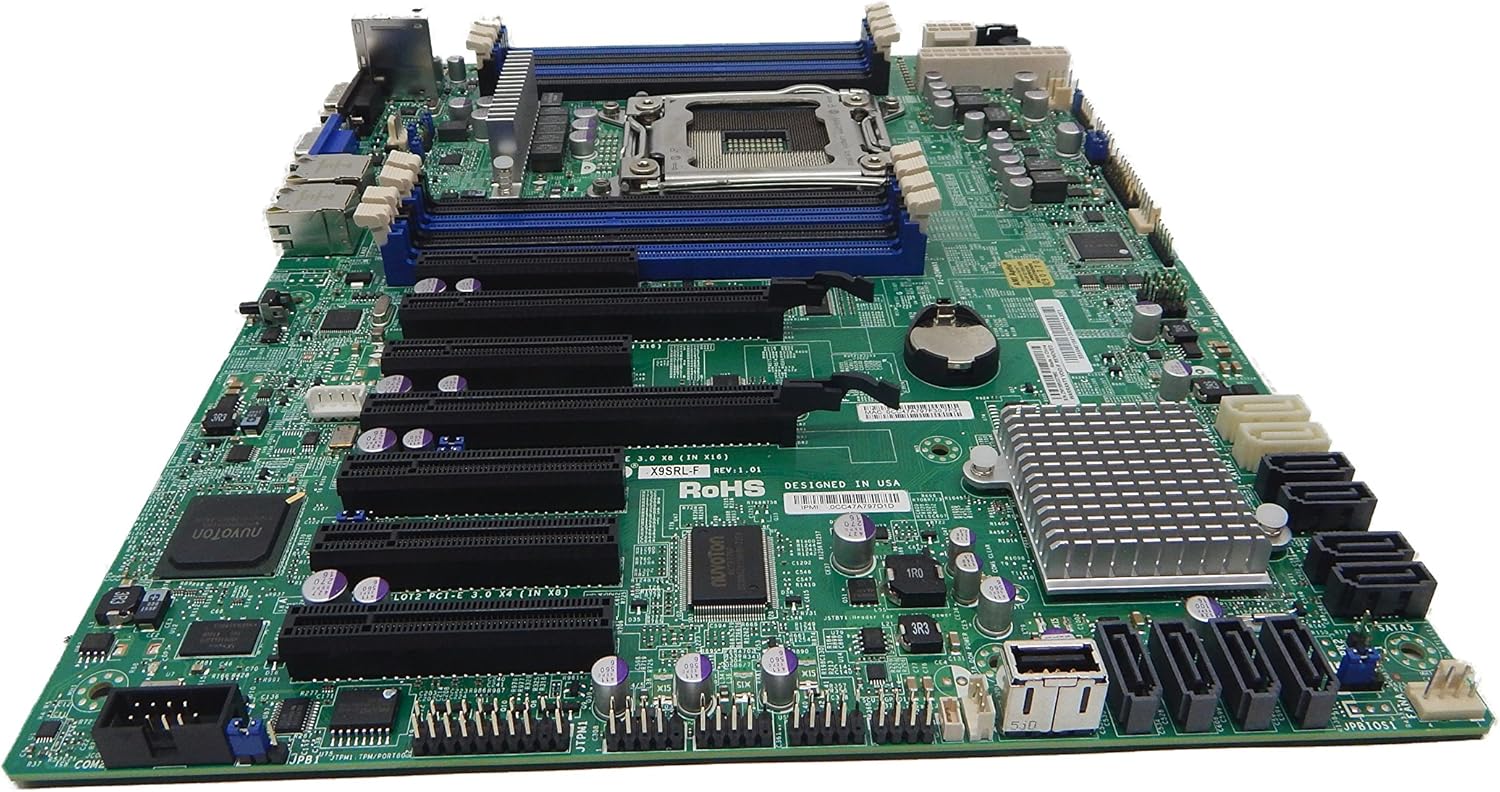
פיגורע 2.1: Top-down view of the Supermicro MBD-X10SLH-F-O motherboard, showing the CPU socket, RAM slots, and various expansion slots.

פיגורע 2.2: אַנגגאַלד view of the motherboard, highlighting the LGA1150 CPU socket and the four DDR3 SODIMM memory slots.

פיגורע 2.3: דערציען view of the Supermicro MBD-X10SLH-F-O motherboard, displaying the I/O panel with USB, VGA, LAN, and IPMI ports.

פיגורע 2.4: נאָענט-אַרויף view of the motherboard, showing the six SATA3 ports and other onboard connectors.
3. ספּעסאַפאַקיישאַנז
| שטריך | באַשרייַבונג |
|---|---|
| סאָרט | סופּערמיקראָ |
| מאָדעל נאָמען | MBD-X10SLH-F-O |
| קפּו סאָקקעט | LGA 1150 |
| טשיפּסעט טיפּ | Intel C226 |
| קאָמפּאַטיבלע פּראַסעסאָרן | Intel Core i3-4xxx, i5-4xxx, i7-4xxx, i3-5xxx, i5-5xxx, i7-5xxx, Intel Xeon E3-1200 v3/v4 series |
| ראַם זכּרון טעכנאָלאָגיע | דדר3 |
| זכּרון ספּיד | 1600 מהז |
| מאַקס ראַם געשטיצט | 32 גיגאבייט |
| נומער פון וסב 2.0 פּאָרץ | 6 |
| נומער פון וסב 3.0 פּאָרץ | 4 |
| SATA פּאָרץ | 6x SATA3 (6Gbps) |
| יקספּאַנשאַן סלאָץ | 1x PCIe 3.0 x16, 1x PCIe 2.0 x8, 1x PCIe 2.0 x4 |
| פאָרם פאַקטאָר | uATX |
| דימענשאַנז (LxWxH) | 14 X 11 X 3.5 אינטשעס |
| פּונקט וואָג | 3.52 אונסעס |
4. סעטאַפּ
Before beginning installation, ensure your system is powered off and disconnected from the power source. Always handle the motherboard by its edges to avoid static discharge.
4.1. סי-פי-יו אינסטאַלאַציע
- לײַכט הייבט אויף דעם CPU סאָקעט לעווער.
- Align the CPU with the socket, ensuring the gold triangle on the CPU matches the triangle on the socket.
- פֿאָרזיכטיק לייגט אַרײַן די סי־פּי־יו אין דער סאָקעט אָן עס צווינגען.
- Lower the socket lever and secure it.
- טראָגט אויף טערמישע פּאַסטע און אינסטאַלירט דעם סי-פּי-יו קולער לויט די אינסטרוקציעס פון זײַן פאַבריקאַנט.
4.2. זכּרון אינסטאַלאַציע
- עפֿנט די קליפּס ביי ביידע עקן פֿון דעם DIMM סלאָט.
- גלייכט אויס דעם קערב פונעם זכּרון מאָדול מיטן שליסל אין דעם DIMM סלאָט.
- דריק פעסט אַראָפּ אויף ביידע עקן פון די זכּרון מאָדול ביז די קליפס קליקן אין פּלאַץ.
4.3. אינסטאַלאַציע פון עקספּאַנסיע קאַרטל
- Remove the corresponding slot cover from your chassis.
- גלייכט אויס די עקספּאַנשאַן קאַרטל מיטן געוואונטשענעם PCIe סלאָט.
- Press down firmly until the card is fully seated.
- Secure the card with a screw or retention clip.
4.4. פֿאַרבינדונג פֿון סטאָרידזש דעווייס
- פֿאַרבינדט איין עק פֿון אַ SATA דאַטן קאַבל צו אַ SATA פּאָרט אויף דער מוטערבאָרד.
- Connect the other end of the SATA data cable to your storage device (HDD/SSD).
- פֿאַרבינדט אַ SATA מאַכט קאַבל פֿון אייער מאַכט צושטעלן צום סטאָרידזש מיטל.
4.5. מאַכט קאַנעקשאַנז
- פֿאַרבינדט דעם 24-פּין ATX הויפּט מאַכט קאַנעקטאָר פֿון אייער מאַכט צושטעל צום מוטערבאָרד.
- Connect the 8-pin (or 4-pin) ATX 12V CPU power connector to the motherboard.
4.6. פראָנט פּאַנעל קאַנעקשאַנז
Connect the front panel headers (Power LED, HDD LED, Power Switch, Reset Switch, USB, Audio) to the corresponding pins on the motherboard. Refer to the motherboard's silkscreen labels for correct pin orientation.
5. אַפּערייטינג ינסטרוקטיאָנס
5.1. ערשטע אויפשטארט
- After all components are installed and connected, connect the power cord to your power supply and turn on the power switch.
- דריק דעם פּאַוער קנעפּל אויף אייער שאַסי.
- די סיסטעם זאָל זיך אײַנשאַלטן, און איר זאָלט זען אַן עקראַן אויף אײַער מאָניטאָר.
5.2. בייאָס/UEFI צוטריט
To enter the BIOS/UEFI setup utility, press the designated key (commonly DEL or F2) during the initial boot sequence. The exact key may vary; observe the on-screen prompts.
5.3. IPMI Remote Management
This motherboard features a dedicated IPMI LAN port for remote management. To access the IPMI interface, connect the IPMI LAN port to your network. Obtain the IP address assigned to the IPMI interface (either from BIOS or a network scan) and access it via a web browser from another computer on the same network. Java may be required for remote console functionality.
6. וישאַלט
רעגולערע אויפהאלטונג העלפט זיכער מאכן די סטאביליטעט און לאנגעוויטי פון אייער מאדערבאארד און סיסטעם.
- באַזייַטיקונג פון שטויב: רייניקן פּעריִאָדיש שטויב פֿון דער מאַדערבאָרד און קאָמפּאָנענטן מיט קאָמפּרעסירטע לופֿט. זיכער מאַכן אַז די סיסטעם איז אויסגעלאָשן און אַרויסגעצויגן פֿון דער פּלאַטע איידער איר רייניקט.
- קאַבלע פאַרוואַלטונג: זיכער מאַכן אַז אַלע קייבלס זענען אָרדנטלעך געפירט און פֿאַרזיכערט צו פֿאַרמייַדן אַ שטערונג פֿון לופֿטפֿלוס און אַקסאַדענטאַלע אָפּגעטיילונגען.
- BIOS/Firmware Updates: קאָנטראָלירן די סופּערמיקראָ website for the latest BIOS and IPMI firmware updates. Follow the provided instructions carefully. Note that IPMI BIOS upgrades may require a separate license. Always update BIOS before IPMI firmware.
- קאָמפּאָנענט טשעקס: Occasionally inspect all connections (power, data, expansion cards) to ensure they are securely seated.
7. טראָובלעשאָאָטינג
די סעקציע באהאנדלט אלגעמיינע פראבלעמען וואס איר קענט באגעגענען.
7.1. סיסטעם קען נישט בוטן
- קוק די מאַכט קאַנעקשאַנז: Ensure the 24-pin ATX and 8-pin CPU power connectors are securely attached.
- איבערזעצן קאמפאנענטן: Remove and re-install the CPU, memory modules, and any expansion cards to ensure they are properly seated.
- קלאָר CMOS: Refer to your motherboard's detailed manual for instructions on how to clear the CMOS, which can resolve boot issues caused by incorrect BIOS settings.
- מינימום קאַנפיגיעריישאַן: Try booting with only essential components (CPU, one RAM stick, power supply, and display) to isolate the problem.
7.2. Fan Speed Issues
Some low RPM, high-efficiency fans may not be accurately detected by the motherboard's fan controller, leading to erratic fan speed behavior (e.g., fans spinning up to max RPM). This is often due to the controller expecting server-grade fans with higher RPM ranges.
- בייאָוס סעטטינגס: Check BIOS settings for fan control options. Adjust fan curves or modes if available.
- 3-Pin vs. 4-Pin Fans: If using 4-pin PWM fans that exhibit this behavior, consider using 3-pin adapters if available with your fans. This can sometimes provide a more stable, albeit less precise, fan control.
- IPMI Fan Control: While IPMI offers fan control, it may have limitations for low RPM fans.
7.3. SATA Port Obstruction
When installing a full-size graphics processing unit (GPU), some SATA ports may become physically blocked or difficult to access.
- פּלאַן פאָרויס: Connect SATA cables to the necessary ports before installing large expansion cards.
- Angled SATA Cables: Use SATA cables with angled connectors if straight connectors are obstructed.
- Alternative Ports: Utilize any unblocked SATA ports first.
8. וואָראַנטי און שטיצע אינפֿאָרמאַציע
For detailed warranty information, including terms, conditions, and duration, please refer to the official Supermicro website or the warranty card included with your product. For technical support, driver downloads, and additional documentation, visit the Supermicro support portal.
סופּערמיקראָ אפיציעל Webפּלאַץ: www.supermicro.com


