פּראָדוקט איבערview
This manual provides essential information for the proper use and maintenance of the OEM Fotga NEW GM VETRONIX TECH 2 DLC MAIN CABLE. This high-quality, super flexible cable is designed to connect your TECH2 Scanner to various vehicle types for diagnostic purposes.
It serves as a direct replacement for part numbers GM P/N: GM3000095 and VETRONIX PN: 02003214, ensuring compatibility and reliable performance with your Tech 2 diagnostic system.
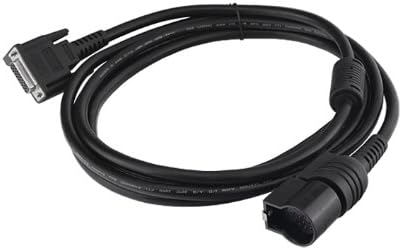
פיגורע 1: The OEM Fotga NEW GM VETRONIX TECH 2 DLC MAIN CABLE. This image displays the full length of the black diagnostic cable, coiled, with its distinct connectors visible at each end. One end features a multi-pin D-sub connector, while the other has a larger, automotive diagnostic link connector (DLC) designed for vehicle communication ports.
סעטאַפּ און קאַנעקשאַן
Follow these steps to properly connect the DLC Main Cable to your TECH2 Scanner and the vehicle:
- ידענטיפיצירן קאַנעקטערז: Locate the two distinct ends of the cable. One end is designed to connect to the TECH2 Scanner, typically a multi-pin connector. The other end is the Diagnostic Link Connector (DLC), which plugs into the vehicle's OBD-II port.
- Connect to TECH2 Scanner: Carefully insert the appropriate end of the DLC Main Cable into the designated port on your TECH2 Scanner. Ensure a secure and firm connection.
- Locate Vehicle OBD-II Port: The vehicle's OBD-II port is usually located under the dashboard on the driver's side. Refer to your vehicle's owner's manual if you have difficulty locating it.
- פאַרבינדן צו פאָרמיטל: Plug the DLC end of the cable into the vehicle's OBD-II port. Ensure it clicks into place, indicating a secure connection.
- מאַכט אויף: Once both ends are securely connected, power on your TECH2 Scanner according to its operating instructions.
באַמערקונג: Always ensure the TECH2 Scanner and vehicle are powered off before connecting or disconnecting the cable to prevent potential damage to either device.
אַפּערייטינג ינסטראַקשאַנז
This cable facilitates communication between your TECH2 Scanner and the vehicle's onboard diagnostic system. Once connected as described in the "Setup and Connection" section, operate your TECH2 Scanner as per its specific user manual to perform diagnostic functions.
- Diagnostic Communication: The cable enables the TECH2 Scanner to read diagnostic trouble codes (DTCs), view live data streams, perform bi-directional controls, and conduct various system tests on compatible vehicles.
- Software Interaction: All diagnostic operations are controlled through the TECH2 Scanner's software interface. Refer to your TECH2 Scanner's documentation for detailed instructions on navigating menus and executing diagnostic routines.
- דאַטאַ אַריבערפירן: The cable ensures stable and reliable data transfer between the vehicle's Electronic Control Units (ECUs) and the TECH2 Scanner.
וויכטיק: Do not bend or crimp the cable excessively during operation, as this may damage internal wiring and affect performance.
וישאַלט און זאָרג
Proper care extends the life of your DLC Main Cable:
- רייניקונג: Wipe the cable and connectors with a soft, dry cloth. Avoid using harsh chemicals or abrasive cleaners.
- סטאָרידזש: Store the cable in a cool, dry place, away from direct sunlight and extreme temperatures. Coil the cable loosely to prevent kinks and damage.
- האַנדלינג: Always grasp the connectors when plugging or unplugging the cable. Avoid pulling on the cable itself, as this can strain the internal wires and connections.
- דורכקוק: Periodically inspect the cable for any signs of wear, cuts, or damage to the insulation or connectors. If damage is observed, discontinue use and replace the cable.
טראָובלעשאָאָטינג
If you encounter issues with your DLC Main Cable, consider the following:
| פּראָבלעם | מעגלעך סיבה | לייזונג |
|---|---|---|
| No communication between TECH2 and vehicle. |
|
|
| אומגעריכטע פֿאַרבינדונג. |
|
|
ספּעסאַפאַקיישאַנז
| אַטריביוט | דעטאַל |
|---|---|
| סאָרט | אָעם |
| מאָדעל נומער | ZB023 |
| קאַמפּאַטאַבאַל דעוויסעס | TECH2 Scanner |
| ערזעצט טייל נומערן | GM P/N: GM3000095, VETRONIX PN: 02003214 |
| פּונקט וואָג | 0.32 אונסעס |
| פּראָדוקט דימענשאַנז | 2.3 x 2.3 x 0.7 אינטשעס (פאַרפּאַקט) |
| UPC | 799975140766 |
וואָראַנטי און שטיצן
For warranty information or technical support regarding your OEM Fotga NEW GM VETRONIX TECH 2 DLC MAIN CABLE, please refer to the original purchase documentation or contact the seller directly. Specific warranty terms may vary depending on the retailer and region of purchase.
Ensure you have your product model number (ZB023) and purchase details available when seeking support.


