1. הקדמה
This manual provides detailed instructions for the proper use and maintenance of your TFA 38.2028.02 Digital Timer and Stopwatch. This device is designed for precise timekeeping in various applications, featuring a reversible display, touch-sensitive buttons, and magnetic mounting options. Please read this manual thoroughly before operating the device.
2. פּראָדוקט פֿעיִקייטן
- Reversible Display: אַלאַוז פֿאַר גרינג viewפון פאַרשידענע אַנגלעס.
- Touch-Sensitive Buttons: For intuitive operation.
- באַקלייט: גיט קלאָרע זעאונג אין נידעריק-ליכט באדינגונגען.
- מאַגנעטיק מאַונטינג: Securely attaches to metallic surfaces.
- Wall or Tabletop Mounting: ווערסאַטאַל פּלייסמאַנט אָפּציעס.
- טיימער קייט: Counts up to 99 minutes and 59 seconds.
- סאָליד פּלאַן: Dimensions of 76 x 25 x 76 mm.
3. פּעקל אינהאַלט
- TFA 38.2028.02 Digital Timer and Stopwatch Unit
- באַניצער מאַנואַל (דעם דאָקומענט)
Note: 2 x 1.5V AAA batteries are required and not included in the package.
4. סעטאַפּ
4.1 באַטאַרייע ייַנמאָנטירונג
- געפינט דעם דעקל פונעם באַטעריע־אָפּטייל אויף דער הינטערשטער זייט פונעם אַפּאַראַט.
- לײַכט שלעפּן אָדער הייבן דעם דעקל צו עפֿענען דעם אָפּטייל.
- Insert two (2) 1.5V AAA batteries, ensuring correct polarity (+/-) as indicated inside the compartment.
- לייג צוריק דעם דעקל פונעם באַטעריע־אָפּטייל, און זאָרג אַז עס קליקט זיכער אַרײַן.
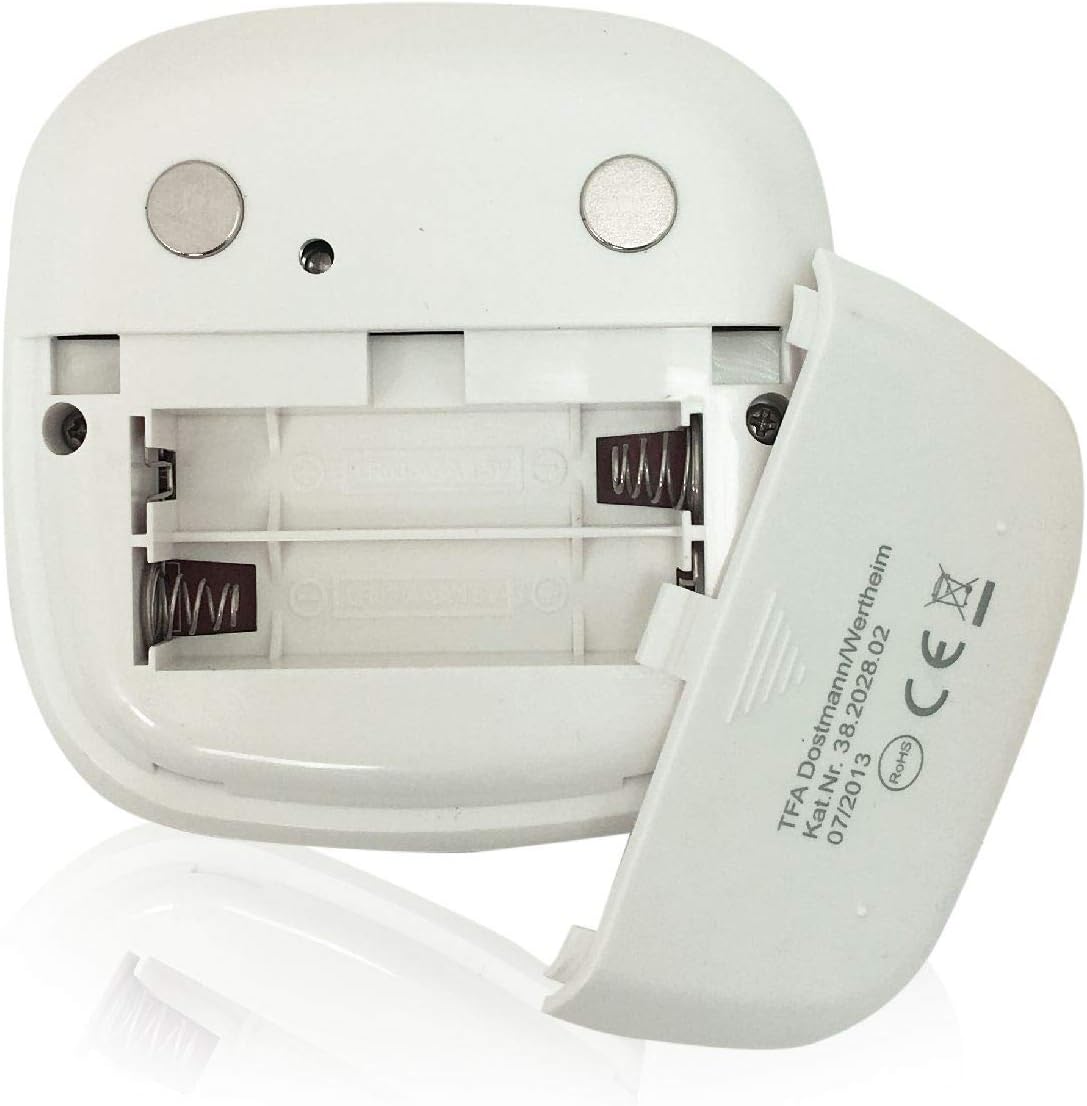
בילד: הינטערשטע view of the timer with the battery compartment open, illustrating where to insert the two AAA batteries.
4.2 ערשט מאַכט אויף
Once batteries are installed, the display will illuminate, and the device will be ready for use. The default display shows "00:00".
5. אַפּערייטינג ינסטרוקטיאָנס

בילד: פראָנט view of the TFA 38.2028.02 timer, highlighting the digital display and the three touch-sensitive buttons: 'M' for minutes, 'S' for seconds, and 'S/S' for Start/Stop.
5.1 קנעפּל פאַנגקשאַנז
- M (Minutes): Press to increase minutes. Hold to rapidly increase minutes.
- S (Seconds): Press to increase seconds. Hold to rapidly increase seconds.
- S/S (Start/Stop): Press to start or stop the timer/stopwatch.
5.2 שטעלן דעם טיימער (קאונטדאון)
- Ensure the display shows "00:00". If not, press M און S simultaneously to reset.
- דרוק די M button to set the desired minutes (up to 99 minutes).
- דרוק די S button to set the desired seconds (up to 59 seconds).
- אַמאָל די געוואונטשענע צייט איז איינגעשטעלט, דריק די S/S קנעפּל צו אָנהייבן די קאָונטדאָוון.
- צו פּויזירן דעם צייל-אויס, דריק S/S ווידער. דרוק S/S צו נעמענ זיכ ווידער.
- When the timer reaches "00:00", an alarm will sound. Press any button to stop the alarm.
5.3 ניצן די סטאָפּוואַטש (ציילן אַרויף)
- Ensure the display shows "00:00". If not, press M און S simultaneously to reset.
- דרוק די S/S button to start the count-up. The display will begin counting from "00:00".
- צו פּויזע די סטאַפּוואַטש, דריקן S/S ווידער. דרוק S/S צו נעמענ זיכ ווידער.
- To reset the stopwatch to "00:00", pause the stopwatch, then press M און S סיימאַלטייניאַסלי.
5.4 באַקלייט פונקציע
The display features a backlight for improved visibility. The backlight activates automatically when buttons are pressed and typically remains on for approximately 30-40 seconds before dimming to conserve battery life.
6. מאַונטינג אָפּציעס
The TFA 38.2028.02 timer offers flexible mounting solutions:
- מאַגנעטיק אַטאַטשמאַנט: The back of the timer is equipped with magnets, allowing it to be securely attached to refrigerators, oven hoods, or any other metallic surface.
- טאַבלעטאָפּ אָרט: The timer's design allows it to stand upright on a flat surface, such as a kitchen counter or desk.
- וואַנט מאָונטינג: The unit can also be mounted on a wall using a small hook or screw (not included) through the designated hole on the back.

בילד: הינטערשטע view of the timer, showing the integrated magnets for secure attachment to metallic surfaces and the model number.
7. וישאַלט
7.1 רייניקונג
צו רייניקן דעם טייַמער, ווישט אים אָפּ מיט אַ ווייכן, דamp cloth. Do not use abrasive cleaners or immerse the device in water. Avoid getting moisture into the battery compartment or display area.
7.2 באַטערי פאַרבייַט
When the display becomes dim or the device stops responding, it is time to replace the batteries. Follow the battery installation steps in Section 4.1. Always use fresh 1.5V AAA batteries and dispose of old batteries responsibly.
8. טראָובלעשאָאָטינג
| פּראָבלעם | מעגלעך סיבה | לייזונג |
|---|---|---|
| די מיטל טוט נישט מאַכט אויף. | באַטעריז זענען טויט אָדער ינקערעקטלי אינסטאַלירן. | קאָנטראָלירט די פּאָלאַריטעט פון די באַטעריע אָדער פאַרבייטן מיט נייע AAA באַטעריעס. |
| דער עקראַן איז טונקל אָדער פליקערט. | נידעריק באַטאַרייע מאַכט. | פאַרבייַטן באַטעריז. |
| די קנעפּלעך זענען נישט ריספּאַנדינג. | נידעריגע באַטעריע מאַכט אָדער צייטווייליגע ווייכווארג פּראָבלעם. | Replace batteries. If problem persists, remove batteries for 1 minute and reinsert. |
| Timer alarm is too quiet. | אַלאַרם וואָלומען איז פאַרפעסטיקט און קען נישט אַדזשאַסטיד ווערן. | Ensure the timer is placed in a location where the alarm can be heard. |
9. ספּעסאַפאַקיישאַנז
| שטריך | דעטאַל |
|---|---|
| מאָדעל נומער | 38.2028.02 |
| סאָרט | טפאַ |
| דימענסיעס (L X W X H) | 76 x 25 x 76 mm (approximately 2.5P x 7.6l x 7.6H cm) |
| וואָג | 92 גראַמז |
| מאַטעריאַל | Plastic with integrated magnets |
| מאַכט צושטעלן | 2 X 1.5V AAA באַטעריז (ניט אַרייַנגערעכנט) |
| טיימער ראַנגע | Up to 99 minutes, 59 seconds |
| ווייַז | Digital with backlight |
| מאַונטינג אָפּציעס | Magnetic, Tabletop, Wall-mountable |

Image: The timer held in a hand, visually demonstrating its compact size and indicating its dimensions (7.6 cm x 7.6 cm x 2.5 cm).
10. וואָראַנטי און שטיצן
TFA products are manufactured with quality and precision. For specific warranty information, please refer to the documentation provided with your purchase or visit the official TFA website. For technical support or inquiries, please contact TFA customer service through their official channels.
האַלטן דעם מאַנואַל פֿאַר צוקונפֿט רעפֿערענץ.


