1. הקדמה
This manual provides detailed instructions for the setup, operation, and maintenance of your Vibe Axcess 5-in-1 Universal Remote. Please read this manual thoroughly before using the remote control to ensure proper functionality and to maximize your user experience. This remote is designed to control up to five different audio/video devices.
2. פּראָדוקט איבערview
The Vibe Axcess 5-in-1 Universal Remote is designed to consolidate control of multiple home entertainment devices into a single unit. It features dedicated buttons for various functions and device types.
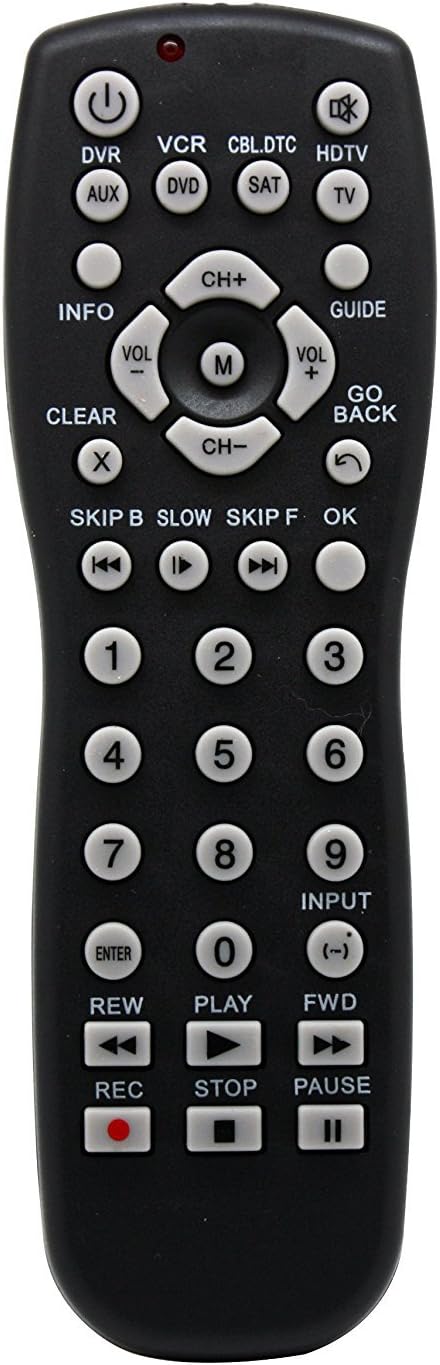
פיגורע 1: פראָנט view of the Vibe Axcess 5-in-1 Universal Remote. This image displays the remote's layout, including device selection buttons (DVR, VCR, CBL.DTC, HDTV, AUX, DVD, SAT, TV), navigation pad, number keys, and media control buttons (REW, PLAY, FWD, REC, STOP, PAUSE).

פיגורע 2: Packaging of the Vibe Axcess 5-in-1 Universal Remote. The packaging highlights the remote's 5-in-1 capability and compatibility with various device types such as DVD/VCR, HDTV, DVD, AUX, and CBL/SAT/CABLE.
3. סעטאַפּ
3.1 באַטאַרייע ייַנמאָנטירונג
- געפֿינען די דעקן פון די באַטאַרייע אָפּטייל אויף די צוריק פון די ווייַט קאָנטראָל.
- שלעפּט דעם דעקל אַראָפּ אָדער דריק דעם לאַטש און הייבט אויף צו עפֿענען.
- Insert two (2) AAA batteries, ensuring the positive (+) and negative (-) terminals match the diagrams inside the compartment.
- לייגט צוריק דעם דעקל פונעם באַטעריע־אָפּטייל, און שטופּט עס צוריק אין פּלאַץ ביז עס קליקט זיכער.
באַמערקונג: Always use fresh batteries and replace both batteries at the same time. Do not mix old and new batteries or different types of batteries.
3.2 פּראָגראַמירן דעם ווײַטקאָנטראָל
To control your devices, the universal remote must be programmed with the correct codes for each device. There are typically two methods for programming:
3.2.1 דירעקט קאָד פּאָזיציע
This method involves entering a specific code from a code list (usually provided with the remote or available online) for your device's brand.
- צינדט אָן דעם דעווייס וואָס איר ווילט קאָנטראָלירן (למשל, טעלעוויזיע, DVD שפּילער).
- Press and hold the desired device button on the remote (e.g., TV, ווי) for approximately 3 seconds until the indicator light (usually red) illuminates and stays on.
- While the indicator light is on, enter the 3-digit or 4-digit code for your device's brand using the number keys.
- If the code is valid, the indicator light will turn off. If the light flashes and remains on, the code was invalid; re-enter the code.
- טעסט די ווײַטקאָנטראָל דורך דריקן די מאַכט button. If the device turns off, the code is correct. If not, try the next code listed for your brand.
3.2.2 אַוטאָ קאָוד זוכן
If you cannot find a code or direct code entry fails, use the auto code search method.
- קער אויף די מיטל איר ווילט צו קאָנטראָלירן.
- Press and hold the desired device button (e.g., TV) for approximately 3 seconds until the indicator light illuminates and stays on.
- While holding the device button, press the מאַכט button once. The indicator light will start flashing, indicating it is searching for a code.
- Point the remote at the device and wait for the device to turn off. This may take several minutes as the remote cycles through codes.
- אַמאָל די דעווייס כאַפּט זיך אויס, דריק גלייך אויף די אַרייַן קנעפּל צו ראַטעווען דעם קאָד. די אינדיקאַטאָר ליכט וועט זיך אויסלעשן.
- Test the remote's functions. If some functions do not work, repeat the auto search process to find a more compatible code.
4. אַפּערייטינג ינסטרוקטיאָנס
Once programmed, operating your Vibe Axcess 5-in-1 Universal Remote is straightforward.
- אויסקלייַבן דיווייס: דריק דעם קארעספאנדירנדיקן דעווייס קנעפל (למשל, TV, ווי, CBL.DTC) for the device you wish to control. The indicator light will briefly illuminate to confirm selection.
- מאַכט אויף / אַוועק: דרוק די מאַכט קנעפּל צו דרייען דעם אויסגעקליבענעם מיטל אן אדער אויס.
- באַנד קאָנטראָל: ניצן די VOL+ און וואָל- קנעפּלעך צו סטרויערן די באַנד.
- קאַנאַל קאָנטראָל: ניצן די CH+ און טש- קנעפּלעך צו טוישן טשאַנאַלז.
- נומער קיז: Use the number keys (0-9) to directly enter channel numbers or other numerical inputs.
- נאַוויגאַציע: Use the directional pad (up, down, left, right) and OK קנעפּל פֿאַר מעניו נאַוויגאַציע.
- מעדיע קאָנטראָלס: ניצן שפּיל, פּויזע, האַלטן, REW, פווד, און REC for controlling media playback on compatible devices.
5. וישאַלט
5.1 רייניקונג
To clean your remote, gently wipe it with a soft, dry cloth. Do not use abrasive cleaners, solvents, or harsh chemicals, as these can damage the remote's finish or internal components.
5.2 באַטערי פאַרבייַט
When the remote's performance degrades or the indicator light fails to illuminate, it is time to replace the batteries. Follow the battery installation steps in Section 3.1. Dispose of used batteries responsibly according to local regulations.
6. טראָובלעשאָאָטינג
- ווייַט ניט ארבעטן:
- Check if the batteries are inserted correctly and are not depleted. Replace if necessary.
- Ensure you have selected the correct device button (e.g., TV for your television).
- Verify that the remote is programmed with the correct code for your device. Re-program if unsure.
- זיכער מאַכן אַז עס זענען נישטאָ קיין שטערונגען צווישן דעם ווײַטקאָנטראָל און דעם אַפּאַראַט'ס אינפֿראַרעד סענסאָר.
- עטלעכע פונקציעס ארבעטן נישט:
- Some universal remote codes may not support all original remote functions. Try another code for your device brand using the programming steps.
- Ensure the device you are trying to control supports the specific function (e.g., not all TVs have a dedicated 'INFO' button function).
- Indicator light not illuminating:
- קוק און פאַרבייַטן באַטעריז.
- If the issue persists after battery replacement, the remote may be faulty.
7. ספּעסאַפאַקיישאַנז
- מאָדעל: OT795-KO
- סאָרט: ווייב
- פּראָדוקט דימענשאַנז: 10.7 X 4 X 0.8 אינטשעס
- נומער וואָג: 4 אונסעס
- באַטעריז: 2 AAA באַטעריז פארלאנגט (ניט אַרייַנגערעכנט)
- מאַקסימום נומער פון שטיצט דעוויסעס: 5
- קאַנעקטיוויטי טעכנאָלאָגיע: ינפרערעד
- ספּעציעלע שטריך: וניווערסאַל
8. וואָראַנטי און שטיצן
For information regarding warranty coverage or technical support, please refer to the documentation included with your purchase or contact the retailer where the product was acquired. Specific warranty terms may vary.


