1. הקדמה
The Olympus E-PL5 is a compact mirrorless digital camera designed for both photography enthusiasts and casual users. It features a 16MP Live MOS sensor, a TruePic VI image processor, and a versatile 14-42mm lens, offering high-quality imaging in a portable form factor. This manual provides essential information for setting up, operating, and maintaining your camera.
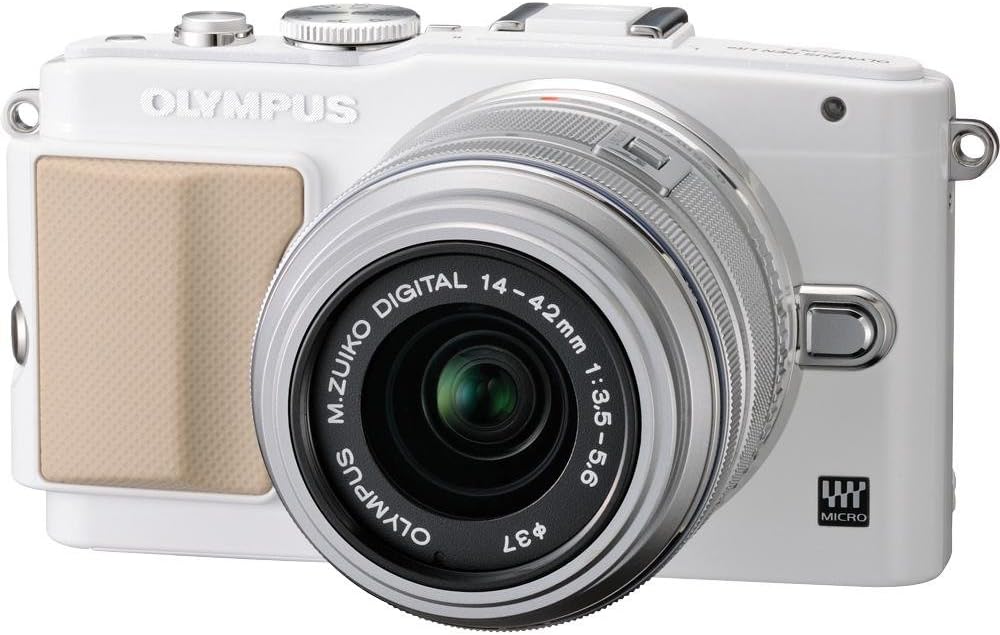
פיגורע 1: פראָנט view of the Olympus E-PL5 Mirrorless Digital Camera with the 14-42mm lens attached.
2. סעטאַפּ
2.1 באַטעריע און זכּרון קאַרטל ינסטאַלירונג
- עפֿנט דעם באַטעריע/זכּרון קאַרטל דעקל וואָס געפֿינט זיך אויף דער אונטערשטער טייל פֿון דער קאַמעראַ.
- Insert the battery with the correct orientation until it clicks into place.
- Insert an SD/SDHC/SDXC memory card into the slot until it clicks. Ensure the card is facing the correct direction.
- פאַרמאַכן די דעקל סיקיורלי.
2.2 אנשטעלן די לינז
- אַראָפּנעמען דעם גוף דעקל פֿון דער קאַמעראַ און דעם הינטערשטן לענס דעקל פֿון דער לענס.
- גלייכט אויס דעם ווייסן פונקט אויף דער לענס מיטן ווייסן פונקט אויף דער קאמערא קערפער.
- מאָנטירט די לינז דורך דרייען עס זייגער־ווייז ביז עס קליקט אין פּלאַץ.
- אַראָפּנעמען די פראָנט אָביעקטיוו היטל.

פיגורע 2: פראָנט view of the camera, illustrating the lens attachment point.
3. אָפּעראַציע
3.1 גרונטלעכע שאָס מאָדעס
דריי דעם מאָדע דיאַל צו אויסקלייבן אייער געוואונטשענע שאָס מאָדע:
- i-Auto: Intelligent Auto mode for automatic scene detection.
- פּ (פּראָגראַם אויטאָמאַטיש): די קאַמעראַ שטעלט די אַפּערטור און שאַטער גיכקייט פֿאַר אָפּטימאַלער עקספּאָזישאַן.
- א (אַפּערטור פּריאָריטעט): You control the aperture, camera sets shutter speed.
- S (שאַטער פּריאָריטעט): You control the shutter speed, camera sets aperture.
- מ (מאַנועל): פולע מאַנועלע קאָנטראָל איבער אַפּערטור און שאַטער גיכקייט.
- SCN (סצענע מאָדעס): Pre-set modes for specific situations (e.g., Portrait, Landscape).
- ART (Art Filters): Apply creative effects to your photos.
3.2 Using the Touch LCD Screen
The 3.0-inch flip self-portrait touch LCD screen allows for intuitive control:
- Touch Shutter: Tap the screen to focus and take a picture.
- Touch AF: Tap to set the autofocus point.
- Live Guide System: Adjust settings like brightness, color, and background blur by touching on-screen sliders and previewינג יפעקץ.
- The screen can be tilted for various shooting angles, including self-portraits.

פיגורע 3: דערציען view of the Olympus E-PL5, showing the LCD screen in use.

פיגורע 4: זייַט view of the Olympus E-PL5 with its tilting LCD screen extended.
3.3 רעקאָרדינג ווידעא
The E-PL5 supports Full 1080i HD video recording with Art Filter Movie and Effects. To record a video:
- Set the mode dial to the movie recording mode (usually indicated by a film camera icon).
- דריק דעם באַזונדערן פֿילם רעקאָרד קנעפּל צו אָנהייבן און אָפּשטעלן רעקאָרדינג.
- Utilize the Art Filters for creative video effects.
Video 1: This video showcases the Olympus E-PL5 camera being used in a 72-hour filmmaking challenge, demonstrating its capabilities for video production in various environments.
4. וישאַלט
4.1 רייניקן די קאַמעראַ
- אַפּאַראַט גוף: ווישט אָפּ דעם קאַמעראַ קערפּער מיט אַ ווייכן, טרוקענעם שטאָף. פֿאַר שווערן שמוץ, ניצט אַ שטאָף וואָס איז לייכט ווייכער געמאַכט.ampגעענדיקט מיט וואַסער. ויסמיידן האַרב קעמיקאַלז.
- לענס: Use a lens brush or blower to remove dust. For smudges, use a specialized lens cleaning solution and a microfiber cloth. Never touch the lens surface with your fingers.
- LCD פאַרשטעלן: ווישט אָפּ דעם עקראַן מיט אַ ווייכן, לינט-פֿרײַעם שטאָף. פֿאַרמײַדט צו דריקן צו שטאַרק.
4.2 סטאָרידזש
When not in use, store the camera in a cool, dry place away from direct sunlight and extreme temperatures. Remove the battery if storing for extended periods to prevent leakage.
5. טראָובלעשאָאָטינג
5.1 פּראָסט ישוז און סאַלושאַנז
- קאַמעראַ טוט זיך נישט אָן: זיכער מאַכן אַז די באַטאַרייע איז גאָר אויפגעלאָדן און ריכטיק אַרײַנגעשטעלט. קאָנטראָלירט צי די באַטאַרייע קאָנטאַקטן זענען ריין.
- בילדער זענען פארשוואומען: Check if the lens is clean and properly attached. Ensure the autofocus is working correctly or try manual focus. Verify that the shutter speed is appropriate for the lighting conditions to prevent camera shake.
- LCD screen is blank or unresponsive: Press the DISPLAY button to cycle through display modes. If the screen is unresponsive to touch, try restarting the camera. Ensure the screen is not physically damaged.
- זכּרון קאַרטל טעות: Ensure the memory card is inserted correctly and is not full. Try formatting the card (this will erase all data, so back up first). If the issue persists, try a different memory card.
- בליץ פליסט נישט: Check if the flash is enabled in the camera settings and if the shooting mode allows flash. Ensure the external flash (if used) is properly mounted and powered.
6. ספּעסאַפאַקיישאַנז
| שטריך | דעטאַל |
|---|---|
| מאָדעל נאָמען | Olympus E-PL5 |
| פאָטאָ סענסאָר האַכלאָטע | 16 מפּ |
| סענסאָר טיפּ | מאָס |
| קאַמפּאַטאַבאַל מאַונטינגז | מיקראָ פיר דריטס |
| בילד סטאַביליזאַטיאָן | סענסאָר-יבעררוק |
| לענס טיפּ | Zoom (14-42mm) |
| מאַקסימום עפענונג | 3.5 f |
| פאַרשטעלן גרייס | 3 אינטשעס |
| ווייַז טיפּ | LCD, Tilting, Touch Screen |
| ווידעא האַכלאָטע | FHD 1080i |
| געשטיצט File פֿאָרמאַט | RAW, JPEG, RAW+JPEG, MPO(3D still) |
| פלאַש זכּרון טיפּ | SD/SDHC/SDXC |
| קאַנעקטיוויטי טעכנאָלאָגיע | HDMI, USB, וויירלעס |
| פּונקט וואָג | 0.72 פונט |
7. וואָראַנטי & שטיצן
For detailed warranty information and customer support, please refer to the official Olympus webזייטל אדער קאנטאקט זייער קאסטומער סערוויס גלייך. האלט אייער באווייז פון קויפן פאר יעדע גאראנטיע טענות.
Online resources, FAQs, and software updates may also be available on the Olympus support pages.


