הקדמה
This manual provides detailed instructions for the installation, operation, and maintenance of your Seasonic SSR-360GP 360W 80PLUS Gold ATX12V Power Supply. Please read this manual thoroughly before installation and keep it for future reference. Proper installation and usage ensure optimal performance and longevity of your power supply unit (PSU).
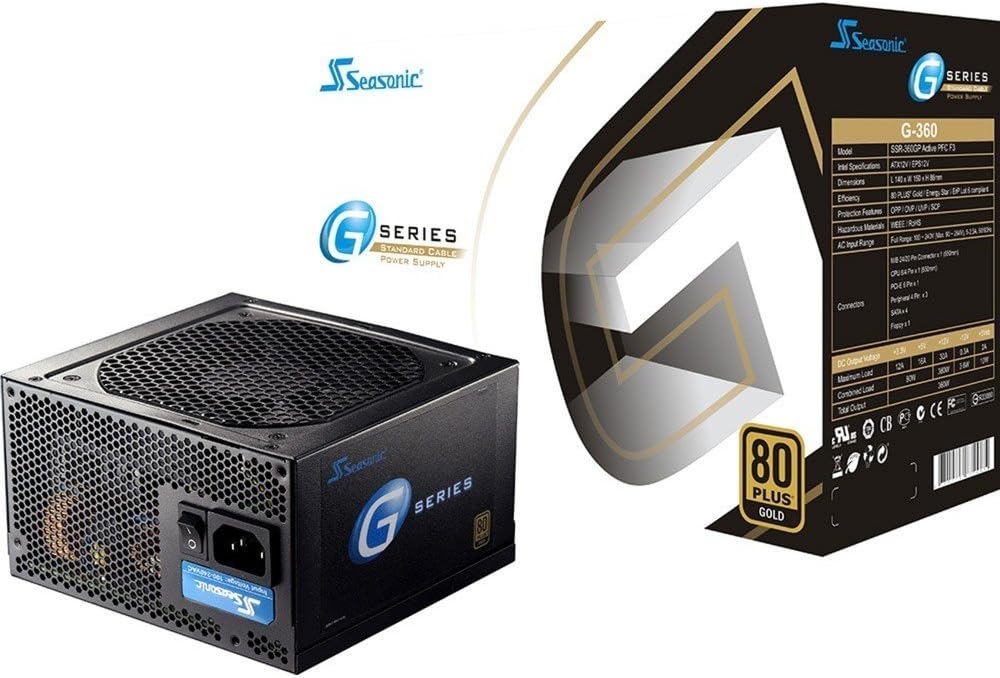
Image: The Seasonic SSR-360GP 360W 80PLUS Gold ATX12V Power Supply shown alongside its retail packaging. This image provides a visual overview of the product and its branding.
זיכערקייַט אינפֿאָרמאַציע
Always observe the following safety precautions to prevent injury or damage to your equipment:
- Ensure the power supply is disconnected from the AC power outlet before installation or maintenance.
- עפֿנט נישט די מאַכט־צושטעל casinז. הויך באַנדtages are present inside, and there are no user-serviceable parts. Opening the casing וועט בטל מאַכן די וואָראַנטי.
- אינסטאלירט די מאַכט צושטעל אין אַ גוט-ווענטילאַטעד אָרט, אַוועק פון היץ קוועלער, דירעקט זונשייַן און נעץ.
- ניצט נאָר די קייבלס וואָס קומען מיטן מאַכט צושטעל.
- Ensure all connectors are securely attached to prevent electrical shorts or damage.
- This product is designed for use in personal computers. Do not use it for other applications.
פּעקל אינהאַלט
באַשטעטיקן אַז אַלע זאכן זענען פאַראַן אין דיין פּעקל:
- Seasonic SSR-360GP 360W Power Supply Unit
- אַק מאַכט שנור
- מאַונטינג סקרוז
- Cable Ties (for cable management)
- באַניצער מאַנואַל (דעם דאָקומענט)
סעטאַפּ און ינסטאַלירונג
גיי די פאלגענדע טריט צו אינסטאַלירן דיין מאַכט צושטעלן:
- צוגרייטן אייער סיסטעם: זיכער מאַכן אַז אייער קאָמפּיוטער איז גאָר אויסגעלאָשן און אַרויסגעצויגן פֿון דער וואַנט־אַויטלעט. עפֿנט אייער קאָמפּיוטער־קעסטל.
- אַראָפּנעמען אַלטע PSU (אויב אָנווענדלעך): דיסקאָנעקט אַלע קייבלס פון דיין אַלטן מאַכט צושטעל און אַרויסנעמען עס פון דעם קעסטל.
- אינסטאַלירן אַ נייע PSU: Carefully place the Seasonic SSR-360GP into the power supply bay of your computer case. Ensure the fan is facing the correct direction for optimal airflow (typically facing down if your case has a bottom vent, or facing into the case if mounted at the top). Secure the PSU with the provided mounting screws.
- Connect Main Motherboard Power: Connect the 20+4 pin ATX connector to your motherboard's main power socket. Ensure it clicks into place.
- פאַרבינדן CPU מאַכט: Connect the 4+4 pin (or 8-pin) EPS/ATX12V connector to your motherboard's CPU power socket.
- Connect PCI-Express Power (if needed): If your graphics card requires additional power, connect the 6-pin PCI-Express connector to the graphics card.
- פאַרבינדן SATA דעוויסעס: Connect the SATA power connectors to your hard drives, SSDs, and optical drives.
- Connect Peripheral Devices: Use the 4-pin peripheral (Molex) connectors for any other components that require them, such as case fans or older drives. A floppy connector is also available if needed.
- קאַבלע פאַרוואַלטונג: Organize cables using the provided cable ties to improve airflow and aesthetics within your case.
- פֿאַרמאַכן דעם קעסטל און פֿאַרבינדן וועקסלשטראָם: Close your computer case. Connect the AC power cord to the power supply and then to a wall outlet or surge protector.

בילד: הינטערשטע view of the Seasonic SSR-360GP Power Supply, showing the AC power input, power switch, and exhaust grille. This illustrates the external connections and controls.
אַפּערייטינג ינסטראַקשאַנז
After successful installation, turn on the power switch located on the rear of the power supply (usually marked 'I' for ON and 'O' for OFF). Then, power on your computer using the case's power button. The 12cm ball bearing cooling fan will operate automatically to maintain optimal temperatures. This power supply is 80 PLUS Gold certified, indicating high energy efficiency during operation.

Image: The 80 PLUS Gold certification logo, signifying the power supply's high energy efficiency.
וישאַלט
The Seasonic SSR-360GP is designed for reliable, long-term operation with minimal maintenance. However, periodic checks can help ensure its performance:
- באַזייַטיקונג פון שטויב: Every 6-12 months, or more frequently in dusty environments, power off and unplug your computer. Use compressed air to gently clear dust from the power supply's fan intake and exhaust grilles. Do not open the PSU casing.
- קאַבלע דורכקוק: Periodically check all power cable connections to ensure they are secure and free from damage.
- ווענטילאַטיאָן: Ensure that the computer case has adequate airflow and that the power supply's fan is not obstructed.
טראָובלעשאָאָטינג
If you encounter issues with your power supply, consider the following common solutions:
- קיין מאַכט:
- זיכער מאַכן אַז די AC מאַכט שנור איז זיכער פארבונדן צו ביידע די מאַכט צושטעל און די וואַנט ווענטיל.
- Check that the power switch on the back of the PSU is in the 'I' (ON) position.
- Verify that all internal power connectors (20+4 pin ATX, 4+4 pin CPU, etc.) are firmly seated.
- פּרובירט די וואַנט אַוטלעט מיט אַן אַנדער דעווייס צו באַשטעטיקן אַז עס האָט שטראָם.
- סיסטעם אינסטאביליטעט/רענדאם אפשטעלונגען:
- זייט זיכער אז אייער סיסטעם'ס מאַכט רעקווייערמענץ טאָן נישט יקסיד די 360 וואט קאַפּאַציטעט פון די PSU.
- Check for proper ventilation within your computer case to prevent overheating.
- קאָנטראָלירט אַלע קאַבלע פֿאַרבינדונגען פֿאַר לויזקייט אָדער שעדיקן.
- ומגעוויינטלעך נויזיז:
- A slight fan noise is normal. If you hear grinding or excessive noise, ensure no cables are obstructing the fan.
- If the noise persists and is unusual, contact customer support.
If troubleshooting steps do not resolve the issue, contact Seasonic customer support for further assistance.
ספּעסאַפאַקיישאַנז
| שטריך | דעטאַל |
|---|---|
| סאָרט | סיזאָניק |
| מאָדעל נאָמען | SSR-360GP |
| גאַנץ מאַכט | 360 וו |
| עפעקטיווקייט סערטיפיקאציע | 80 פּלוס גאָלד |
| פאָרם פאַקטאָר | ATX12V |
| קאָאָלינג פאַן | 12cm Ball Bearing |
| אַרייַנשרייַב אָפטקייַט | 50/60 הז |
| דימענשאַנז (LxWxH) | 5.51 X 3.38 X 5.9 אינטשעס (140 X 86 X 150 מם) |
| וואָג | 5 פונט (2.27 קג) |
| הויפּט קאַנעקטער | 1x 20/24 pin M/B Connector |
| קפּו קאַנעקטער | 1x 8/4 pin CPU Connector |
| PCI-Express Connector | 1x 6pin PCI-Express Connector |
| SATA קאַנעקטערז | 4 קס SATA קאַנעקטערז |
| Peripheral Connectors | 3x 4pin Peripheral Connectors |
| פלאַפּי קאַנעקטער | 1x Floppy Connector |
וואָראַנטי און שטיצן
Seasonic provides a 5 יאָר וואָראַנטי for the SSR-360GP power supply, covering defects in materials and workmanship under normal use. For warranty claims or technical support, please visit the official Seasonic webזייטל אדער קאנטאקט זייער קאסטומער סערוויס דעפארטמענט. האלט אייער באווייז פון קויפן פאר גאראנטיע וואַלידאציע.
Seasonic Official Webפּלאַץ: https://seasonic.com
For the most up-to-date support information, including FAQs and contact details, please refer to the official Seasonic support page.


