1. הקדמה
This manual provides essential information for the proper installation, operation, and maintenance of your Alpine VIE-X08VS 7-inch WVGA HDD Navigation and AV Integrated System. Please read this manual thoroughly before using the product to ensure safe and optimal performance. Keep this manual for future reference.
2. זיכערקייַט אינפֿאָרמאַציע
WARNING: Failure to follow these safety instructions could result in fire, electric shock, or other injury or damage.
- Do not attempt to install or service this product yourself. Installation and service should be performed by qualified professionals.
- ניצט נישט דאָס סיסטעם אויף אַן אופן וואָס זאָל אייך אָפּלענקן פֿון פֿאָרן. שטעלט שטענדיק אין פֿאָרויס זיכערקייט אויף דער גאַס.
- זיכער מאַכן אַז אַלע וויירינג איז ריכטיק פארבונדן צו פאַרמייַדן קורץ קרייזן אָדער שעדיקן.
- Keep the unit free from moisture and extreme temperatures.
- Do not disassemble or modify the unit. This may cause malfunction or injury.
3. פּעקל אינהאַלט
באַשטעטיקן אַז אַלע זאכן זענען פאַראַן אין פּעקל:
- Alpine VIE-X08VS Main Unit
- Film TV Antenna (4 front pieces)
- Hands-free Call Microphone (4m cable)
- באַניצער מאַנואַל (דעם דאָקומענט)
- ינסטאַללאַטיאָן גייד
4. סעטאַפּ און ייַנמאָנטירונג
Professional installation is highly recommended for this integrated system. Incorrect installation can lead to damage to the unit or your vehicle's electrical system.
4.1. פאַר-ינסטאַלירונג טשעקס
- זיכער מאַכן אַז די באַטאַרייע פֿון דער פֿאָרמיטל איז אָפּגעטיילט איידער איר הייבט אָן די אינסטאַלאַציע.
- Confirm compatibility with your vehicle's dashboard and wiring harness.
4.2. אַנטענע ינסטאַלירונג
Install the included film TV antennas on the front windshield according to the separate installation guide. Ensure proper placement for optimal digital TV reception.
4.3. מיקראָפאָן פּלאַצירונג
Mount the hands-free microphone in a location that allows clear voice pickup, typically near the driver's sun visor or rearview mirror. Route the cable discreetly to the main unit.
4.4. Initial Power-On and Settings
After installation, reconnect the battery. Upon first power-on, the system may guide you through initial setup steps, including language selection, time zone, and basic navigation preferences. Follow the on-screen prompts.
5. אַפּערייטינג ינסטרוקטיאָנס
The Alpine VIE-X08VS offers a comprehensive range of features. This section outlines the basic operation of key functions.
5.1. נאַוויגאַציע סיסטעם
The 7-inch WVGA LCD provides clear map displays. The system supports both 2D and 3D map views for enhanced situational awareness. Utilize the Eco-Guide display function to support fuel-efficient driving.
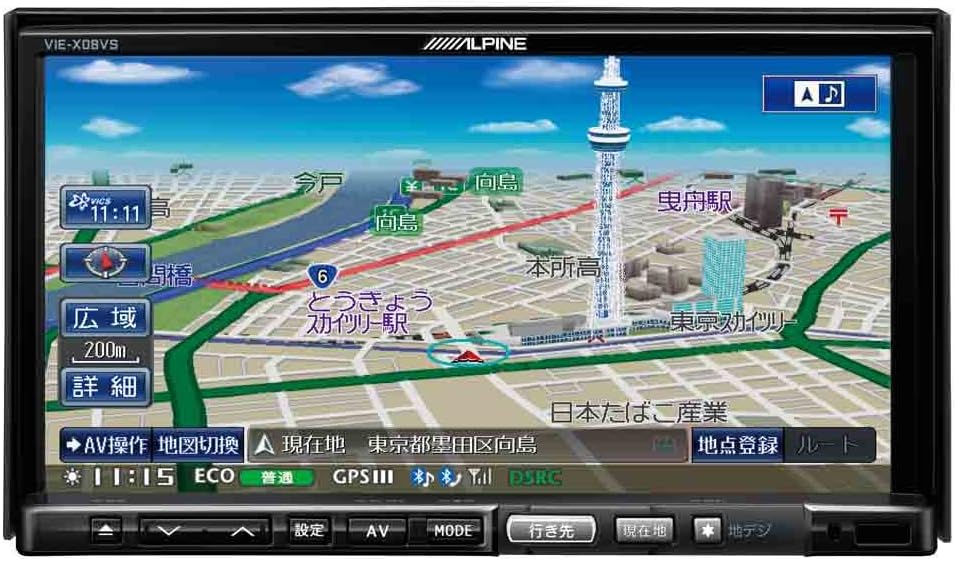
פיגורע 1: פראָנט view of the Alpine VIE-X08VS unit displaying a detailed navigation map with Tokyo Skytree visible.

פיגור 2: ווינקלדיק view of the Alpine VIE-X08VS unit, showing the navigation map and side profile.
5.1.1. מאַפּע דערהייַנטיקונגען
The system includes free map updates until the 2015 edition. For information on subsequent map updates, please refer to the Alpine support webפּלאַץ אָדער קאָנטאַקט דיין הענדלער.
5.2. Audio/Video (AV) Features
The VIE-X08VS integrates various AV sources for your entertainment.
- HDD Music Storage: The built-in 60GB HDD is designed for audio, capable of automatically recording approximately 5,500 songs.
- דיגיטאַל טעלעוויזיע: Access digital terrestrial TV broadcasts using the easy-to-use one-touch key.
- DVD-V/CD Playback: Insert DVDs or CDs into the disc slot for video and audio playback.
- בלועטאָאָטה קאַנעקטיוויטי: Pair your Bluetooth-enabled devices for audio streaming and hands-free calling.
- USB/SD Media: Connect USB devices or insert SD cards to play compatible audio and video files.
- 5.1ch Decoder: Enjoy enhanced audio quality with the built-in 5.1ch decoder.
- Rear Vision Link: Transmit high-quality video to rear monitors. This function also allows for navigation screen display and operation from the rear, enhancing the overall driving experience for passengers.
- Sony Walkman Compatibility: Connect compatible Sony Walkman devices for music playback.
5.3. Dual-Screen Display
The system supports a dual-screen display, allowing you to view both navigation and AV content simultaneously. This feature can be accessed via the on-screen menu or dedicated buttons.
6. וישאַלט
Regular maintenance helps ensure the longevity and optimal performance of your Alpine VIE-X08VS unit.
6.1. רייניקונג די ווייַז
Use a soft, dry cloth to gently wipe the display screen. For stubborn smudges, slightly dampen the cloth with water or a screen-cleaning solution specifically designed for electronic displays. Avoid harsh chemicals or abrasive materials.
6.2. אַלגעמיינע רייניקונג
Wipe the exterior of the unit with a soft, dry cloth. Do not allow liquids to enter the unit.
6.3. Disc Slot Care
Keep the disc slot free of dust and debris. Avoid inserting bent, scratched, or dirty discs, as this can damage the disc drive.
7. טראָובלעשאָאָטינג
If you encounter issues with your Alpine VIE-X08VS, refer to the following common problems and solutions before contacting support.
| פּראָבלעם | מעגלעך סיבה / לייזונג |
|---|---|
| קיין מאַכט | Check vehicle's fuse box. Ensure all power cables are securely connected. |
| קיין געזונט | Verify volume level. Check speaker connections. Ensure audio source is selected correctly. |
| גפּס סיגנאַל אָנווער | זיכער מאַכן אַז די GPS אַנטענע האָט אַ קלאָרע view of the sky. Move to an open area away from tall buildings or tunnels. |
| בלועטוט דעווייס וועט נישט פארבינדן | Ensure Bluetooth is enabled on both the unit and your device. Place devices close together. Delete previous pairings and try again. |
| דיסק ווידערשפּיל פּראָבלעמען | Ensure the disc is clean and free of scratches. Verify the disc format is supported. |
8. ספּעסאַפאַקיישאַנז
Detailed technical specifications for the Alpine VIE-X08VS unit:
| שטריך | באַשרייַבונג |
|---|---|
| פאַבריקאַנט | אַלפּיין |
| מאָדעל נאָמען | VIE X08VS |
| פּראָדוקט מאָדעל נומער | VIE-X08VS |
| פּראָדוקט דימענשאַנז (LxWxH) | 18.73 X 17.8 X 10 סענטימעטער |
| פּונקט וואָג | 3.2 קילאָגראַמס |
| פאַרשטעלן גרייס | 7 אינטשעס |
| ווייַז טיפּ | WVGA LCD |
| זכּרון סטאָרידזש קאַפּאַסיטי | 60 גיגאבייט (האַרט דיסק) |
| קאַנעקטיוויטי טעכנאָלאָגיע | בלועטאָאָטה, וסב |
| שטיצט מידיאַ | די-ווי-די, סי-די, יו-עס-בי, עס-די |
| מאַפּע טיפּ | סטריט |
| מאַונטינג טיפּ | טאַפליע בארג |
| ספּעציעלע פֿעיִקייטן | Hands-free calling, Digital TV, 5.1ch Decoder, Eco-Guide, Rear Vision Link |
| קאָמפּאַטיבלע פאָרמיטל טיפּ | פּאַסאַזשיר מאַשין |
9. וואָראַנטי און שטיצן
For warranty information, please refer to the warranty card included with your product or visit the official Alpine webזייטל. האַלט דיין קויפן באַווייַז פֿאַר וואָראַנטי קליימז.
9.1. קונה שטיצן
If you require technical assistance, have questions about your product, or need to arrange service, please contact Alpine customer support through their official webזייטל אדער די קאָנטאַקט אינפֿאָרמאַציע וואָס איז צוגעשטעלט אין אייער פּראָדוקט דאָקומענטאַציע.


