1. הקדמה
This manual provides detailed instructions for the installation, operation, and maintenance of your Soundstream VL-11A Single DIN Digital Media Receiver. Please read this manual thoroughly before using the product to ensure proper operation and to prevent damage.
The Soundstream VL-11A is designed to provide high-quality audio playback from various digital sources, including USB drives, SD cards, and auxiliary input devices. It features a compact single DIN chassis for easy integration into most vehicle dashboards.
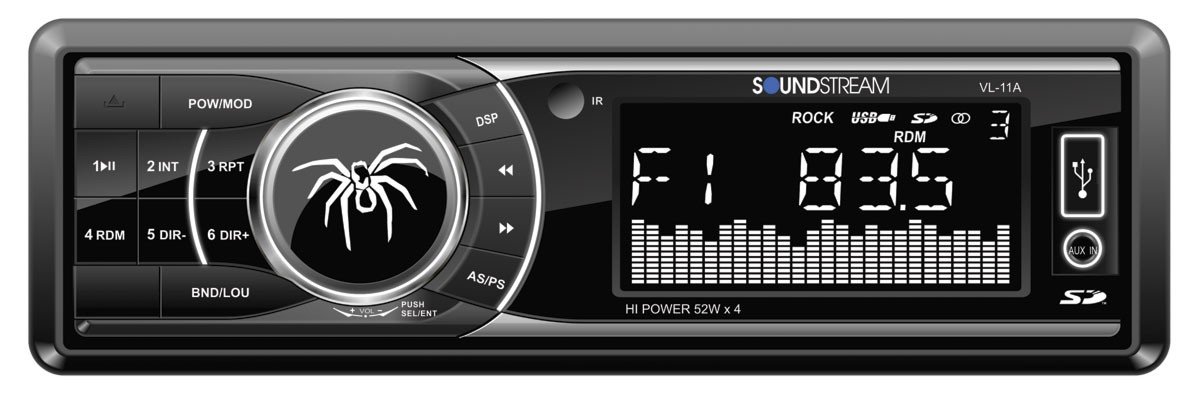
פיגורע 1.1: פראָנט view of the Soundstream VL-11A Digital Media Receiver. This image displays the main unit with its control buttons and display panel.
2. זיכערקייַט אינפֿאָרמאַציע
אָבסערווירן די פאלגענדע זיכערהייט מיטלען צו פאַרמייַדן שאָדן אָדער שעדיקן צו די אַפּאַראַט:
- ניצט נישט דעם אַפּאַראַט אויף אַ וועג וואָס זאָל אייך אָפּלענקן פֿון פֿאָרן. שטעלט שטענדיק אין פֿאָרויס זיכערקייט אויף דער גאַס.
- Ensure proper wiring connections. Incorrect wiring can cause fire or damage to the vehicle's electrical system.
- פֿאַרמײַדן אויסצושטעלן דעם אַפּאַראַט צו פֿײַכטקייט אָדער עקסטרעמע טעמפּעראַטורן.
- פרובירט נישט צו צענעמען אדער מאדיפיצירן דעם איינהייט. לאָזט איבער אלע סערוויסעס צו קוואַליפֿיצירטע פּערסאָנעל.
- האַלט די קול אויף אַ מדרגה וואָס אַלאַוז איר צו הערן דרויסן פאַרקער קלאַנגען.
3. פּעקל אינהאַלט
באַשטעטיקן אַז אַלע זאכן זענען פאַראַן אין פּעקל:
- Soundstream VL-11A Digital Media Receiver
- וויירינג כאַרניס
- מאָנטירונג האַרדווער (שרויף, מאָנטירונג אַרבל)
- ווייַט קאָנטראָל
- באַניצער מאַנואַל (דעם דאָקומענט)
4. פּראָדוקט איבערview
4.1 פראָנט פּאַנעל קאָנטראָלס
The front panel provides access to primary functions and media inputs.
פיגורע 4.1: Illustrative diagram of the VL-11A front panel. This image highlights the display, volume knob, mode button, track controls, USB port, SD card slot, and auxiliary input.
- מאַכט / מאָדע קנעפּל: Press to turn on/off. Short press to cycle through audio sources (Radio, USB, SD, AUX).
- באַנד קנעפּל: Rotate to adjust volume. Press to access audio settings (Bass, Treble, Balance, Fader, EQ).
- ווייַז: Shows current status, track information, and settings.
- וסב פּאָרט: פֿאַרבינדט USB סטאָרידזש דעוויסעס פֿאַר מעדיע ווידערשפּיל.
- SD Card Slot: אַרײַנשטעלן SD קאַרדס פֿאַר מעדיע ווידערשפּיל.
- AUX אַרייַנשרייַב: פֿאַרבינדט עקסטערנע אַודיאָ דעוויסעס דורך אַ 3.5 מם דזשעק.
- Track/Tune Buttons: נאַוויגירן טראַקס אָדער סטרויערן ראַדיאָ פרעקווענצן.
4.2 הינטערשטע פֿאַרבינדונגען
The rear of the unit contains the main wiring harness and preamp אַוטפּוץ.
פיגורע 4.2: Illustrative diagram of the VL-11A rear connections. This image shows the main wiring harness connector and the RCA preamp אַוטפּוץ.
- Main Wiring Harness: Connects to vehicle power, ground, accessory, and speaker wires.
- RCA Preamp אויסגאבעס: Two sets of 2V outputs for connecting external ampליפערז.
5. סעטאַפּ
5.1 ינסטאַלירונג
Professional installation is recommended. If installing yourself, ensure the vehicle's battery is disconnected before beginning.
- מאָונטינג: Insert the metal mounting sleeve into the vehicle's dashboard opening. Bend the tabs to secure it.
- וויירינג: Connect the supplied wiring harness to the vehicle's wiring. Match wire colors and functions carefully.
- רעדנער קאַנעקשאַנז: Connect the speaker wires from the harness to your vehicle's speakers. Ensure correct polarity.
- מאַכט קאַנעקשאַנז: Connect the yellow wire (constant 12V), red wire (switched 12V), and black wire (ground) to the appropriate vehicle circuits.
- אַנטענע: Connect the vehicle's antenna cable to the unit's antenna input.
- זיכערע איינהייט: Slide the VL-11A into the mounting sleeve until it clicks into place.
Warning: Incorrect wiring can cause severe damage to the unit or vehicle. Consult a professional if unsure.
5.2 ערשט מאַכט-אַרויף
After installation, reconnect the vehicle's battery. Press the power button on the unit or remote control to turn it on. The display should illuminate.
6. אַפּערייטינג ינסטרוקטיאָנס
6.1 יקערדיק קאָנטראָלס
- מאַכט אויף / אַוועק: דרוק די PWR/MODE קנעפּל.
- באַנד אַדזשאַסטמאַנט: דרייען די באַנד קנופּ.
- מקור סעלעקציע: קורץ דריקן די PWR/MODE button to cycle through Radio, USB, SD, and AUX.
6.2 אַודיאָ סעטטינגס
דרוק די באַנד knob to enter the audio menu. Rotate the knob to navigate options and press to select.
- באַס / טרעבל: אַדזשאַסטירן באַס און טרעבל לעוועלס.
- באלאנס: Adjust audio balance between left and right speakers.
- פאַדער: Adjust audio balance between front and rear speakers.
- עק (עקוואַליזער): Select from preset EQ curves (e.g., Pop, Rock, Classic) or a custom setting.
6.3 USB/SD שפּיל
Insert a USB drive into the USB port or an SD card into the SD card slot. The unit will automatically switch to the respective source and begin playback.
- שפּיל / פּויזע: דרוק די שפּיל / פּויזע קנעפּל.
- ווייַטער / פרייַערדיק שפּור: דרוק די NEXT/PREV קנעפּלעך.
- טעקע נאַוויגאַציע: ניצן די FOLDER UP/DOWN buttons (if available on remote or unit).
6.4 הילפס-איינגאנג (AUX)
Connect an external audio device (e.g., smartphone, MP3 player) to the 3.5mm AUX input on the front panel using an audio cable. Select AUX as the source using the מאָדע קנעפּל.
6.5 ראַדיאָ טונער
Select Radio as the source. The unit supports AM/FM bands.
- באַנד סעלעקציע: דרוק די BAND קנעפּל צו באַשטימען צווישן FM1, FM2, FM3, און AM.
- מאַנואַל טונינג: קורץ דריקן די טונען אַרויף/אַראָפּ buttons to adjust frequency step-by-step.
- זוכן טונינג: לאנג דריקן די טונען אַרויף/אַראָפּ קנעפלעך צו אויטאָמאַטיש זוכן די נעקסטע שטאַרקע סטאַנציע.
- פּריסעט סטיישאַנז: Press and hold a numbered preset button (1-6) to save the current station. Short press to recall a saved station.
6.6 רימאָוט קאָנטראָל
The included remote control provides convenient access to most functions. Point the remote control towards the unit's front panel sensor.
פיגורע 6.1: Illustrative diagram of the VL-11A remote control. This image shows the various buttons for power, mode, volume, track control, and numeric presets.
7. וישאַלט
7.1 רייניקונג די אַפּאַראַט
- ניצט אַ ווייכן, טרוקענעם שטאָף צו ווישן דעם פראָנט פּאַנעל און דעם עקראַן.
- ניצט נישט קיין אברייסיוו רייניגער, וואקס, אדער סאָלווענטן.
- Avoid spraying cleaning solutions directly onto the unit.
7.2 אַלגעמיינע קער
- פאַרזיכערן געהעריק ווענאַליישאַן אַרום די אַפּאַראַט צו פאַרמייַדן אָוווערכיטינג.
- ויסמיידן פּלייסינג שווער אַבדזשעקץ אויף די אַפּאַראַט.
- If the unit is exposed to extreme cold, allow it to warm up before operation to prevent condensation.
8. טראָובלעשאָאָטינג
If you encounter issues, refer to the following table before contacting support:
| פּראָבלעם | מעגלעך סיבה | לייזונג |
|---|---|---|
| קיין מאַכט | Blown fuse; Incorrect wiring; Disconnected battery. | Check vehicle fuses and unit fuse. Verify wiring connections. Ensure battery is connected. |
| קיין געזונט | קול צו נידעריג; שטום אַקטיוויזירט; פאַלשע רעדנער וויירינג; מקור נישט אויסגעקליבן. | Increase volume. Deactivate mute. Check speaker connections and polarity. Select correct audio source. |
| יו-עס-בי/עס-די שפילט נישט | ניט געשטיצט file format; Corrupt media; Incorrectly inserted device. | זיכער מאַכן אַז די מעדיע כּולל געשטיצט אַודיאָ files (e.g., WMA). Try a different USB/SD. Reinsert device. |
| ראַדיאָ אָפּנאַם שלעכט | אַנטענע נישט פארבונדן; שוואַך סיגנאַל געגנט. | קאָנטראָלירט די אַנטענע פֿאַרבינדונג. פּרוּווט צושטעלן צו אַ שטאַרקערע סטאַנציע. |
| ווייַט קאָנטראָל נישט ארבעטן | Dead battery; Obstruction; Not pointing at sensor. | Replace remote battery. Remove obstructions. Ensure direct line of sight to unit's IR sensor. |
9. ספּעסאַפאַקיישאַנז
Technical specifications for the Soundstream VL-11A Digital Media Receiver:
- מאָדעל: VL-11A
- סאָרט: סאָונדסטרים
- פאַבריקאַנט: סאָונדסטרים
- פּראָדוקט דימענשאַנז: 22.35 X 20.32 X 9.65 סענטימעטער
- נומער וואָג: 771.11 ג (1.7 פונט)
- אַודיאָ וואָסtage: 52 וואטס (מאַקס)
- נומער פון טשאַנאַלז: 4
- Preamp אויסגאבעס: 2 Sets of 2V
- מעדיע פֿאָרמאַט: WMA (and other common digital audio formats)
- ספּעציעלע פֿעיִקייטן: SD Card Input, USB Input, Auxiliary Input
- קאַנעקטער טיפּ: Auxiliary, USB, 3.5mm Jack
- קאַמפּאַטאַבאַל דעוויסעס: רעדנער
- קאָנטראָל אופֿן: ווייַט
10. וואָראַנטי & שטיצן
סאַונדסטרים פּראָדוקטן זענען דיזיינד און פאַבריצירט לויט די העכסטע קוואַליטעט סטאַנדאַרדן. פֿאַר ספּעציפֿישע וואָראַנטי אינפֿאָרמאַציע, ביטע זען די וואָראַנטי קאַרטל וואָס איז אַרייַנגערעכנט מיט דיין פּראָדוקט אָדער באַזוכן די אָפֿיציעלע סאַונדסטרים וועבזייטל webפּלאַץ.
For technical support or service inquiries, please contact Soundstream customer service through their official channels. Keep your purchase receipt and product model number (VL-11A) handy when contacting support.


