1. הקדמה
The Genius GX-Gaming SW-G2.1 3000 is a 2.1 channel speaker system designed to enhance audio experiences for gaming, music, and movies. It features a powerful subwoofer for deep bass and two satellite speakers for clear mid and high-range sounds. The system includes a dedicated control box for convenient adjustments and multiple input options for various devices.
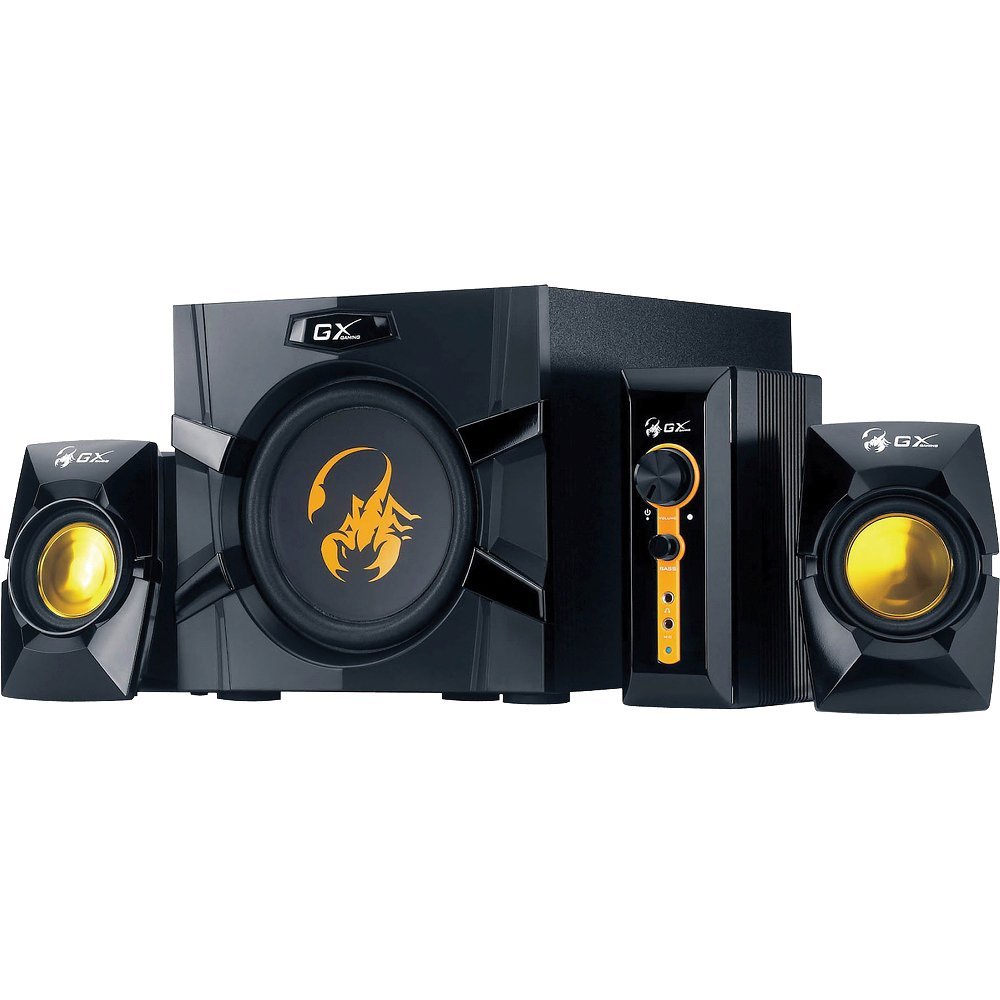
An image showing the Genius GX-Gaming SW-G2.1 3000 speaker system, featuring the subwoofer, two satellite speakers, and the control unit.
2. פּעקל אינהאַלט
ביטע באַשטעטיקן אַז אַלע זאכן וואָס זענען ליסטעד אונטן זענען אַרייַנגערעכנט אין דיין פּעקל:
- One (1) Wooden Cabinet Subwoofer
- צוויי (2) סאַטעליט רעדנערס
- One (1) Control Box
- One (1) Stereo RCA to 3.5mm Audio Cable
- One (1) 3.5mm Plug Audio Cable
- One (1) Microphone Jack Cable
- One (1) Headphone Jack Cable
- One (1) Multi-language User Manual
3. פּראָדוקט פֿעיִקייטן
- גאַנץ רעזולטאַט מאַכט: 70 וואטס (RMS)
- סובוואָאָפער: Wooden cabinet with a 6.5-inch driver for deep bass
- סאַטעליט רעדנערס: Two curvaceous speakers with 3-inch metal drivers for clear mid and high tones
- קאָנטראָל קעסטל: Independent controls for volume and bass adjustment
- קאַנעקטיוויטי: Two input jacks (3.5mm standard and two RCA) for PC, TV, DVD, and game devices
- אַודיאָ דזשעקס: Dedicated microphone jack for online communication and headphone jack for private listening
- אָפטקייַט ענטפער: 35 Hz ~ 20K Hz
- סיגנאַל-צו-ראַש פאַרהעלטעניש: 85 דב
- מאַכט שפּאָרן מאָדע: Automatically enters sleep mode after 1 minute of inactivity. To resume, ensure audio input device volume is at least 50%.
4. סעטאַפּ אינסטרוקציעס
- פּאַזישאַנינג ספּיקערז: Place the subwoofer on a stable surface, preferably on the floor, for optimal bass. Position the satellite speakers on either side of your listening area, facing you.
- פֿאַרבינדן סאַטעליט רעדנערס: Connect the cables from the two satellite speakers to the corresponding output ports on the subwoofer.
- קאָנעקט קאָנטראָל קעסטל: Plug the control box cable into the designated port on the subwoofer.
- פֿאַרבינדן אַודיאָ מקור:
- For PC, MP3/CD players: Use the 3.5mm audio cable to connect your device's audio output to the 3.5mm input on the control box.
- For Game Consoles, DVD Players, TV: Use the stereo RCA to 3.5mm cable. Connect the RCA ends to your device's audio output and the 3.5mm end to the corresponding input on the control box.
- פאַרבינדן מאַכט: Plug the subwoofer's power cord into a standard electrical outlet (110V or 220V AC, depending on your region).
- מאַכט אויף: Turn on the power switch, usually located on the subwoofer. The system is now ready for use.
5. אַפּערייטינג ינסטרוקטיאָנס
- באַנד קאָנטראָל: Use the large knob on the control box to adjust the overall volume of the speaker system.
- באַס קאָנטראָל: Use the dedicated bass knob on the control box to increase or decrease the subwoofer's bass output.
- מיקראָפאָן באַניץ: Connect a microphone to the MIC jack on the control box for online communication.
- כעדפאָון באַניץ: Plug your headphones into the headphone jack on the control box for private listening. This will mute the speakers.
- מאַכט שפּאָרן מאָדע: If the system enters sleep mode due to inactivity, ensure your audio input device's volume is set to 50% or higher, then adjust the system's volume using the control box to resume audio.
6. וישאַלט
- רייניקונג: Use a soft, dry cloth to clean the surfaces of the speakers and control box. Avoid using liquid cleaners or abrasive materials.
- אָרט: האַלט די רעדנערס אַוועק פון דירעקט זונשייַן, היץ קוועלער, און איבערגעטריבענע נעץ. זאָרגט פֿאַר גענוג ווענטילאַציע אַרום דעם סאַבוווּפער.
- קאַבלע פאַרוואַלטונג: זיכער מאַכן אַז אַלע קייבלס זענען זיכער פארבונדן און נישט פֿאַרפּלאָנטערט אָדער צוגעקניפּט צו פאַרמייַדן שעדיקן.
- סטאָרידזש: If storing the system for an extended period, disconnect it from power and store it in a cool, dry place.
7. טראָובלעשאָאָטינג
- קיין קול:
- Ensure the power cable is securely plugged in and the power switch is on.
- Check all audio cables are correctly connected between the source device, control box, and subwoofer.
- Verify the volume knob on the control box is turned up.
- Ensure the audio source device (PC, TV, etc.) is playing audio and its volume is not muted or too low.
- If in Power Saving Mode, increase the audio source device's volume to at least 50%.
- פאַרקרימט סאָונד:
- Reduce the volume on both the speaker system and the audio source device.
- Adjust the bass level on the control box.
- זיכער מאַכן אַז די רעדנער קאַבלען זענען נישט געשעדיגט אָדער לויז פארבונדן.
- איין רעדנער ארבעט נישט:
- קאָנטראָלירט די פֿאַרבינדונג פֿון דעם נישט-אַרבעטנדיקן סאַטעליט רעדנער צום סאַבוווּפֿער.
- Test with another audio source or swap the satellite speaker connections (if possible) to isolate the issue.
8. טעכניש ספּעסאַפאַקיישאַנז
| גאַנץ רעזולטאַט מאַכט | 70 וואטס (RMS) |
| Satellite Power | 2 רענטגענ 15 וואטס |
| סובוואָאָפער מאַכט | 40 וואטס |
| דרייווער וניץ | Satellites: 2 x 3 inches, Subwoofer: 1 x 6.5 inches |
| אָפטקייַט ענטפער | 35 Hz ~ 20K Hz |
| סיגנאַל-צו-נויז ראַטיאָ | 85 דב |
| סובוואָאָפער דימענשאַנז (WxHxD) | 230 X 314 X 215 מם (בעערעך 9 X 12.4 X 8.5 אינטשעס) |
| Satellite Dimensions (WxHxD) | 99 X 115 X 143 מם |
| Controller Dimensions (WxHxD) | 60 X 154 X 170 מם |
| סיסטעם וואָג | 4.66 קג (בעערעך 10.27 לבס) |
| מאַכט מקור | 110 וו אָדער 220 וו אַק |
| קאַמפּאַטאַבאַל דעוויסעס | Personal Computer, Television, DVD Players, Game Consoles, MP3/CD players |
| אַרייַנשרייַב דזשאַקס | 3.5mm standard input, two RCA jacks |
| קאָנטראָל מעטאָד | Knobs/Buttons (listed as 'Touch' in some specifications) |
9. וואָראַנטי און שטיצן
This Genius GX-Gaming SW-G2.1 3000 speaker system comes with a לימיטעד וואָראַנטי. For specific details regarding warranty coverage, duration, and terms, please refer to the warranty card included in your product packaging or visit the official Genius webפּלאַץ.
For technical support, troubleshooting assistance, or service inquiries, please contact Genius customer support through their official website or the contact information provided in your product documentation. When contacting support, please have your product model number (SW-G2.1 3000) and purchase information readily available.


