הקדמה
א דאנק פארן קויפןasing the GPX Weatherx WR282B Weather and Alert Radio. This portable radio is designed to provide you with AM/FM radio reception and access to all 7 NOAA weatherband channels, ensuring you stay informed during various conditions. It offers flexible power options, operating on either AC power or D-size batteries, making it suitable for both indoor and outdoor use.
ביטע ליינט דעם מאַנואַל גרינטלעך איידער איר ניצט דעם מיטל צו ענשור ריכטיק נוצן און צו מאַקסאַמיזירן זיין פאָרשטעלונג און לאַנגלעבעדיקייט.
וויכטיק סאַפעטי אינפֿאָרמאַציע
- לייענען אינסטרוקציעס: אַלע זיכערקייַט און אַפּערייטינג ינסטראַקשאַנז זאָל זיין לייענען איידער די פּראָדוקט איז אַפּערייטאַד.
- האַלטן אינסטרוקציעס: די זיכערקייַט און אַפּערייטינג ינסטראַקשאַנז זאָל זיין ריטיינד פֿאַר צוקונפֿט רעפֿערענץ.
- היט וואָרנינגז: אַלע וואָרנינגז אויף דעם פּראָדוקט און אין די אַפּערייטינג ינסטראַקשאַנז זאָל זיין אַדכירד צו.
- גיי אינסטרוקציעס: כל אַפּערייטינג און נוצן ינסטראַקשאַנז זאָל זיין נאכגעגאנגען.
- וואַסער און נעץ: ניצט נישט דעם פּראָדוקט לעבן וואַסער (למשל, לעבן אַ וואַנע, וואַשבעקן, קיך זינק, וועש וואַנע, אין אַ נאַסן קעלער, אָדער לעבן אַ שווימבאָד).
- רייניקונג: ריין בלויז מיט אַ טרוקן שטאָף.
- ווענטילאַטיאָן: בלאָקירט נישט קיין ווענטילאַציע עפענונגען. אינסטאַלירט לויט די אינסטרוקציעס פונעם פאַבריקאַנט.
- היץ: דו זאלסט נישט ינסטאַלירן לעבן קיין היץ קוואלן אַזאַ ווי ראַדיאַטאָרס, היץ רעדזשיסטערז, סטאָוווז אָדער אנדערע אַפּאַראַט (אַרייַנגערעכנט ampליפיערס) וואָס פּראָדוצירן היץ.
- מאַכט קאָרד שוץ: באַשיצן די מאַכט שנור פון גיין אויף אָדער פּינטשט, ספּעציעל אין די פּלאַגז, קאַנוויניאַנס רעסאַפּיז און די פונט ווו זיי אַרויסגיין פון די אַפּאַראַט.
- בליץ: אָפּשטויסן דעם אַפּאַראַט בעשאַס בליץ סטאָרמז אָדער ווען אַניוזד פֿאַר לאַנג פּיריאַדז.
- סערוויס: אָפּשיקן אַלע סערוויסעס צו קוואַלאַפייד סערוויס פּערסאַנעל. סערוויס איז פארלאנגט ווען דער אַפּאַראַט איז דאַמידזשד אין קיין וועג, אַזאַ ווי מאַכט צושטעלן שנור אָדער צאַפּן איז דאַמידזשד, פליסיק איז ספּילד אָדער אַבדזשעקץ זענען געפאלן אין די אַפּאַראַט, דער אַפּאַראַט איז יקספּאָוזד צו רעגן אָדער נעץ, אַרבעט נישט נאָרמאַלי , אָדער האט שוין דראַפּט.
פֿעיִקייטן
- AM/FM ראַדיאָ טונער
- Weatherband - All 7 NOAA Channels
- Swivel Telescopic Antenna
- באַנד קאָנטראָל
- Audio Line Input (Auxiliary Input)
- ינטעגראַטעד קאַררי האַנדלע
- Dual Power Options: AC/DC Adapter or 3 x 'D' Batteries
פּעקל אינהאַלט
- GPX Weatherx WR282B Weather and Alert Radio
- אַק / דק מאַכט אַדאַפּטער
- באַניצער מאַנואַל (דעם דאָקומענט)
קאָנטראָלס און ינדיקאַטאָרס
Familiarize yourself with the various controls and indicators on your WR282B radio.
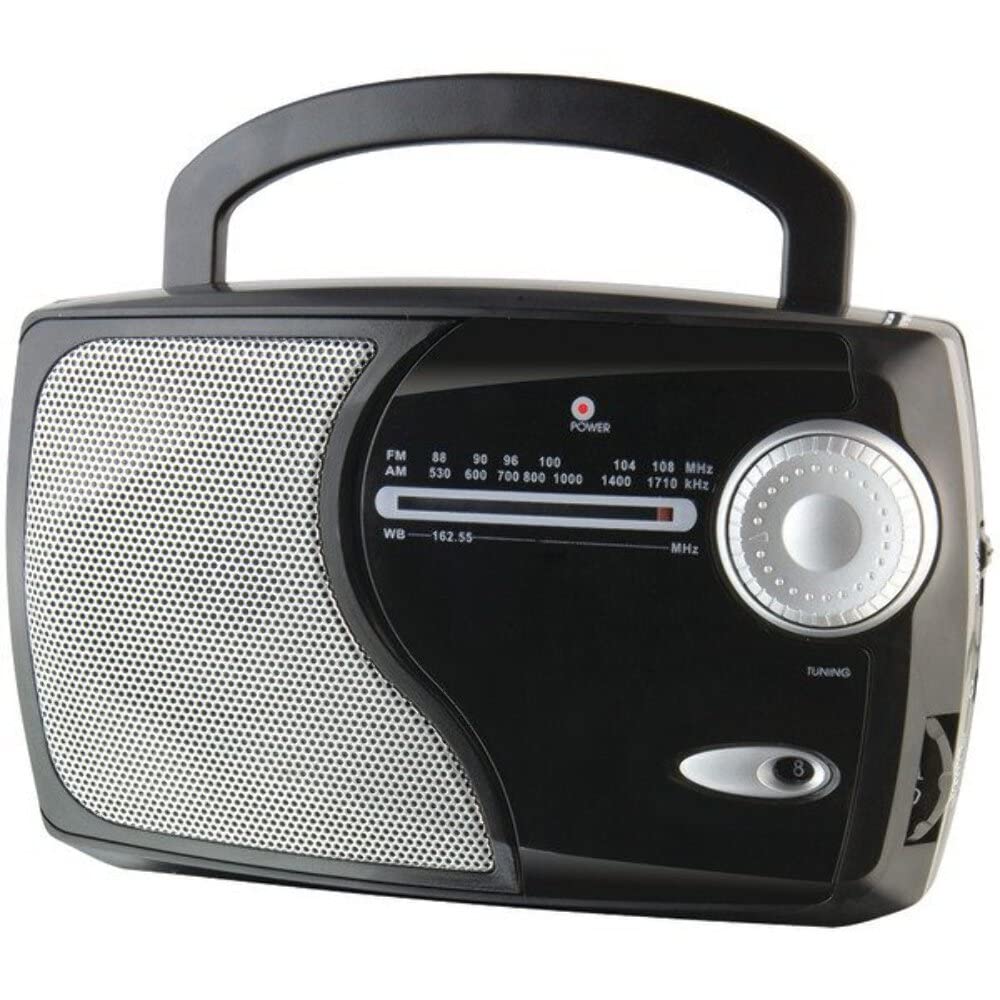
בילד: פראָנט view of the GPX Weatherx WR282B radio, showing the speaker, tuning dial, and control knobs.
- מאַכט / וואָלום קנופּ: Turns the radio on/off and adjusts the audio output level.
- באַנד סעלעקטאָר סוויטש: Selects between AM, FM, and Weatherband (WB) modes.
- טונינג קנעפּל: Adjusts the frequency to tune into desired radio stations or weather channels.
- Tuning Indicator: Illuminates when a strong signal is received.
- אָפטקייַט רעדל: דיספּלייז די קראַנט ראַדיאָ אָפטקייַט.
- טעלאַסקאָפּיק אַנטענע: Extendable antenna for improved FM and Weatherband reception.
- הילפס־אינפּוט (AUX IN): 3.5 מ״מ דזשעק פֿאַר פֿאַרבינדן עקסטערנע אַודיאָ דעוויסעס.
- אַק מאַכט אַרייַנשרייַב: Jack for connecting the included AC/DC power adapter.
- באַטערי אָפּטייל: Located on the back, holds 3 'D' size batteries.
- פירן שעפּן: פֿאַר גרינג פּאָרטאַביליטי.
סעטאַפּ
מאַכט די ראַדיאָ
The WR282B radio can be powered using either the included AC/DC power adapter or three 'D' size batteries.
1. AC Power Operation
- Ensure the radio is turned off by rotating the Power/Volume knob counter-clockwise until it clicks.
- Insert the small plug of the AC/DC power adapter into the AC Power Input jack on the radio.
- Plug the other end of the AC/DC power adapter into a standard wall outlet (AC 120V~60Hz).
- The radio is now ready for use with AC power.
באַמערקונג: When the AC adapter is connected, battery power is automatically disconnected.
2. Battery Power Operation
- מאַכן זיכער אַז די ראַדיאָ איז אויסגעדרייט אַוועק.
- געפֿינען די באַטאַרייע אָפּטייל אויף די צוריק פון די ראַדיאָ.
- עפענען די באַטאַרייע אָפּטייל דעקן.
- Insert three (3) 'D' size batteries (not included) into the compartment, observing the correct polarity (+/-) as indicated inside the compartment.
- פאַרמאַכן די באַטאַרייע אָפּטייל דעקן סיקיורלי.
- The radio is now ready for use with battery power.
וויכטיק: אַרויסנעמען די באַטעריעס אויב דער ראַדיאָ וועט נישט ווערן גענוצט פֿאַר אַ לענגערער צייט צו פאַרמייַדן ליקאַדזש און שעדיקן.
אַפּערייטינג ינסטראַקשאַנז
1. Turning On and Adjusting Volume
- דרייען די מאַכט / באַנד קנופּ clockwise to turn on the radio. Continue rotating to increase the volume to a comfortable listening level.
- צו פאַרמאַכן דעם ראַדיאָ, דרייען די מאַכט / באַנד קנופּ counter-clockwise until it clicks.
2. Selecting a Radio Band (AM/FM/Weatherband)
- ניצן די באַנד סעלעקטאָר סוויטש to choose your desired listening mode:
- AM: פֿאַר Amplitude Modulation radio stations.
- עפעם: For Frequency Modulation radio stations.
- ווב: For NOAA Weatherband channels.
3. Tuning to a Station or Channel
- פאַרלענגערן די טעלאַסקאָפּיק אַנטענאַ fully for optimal FM and Weatherband reception. For AM reception, the radio has a built-in antenna, and adjusting the radio's position may improve reception.
- דרייען די טונינג קנופּ to scan through frequencies on the אָפטקייַט דיאַל.
- When a strong signal is received, the טונינג ינדיקאַטאָר ליכט וועט ילומיניט.
- For Weatherband (WB) mode, tune to one of the 7 NOAA weather channels (162.400 MHz to 162.550 MHz).
4. Using the Auxiliary Input (AUX IN)
- Connect a 3.5mm audio cable (not included) from your external audio device (e.g., MP3 player, smartphone) to the הילפס-איינגאנג (AUX IN) jack on the radio.
- Ensure the radio is turned on and the volume is adjusted.
- The audio from your external device will now play through the radio's speaker. Control playback and track selection from your external device.
וישאַלט
- רייניקונג: ווישט אָפּ די אויסערלעכע זייט פון ראַדיאָ מיט אַ ווייכן, טרוקענעם שטאָף. ניצט נישט קיין שרײַבנדיקע רייניגער, וואַקסן אָדער סאָלווענטן.
- באַטערי פאַרבייַט: Replace all three 'D' batteries when the radio's performance diminishes or if the unit will not be used for an extended period. Always replace with new batteries of the same type.
- סטאָרידזש: When storing the radio for a long time, remove the batteries to prevent leakage. Store in a cool, dry place away from direct sunlight and extreme temperatures.
- אַנטענע זאָרגן: האַנדלט מיט דער טעלעסקאָפּישער אַנטענע מיט לײַכטקייט כּדי זי זאָל זיך נישט בייגן אָדער צעברעכן.
טראָובלעשאָאָטינג
| פּראָבלעם | מעגלעך סיבה | לייזונג |
|---|---|---|
| קיין מאַכט |
|
|
| נעבעך ראַדיאָ אָפּטראָג |
|
|
| No sound from AUX IN |
|
|
ספּעסאַפאַקיישאַנז
- מאָדעל: WR282B
- ראַדיאָ באַנדס: AM, FM, Weatherband (7 NOAA channels)
- מאַכט מקור: AC 120V~60Hz (via included adapter) or 3 x 'D' Batteries (not included)
- קאַנעקטיוויטי: 3.5 מם אַגזיליערי אַרייַנשרייַב
- אַנטענע: Telescopic (FM/WB), Built-in Ferrite Bar (AM)
- פּראָדוקט דימענשאַנז: 8.86" L x 2.76" W x 5.51" H (approximately)
- נומער וואָג: 1.06 פונט (אָן באַטעריעס)
וואָראַנטי און שטיצן
For detailed warranty information and customer support, please refer to the warranty card included with your product or visit the official GPX webזייטל. האַלט אייער קויף קוויטל ווי אַ באַווייַז פון קויפן פֿאַר קיין וואָראַנטי קליימז.
If you experience issues not covered in the troubleshooting section, please contact GPX customer service for assistance.