1. איבערview
The Traxxas Slash 4X4 is a 1/10 scale, four-wheel-drive short course truck designed for off-road performance. It features a powerful Titan 12T 550 brushed motor and a waterproof XL-5 electronic speed control, enabling operation in various conditions. The vehicle is equipped with a TQ 2.4GHz radio system for reliable control and comes with a 7-cell NiMH battery and a 4-amp 12-volt DC peak-detecting fast charger.
Key features include a tough, brushless-ready shaft-driven 4X4 drivetrain with fluid-filled steel-gear front and rear differentials, and an easily disassembled modular chassis with a Torque Control slipper clutch featuring large 32-pitch gears.

פיגורע 1.1: פראָנט view of the Traxxas Slash 4X4 truck. This image displays the front bumper, headlights, and the distinctive orange and black body design with the Traxxas branding.

פיגורע 1.2: זייַט view of the Traxxas Slash 4X4 truck. This image shows the full profile of the vehicle, highlighting its short course truck design, wheels, and body graphics.
2. פּעקל אינהאַלט
באַשטעטיקן אַז אַלע קאָמפּאָנענטן זענען פאַראַן אין דער פּאַקעט:
- Traxxas Slash 4X4 1/10 Scale Short Course Truck (fully assembled)
- TQ 2.4GHz Radio System (Transmitter)
- 7-cell NiMH Battery with iD Technology
- 4-amp 12-volt DC Peak-Detecting Fast Charger
- שנעל אָנהייב גייד
- Tuning Tools
3. סעטאַפּ
The Traxxas Slash 4X4 comes fully assembled and ready for initial use after battery charging and radio system setup.
3.1 באַטערי טשאַרדזשינג
- פאַרבינדן די 4-amp 12-volt DC peak-detecting fast charger to a 12-volt DC power source (e.g., a car accessory outlet).
- Connect the 7-cell NiMH battery with iD technology to the charger. Ensure a secure connection.
- Allow the battery to charge completely. The charger will indicate when charging is complete (refer to the Quick Start Guide for specific indicator details).
- אַמאָל אָפּגעלאָדן, אָפּשטעקן די באַטאַרייע פֿון דעם טשאַרדזשער.
3.2 Radio System Setup
The TQ 2.4GHz radio system is typically pre-bound to the vehicle. If re-binding is necessary, consult the Quick Start Guide for detailed instructions on linking the transmitter to the receiver.
3.3 Initial Vehicle Preparation
- Install the charged NiMH battery into the vehicle's battery compartment. Secure it according to the vehicle's design.
- Ensure the vehicle's power switch is in the OFF position before connecting the battery.
- Turn on the transmitter first, then turn on the vehicle's power switch.
- Perform a quick check of steering and throttle response to ensure proper function before operation.

Figure 3.1: Chassis view of the Traxxas Slash 4X4 with the body removed. This image illustrates the layout of the battery, motor, electronic speed control, and receiver box.
4. אַפּערייטינג ינסטרוקטיאָנס
Always operate the Traxxas Slash 4X4 in a safe and responsible manner. Read and understand all safety warnings in the Quick Start Guide before operation.
4.1 יקערדיק קאָנטראָלס
- גערגל טריגער: Pull the trigger to move forward. Push the trigger forward for reverse and braking.
- סטירינג ראָד: Turn the wheel left to steer left, and right to steer right.
4.2 Driving Environment
The Slash 4X4 is designed for off-road use. It performs optimally on surfaces such as dirt, gravel, and short grass. Avoid operating in deep water despite the waterproof electronics, as mechanical components can still be affected.
4.3 נאָך דער אָפּעראַציע
- Turn off the vehicle's power switch first, then turn off the transmitter.
- Disconnect and remove the battery from the vehicle.
- Allow the motor and electronic speed control to cool down before handling or storing.

Figure 4.1: The Traxxas Slash 4X4 in operation on a dirt surface. This image demonstrates the vehicle's capability to handle off-road terrain and its dynamic performance.

Figure 4.2: The Traxxas Slash 4X4 performing a turn on a dirt track. This image highlights the vehicle's suspension and handling characteristics during dynamic maneuvers.
5. וישאַלט
Regular maintenance ensures the longevity and optimal performance of your Traxxas Slash 4X4.
5.1 רייניקונג
- After each use, remove dirt, mud, and debris from the chassis, suspension components, and body. Use a soft brush or compressed air.
- Avoid using water directly on electronic components unless specifically designed for it (XL-5 ESC is waterproof, but other components may not be).
5.2 קאָמפּאָנענט דורכקוק
- Regularly inspect the drivetrain, including the shaft, differentials, and gears, for wear or damage.
- Check the slipper clutch for proper adjustment and wear on the 32-pitch gears.
- Examine suspension components (shocks, arms, linkages) for bends, cracks, or loose fasteners.
- זיכער מאַכן אַז אַלע שרויפן און פאַסטאַנינגז זענען פעסט.
5.3 באַטערי קער
- Store NiMH batteries in a cool, dry place.
- Do not overcharge or completely discharge NiMH batteries.
- Always disconnect the battery from the vehicle when not in use.

פיגור 5.1: פון אויבן אַראָפּ view of the Traxxas Slash 4X4 chassis. This image provides a clear perspective of the internal components, including the battery, motor, and electronic speed control, useful for maintenance and inspection.

פיגורע 5.2: עקספּלאָדעד view of the Traxxas Slash 4X4 chassis. This diagram illustrates the modular design, showing how different sections of the chassis can be disassembled for maintenance or repair.
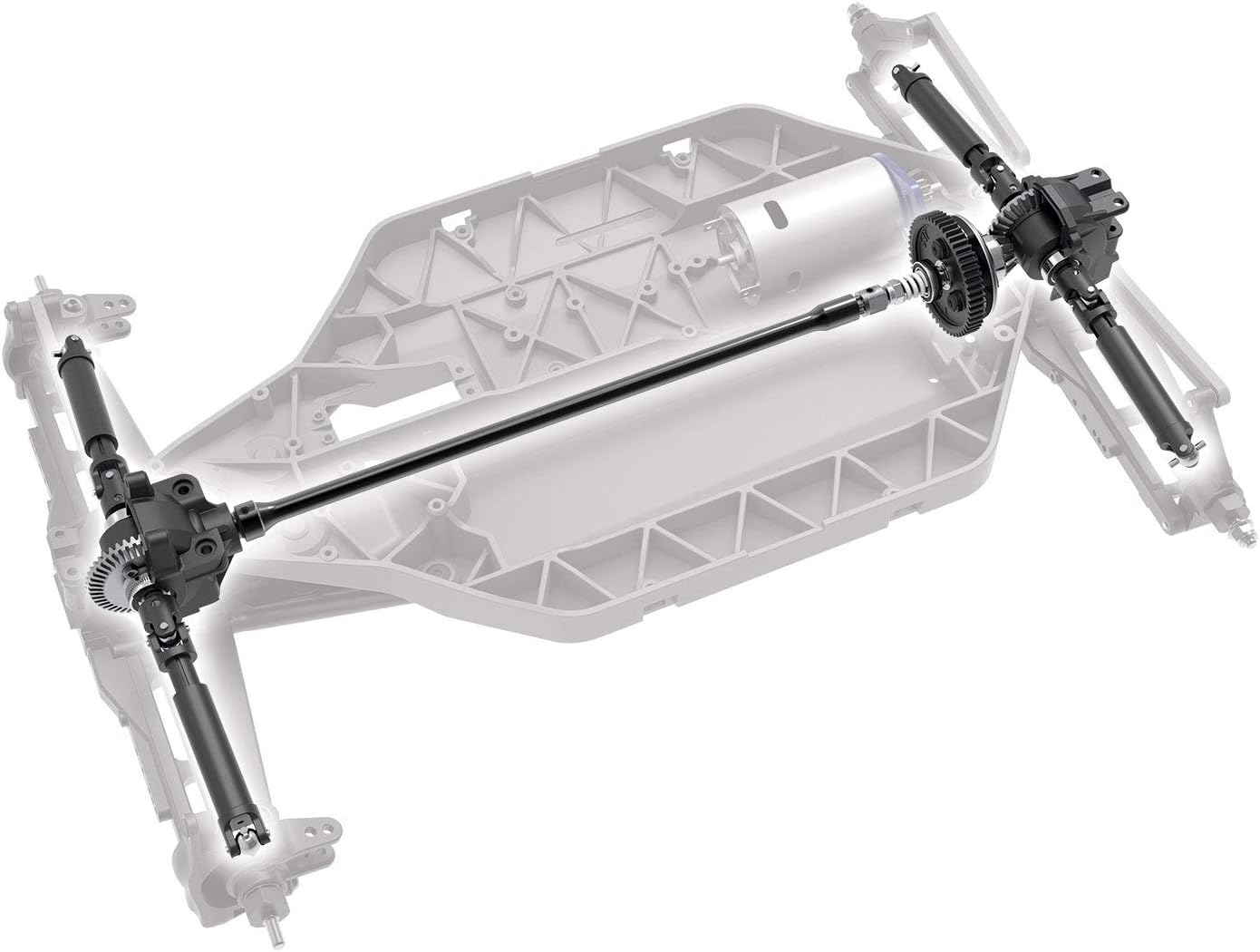
Figure 5.3: Drivetrain diagram of the Traxxas Slash 4X4. This image details the shaft-driven 4X4 system, including the central drive shaft and the front and rear differentials, crucial for understanding power transmission.
6. טראָובלעשאָאָטינג
This section addresses common issues you might encounter. For more detailed troubleshooting, refer to the Quick Start Guide or the official Traxxas support resources.
- פאָרמיטל ניט ריספּאַנדינג:
- Ensure both the transmitter and vehicle are powered on.
- Check if the battery in the vehicle is charged and properly connected.
- Verify that the transmitter batteries are fresh and correctly installed.
- Confirm the radio system is properly linked (bound).
- Loss of Range or Intermittent Control:
- Check transmitter battery levels.
- Ensure no strong radio interference sources are nearby.
- Inspect the antenna on both the transmitter and receiver for damage.
- Steering Issues (e.g., vehicle pulls to one side, no steering response):
- Check for obstructions in the steering mechanism.
- Inspect the steering servo for damage or malfunction.
- Verify steering trim settings on the transmitter.
- Motor Not Running or Running Weakly:
- Ensure the vehicle battery is fully charged.
- Check motor and ESC connections.
- Inspect the motor for debris or damage.
- Allow the motor and ESC to cool if they are hot.
7. ספּעסאַפאַקיישאַנז
| שטריך | באַשרייַבונג |
|---|---|
| מאָדעל נומער | 68054-1 |
| פּראָדוקט דימענשאַנז | 22.36 X 11.65 X 7.6 אינטשעס |
| פּונקט וואָג | 8.63 פונט |
| מאָטאָר | Titan 12T 550 Brushed Motor |
| עלעקטראָניש גיכקייַט קאָנטראָל (ESC) | XL-5 (Waterproof) |
| ראַדיאָ סיסטעם | TQ 2.4GHz |
| באַטערי ינקלודעד | 7-cell NiMH with iD Technology |
| טשאַרדזשער אַרייַנגערעכנט | 4-amp 12-volt DC Peak-Detecting Fast Charger |
| דרייווינג | Shaft-driven 4X4 |
| דיפערענטשאַלז | Fluid-filled Steel-Gear (Front & Rear) |
| סליפּער קלאַטש | Torque Control (32-pitch gears) |
| רעקאַמענדיד עלטער | 14 יאר און העכער |
| מעלדונג טאָג | 15 אויגוסט 2018 |
8. וואָראַנטי און שטיצן
Traxxas provides comprehensive support for its products. For warranty information, technical assistance, or replacement parts, please refer to the official Traxxas website or contact their customer service department. Details can typically be found in the Quick Start Guide included with your product.