הקדמה
This manual provides detailed instructions for the operation and maintenance of your Casio DBC-611-1DF Men's Silver Tone 25 Memory Calculator Databank Watch. Please read this manual thoroughly to ensure proper use and to fully utilize all features of your watch.

פראָנט view of the Casio DBC-611-1DF Databank Watch, displaying the digital time and calculator keypad.
סעטאַפּ
באַשטעטיקן די צייט און דאַטע
- אין צייט-מעכטן מאָדע, דריק די ADJUST button (top left) until the seconds start to flash. This indicates the setting mode.
- דרוק די מאָדע button (bottom left) to cycle through the settings: seconds, hour, minutes, year, month, day.
- Use the numeric keypad (calculator buttons) to input the correct values for each setting. For example, to set the hour, press the corresponding number on the keypad.
- צו בייטן צווישן 12-שעה און 24-שעה פֿאָרמאַט, דריק די PM button (bottom left of keypad) while the hour setting is flashing.
- אַמאָל אַלע סעטטינגס זענען אַדזשאַסטיד, דריקן די ADJUST קנעפּל ווידער צו אַרויסגאַנג די באַשטעטיקן מאָדע.
אַדזשאַסטינג די באַנד
The watch features an adjustable metal band. To adjust the length, locate the clasp and use a small flathead tool to lift the locking tab. Slide the clasp along the band to the desired position, then press the tab down firmly to secure it. Ensure the clasp is securely fastened before wearing.
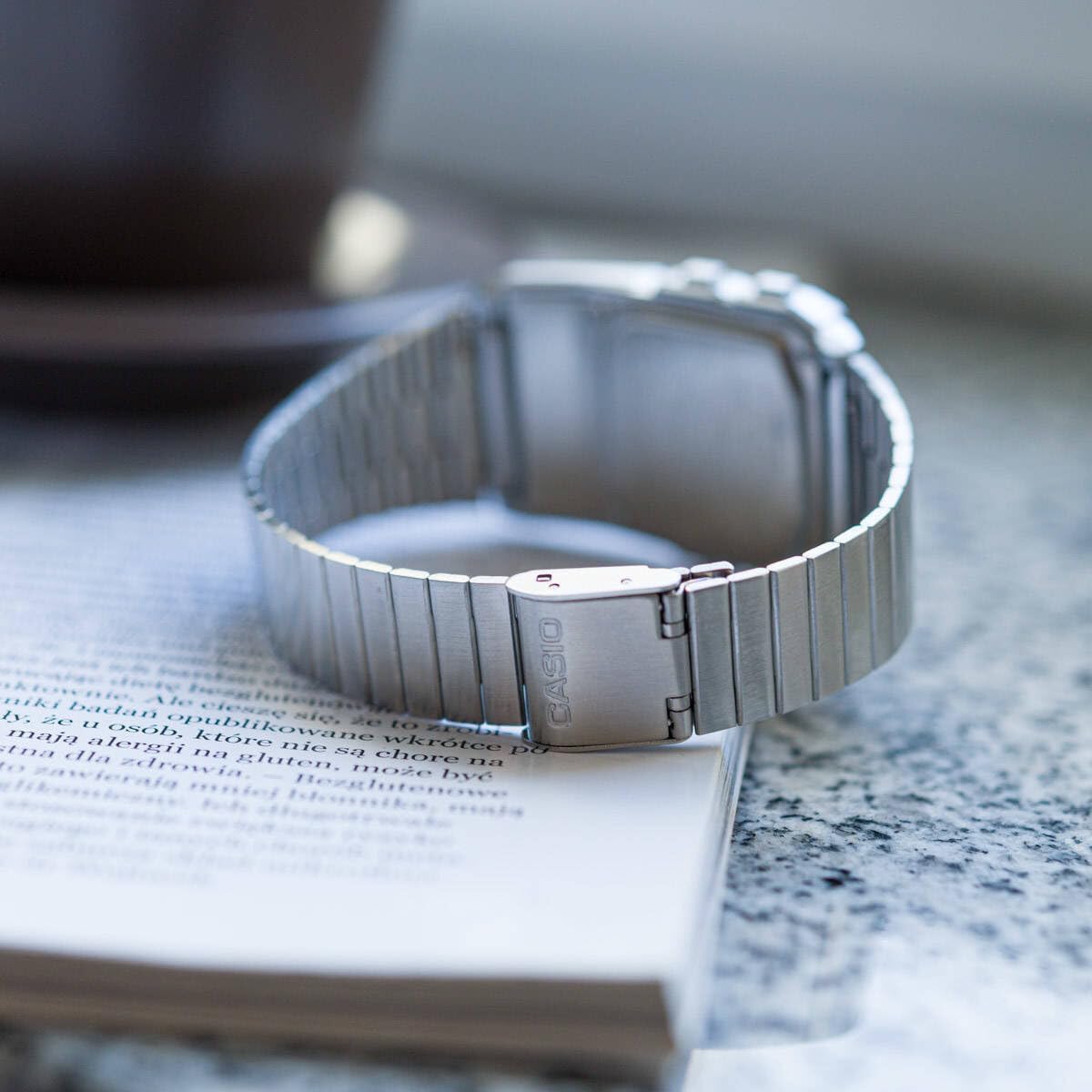
דערציען view of the watch, showing the adjustable metal clasp for band sizing.
אַפּערייטינג ינסטראַקשאַנז
מאָדע נאַוויגאַציע
דרוק די מאָדע קנעפּל (אונטן לינקס) צו דורכגיין די פארשידענע מאָדעס:
- צייטקיפּינג מאָדע: ווײַזט די איצטיקע צײַט, דאַטע און טאָג פֿון דער וואָך.
- Telememo Mode: Stores up to 25 sets of name and telephone number data.
- Calculator Mode: Performs basic arithmetic calculations.
- סטאַפּוואַטש מאָדע: Measures elapsed time, split times, and 1st-2nd place times.
- צווייענדיק צייט מאָדע: Displays the current time in a different time zone.
- שרעק מאָדע: Sets up to 5 daily alarms and an hourlי צייט סיגנאַל.
ניצן די קאַלקולאַטאָר
In Calculator Mode, use the numeric keypad to input numbers and perform operations. The display supports 8 digits. Press the AC button (top right of keypad) to clear the current entry.
Telememo Function
To enter or recall data in Telememo Mode:
- Navigate to Telememo Mode.
- דרוק די ADJUST button to enter data input mode.
- Use the numeric keypad to enter numbers. Use the פּלאַץ button for spaces.
- דרוק ADJUST צו ראַטעווען די פּאָזיציע.
- ניצן די TEL/FWD און REV/TIME buttons to scroll through stored entries.
סטאַפּוואַטש פֿונקציע
אין סטאָפּוואַטש מאָדע:
- דרוק אָנהייב / האַלטן (bottom right of keypad) to start and stop the stopwatch.
- דרוק לאַפּ/באַשטעטיק (bottom left of keypad) to record lap times or reset the stopwatch when stopped.
אַלאַרמס און האָurly צייט סיגנאַל
אין אַלאַרם מאָדע:
- ניצן די מאָדע button to select one of the 5 alarms or the hourlי צייט סיגנאַל.
- דרוק ADJUST to set the alarm time. Use the numeric keypad to input the hour and minutes.
- דרוק ALM ON/OFF (top left of keypad) to toggle the selected alarm on or off.
- דרוק SIG ON/OFF (middle right of keypad) to toggle the hourlי צייט סיגנאַל אויף אָדער אַוועק.
Auto LED Light
The watch features an Auto LED light. This function automatically illuminates the display when the watch is tilted towards your face in a dark environment. To activate or deactivate this feature, refer to the detailed instructions in the full module manual (Module No. 437, 438, 3208).

אַנגגאַלד view of the Casio Databank Watch, highlighting the display and keypad.
וישאַלט
אַלגעמיינע קער
- רייניקט די זייגער רעגולער מיט א ווייכן, טרוקענעם שטאָף.
- פֿאַרמײַדט אויסשטעלן די זייגער צו עקסטרעמע טעמפּעראַטורן, דירעקטע זונשײַן פֿאַר פֿאַרלענגערטע פּעריאָדן, אָדער שטאַרקע מאַגנעטישע פֿעלדער.
- While the watch is water-resistant, avoid direct contact with water to prolong its lifespan, especially for the calculator buttons.
באַטערי פאַרבייַט
The watch uses 1 CR123A battery. Battery life is approximately 5 years. When the display becomes dim or functions become erratic, it is time to replace the battery. Battery replacement should ideally be performed by a qualified technician to ensure water resistance is maintained.
טראָובלעשאָאָטינג
- דיספּליי איז ליידיק אָדער טונקל: Check the battery. If recently replaced, ensure it is installed correctly.
- די קנעפּלעך זענען נישט ריספּאַנדינג: Ensure the watch is not in a locked mode (if applicable, refer to full manual). If the issue persists, a reset may be required (consult a technician).
- די צייט איז נישט ריכטיק: Re-set the time and date as per the "Setting the Time and Date" section.
ספּעסאַפאַקיישאַנז
| סאָרט | קאַסיאָ |
| מאָדעל נומער | DBC-611-1DF |
| פּראָדוקט דימענשאַנז | 2.44 X 4.09 X 3.62 אינטשעס |
| פּונקט וואָג | 1.69 אונסעס |
| באַטערי טיפּ | 1 CR123A (אריינגערעכנט) |
| ספּעציעלע פֿעיִקייטן | 25 pages of Telememo, 1/100-second stopwatch, Dual time, 5 alarms, Auto LED light |
| וואַסער קעגנשטעל | Water Resistant (general daily use, not for swimming or diving) |
| ערשטער דאַטע בנימצא | 22 מערץ 2012 |
אפיציעלע פּראָדוקט ווידעאָ
אפיציעלע פּראָדוקט ווידעאָ שאָוasing the features and design of the Casio Databank Watch.
וואָראַנטי און שטיצן
פֿאַר וואָראַנטי אינפֿאָרמאַציע און קונה שטיצע, ביטע זען די וואָראַנטי קאַרטל וואָס איז אַרייַנגערעכנט מיט דיין פּראָדוקט אָדער באַזוכן די באַאַמטער קאַסיאָ וועבזייטל website. The module number for this watch is 437, 438, or 3208, which can be used to find specific support documents online.
For additional assistance, you may contact Casio customer service directly.