הקדמה
This manual provides essential information for the proper setup, operation, and maintenance of your Hitachi Touro Desk Dx3 2TB External Hard Drive. Please read these instructions carefully before using the device to ensure optimal performance and longevity.
פּעקל אינהאַלט
באַשטעטיקן אַז אַלע זאכן זענען פאַראַן אין פּעקל:
- Hitachi Touro Desk Dx3 2TB External Hard Drive
- וסב 3.0 דאַטאַ קאַבלע
- AC Power Adapter (EURO plug)
- שנעלע אָנהייב גייד (אויב אַרייַנגערעכנט)
פּראָדוקט איבערview
The Hitachi Touro Desk Dx3 is a 2TB external desktop hard drive designed for reliable data storage and backup. It features a stylish, stackable design and SuperSpeed USB 3.0 connectivity for fast data transfers, while also being backwards compatible with USB 2.0.

פיגורע 1: פראָנט view of the Hitachi Touro Desk Dx3. This image displays the sleek, black, vertically ribbed casing of the external hard drive. A small, rectangular indicator light is visible towards the bottom center of the front panel, signifying power or activity status.
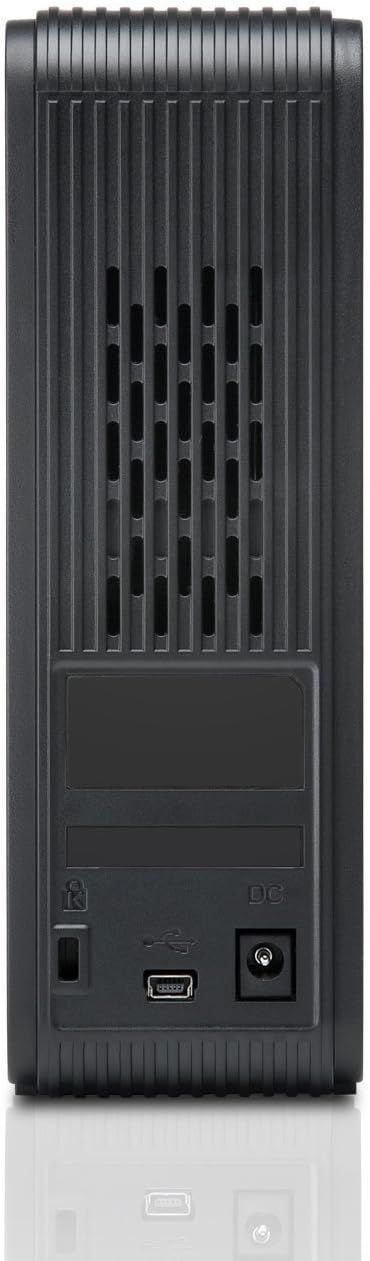
פיגורע 2: צוריק view of the Hitachi Touro Desk Dx3. This image shows the rear panel of the hard drive, which includes the DC power input port on the right, the USB 3.0 data port in the center, and a security lock slot on the left. Ventilation grilles are visible across the top portion of the back panel.
סעטאַפּ
Follow these steps to set up your external hard drive:
- פאַרבינדן די מאַכט אַדאַפּטער: Plug the AC power adapter into the DC power input port on the back of the Touro Desk Dx3. Then, plug the other end of the power adapter into a wall outlet. The drive will power on automatically.
- פאַרבינדן די וסב קאַבלע: Connect one end of the supplied USB 3.0 data cable to the USB port on the back of the Touro Desk Dx3. Connect the other end of the USB cable to an available USB port on your computer. For optimal performance, use a USB 3.0 port.
- אַפּערייטינג סיסטעם דערקענונג: Your computer's operating system (Windows or macOS) should automatically detect and install the necessary drivers for the hard drive. The drive will appear as a new storage device in 'My Computer' (Windows) or 'Finder' (macOS).
- Initial Formatting (Optional): The drive comes pre-formatted. If you wish to reformat the drive or partition it, refer to your operating system's disk management tools. באַמערקונג: רעפאָרמאַטירן וועט אויסמעקן אַלע דאַטן אויף דעם דרייוו.
אַפּערייטינג
Once connected, your Touro Desk Dx3 is ready for use.
- דאַטאַ אַריבערפירן: שלעפּן און פאַלן files or folders to and from the Touro Desk Dx3 icon on your desktop or in your file explorer. The USB 3.0 interface allows for rapid data transfer speeds.
- באַקקופּ: Use your operating system's built-in backup utilities or third-party software to create backups of your important files on the external drive.
- זיכער באַזייַטיקונג: Always safely eject the hard drive before disconnecting it from your computer. In Windows, right-click the drive icon in the system tray and select 'Eject'. In macOS, drag the drive icon to the Trash or click the Eject button next to the drive in Finder. This prevents data corruption.
וישאַלט
Proper maintenance ensures the longevity of your device.
- רייניקונג: ניצט אַ ווייכע, טרוקענע, לינט-פֿרייע שטאָף צו רייניקן די אויסערלעכע זייט פֿון דעם דרייוו. ניצט נישט קיין פֿליסיקע רייניגער אָדער אַעראָזאָלן.
- ינווייראַנמענאַל טנאָים: Store and operate the drive in a cool, dry environment, away from direct sunlight, extreme temperatures, and high humidity. Avoid placing the drive near strong magnetic fields.
- גשמיות באַהאַנדלונג: Handle the drive with care. Avoid dropping it or subjecting it to strong impacts, as this can damage the internal components.
טראָובלעשאָאָטינג
אויב איר טרעפט פּראָבלעמען, באַציעט זיך צו די פאלגענדע געוויינטלעכע לייזונגען:
- דרייוו נישט דערקענט:
- זיכער מאַכן אַז דער מאַכט אַדאַפּטער איז זיכער פארבונדן צו ביידע דעם דרייוו און אַ אַרבעטנדיקן מאַכט ווענטיל.
- Verify the USB cable is firmly connected to both the drive and your computer. Try a different USB port or cable.
- ריסטאַרט דיין קאָמפּיוטער.
- Check Disk Management (Windows) or Disk Utility (macOS) to see if the drive is detected but not assigned a drive letter or mounted.
- לאַנגזאַמע טראַנספער גיכקייטן:
- Ensure you are connected to a USB 3.0 port on your computer for SuperSpeed performance. USB 2.0 ports will operate at slower speeds.
- פֿאַרמײַדן איבערצוגעבן אַ סך קליינע files simultaneously; large files transfer more efficiently.
- שליסט צו אַנדערע אַפּליקאַציעס וואָס קענען נוצן סיסטעם רעסורסן אָדער דעם USB באַס.
- דרייוו ליכט נישט אויף:
- קאָנטראָלירט די פֿאַרבינדונג פֿון דער מאַכט אַדאַפּטער צום דרייוו און צום וואַנט אַוטלעט.
- פּרוּווט אַ אַנדערש מאַכט ווענטיל.
ספּעסאַפאַקיישאַנז
| דיגיטאַל סטאָרידזש קאַפּאַציטעט | 2 טב |
| שווער דיסק צובינד | וסב 3.0 |
| קאַנעקטיוויטי טעכנאָלאָגיע | וסב |
| סאָרט | היטאַטשי |
| שווער דיסק פאָרם פאַקטאָר | 3.5 אינטשעס |
| קאַמפּאַטאַבאַל דעוויסעס | דעסקטאָפּ קאָמפּיוטערס |
| ייַנמאָנטירונג טיפּ | טאַבלעטאָפּ |
| קאָליר | שוואַרץ |
וואָראַנטי אינפֿאָרמאַציע
This product is covered by a limited warranty. For detailed information regarding warranty terms, conditions, and duration, please refer to the warranty card included in your product packaging or visit the official Hitachi support webזייטל. האַלט דיין קויפן באַווייַז פֿאַר וואָראַנטי קליימז.
קונה שטיצן
For further assistance, technical support, or to inquire about service, please visit the official Hitachi support webזייטל אדער קאנטאקט זייער קאסטומער סערוויס דעפארטמענט. קאנטאקט אינפארמאציע קען געווענליך געפונען ווערן אויף די פאבריקאנט'ס webפּלאַץ אָדער אין די פּראָדוקט דאַקיומענטיישאַן.


