1. הקדמה
Thank you for choosing the LTC 3-Channel 60W Public Address Amplifier with USB/SD-MP3. This manual provides essential information for the safe and efficient operation of your new amplifier. Please read it thoroughly before use and keep it for future reference. This amplifier is designed for public address applications, offering versatile input options including microphones, auxiliary devices, and integrated USB/SD card playback.
2. זיכערקייַט אינסטרוקציעס
כדי צו זיכער מאַכן זיכערע אָפּעראַציע און פאַרמייַדן שאָדן, ביטע אָבסערווירן די פאלגענדע זיכערהייט מיטלען:
- מאַכט מקור: פאַרבינדן די amplifier only to the specified power sources (12V DC or 220V AC) as indicated on the unit. Ensure the voltage שוועבעלעך דיין היגע מאַכט צושטעלן.
- ווענטילאַטיאָן: בלאָקירט נישט קיין ווענטילאַציע עפענונגען. זאָרגט פֿאַר גענוג לופט שטראָם אַרום דעם אַפּאַראַט צו פאַרמייַדן איבערהיצונג.
- נעץ: דו זאלסט נישט ויסשטעלן די amplifier to rain, moisture, or excessive humidity. Keep it away from liquids.
- רייניקונג: טרענט אפ די עלעקטריציטעט איידער איר רייניגט. ניצט א טרוקענעם, ווייכן טוך. ניצט נישט קיין פליסיגע רייניגער אדער עראזאלן.
- סערוויס: פרובירט נישט צו סערוויסן דעם פראדוקט אליין. לאָזט איבער אלע סערוויסינג צו קוואַליפֿיצירטע סערוויס פּערסאָנעל. עפענען דעם אַפּאַראַט קען אייך אויסשטעלן צו געפערלעכע וואָלומען.tagעס אָדער אנדערע כאַזערדז.
- אָרט: שטעלן די amplifier on a stable, flat surface. Avoid placing it near heat sources or in direct sunlight.
- אָווערלאָאַד: דו זאלסט נישט אָווערלאָאַד די amplifier. Ensure connected speakers match the amplifier's impedance and power ratings.
3. פּראָדוקט איבערview
The LTC 3-Channel 60W Public Address Amplifier is a versatile audio solution designed for various PA applications. It features multiple input options and an integrated MP3 player for convenience.
3.1 פראָנט פּאַנעל קאָנטראָלס און קאַנעקשאַנז
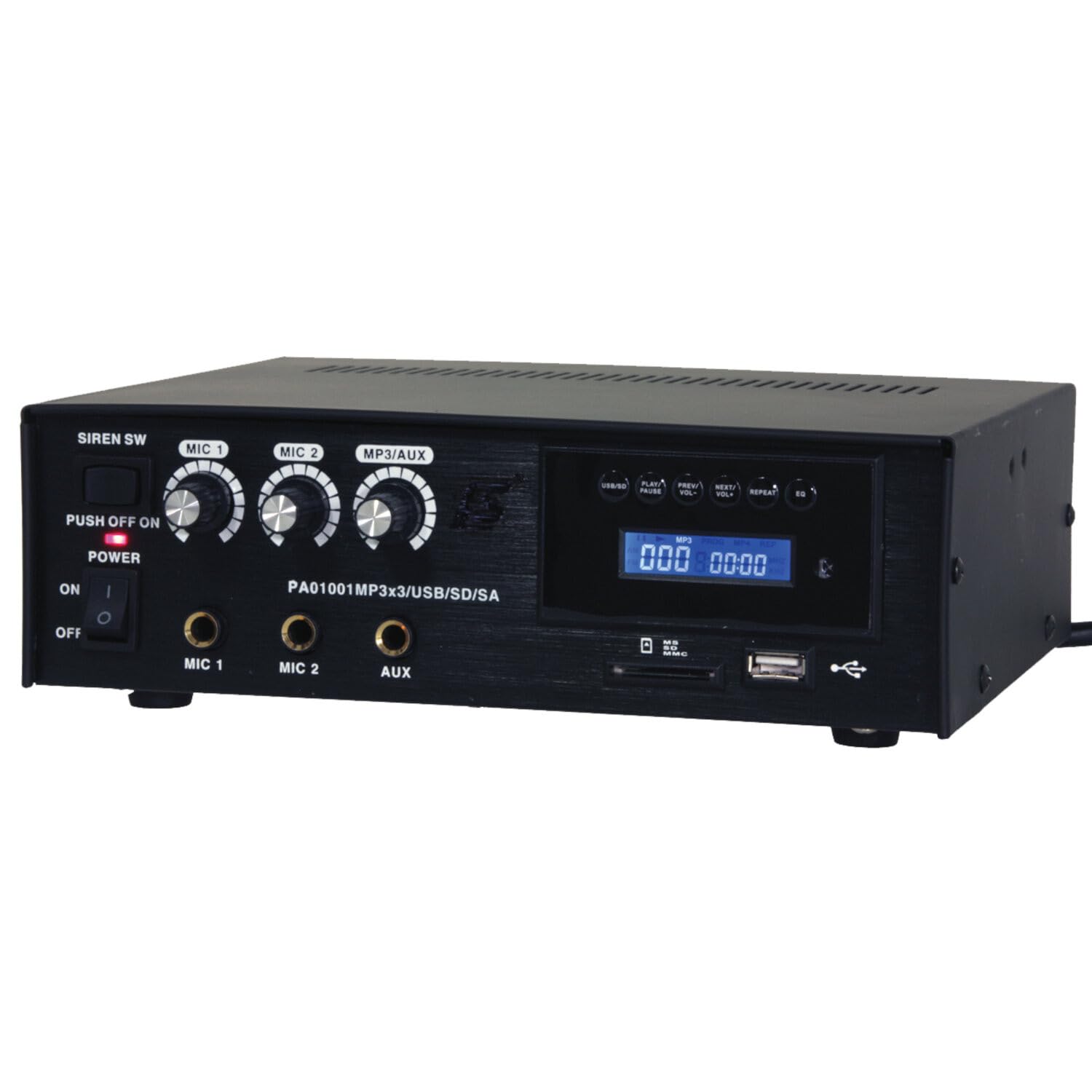
Image: Front panel of the LTC 3-Channel 60W Public Address Amplifier. Visible controls include volume knobs for MIC1, MIC2, and MP3/AUX, a Master volume knob, a Power switch, a Siren switch, and input jacks for MIC1, MIC2, and AUX. The MP3 player section features a display, USB port, and SD card slot.
- SIREN SW: Switch to activate the built-in siren sound.
- PUSH OFF / ON / OF Power Switch: Main power switch for the ampליפער.
- MIC 1 Volume: Rotary knob to adjust the volume level for Microphone Input 1.
- MIC 2 Volume: Rotary knob to adjust the volume level for Microphone Input 2.
- MP3/AUX Volume: Rotary knob to adjust the volume level for the MP3 player and Auxiliary input.
- מאַסטער באַנד: Rotary knob to control the overall output volume of the ampליפער.
- MIC 1 אַרייַנשרייַב: 6.3mm jack for connecting Microphone 1.
- MIC 2 אַרייַנשרייַב: 6.3mm jack for connecting Microphone 2.
- AUX אַרייַנשרייַב: 6.3mm jack for connecting external audio sources (e.g., CD player, smartphone).
- USB/SD MP3 Player: Integrated player with USB port and SD card slot for direct playback of audio files. Includes control buttons (Play/Pause, Prev/Vol-, Next/Vol+, Repeat, EQ) and an LCD display.
3.2 שליסל פֿעיִקייטן
- Mobile or fixed amplifier with 12V battery (car, boat) or 220V mains power supply.
- Integrated MP3 player with USB and SD ports for music playback.
- Includes a siren for powerful sound and an MP3 control screen with a blue LCD display.
4. סעטאַפּ
פֿאָלגט די סטעפּס צו אויפֿשטעלן אייער ampלייבער:
4.1 מאַכט קאַנעקשאַן
- For 220V AC Operation: Connect the supplied power cord to the AC input on the rear panel of the amplifier and then to a standard 220V AC wall outlet.
- פֿאַר 12V DC אָפּעראַציע: Connect a 12V DC power source (e.g., car battery) to the 12V DC input terminals on the rear panel. Ensure correct polarity (+ to + and - to -).
- פאַרזיכערן די amplifier's power switch is in the 'OFF' position before connecting to power.
4.2 רעדנער קאַנעקשאַן
- Locate the speaker output terminals on the rear panel of the ampליפער.
- Connect your speakers to these terminals, ensuring correct polarity (positive to positive, negative to negative).
- Verify that the total impedance of the connected speakers is compatible with the amplifier's output specifications to prevent damage.
4.3 Audio Input Connection
- מיקראָפאָן: Insert your microphones into the MIC 1 and/or MIC 2 input jacks on the front panel.
- הילפס-דעווייסעס: Connect external audio sources (e.g., smartphone, laptop, CD player) to the AUX input jack on the front panel using an appropriate 6.3mm audio cable.
- USB/SD Media: Insert a USB flash drive into the USB port or an SD card into the SD card slot on the front panel for MP3 playback.
5. אַפּערייטינג ינסטרוקטיאָנס
אַמאָל די ampאויב דער ליפיער איז אויפגעשטעלט, גייט נאך די שריט צו ארבעטן:
5.1 פּאַוערינג אויף / אַוועק
- מאַכן זיכער אַז אַלע קאַנעקשאַנז זענען זיכער.
- Turn the MASTER volume knob to its minimum position.
- Flip the POWER switch to the 'ON' position. The power indicator light will illuminate.
- To power off, turn the MASTER volume to minimum and then flip the POWER switch to 'OFF'.
5.2 מיקראָפאָן באַניץ
- Connect your microphone(s) to the MIC 1 and/or MIC 2 inputs.
- Slowly increase the MIC 1 and/or MIC 2 volume knob(s) to the desired level.
- Adjust the MASTER volume for overall output.
- Avoid pointing microphones directly at speakers to prevent feedback (howling).
5.3 AUX אריינגאנג באַניץ
- Connect your external audio device to the AUX input.
- Ensure the volume on your external device is set to a moderate level.
- Slowly increase the MP3/AUX volume knob to the desired level.
- Adjust the MASTER volume for overall output.
5.4 MP3/USB/SD Playback
- Insert a USB flash drive into the USB port or an SD card into the SD card slot. The amplifier will automatically detect the media and begin playback.
- Use the 'PLAY/PAUSE' button to start or pause playback.
- Use the 'PREV/VOL-' button to go to the previous track or press and hold to decrease volume.
- Use the 'NEXT/VOL+' button to go to the next track or press and hold to increase volume.
- Use the 'REPEAT' button to cycle through repeat modes (e.g., repeat one, repeat all).
- Use the 'EQ' button to cycle through equalizer presets.
- Adjust the MP3/AUX volume knob and MASTER volume for desired output.
5.5 Siren Function
- To activate the siren, flip the SIREN SW to the 'ON' position.
- To deactivate, flip the SIREN SW back to the 'OFF' position.
- Use the MASTER volume to control the siren's output level.
6. וישאַלט
געהעריקע אויפהאלטונג זיכערט די לאנגעוויטי פון אייער ampלייבער:
- רייניקונג: ווישט רעגולער אויס דעם אַפּאַראַט מיט אַ ווייכן, טרוקענעם שטאָף. ניצט נישט קיין שרײַבנדיקע רייניגער, וואַקסן אָדער סאָלווענטן.
- ווענטילאַטיאָן: Ensure that the ventilation grilles are free from dust and debris. Use a soft brush or vacuum cleaner to clear them if necessary.
- סטאָרידזש: אויב סטאָרינג די ampאויב איר ניצט דעם עלעקטרישן טעכניק פאר א לענגערע צייט, זאלט איר עס אפשטעלן פון עלעקטריע און אפהיטן עס אין א קיל, טרוקן ארט ווייט פון דירעקט זונשייַן און עקסטרעמע טעמפעראטורן.
- פֿאַרבינדונגען: קאָנטראָלירט פּעריִאָדיש אַלע קאַבלע פֿאַרבינדונגען פֿאַר פעסטקייט און וואונדער פֿון טראָגן.
7. טראָובלעשאָאָטינג
אויב איר טרעפט פראבלעמען מיט אייער amplifier, refer to the table below for common problems and solutions:
| פּראָבלעם | מעגלעך סיבה | לייזונג |
|---|---|---|
| קיין מאַכט | Power cable not connected; Power outlet faulty; Power switch off; 12V DC battery depleted or incorrectly connected. | Check power cable connection; Try a different outlet; Ensure power switch is ON; Check 12V DC battery charge and polarity. |
| קיין געזונט רעזולטאַט | Master volume too low; Input volume too low; Speakers not connected or faulty; Incorrect input selected (for MP3/AUX); Mute activated. | Increase Master and input volumes; Check speaker connections and functionality; Ensure correct input source is active; Check if any mute function is engaged. |
| פאַרקרימט געזונט | Volume too high (clipping); Speaker impedance mismatch; Faulty cables or connections. | Reduce volume; Verify speaker impedance compatibility; Check and replace faulty cables. |
| MP3/USB/SD not playing | אומרעכט file format; USB drive/SD card faulty or not inserted correctly; MP3/AUX volume too low. | פאַרזיכערן files are MP3 format; Reinsert USB/SD card; Try a different USB/SD card; Increase MP3/AUX volume. |
| Feedback (howling) from microphones | Microphone too close to speakers; Microphone volume too high. | Reposition microphones away from speakers; Reduce microphone volume. |
אויב די פראבלעם בלייבט נאך פרובירן די לייזונגען, ביטע קאנטאקטירט קאסטומער סופארט.
8. ספּעסאַפאַקיישאַנז
Technical specifications for the LTC 3-Channel 60W Public Address Ampלייבער:
| שטריך | באַשרייַבונג |
|---|---|
| מאָדעל נומער | LTCAUDIO95-1000 |
| אַרויסגאַנג מאַכט (12V) | RMS 35W, Max. 45W |
| אַרויסגאַנג מאַכט (220V) | RMS 45W, Max. 60W |
| נומער פון טשאַנאַלז | 3 (MIC1, MIC2, AUX/MP3) |
| Voltage | 220 וואלטס (AC), 12 וואלטס (DC) |
| מאַקסימום צושטעלן וואָלtage | 240 וואלטס |
| מינימום צושטעלן וואָלtage | 220 וואלטס (AC) |
| פּראָדוקט דימענשאַנז (L x W x H) | 48 X 9 X 35 סענטימעטער (18.9 X 3.5 X 13.8 אינטשעס) |
| פּראָדוקט וואָג | 3.26 קילאָגראַמס (7.19 לבס) |
| מאַונטינג טיפּ | טיש בארג |
| ינטעגראַטעד פֿעיִקייטן | USB/SD MP3 Player, Siren |
9. וואָראַנטי און שטיצן
This product is manufactured by Ibiza and sold under the LTC brand. Spare parts availability is indicated for 2 years from the date of purchase. For technical support, troubleshooting assistance beyond what is provided in this manual, or warranty claims, please contact your retailer or the authorized service center. Keep your proof of purchase for warranty validation.


