הקדמה
The My Weigh CTS-3000 Digital Counting Scale is a versatile and precise instrument designed for accurate weighing and counting of various items. With a robust 30,000 gram capacity and 0.5 gram resolution, it is suitable for a wide range of applications including kitchen use, business inventory, and educational purposes. This manual provides comprehensive instructions to help you set up, operate, and maintain your scale for optimal performance.
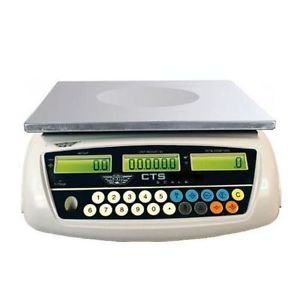
Image: The My Weigh CTS-3000 Digital Counting Scale, featuring a stainless steel platform and a blue backlit LCD display.
סעטאַפּ
- אויספּאַקן: Carefully remove the scale from its packaging. Ensure all components are present: the scale unit, stainless steel platform, clear protective cover, and AC adapter.
- אָרט: Place the scale on a stable, flat, and level surface. Avoid areas with excessive vibration, drafts, or direct sunlight, as these can affect accuracy. The scale features adjustable feet for leveling.
- מאַכט קשר:
- AC מאַכט: Connect the provided AC adapter to the scale's power input port and then plug it into a standard electrical outlet.
- באַטאַרייע מאַכט: The scale can also operate on 5 AA batteries (not included). Open the battery compartment on the underside of the scale and insert the batteries, ensuring correct polarity. The scale features overcharge and over-discharge protection when using the rechargeable battery pack (if included).
- ייַנמאָנטירונג פּלאַטפאָרמע: Place the stainless steel weighing platform securely onto the scale base.
- פּראַטעקטיוו דעקן: Position the clear protective cover over the display and control panel to guard against spills and debris.
- ערשט מאַכט אויף: דרוק די ON/OFF button to power on the scale. The display will show a self-test sequence before settling at 0.00.
אַפּערייטינג ינסטראַקשאַנז
1. גרונטלעכע וואָג
- מאַכט אויף: דרוק די ON/OFF button. Wait for the display to stabilize at 0.00.
- אָרט זאַך: Gently place the item(s) to be weighed onto the center of the stainless steel platform.
- לייענען מעסטונג: The weight will be displayed on the main LCD screen.
2. טוישן וואָג מאָדעס (איינהייטן)
The CTS-3000 supports multiple weighing modes: grams (g), ounces (oz), kilograms (kg), and pounds (lb).
- דרוק MODE: מיט דער וואָג אויף, דריק די מאָדע button repeatedly to cycle through the available units.
- אויסקלייַבן אַפּאַראַט: Stop pressing when your desired unit (e.g., "g" for grams, "lb" for pounds) is displayed.
Video: Demonstration of the scale's accurate weighing and unit conversion functions. The video shows how to switch between grams, kilograms, and pounds.
3. טארע פונקציע
The Tare function allows you to subtract the weight of a container, so only the weight of its contents is measured.
- אָרט קאַנטיינער: שטעלט א ליידיגן קאנטעינער אויף דער וואָג פּלאַטפאָרמע. דער עקראַן וועט ווײַזן זײַן וואָג.
- Press TARE: דרוק די TARE button. The display will reset to 0.00, effectively subtracting the container's weight.
- לייג צו זאכן: Add the items you wish to weigh into the container. The display will show only the net weight of the items.
4. קאַונטינג פונקטיאָן
The counting function allows you to count a large number of identical items quickly.
- Sampקוואַנטיטי: Place a known number of sample items (e.g., 10, 20, 50, 100) on the platform. The more samples, the more accurate the count.
- ינפּוט שampלאַ: Using the numeric keypad, enter the exact number of samples you placed on the platform.
- דרוק SAMPדו: דרוק די SAMPLE button. The scale will calculate the average unit weight and display the quantity.
- Add More Items: אַראָפּנעמען די samples and add the bulk quantity of items. The scale will automatically count them.
Video: Demonstration of the counting function, showing how to input a sample quantity and then count a larger batch of items.
5. Alarm Function (Weight & Quantity)
The scale features an alarm function that can be set for both weight and quantity thresholds.
- אַרייַן אַלאַרם מאָדע: דריקן און האַלטן די '.' שליסל, דעמאָלט דריקן 5 to enter the alarm mode setting.
- Select Alarm Type: ניצן די M+ key to cycle through alarm modes: "no" (alarm off), "in" (alarm within range), "out" (alarm outside range), "up" (alarm when exceeding set value).
- Set Alarm Value: דרוק די אַלאַרם שטעלן key. Input the desired alarm value using the numeric keypad. For weight, input the value in grams (e.g., 10000 for 1kg on a 0.1g scale). For quantity, input the number of pieces.
- באַשטעטיקן: דרוק די TARE שליסל צו באַשטעטיקן די באַשטעטיקן.
Video: Detailed instructions on setting up the weight and quantity alarm functions on the counting scale.
וישאַלט
- רייניקונג: ווישט די וואָג פּלאַטפאָרמע און דיספּליי מיט אַ ווייכן, דamp cloth. Do not use abrasive cleaners or immerse the scale in water. The removable "gunk shield" protects the display from spills.
- סטאָרידזש: Store the scale in a clean, dry environment away from extreme temperatures and humidity.
- באַטערי זאָרגן: If using battery power, ensure batteries are replaced when low to maintain accuracy. If storing for extended periods, remove batteries to prevent leakage.
טראָובלעשאָאָטינג
| פּראָבלעם | מעגלעך סיבה | לייזונג |
|---|---|---|
| וואָג טוט נישט קער אויף. | קיין מאַכט, טויטע באַטעריעס, אָדער אַ דעפעקטיווער אַדאַפּטער. | קאָנטראָלירט די AC אַדאַפּטער פֿאַרבינדונג אָדער פֿאַרבייט די באַטעריעס. |
| ומפּינקטלעך רידינגז. | Unstable surface, drafts, or scale not level. | Place on a stable, level surface. Avoid drafts. Ensure feet are adjusted. |
| דיספּליי ווייזט "איבערלאַסט". | וואָג יקסידז מאַקסימום קאַפּאַציטעט. | אַראָפּנעמען איבעריק וואָג גלייך צו פאַרמייַדן שאָדן. |
| Counting function is inaccurate. | ניט גענוג sample size or inconsistent unit weight. | ניצן אַ גרעסערע sample size (e.g., 50 or 100 pieces) for calibration. Ensure all items are identical. |
ספּעסאַפאַקיישאַנז
- סאָרט: מיין וועג
- מאָדעל: CTS-3000
- קאַפּאַציטעט: 30,000 grams (30 kg / 66.078 lb / 1057.24 oz)
- רעזאלוציע: 0.5 grams (0.0005 kg / 0.001 lb / 0.02 oz)
- Weighing Modes: Grams (g), Ounces (oz), Kilograms (kg), Pounds (lb), Counting Mode
- ווייַז: Three backlit LCD displays (Total Weight, Unit Weight, Number of Pieces)
- פּלאַטפאָרמע מאַטעריאַל: ומבאַפלעקט שטאָל
- פֿעיִקייטן: Tare function, Batching feature, Counting feature, Removable "gunk shield", RS-232 serial port, Liquid level indicator
- מאַכט: Rechargeable battery pack and AC adapter included
- פּראָדוקט דימענשאַנז: 14.5 X 7 X 15 אינטשעס
- נומער וואָג: 8.9 פונט
וואָראַנטי און שטיצן
For warranty information and technical support, please refer to the official My Weigh webזייטל אדער קאנטאקט זייער קאסטומער סערוויס דעפארטמענט. האלט אייער קויף קוויטל אלס באווייז פון קויפן פאר יעדע גאראנטיע טענות.
פֿאַר נאָך רעסורסן און פּראָדוקט רעגיסטראַציע, באַזוכט: www.myweigh.com


