הקדמה
This manual provides comprehensive instructions for the safe and efficient use of your BlackBerry HS-300 Wireless Bluetooth Headset. Please read this manual thoroughly before operating the device and retain it for future reference. The BlackBerry HS-300 is designed for hands-free communication with compatible Bluetooth-enabled devices.
פּעקל אינהאַלט
באַשטעטיקן אַז דיין פּעקל כּולל די פאלגענדע זאכן:
- BlackBerry HS-300 Wireless Bluetooth Headset
- Ear hook (optional, for secure fit)
- Ear gels/tips (various sizes for comfort)
- טשאַרדזשינג קאַבלע
- באַניצער מאַנואַל (דעם דאָקומענט)
מיטל איבערview
Familiarize yourself with the components of your BlackBerry HS-300 headset.
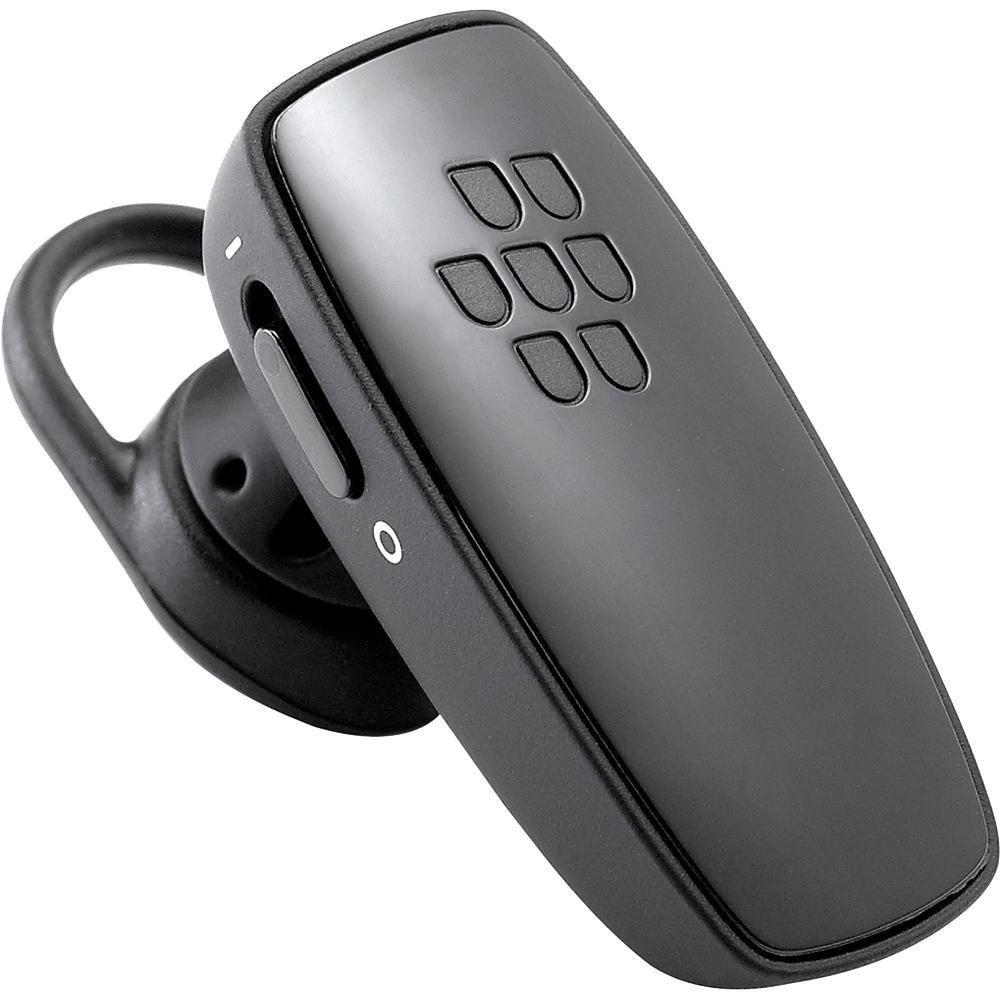
בילד 1: פראָנט view of the BlackBerry HS-300 Wireless Bluetooth Headset. The image displays the main body of the headset, featuring the BlackBerry logo (seven-dot pattern) on the front surface. A slender button, likely for volume control or multi-function, is visible on the side. An ear hook is attached, designed to secure the headset over the ear. A small indicator light is also present near the button.
- מולטי-פונקציע קנעפּל: Used for answering/ending calls, voice commands, and pairing.
- באַנד קאָנטראָל קנעפּלעך: Adjusts call and media volume.
- LED ינדיקאַטאָר ליכט: Displays status (power, pairing, charging).
- מיקראָפאָן: Captures your voice during calls.
- מאַכט סוויטש: טורנס די כעדסעט אויף אָדער אַוועק.
- טשאַרדזשינג פּאָרט: פֿאַרבינדט זיך צום טשאַרדזשינג קאַבל.
סעטאַפּ
1. טשאַרדזשינג די העאַדסעט
Before initial use, fully charge your headset. The HS-300 features rapid charge capabilities.
- Connect the charging cable to the headset's charging port and to a compatible USB power source.
- The LED indicator will show the charging status (e.g., solid red for charging, solid blue for fully charged).
- A full charge provides up to 4 hours of talk time.
2. פּערינג מיט אַ בלועטאָאָטה דיווייס
To use your headset, it must be paired with a Bluetooth-enabled phone or device.
- מאַכן זיכער אַז די כעדסעט איז אויסגעדרייט אַוועק.
- Press and hold the Multi-function Button until the LED indicator flashes blue and red alternately. This indicates pairing mode.
- אויף אייער טעלעפאָן, אַקטיוויזירט בלועטוט און זוכט פֿאַר נײַע דעוויסעס.
- Select "BlackBerry HS-300" from the list of available devices.
- אויב געבעטן פֿאַר אַ פּאַראָל, אַרייַן "0000" (פיר נולן).
- Once paired, the LED indicator will flash blue periodically.
אַפּערייטינג ינסטראַקשאַנז
מאַכט אויף / אַוועק
- צו מאַכט אויף: Slide the Power Switch to the 'On' position. The LED indicator will flash blue.
- צו מאַכט אַוועק: Slide the Power Switch to the 'Off' position. The LED indicator will turn off.
מאַכן און באַקומען קאַללס
- ענטפֿערן אַ רוף: דריק איין מאל דעם מולטי-פונקציע קנעפל.
- ענדיקן אַ רוף: דריק דעם מולטי-פונקציע קנעפּל איין מאָל בעת אַ רוף.
- פארווארפן א רוף: דריק און האַלט דעם מולטי-פונקציע קנעפּל פֿאַר אַרום 2 סעקונדעס.
- מאַכן אַ רוף: Dial the number on your phone. The call will automatically transfer to the headset if connected.
- שטימע דייאַלינג (אויב געשטיצט דורך טעלעפאָן): Press the Multi-function Button once when not on a call.
באַנד קאָנטראָל
- Use the Volume Control Buttons on the headset to adjust the call or media volume.
וישאַלט
- רייניקט דעם כעדסעט רעגולער מיט אַ ווייכן, טרוקענעם שטאָף.
- Avoid exposing the headset to extreme temperatures, moisture, or corrosive substances.
- סטאָר די כעדסעט אין אַ קיל, טרוקן אָרט ווען ניט אין נוצן.
- פרובירט נישט צו צענעמען אדער מאדיפיצירן דעם כעדסעט, ווייל דאס וועט בטל מאכן די גאראנטיע און קען שאפן שאדן.
טראָובלעשאָאָטינג
| פּראָבלעם | לייזונג |
|---|---|
| כעדסעט טוט זיך נישט אן. | Ensure the headset is charged. Connect it to a power source using the charging cable. |
| Cannot pair the headset with my phone. |
|
| קיין אַודיאָ אָדער שלעכטע אַודיאָ קוואַליטעט. |
|
| כעדסעט דיסקאָנעקט זיך אָפט. |
|
ספּעסאַפאַקיישאַנז
| שטריך | דעטאַל |
|---|---|
| מאָדעל נומער | הס-300 |
| קאַנעקטיוויטי | Bluetooth Wireless (Version 2.1) |
| רעדן צייט | אַרויף צו 4 שעה |
| טשאַרדזשינג | Rapid charge capable |
| קאָנטראָלס | Volume control, Multi-function button |
| מיקראָפאָן | ינטעגראַטעד |
| פאָרם פאַקטאָר | On-ear (single ear) |
| וואָג | בעערעך 3.2 אונסעס |
| דימענשאַנז | 2.5 X 2 X 6.5 אינטשעס (בעערעך) |
וואָראַנטי און שטיצן
For warranty information and technical support, please refer to the documentation provided at the time of purchase or visit the official BlackBerry support webזייטל. האַלט דיין קויפן באַווייַז פֿאַר וואָראַנטי קליימז.
אָנליין שטיצן: www.blackberry.com/support


