הקדמה
The Focusrite ISA 428 MK2 is a high-quality 4-channel microphone preamplifier designed for professional audio recording environments. It features Focusrite's renowned transformer-based preamps, offering exceptional sonic clarity and versatility. This manual provides essential information for the setup, operation, maintenance, and troubleshooting of your ISA 428 MK2.

Figure 1: Front panel of the ISA 428 MK2, showing four input channels with controls and metering.
סעטאַפּ
Proper setup ensures optimal performance and longevity of your ISA 428 MK2. Follow these steps for initial installation:
- אויספּאַקן: Carefully remove the ISA 428 MK2 from its packaging. Retain all packaging materials for future transport or storage.
- געשטעל מאָונטינג: The ISA 428 MK2 is designed for standard 19-inch rack mounting. Secure the unit using appropriate rack screws. Ensure adequate ventilation around the unit.
- מאַכט קשר: Connect the supplied power cord to the IEC inlet on the rear panel of the unit and then to a grounded AC power outlet. The unit operates on Corded Electric power.
- אַודיאָ קאַנעקשאַנז:
- מיקראָפאָן ינפּוץ: Connect microphones to the XLR inputs on the rear panel.
- Line/Instrument Inputs: Use the 1/4" jack inputs for line-level signals or direct instrument connections.
- אויסגאבעס: Connect the XLR outputs to your audio interface, mixer, or recording device.
- אַרייַנלייגן פונקטן: Utilize the dedicated insert points for integrating external signal processors like compressors or EQs.

Figure 2: Rear panel of the ISA 428 MK2, illustrating the various audio input and output connections.
אַפּערייטינג ינסטראַקשאַנז
The ISA 428 MK2 offers precise control over your audio signals. Familiarize yourself with the following operational aspects:
געווינען קאָנטראָל
Each channel features a versatile gain range from 0dB to +60dB, with an additional 20dB variable trim. Adjust the gain knob to achieve optimal signal levels without clipping. Monitor the input level meters to prevent overload.
ימפּידאַנס קאָנטראָל
The ISA 428 MK2 allows you to tailor the preamp to your microphone with selectable impedance options: 600, 1400, 2400, and 6800 Ohms. Experiment with different impedance settings to find the optimal match for your microphone, which can significantly affect its tonal character and performance.
פאַנטאָם מאַכט (48 וו)
Engage the 48V phantom power switch for condenser microphones that require external power. Ensure the microphone is connected before activating phantom power to prevent damage.
הויך-פּאַס פילטער
Each channel includes a high-pass filter to remove unwanted low-frequency rumble or noise. Activate this filter when recording sources prone to such issues, like vocals or acoustic instruments in a live room.
מעטער
The front panel features clear LED metering for each channel, allowing you to visually monitor input and output levels and prevent digital clipping.
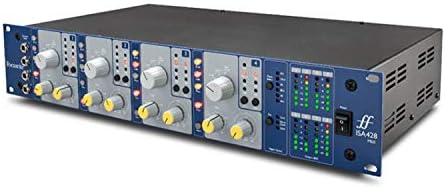
פיגור 3: ווינקלדיק view of the ISA 428 MK2, providing a clearer perspective of the front panel controls and indicators.
וישאַלט
To ensure the longevity and optimal performance of your ISA 428 MK2, follow these maintenance guidelines:
- רייניקונג: Use a soft, dry cloth to clean the exterior of the unit. Avoid abrasive cleaners or solvents, which can damage the finish.
- ווענטילאַטיאָן: Ensure that the ventilation slots are clear of dust and obstructions to prevent overheating.
- סטאָרידזש: When not in use for extended periods, store the unit in a cool, dry place, ideally in its original packaging or a protective case.
- מאַכט אַוועק: Always power off the unit and disconnect it from the mains before cleaning or performing any maintenance.
טראָובלעשאָאָטינג
If you encounter issues with your ISA 428 MK2, refer to the following common troubleshooting steps:
| פּראָבלעם | מעגלעך סיבה | לייזונג |
|---|---|---|
| קיין מאַכט | Power cable disconnected; Power outlet faulty; Unit fuse blown. | Check power cable connection; Try a different outlet; Consult a qualified technician for fuse replacement. |
| קיין אַודיאָ רעזולטאַט | Incorrect cabling; Gain set too low; Phantom power not engaged for condenser mics; Output device issues. | Verify all audio cables are correctly connected; Increase gain; Activate 48V phantom power if needed; Check your audio interface/mixer settings. |
| פאַרקרימט אַודיאָ | Input signal too hot (clipping); Faulty cable; Microphone impedance mismatch. | Reduce input gain; Try a different cable; Adjust impedance setting on the ISA 428 MK2. |
| ברומען אָדער ראַש | Ground loop; Faulty cable; External interference. | Ensure all equipment is properly grounded; Try different cables; Isolate the unit from other electronic devices. |
If the problem persists after attempting these solutions, please contact Focusrite customer support.
ספּעסאַפאַקיישאַנז
Detailed technical specifications for the Focusrite ISA 428 MK2:
- מאָדעל: 428MKII
- טשאַנאַלז: 4 מיקראָפאָן פּרעamps
- געווינען קייט: 0dB to +60dB (Mic), +20dB variable trim
- אַרייַנשרייַב ימפּידאַנס: Selectable (600, 1400, 2400, 6800 Ohms)
- קאַנעקטיוויטי: XLR Mic Inputs, 1/4" Line/Instrument Inputs, XLR Outputs, Insert Points
- THD+N: As low as 0.0009%
- דימענשאַנז (פּראָדוקט): 25 X 17.4 X 8.9 אינטשעס
- וואָג (אייטעם): 12.1 פונט
- מאַכט מקור: קאָרדעד עלעקטריק
- מאָונטינג: 19" Rack-mountable
וואָראַנטי אינפֿאָרמאַציע
The Focusrite ISA 428 MK2 comes with a 2-year Focusrite warranty. This warranty covers defects in materials and workmanship under normal use. Please retain your proof of purchase for warranty claims. For full terms and conditions, refer to the official Focusrite website or contact their support.
שטיצן און קאָנטאַקט
For further assistance, technical support, or to register your product, please visit the official Focusrite webפּלאַץ:
You can also find additional resources, FAQs, and driver downloads on their support pages.


