1. הקדמה
The Antelope Audio Isochrone Trinity is a high-definition master clock designed for professional audio environments. It provides precise synchronization for digital audio systems, ensuring optimal performance and sound quality. This manual details the setup, operation, and maintenance of your Isochrone Trinity unit.
שליסל פֿעיִקייטן אַרייַננעמען:
- Universal high-definition synchronization for superior audio.
- Advanced 4th Generation Acoustically Focused Clocking (AFC) with 64-bit DSP.
- Military-grade stability with temperature-controlled crystal oscillators.
- Support for audio up to 384kHz, varispeed functionality, and nine independent generators.
- Atomic input and USB connectivity for remote control and firmware upgrades.

פיגורע 1: פראָנט view of the Antelope Audio Isochrone Trinity Master Clock.
2. סעטאַפּ
2.1 אַנפּאַקינג און דורכקוק
Carefully remove the Isochrone Trinity from its packaging. Inspect the unit for any signs of damage that may have occurred during transit. Retain the original packaging for future transport or storage.
2.2 געשטעל מאַונטינג
The Isochrone Trinity is designed for standard 19-inch rack mounting. Secure the unit using appropriate rack screws. Ensure adequate ventilation around the unit to prevent overheating.
2.3 דערציען פּאַנעל קאַנעקשאַנז
The rear panel provides all necessary input and output connections for integrating the Isochrone Trinity into your audio system.
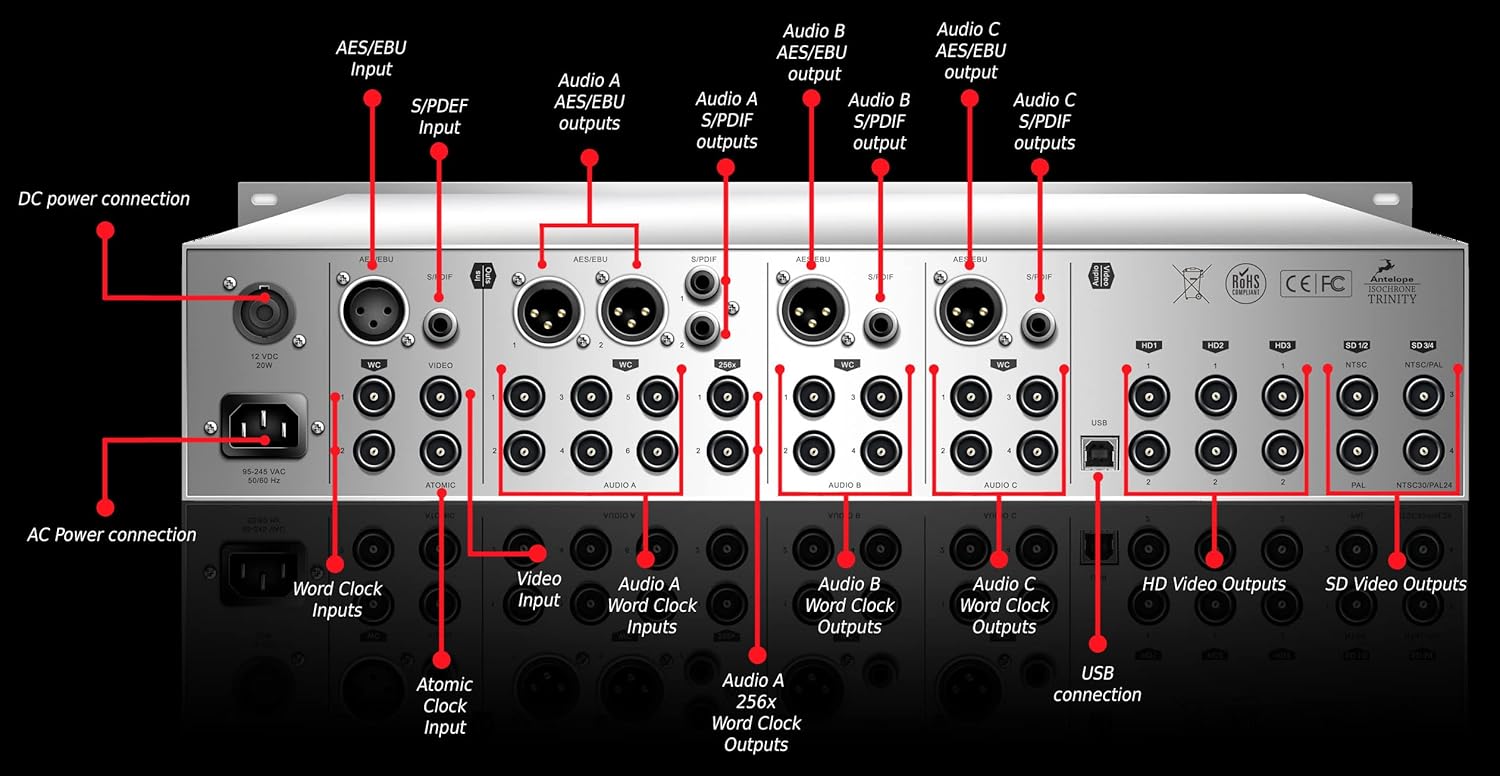
Figure 2: Rear panel connections of the Antelope Audio Isochrone Trinity Master Clock.
- AC Power Connection: Connect the provided power cable to this input and a suitable AC power source.
- DC מאַכט קאַנעקשאַן: An alternative DC power input (12VDC, 20W).
- אַטאָמישע זייגער אַרייַנשרייַב: For connecting an external atomic clock source for ultimate precision.
- Word Clock Inputs: BNC connectors for external word clock synchronization.
- ווידעא ינפּוט: BNC connector for video synchronization.
- Audio A/B/C Word Clock Outputs: Multiple BNC outputs for distributing word clock signals to other devices.
- Audio A/B/C 256x Word Clock Outputs: Dedicated BNC outputs for 256x word clock signals.
- AES/EBU Inputs/Outputs: XLR connectors for AES/EBU digital audio signals.
- S/PDIF Inputs/Outputs: RCA connectors for S/PDIF digital audio signals.
- USB קשר: For remote control, preset management, and firmware updates via a computer.
- HD Video Outputs: BNC connectors for High Definition video synchronization.
- SD Video Outputs: BNC connectors for Standard Definition video synchronization (NTSC/PAL).
2.4 ערשט מאַכט-אַרויף
After making all necessary connections, connect the power cable. The unit will perform a self-test. The front panel display will illuminate, indicating the unit is operational.
3. אַפּערייטינג ינסטרוקטיאָנס
The front panel of the Isochrone Trinity provides intuitive controls for managing synchronization settings.

Figure 3: Front panel controls of the Antelope Audio Isochrone Trinity Master Clock.
- מאַכט קנעפּל: נעמט אָן און אויס די מאַכט פון דער אַפּאַראַט.
- AC/DC Power Indicator: לייכט זיך צו ווײַזן דעם מאַכט סטאַטוס.
- SOURCE Encoder Knob: Selects the synchronization source.
- Sample Rate Encoder Knob: Adjusts the output sample rate. The current rate is shown on the Triple Display.
- Audio Channel Edit Button: Selects which audio channel (A, B, or C) to edit.
- דרייַיק ווייַז: Shows the current sample rates for Audio A, B, and C.
- Display Dimmer Knob: Adjusts the brightness of the front panel display.
- HD Select Encoders: Controls for High Definition video synchronization settings.
- VARISPEED Select Button: Engages or disengages varispeed mode.
- שפּאַלטן מאָדע: Allows independent control of different output groups.
- Pull Up/Down Buttons: אַדזשאַסטיד די sample rate by small percentages (e.g., +/- 0.1% for USA, +/- 4% for European standards).
- ATOMIC Lock Light: Indicates when the unit is successfully locked to an atomic clock source.
- W.C. Lock Light: Indicates when the unit is successfully locked to an external word clock source.
- Over Clock Light: Indicates an over-clocking condition.
- אינפֿאָרמאַציע קנעפּל: Provides access to system information or settings.
- SD Video Select Button: Selects Standard Definition video synchronization format (NTSC/PAL).
3.1 Basic Synchronization
- Ensure all audio devices are connected to the appropriate Word Clock or AES/EBU/S/PDIF outputs of the Trinity.
- ניצן די מקור ענקאָדער קנופּ to select the desired clock source (e.g., Internal, Atomic, Word Clock Input).
- סטרויערן די Sample Rate Encoder Knob צו שטעלן די פארלאנגט סampדי קורס פֿאַר דיין סיסטעם.
- אָבסערווירן די ATOMIC Lock Light or W.C. Lock Light to confirm successful synchronization.
3.2 אַוואַנסירטע פֿעיִקייטן
For detailed information on Varispeed, Split Mode, and HD/SD video synchronization, refer to the comprehensive online manual available on the Antelope Audio website. The USB connection allows for software control and advanced configuration.
4. וישאַלט
The Antelope Audio Isochrone Trinity is designed for reliable operation with minimal maintenance.
- רייניקונג: ניצט אַ ווייכע, טרוקענע שטאָף צו רייניקן די אויסערלעכע זייט פון דעם אַפּאַראַט. פֿאַרמייַדט אַברייסיוו רייניגער אָדער סאָלווענטן.
- סוויווע: Operate the unit in a clean, dry environment, away from direct sunlight, excessive heat, and moisture. Ensure proper ventilation.
- Firmware דערהייַנטיקונגען: Periodically check the Antelope Audio website for firmware updates. Updates can be installed via the USB connection.
5. טראָובלעשאָאָטינג
If you encounter issues with your Isochrone Trinity, consider the following troubleshooting steps:
- קיין מאַכט:
- Check that the power cable is securely connected to both the unit and the power outlet.
- באַשטעטיקן אַז די מאַכט ווענטיל איז פאַנגקשאַנאַל.
- No Lock Indication:
- Ensure the selected clock source (Internal, Atomic, Word Clock) is correctly configured.
- If using an external source, verify the cable connections and the external device's output.
- קוק די sample rate settings on both the Trinity and connected devices.
- Audio Glitches/Dropouts:
- Confirm all devices in the audio chain are synchronized to the Isochrone Trinity.
- Check for proper termination of Word Clock signals if applicable.
- Ensure all cables are in good condition and securely connected.
- USB קאַנעקטיוויטי ישוז:
- פּרוּווט אַ אַנדערש וסב פּאָרט אָדער קאַבלע.
- Ensure the correct drivers are installed on your computer.
- Restart both the Isochrone Trinity and your computer.
If problems persist, consult the Antelope Audio support resources or contact their customer service.
6. ספּעסאַפאַקיישאַנז
| שטריך | דעטאַל |
|---|---|
| סאָרט | אַנטילאָפּע אַודיאָ |
| מאָדעל | Isochrone Trinity (Model No. 853744004168) |
| Clocking Technology | 4th Generation Acoustically Focused Clocking (AFC), 64-bit DSP |
| אַסאַלייטער טיפּ | Temperature-Controlled Crystal Oscillators |
| מאַקס שample קורס | 384 כז |
| גענעראַטאָרס | 9 Independent Generators |
| ינפּוץ | Atomic Clock, Word Clock, Video, AES/EBU, S/PDIF, USB |
| אַוטפּוץ | Word Clock (Audio A/B/C, 256x), AES/EBU, S/PDIF, HD Video, SD Video |
| קאַנעקטיוויטי | וסב |
| דימענשאַנז | 19"W x 9"H (Rack-mountable) |
| וואָג | 10.1 פונט |
| מאַכט מקור | Corded Electric (AC/DC 12VDC, 20W) |
| ווייַז טיפּ | Multi Display (Digital) |
7. וואָראַנטי און שטיצן
For information regarding the warranty period and terms for your Antelope Audio Isochrone Trinity, please refer to the warranty card included with your product or visit the official Antelope Audio webפּלאַץ.
For technical support, product registration, or to download the latest drivers and firmware, please visit the Antelope Audio support page: Antelope Audio Support.


