1. הקדמה
די weBoost 901117 Pole Mount is designed to provide a secure and stable mounting solution for outdoor antennas, particularly those used with cell phone signal boosters. This durable aluminum pole mount is suitable for installation on building roofs or walls, ensuring optimal placement for your external antenna.
This manual provides essential information regarding the installation, maintenance, and specifications of your weBoost 901117 Pole Mount.
2. זיכערקייַט אינפֿאָרמאַציע
- Always exercise caution when working at heights, especially on roofs or ladders. Ensure stable footing and use appropriate safety equipment.
- Do not install the pole mount during adverse weather conditions, such as strong winds, rain, or lightning.
- Ensure the mounting surface is structurally sound and can support the weight of the pole mount and the attached antenna, even in windy conditions.
- Avoid contact with power lines or other electrical hazards during installation.
- אויב איר זענט נישט זיכער וועגן קיין טייל פון די ינסטאַלירונג פּראָצעס, קאָנסולטירט אַ קוואַליפֿיצירט פאַכמאַן.
3. פּעקל אינהאַלט
באַשטעטיקן אַז אַלע קאָמפּאָנענטן זענען פאַראַן איידער איר הייבט אָן די אינסטאַלאַציע:
- 1x Pole Mount (10 inches length, 1.5 inches diameter)
- 1x U-Bracket Assembly
- 1x וואנט בארג בראַקעט
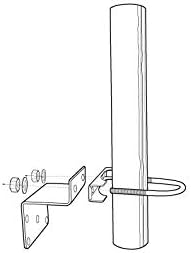
Figure 3.1: Included components of the weBoost 901117 Pole Mount.
4. סעטאַפּ און ייַנמאָנטירונג
די weBoost 901117 Pole Mount is designed for easy installation on various outdoor surfaces. Follow these steps for proper setup:
4.1. Choose a Mounting Location
Select a location on your building's roof or wall that provides the best line of sight for your outdoor antenna. Ensure the surface is flat and strong enough to securely hold the mount and antenna.
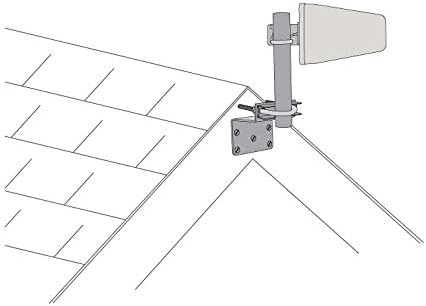
פיגורע 4.1: עקסample of pole mount installation on a roof.
4.2. באַפעסטיקט די וואַנט מאָונט קלאַמער
- Position the wall mount bracket against the chosen surface.
- Mark the drilling points through the holes on the bracket.
- Drill pilot holes if necessary, appropriate for your mounting hardware (screws not included).
- Securely fasten the wall mount bracket to the surface using suitable screws or bolts.
4.3. Assemble the Pole and U-Bracket
- Slide the U-bracket assembly onto the pole.
- Insert the pole into the opening of the secured wall mount bracket.
- Align the U-bracket with the wall mount bracket and tighten the nuts on the U-bracket bolts to firmly secure the pole to the wall mount.

Figure 4.2: Assembled pole mount ready for antenna attachment.
4.4. Attach Your Antenna
Once the pole mount is securely installed, attach your outdoor antenna to the top of the pole using the antenna's provided mounting hardware. Ensure the antenna is oriented correctly for optimal signal reception as per its own instruction manual.

פיגורע 4.3: עקסample of an antenna mounted on the pole.
5. אַפּערייטינג ינסטרוקטיאָנס
די weBoost 901117 Pole Mount is a passive component designed to provide a stable platform for your outdoor antenna. It does not require any electrical power or active operation. Once installed, its function is to securely hold the antenna in its desired position.
6. וישאַלט
To ensure the longevity and continued stability of your pole mount, periodic maintenance is recommended:
- וויסואַל דורכקוק: Annually inspect the pole mount and its connections for any signs of corrosion, loose bolts, or physical damage.
- פאַרשטאַרקן קאַנעקשאַנז: If any bolts or nuts appear loose, carefully re-tighten them to ensure the mount remains secure.
- ריינקייַט: Keep the mount free from excessive dirt, debris, or ice buildup, which could add unnecessary stress.
7. טראָובלעשאָאָטינג
As a passive component, the pole mount typically does not experience "malfunctions." However, if you encounter issues related to its stability or the performance of your antenna, consider the following:
- Mount is Loose: Check all mounting bolts and nuts. Ensure they are securely tightened. Verify the integrity of the mounting surface.
- Antenna Performance Issues: If your antenna's signal strength has decreased, first check the antenna itself and its connections. Then, inspect the pole mount for any shifting or damage that might have altered the antenna's orientation.
- קעראָוזשאַן: While made of durable materials, prolonged exposure to harsh environments can cause corrosion. If significant corrosion is observed, consider replacement to ensure structural integrity.
8. ספּעסאַפאַקיישאַנז
| שטריך | דעטאַל |
|---|---|
| מאָדעל נומער | 901117 |
| פּראָדוקט דימענשאַנז (L x W x H) | 10 inches x 1.5 inches (diameter) |
| פּונקט וואָג | 9.1 אונסעס |
| מאַטעריאַל | Aluminum (implied from product description and reviews) |
| פאַבריקאַנט | ווילסאָן עלעקטראָניקס |
| אַרייַנגערעכנט קאַמפּאָונאַנץ | Pole, U-Bracket Assembly, Wall Mount Bracket |
9. וואָראַנטי אינפֿאָרמאַציע
די weBoost 901117 Pole Mount is covered by a 2-יאָר פאַבריקאַנט וואָראַנטידי וואָראַנטי דעקט חסרונות אין מאַטעריאַלן און אַרבעט אונטער נאָרמאַל נוצן. ביטע האַלטן דיין קויפן באַווייַז פֿאַר וואָראַנטי קליימז.
For detailed warranty terms and conditions, please refer to the official weBאָאָסט webפּלאַץ אָדער קאָנטאַקט קונה שטיצן.
10. קונה שטיצן
For technical assistance, installation questions, or warranty inquiries, please contact weBoost customer support. US-based customer support is available to assist you.
זעט אייער פּראָדוקט פּאַקאַדזשינג אָדער די באַאַמטער weBאָאָסט webזייטל פֿאַר די מערסט אַקטועלע קאָנטאַקט אינפֿאָרמאַציע.


