הקדמה
א דאנק פארן קויפןasing the Muse M-10 CR Clock Radio. This manual provides important information regarding the setup, operation, and maintenance of your new device. Please read it thoroughly before use and retain it for future reference.
וויכטיק סאַפעטי אינפֿאָרמאַציע
- דו זאלסט נישט ויסשטעלן דעם אַפּפּליאַנסע צו דריפּינג אָדער ספּלאַשינג וואַסער.
- שטעלט נישט קיין זאכן אָנגעפילט מיט פליסיקייטן, ווי למשל וואַזעס, אויף דעם אַפּאַראַט.
- זיכער מאַכן אַז די ווענטילאַציע איז געהעריק אַרום דעם אַפּאַראַט. נישט פאַרשפּאַרן די ווענטילאַציע עפענונגען.
- ניצן בלויז די מאַכט אַדאַפּטער סאַפּלייד מיט די אַפּאַראַט.
- פרובירט נישט צו צענעמען אדער מאדיפיצירן דעם איינהייט. לאָזט איבער אלע סערוויסעס צו קוואַליפֿיצירטע פּערסאָנעל.
- האַלט דעם אַפּאַראַט אַוועק פון דירעקטער זונשייַן, היץ קוועלער און שטאַרקע מאַגנעטישע פעלדער.
- ריין די אַפּאַראַט בלויז מיט אַ ווייך, טרוקן שטאָף.
פּעקל אינהאַלט
ביטע קאָנטראָלירט אַז אַלע זאכן זענען פאַראַן:
- Muse M-10 CR Clock Radio
- מאַכט אַדאַפּטער
- באַניצער מאַנואַל
פּראָדוקט איבערview
Familiarize yourself with the controls and display of your Muse M-10 CR.

בילד: פראָנט view of the Muse M-10 CR Clock Radio, showing the large white LED display and control buttons on top.

בילד: Top view of the Muse M-10 CR Clock Radio, highlighting the control buttons for power, alarm settings, hour/minute adjustment, radio tuning, and the large snooze button.
קאָנטראָלס און ינדיקאַטאָרס:
- מאַכט קנעפּל: טורנס די אַפּאַראַט אויף/אַוועק.
- Alarm 1 / Alarm 2 Buttons: Set and activate individual alarms.
- שעה (HR) קנעפל: אַדזשאַסטירט די שעה.
- מינוט (מינוט) קנעפל: אַדזשאַסטירט די מינוט.
- Tuning Buttons (<< / >>): אַדזשאַסטירט ראַדיאָ פרעקווענץ.
- Snooze Button: Temporarily silences the alarm and dims the display.
- געפֿירט ווייַז: ווײַזט צײַט, אַלאַרם סטאַטוס און ראַדיאָ פֿרעקווענץ.
סעטאַפּ
1. קאַנעקטינג מאַכט
- Insert the DC plug of the power adapter into the DC IN jack on the back of the unit.
- Plug the power adapter into a standard wall outlet (AC 220V, 50Hz).
- The LED display will light up, indicating the unit is powered.
2. באַשטעטיקן די צייט
- צו שטעלן די צייט, דריקן און האַלטן די HR קנעפּל צו סטרויערן די שעה.
- דרוק די MIN קנעפּל צו סטרויערן די מינוט.
- Release the buttons to confirm the time. The time will be set in 24-hour format.
אַפּערייטינג ינסטראַקשאַנז
ראַדיאָ אָפּעראַציע (FM)
- דרוק די מאַכט קנעפּל צו קער אויף די ראַדיאָ.
- דרוק די Tuning (<< / >>) buttons briefly to manually tune to your desired FM frequency.
- To auto-scan and store presets: Press and hold the Tuning (<< / >>) button for a few seconds. The radio will scan for available stations and store them automatically. The unit supports 20 preset FM stations.
- To recall a preset station: After auto-scanning, use the Tuning (<< / >>) קנעפּלעך צו דורכגיין די פארגעשטעלטע פארגעשטעלטע סטאנציעס.
באַמערקונג: For optimal reception, ensure the FM wire antenna (located at the back of the unit) is fully extended.
שטעלן אַלאַרמס (צווייענדיק אַלאַרם)
The Muse M-10 CR features a dual alarm system, allowing you to set two separate alarm times.
- דרוק די שרעק 1 or שרעק 2 button once. The alarm time will flash on the display.
- While the alarm time is flashing, press the HR קנעפּל צו שטעלן די אַלאַרם שעה.
- דרוק די MIN קנעפּל צו שטעלן די אַלאַרם מינוט.
- דרוק די שרעק 1 or שרעק 2 קנעפּל נאכאמאל צו באשטעטיגן די אַלאַרם צייט.
- To select the alarm source (Buzzer or Radio), press the respective שרעק 1 or שרעק 2 button repeatedly until the desired icon (buzzer or radio wave) appears next to the alarm indicator on the display.
- כדי צו דעאַקטיווירן אַן אַלאַרם, דריק די קאָרעספּאָנדירנדיקע שרעק 1 or שרעק 2 קנעפּל ביז דער אַלאַרם אינדיקאַטאָר פֿאַרשווינדט פֿון דיספּליי.
סנאָאָזע פֿונקציע
ווען אַן אַלאַרם קלינגט, דריק די גרויסע קנעפּל SNOOZE button on top of the unit. The alarm will be temporarily silenced for approximately 9 minutes and will sound again after this period. The snooze function can be used multiple times.
ווייַז דיממער
The 0.6-inch white LED display has adjustable intensity. Press the SNOOZE button while the unit is in standby mode to cycle through different brightness levels (High, Low, Off). This allows you to adjust the display brightness to your preference, especially for nighttime use.
וישאַלט
רייניקונג
- שטענדיק אָפּשטעקן די אַפּאַראַט פון די מאַכט ווענטיל איידער רייניקונג.
- Use a soft, dry cloth to wipe the exterior surfaces of the clock radio.
- ניצט נישט קיין שרײַבנדיקע רייניגער, וואַקסן אדער סאָלווענטן, ווײַל זיי קענען שאַטן די ענדיקונג.
סטאָרידזש
If you plan to store the unit for an extended period, unplug it from the power source and store it in a cool, dry place, away from direct sunlight and extreme temperatures.
טראָובלעשאָאָטינג
| פּראָבלעם | מעגלעך סיבה | לייזונג |
|---|---|---|
| דער אַפּאַראַט טוט נישט מאַכט אויף. | מאַכט אַדאַפּטער נישט פארבונדן אָדער דעפעקטיוו. | זיכער מאַכן אַז דער מאַכט אַדאַפּטער איז זיכער אַרייַנגעשטעקט אין דער אַפּאַראַט און אין אַ אַרבעטנדיקער וואַנט אַוטלעט. פּרוּווט אַן אַנדער אַוטלעט. |
| נעבעך ראַדיאָ אָפּטראָג. | שוואַך סיגנאַל; אַנטענע נישט ריכטיק אויסגעצויגן. | ציט אויס די FM דראָט אַנטענע גאָר. שטעלט די אַפּאַראַט צוריק פֿאַר אַ בעסערן אָפּנאַם. |
| דער אַלאַרם קלינגט נישט. | Alarm not set or deactivated; volume too low (for radio alarm). | Verify that the alarm is set and activated (alarm icon visible). Ensure radio alarm volume is audible. |
| דער עקראַן איז צו העל/טונקעל. | Display dimmer setting needs adjustment. | Press the SNOOZE button in standby mode to cycle through display brightness levels. |
ספּעסאַפאַקיישאַנז
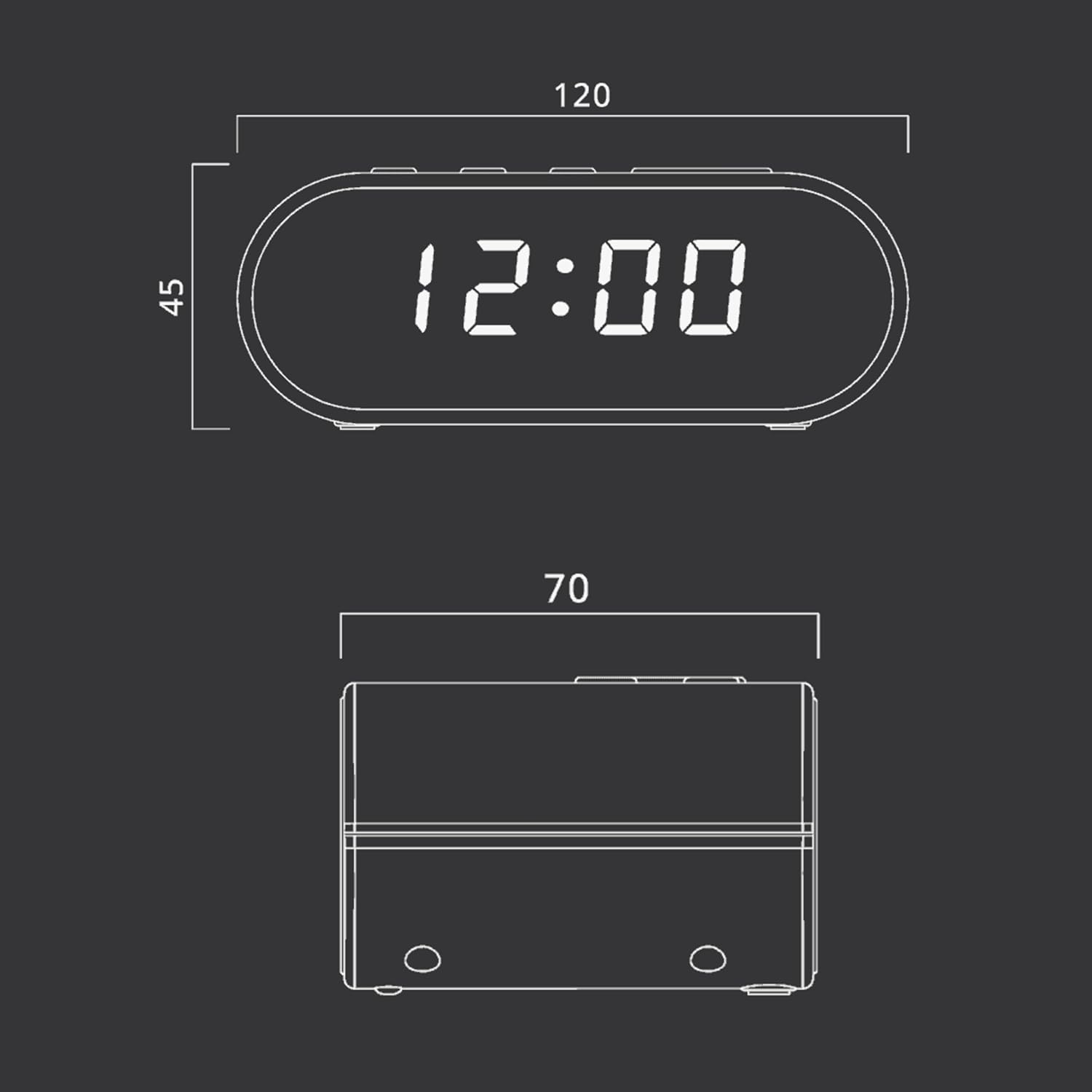
בילד: Technical drawing illustrating the dimensions of the Muse M-10 CR Clock Radio, with measurements in millimeters.
- סאָרט: מוזע
- מאָדעל נומער: 3700460200701
- קאָליר: שווארצע (שווארצע)
- פּראָדוקט דימענשאַנז: 12 X 7 X 10.9 סענטימעטער (L X W X H)
- נומער וואָג: 200 ג
- Voltage: 220 וואלטס
- מאַטעריאַל: קונסטשטאָף (פּלאַסטיק)
- ווייַז טיפּ: LED (0.6-inch white)
- ראַדיאָ: FM PLL Radio with 20 preset stations
- ספּעציעלע פֿעיִקייטן: Adjustable Brightness, Large Display, Radio, Snooze Function, Dual Alarm
וואָראַנטי און שטיצן
For warranty information or technical support, please refer to the warranty card included with your purchase or contact your local Muse distributor or retailer. Keep your proof of purchase for any warranty claims.
You can also visit the official Muse webזייטל פֿאַר ווייטערדיקע הילף און פּראָדוקט אינפֿאָרמאַציע.


