הקדמה
This manual provides detailed instructions for the proper use and maintenance of your Royal DM2070 Electronic Organizer. Please read this manual thoroughly before operating the device to ensure safe and efficient use. Keep this manual for future reference.
זיכערקייַט אינפֿאָרמאַציע
- שטעלט נישט אויס דעם אפאראט צו עקסטרעמע טעמפעראטורן, דירעקטע זונשייַן, אדער הויכע הומידיטי.
- ויסמיידן דראַפּינג די מיטל אָדער אונטערטעניק צו שטאַרק ימפּאַקץ.
- פרובירט נישט צו צענעמען אדער פאררעכטן דעם אפאראט אליין. לאָזט איבער אלע סערוויסעס צו קוואַליפֿיצירטע פּערסאָנעל.
- האַלטן די מיטל אַוועק פון וואַסער און אנדערע ליקווידס.
- Use only the specified battery type for replacement.
פּעקל אינהאַלט
באַשטעטיקן אַז אַלע זאכן זענען פאַראַן אין דיין פּעקל:
- Royal DM2070 Electronic Organizer
- Stylus (if applicable)
- שנעל אָנהייב גייד
- וואָראַנטי קאַרד
סעטאַפּ
1. באַטאַרייע ייַנמאָנטירונג
The Royal DM2070 requires batteries for operation. Follow these steps to install them:
- געפינט דעם דעקל פונעם באַטעריע־אָפּטייל אויף דער הינטערשטער זייט פונעם אַפּאַראַט.
- שלעפּט אָדער הייבט אויף דעם דעקל צו עפֿענען דעם אָפּטייל.
- Insert the required batteries, ensuring correct polarity (+ and -) as indicated inside the compartment.
- פאַרבייַטן די באַטאַרייע אָפּטייל דעקן סיקיורלי.
2. Initial Power-On and Settings
After installing batteries, power on your device and configure basic settings:
- דריקן און האַלטן די מאַכט קנעפּל ביז דער עקראַן באַלויכטנט זיך.
- The device may prompt you to set the date and time. Use the navigation buttons or stylus to enter the correct information.
- Confirm your settings to complete the initial setup.
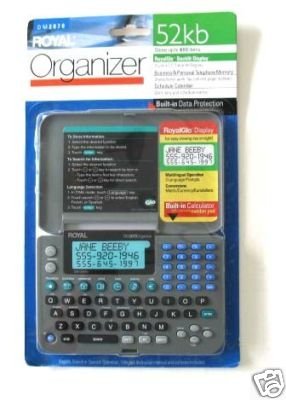
Image: Royal DM2070 Electronic Organizer. This image displays the device's front view, highlighting its screen and keypad, essential for navigation and data entry.
אַפּערייטינג ינסטראַקשאַנז
1. נאַוויגאַציע
The DM2070 features a keypad and potentially a stylus for navigation. Use the arrow keys to move between menu options and press אַרייַן or a designated selection button to confirm.
2. Entering Data
To enter information such as contacts, appointments, or notes:
- Navigate to the desired application (e.g., 'Contacts', 'Calendar', 'Notes').
- Select 'New Entry' or a similar option.
- Use the alphanumeric keypad to input text. Some models may offer an on-screen keyboard via stylus.
- Save your entry before exiting the application.
3. ניצן אַפּליקאַציעס
The DM2070 includes various applications:
- קאַלענדאַר: View daily, weekly, or monthly schedules. Add and edit appointments.
- קאָנטאַקט: Store names, phone numbers, addresses, and email information.
- הערות: Create and manage text notes or memos.
- קאַלקולאַטאָר: Perform basic arithmetic calculations.
- קראַנטקייַט קאַנווערטער: Convert between different currencies (requires manual update of exchange rates on some models).
וישאַלט
1. רייניקונג די מיטל
To keep your DM2070 in optimal condition:
- ווישט אויס דעם עקראַן און גasinג מיט אַ ווייכן, טרוקענעם, לינט-פֿרייע שטאָף.
- פֿאַר שווערע מאַרקן, אַ ביסל דampשווענקט דעם שטאָף מיט וואַסער; פֿאַרמייַדט שטרענגע כעמיקאַלן אָדער אַברייסיוו רייניגער.
- Ensure no moisture enters openings.
2. באַטערי קער
- טוישט באַלד די באַטעריעס ווען דער אינדיקאַטאָר פֿאַר נידעריקע באַטעריע דערשיינט.
- אַרויסנעמען באַטעריעס אויב די דעוויס וועט נישט ווערן גענוצט פֿאַר אַ לענגערע צייט צו פאַרמייַדן ליקאַדזש.
טראָובלעשאָאָטינג
If you encounter issues with your Royal DM2070, refer to the following common solutions:
| פּראָבלעם | מעגלעך סיבה | לייזונג |
|---|---|---|
| די מיטל טוט נישט מאַכט אויף. | טויטע אדער נישט ריכטיק אינסטאלירטע באַטעריעס. | פאַרבייַטן באַטעריז מיט נייַ אָנעס, ינשורינג ריכטיק פּאָולעראַטי. |
| דער עקראַן איז ליידיק אָדער פֿאַרפֿרוירן. | ווייכווארג גליטש אָדער נידעריק באַטאַרייע. | Try a soft reset (refer to Quick Start Guide for specific button combination) or replace batteries. |
| Data loss. | Battery depletion or improper shutdown. | Ensure batteries are fresh. Always save data before powering off. |
| קלאַוויאַטור רעאַגירט נישט. | Dust/debris under keys or internal issue. | Clean keypad gently. If problem persists, contact support. |
ספּעסאַפאַקיישאַנז
Key technical specifications for the Royal DM2070 Electronic Organizer:
| שטריך | דעטאַל |
|---|---|
| סאָרט | קעניגלעך |
| מאָדעל נומער | DM2070 |
| דעקן מאַטעריאַל | לעדער |
| פֿאָרמאַט | אָרגאַניזאַטאָר |
| פּונקט וואָג | 181 ג |
| נומער דימענשאַנז (LxWxH) | 24.4 X 14.5 X 1 סענטימעטער |
| ציל וילעם | דערוואַקסן |
וואָראַנטי און שטיצן
The Royal DM2070 Electronic Organizer comes with a standard manufacturer's warranty. Please refer to the warranty card included in your package for specific terms and conditions. For technical support, service, or inquiries, please contact Royal customer service through the contact information provided on the warranty card or the official Royal webפּלאַץ.


