1. הקדמה
This manual provides instructions for the SanDisk MobileMate MS+ USB 2.0 Mobile Card Reader/Writer, model SDDR-107-A10M. This device facilitates the transfer of files between various memory cards and your computer. It supports Memory Stick, Memory Stick Duo, Memory Stick PRO, and Memory Stick PRO Duo formats, offering a Hi-Speed USB 2.0 interface for efficient data transfer.
2. פּעקל אינהאַלט
באַשטעטיקן אַז אַלע זאכן זענען פאַראַן אין דיין פּעקל:
- SanDisk MobileMate MS+ USB 2.0 Mobile Card Reader/Writer (SDDR-107-A10M)
- 3-inch type Installation CD
- וסב פאַרלענגערונג קאַבלע
- Clear protective caps (2)

Figure 2.1: SanDisk MobileMate MS+ Card Reader, USB extension cable, and protective caps.
3. סעטאַפּ
3.1 סיסטעם רעקווירעמענץ
Ensure your computer meets the following minimum requirements:
- פּיסי: Windows 98SE/ME/2000/XP, supported memory cards, USB 2.0 port (for Hi-Speed transfer), CD-ROM drive.
- מאַסינטאָש: Mac OS 9.2.x+, OS X v10.1.2+, supported memory cards, USB 2.0 port (for Hi-Speed transfer), CD-ROM drive.
3.2 דרייווער ינסטאַלירונג
- Insert the provided 3-inch Installation CD into your computer's CD-ROM drive.
- Follow the on-screen instructions to install any necessary drivers or the TransferMate application.
- If prompted, restart your computer after installation.
3.3 Connecting the Card Reader
- געפֿינען אַן בנימצא וסב פּאָרט אויף דיין קאָמפּיוטער.
- Plug the SanDisk MobileMate MS+ directly into the USB port. If the port is difficult to access or crowded, use the provided USB extension cable.
- Your computer should detect the device automatically.
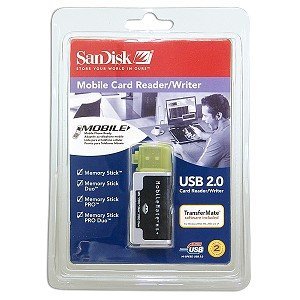
Figure 3.1: SanDisk MobileMate MS+ Card Reader with protective cap.
4. אַפּערייטינג ינסטרוקטיאָנס
4.1 אַרייַנלייגן אַ זכּרון קאָרט
- Identify the correct slot on the MobileMate MS+ for your memory card type (Memory Stick, Memory Stick Duo, Memory Stick PRO, or Memory Stick PRO Duo).
- Gently insert the memory card into the appropriate slot until it is fully seated. Do not force the card.
4.2 אַקסעס Files
- Once the card reader is connected and a memory card is inserted, your computer should recognize it as a removable drive.
- Open "My Computer" (Windows) or "Finder" (Mac) and locate the new removable drive.
- Double-click the drive icon to view the contents of the memory card.
4.3 טראַנספערינג Files
- Using Drag-and-Drop: אויסקלייַבן די files or folders you wish to transfer from the memory card and drag them to a desired location on your computer's hard drive. Conversely, drag files from your computer to the memory card drive to transfer them to the card.
- Using TransferMate Application: If installed, launch the TransferMate application for additional features such as easy transfer, printing, emailing, and displaying images. Refer to the TransferMate application's help documentation for detailed instructions.
4.4 Safely Removing the Device
Before disconnecting the MobileMate MS+ from your computer, always safely eject the device to prevent data corruption:
- Windows: Click the "Safely Remove Hardware" icon in the system tray, then select the MobileMate MS+ device. Wait for the "Safe to Remove Hardware" message.
- מאַסינטאָש: Drag the removable drive icon to the Trash or right-click (Control-click) the drive icon and select "Eject."
Once safely ejected, you can physically disconnect the card reader from the USB port.
5. וישאַלט
- רייניקונג: Use a soft, dry, lint-free cloth to clean the exterior of the card reader. Do not use liquid cleaners or solvents.
- סטאָרידזש: When not in use, store the MobileMate MS+ with its protective caps in a clean, dry environment away from extreme temperatures and direct sunlight.
- האַנדלינג: ויסמיידן דראַפּינג די מיטל אָדער אונטערטעניק צו שטאַרק ימפּאַקץ.
6. טראָובלעשאָאָטינג
| פּראָבלעם | מעגלעך סיבה | לייזונג |
|---|---|---|
| די דעווייס נישט דערקענט דורך קאמפיוטער. |
|
|
| לאנגזאמע דאטן איבערפירן גיכקייטן. |
|
|
| Cannot read or write to memory card. |
|
|
7. ספּעסאַפאַקיישאַנז
| מאָדעל נומער | SDDR-107-A10M |
| פּראָדוקט דימענשאַנז | 6.1 X 4.8 X 1.2 אינטשעס (בעערעך) |
| פּונקט וואָג | 2.89 אונסעס (אומגעפער) |
| קאַנעקטיוויטי טעכנאָלאָגיע | וסב טיפּ א |
| צובינד | Hi-Speed USB 2.0 (compatible with USB 1.1) |
| שטיצט מעדיע טייפּס | Memory Stick, Memory Stick Duo, Memory Stick PRO Duo, Memory Stick Pro |
| קאָליר | שוואַרץ |
| רעגולאַטאָרי אַפּרווואַלז | פקק, סע, C-טיק |
8. וואָראַנטי און שטיצן
For information regarding product warranty, technical support, or service, please refer to the documentation included with your purchase or visit the official SanDisk website. Contact information for customer support can typically be found on the manufacturer's webפּלאַץ.
פאַבריקאַנט: סאַנדיסק