הקדמה
This manual provides instructions for the Vivitar Vivicam 5024 5.1MP Digital Camera. It covers setup, operation, maintenance, and troubleshooting to help you get the most from your camera. The Vivicam 5024 features a 5.1-megapixel sensor, 8x digital zoom, and a 2.4-inch TFT preview screen, designed for capturing photos and videos.
פּראָדוקט איבערview
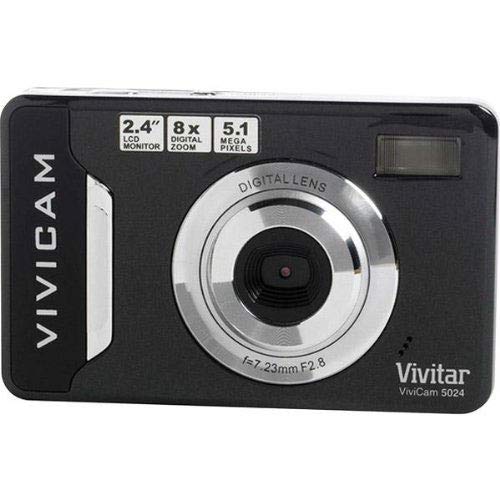
בילד 1: פראָנט view of the Vivitar Vivicam 5024 Digital Camera. Shows the lens, flash, and overall compact design.
The Vivitar Vivicam 5024 is a compact digital camera equipped with a 5.1-megapixel sensor for still images and video recording. It includes an 8x digital zoom and a 2.4-inch color LCD screen for framing shots and reviewing content. Key features include anti-shake technology, scene modes, ISO adjustment, and white balance settings.
סעטאַפּ
1. באַטאַרייע ייַנמאָנטירונג
The Vivicam 5024 operates on three (3) AAA batteries. Ensure batteries are inserted with correct polarity.
- געפינט דעם דעקל פונעם באַטעריע־אָפּטייל אויף דער אונטערשטער טייל פון דער קאַמעראַ.
- רוק די דעקל עפענען.
- Insert three fresh AAA batteries, matching the positive (+) and negative (-) terminals as indicated inside the compartment.
- פאַרמאַכן די באַטאַרייע אָפּטייל דעקן סיקיורלי.
2. סד קאַרד ינסטאַללאַטיאָן
The camera uses an SD (Secure Digital) card for storing photos and videos. A 4GB SD card is typically included.
- Locate the SD card slot, which does not have a cover, on the side of the camera.
- Insert the SD card into the slot with the metal contacts facing the front of the camera until it clicks into place.
- To remove, gently push the card further in until it springs out.
3. ערשטע איינשאַלטונג
Press and hold the Power button, usually located on the top of the camera, until the LCD screen illuminates.
אַפּערייטינג די אַפּאַראַט
1. גרונטלעכע קאנטראלן
- מאַכט קנעפּל: טוט אָן/אויסלעשן די קאַמעראַ.
- לאָדן קנעפּל: דריק האַלבוועגס צו פאָקוסירן, גאָר צו נעמען אַ בילד.
- פארגרעסער קנעפּלעך: Control the 8x digital zoom (usually marked 'W' for Wide and 'T' for Telephoto).
- נאַוויגאַציע קנעפּלעך: Used to navigate menus and playback images.
- LCD פאַרשטעלן: 2.4-inch display for framing shots, reviewing images, and accessing menus.
2. גענומען פאָטאָס
- קער אויף די אַפּאַראַט.
- ראַם אייער שאָס ניצנדיק דעם 2.4-אינטש LCD עקראַן.
- Use the zoom buttons to adjust the 8x digital zoom as needed.
- דריק דעם שאטער קנעפל האלבוועגס אראפ כדי די קאמערא זאל זיך קאנצענטרירן.
- דריק דעם שאטער קנעפל אינגאנצן צו כאפן דאס בילד.
- וויכטיק: Due to the camera's design, it is crucial to hold the camera perfectly still for a couple of seconds after pressing the shutter button to ensure a clear image.
The camera features anti-shake technology to assist in reducing blur, but stable handling is still recommended.
3. רעקאָרדינג ווידיאס
The Vivicam 5024 can record video. To switch to video mode, navigate through the camera's menu or use a dedicated mode button if available.
- Start recording by pressing the Shutter button (or dedicated record button).
- Stop recording by pressing the button again.
- באַמערקונג: The Vivitar Vivicam 5024 records video without sound. This is a design characteristic and not a malfunction.
4. פּלייבאַק מאָדע
צו שייַעךview your photos and videos:
- Enter Playback mode (usually via a dedicated button or menu option).
- Use the navigation buttons to scroll through your captured media.
- דריק דעם שאטער קנעפל אדער OK קנעפל צו view אַ ווידעאָ אָדער אַ גרעסער בילד.
5. מעניו סעטטינגס
Access the camera's menu to adjust various settings:
- סצענע מאָדעס: Select pre-set modes for different shooting conditions (e.g., Portrait, Landscape).
- ISO: Adjust light sensitivity (e.g., for low-light conditions).
- ווייַס באַלאַנס: Correct color cast based on lighting (e.g., Daylight, Cloudy, Fluorescent).
- פלאַש מאָדעס: Set the built-in flash to Automatic, Red-Eye Reduction, Fill-Flash, or Off.
- Self-Timer: Set a delay (e.g., 10 seconds) before taking a photo.
קאַנעקטינג צו אַ קאָמפּיוטער
צו איבערפירן בילדער און ווידעאס צו אייער קאמפיוטער:
- מאַכן זיכער אַז די אַפּאַראַט איז פּאַוערד אַוועק.
- Locate the USB port on the דנאָ פון דער אַפּאַראַט.
- Connect the camera to your computer using a compatible USB cable.
- Turn on the camera. It should appear as a removable disk drive on your computer.
- שלעפּן און פאַלן files from the camera's SD card folder to your computer.
- Safely eject the camera from your computer before disconnecting the USB cable.
וישאַלט
1. רייניקונג די קאַמעראַ
- ניצט אַ ווייכן, טרוקענעם שטאָף צו רייניקן דעם קאַמעראַ קערפּער.
- For the lens and LCD screen, use a specialized lens cleaning cloth and solution.
- ויסמיידן ניצן אַברייסיוו קלינערז אָדער סאָלוואַנץ.
- Note that the camera does not have a lens cover, so keep the lens area clean and protected from dust.
2. באַטערי קער
- אַרויסנעמען באַטעריעס אויב די קאַמעראַ וועט נישט ווערן גענוצט פֿאַר אַ לענגערע צייט.
- Use high-quality AAA alkaline or rechargeable batteries for optimal performance.
3. SD Card Care
- Format the SD card periodically within the camera's menu to maintain performance.
- Avoid removing the SD card while the camera is writing data.
- The SD card slot does not have a cover; protect it from dust and moisture.
טראָובלעשאָאָטינג
- די אַפּאַראַט טוט נישט קער אויף: קאָנטראָלירט די באַטעריע אינסטאַלאַציע און זיכערט זיך אַז די באַטעריעס זענען פריש.
- פארשווימענע בילדער: Ensure the camera is held still for a few seconds after pressing the shutter. Check lighting conditions and adjust ISO if necessary.
- בליץ אַרבעט נישט: Verify flash mode settings in the camera menu. Ensure batteries have sufficient power.
- No sound in videos: This camera model (Vivicam 5024) does not record audio with video. This is a normal operational characteristic.
- קענען ניט אַריבערפירן files צו קאָמפּיוטער: Ensure USB cable is securely connected to both camera (bottom port) and computer. Verify camera is powered on and recognized as a removable disk.
ספּעסאַפאַקיישאַנז
| מאָדעל נאָמען | 5024 |
| פאָטאָ סענסאָר האַכלאָטע | 5.1 Megapixels (Effective Still Resolution: 5 MP) |
| דיגיטאַל פארגרעסער | 8x |
| פאַרשטעלן גרייס | 2.4 Inches (TFT LCD) |
| בילד סטאַביליזאַטיאָן | דיגיטאַל |
| געשטיצט File פֿאָרמאַט | JPEG (Stills), MP4 (Video) |
| געבויט-אין מידיאַ | SD קאַרטל (ביז 4 גיגאבייט רעקאָמענדירט) |
| קאַנעקטיוויטי טעכנאָלאָגיע | וסב |
| מאַכט מקור | 3 X AAA באַטעריז |
| פלאַש | Built-In, Automatic modes |
| אַליינ טיימער | 10 סעקונדעס |
| פּונקט וואָג | 100 גראַמז |
וואָראַנטי און שטיצן
Specific warranty information for the Vivitar Vivicam 5024 is typically provided with the product packaging or can be found on the manufacturer's official website. For technical support or service inquiries, please refer to the contact information provided by Vivitar at the time of purchase or visit their official support channels.


