1. הקדמה
The DigiTech RP255 is a versatile guitar multi-effect processor designed for musicians who gig, practice, and compose. It offers a wide array of tonal possibilities with 94 amps, cabinets, stompboxes, and effects. This unit also features USB streaming audio, allowing for direct recording to a computer. Key functionalities include a built-in 20-second looper, an integrated wah, whammy, and volume pedal, and 60 high-quality drum patterns for practice and songwriting.
2. סעטאַפּ און קאַנעקשאַנז
Proper connection of your RP255 is essential for optimal performance. Follow these steps to set up your device:
- מאַכט קשר: Connect the included 9V AC adapter to the 9VAC 1.3A power input jack on the rear panel of the RP255. Plug the adapter into a suitable power outlet.
- גיטאַרע אַרייַנשרייַב: פאַרבינדן דיין גיטאַרע צו די אַרייַנשרייַב דזשעק אויף דער הינטערשטער פּאַנעל ניצנדיק אַ סטאַנדאַרט 1/4-אינטש אינסטרומענט קאַבל.
- רעזולטאַט צו Ampליפיער/מיקסער: Use 1/4-inch cables to connect the LEFT (Mono) OUTPUT און רעכט רעזולטאַט jacks to your guitar amplifier, mixer, or audio interface. For mono operation, use only the LEFT (Mono) OUTPUT.
- אַגזיליערי אַרייַנשרייַב: To play along with external audio sources (e.g., MP3 player), connect the device to the AUX IN jack using a 1/8-inch stereo cable.
- כעדפאָונז: For silent practice, connect stereo headphones to the כעדפאָונז דזשאַק.
- USB קשר: Connect the RP255 to your computer using a USB cable for audio streaming and editing presets via software.
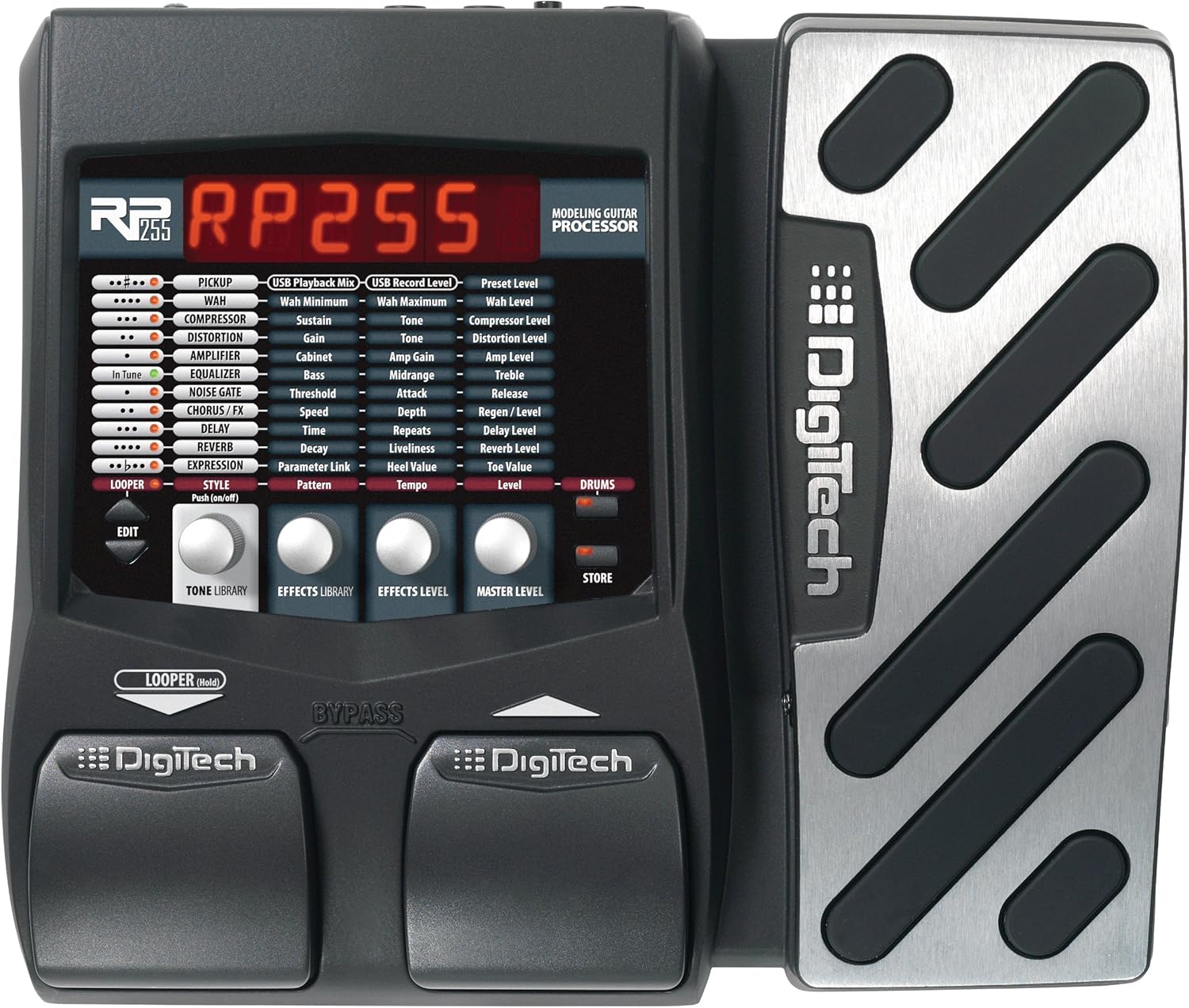
פיגורע 1: פראָנט view of the DigiTech RP255, showing the display and control pedals.

Figure 2: Rear panel of the DigiTech RP255, illustrating input, output, USB, and power connections.
3. אַפּערייטינג ינסטרוקטיאָנס
3.1 Navigating Presets
The RP255 comes with numerous factory presets. Use the footswitches to scroll through them. The display will show the preset number and name.
3.2 Effects and Amp מאָדעלינג
The RP255 features 94 amps, cabinets, stompboxes, and effects. These can be combined and customized to create unique tones. Refer to the detailed manual for specific parameter adjustments for each effect type.
- Stompboxes: Access various overdrive, distortion, and fuzz effects.
- Amps & Cabinets: Emulate a wide range of classic and modern guitar ampליפֿיקאַטאָרן און רעדנער קאַבינעטן.
- מאָדולאַציע עפֿעקטן: Includes chorus, flanger, phaser, and tremolo for adding movement to your sound.
- Delay & Reverb: Essential time-based effects for depth and atmosphere.
3.3 Looper Functionality
The built-in 20-second looper allows you to record and layer guitar phrases. This is ideal for practice, songwriting, or creating complex arrangements. Consult the full manual for detailed instructions on recording, overdubbing, and playback.
3.4 Drum Patterns
The RP255 includes 60 high-quality drum patterns. These can be used as a rhythmic backing for practice sessions or as a foundation for new song ideas. Adjust tempo and volume to suit your needs.
3.5 USB Audio Streaming
Connect the RP255 to your computer via USB to use it as an audio interface. This allows you to record your guitar directly into a Digital Audio Workstation (DAW) with the RP255's effects and amp models. It also enables editing and managing presets using dedicated software.
4. וישאַלט
To ensure the longevity and optimal performance of your DigiTech RP255, follow these maintenance guidelines:
- רייניקונג: ניצט אַ ווייכע, טרוקענע שטאָף צו רייניקן די אויסערלעכע זייט פון דעם אַפּאַראַט. פֿאַרמייַדט ניצן אַברייסיוו רייניגער, סאָלווענטן, אָדער וואַקסן, ווייל די קענען שעדיקן די ענדיקונג.
- סטאָרידזש: Store the RP255 in a cool, dry place away from direct sunlight, extreme temperatures, and high humidity.
- האַנדלינג: Avoid dropping the unit or subjecting it to strong impacts. Always disconnect power and cables when moving the device.
- מאַכט צושטעלן: Use only the specified 9V AC power adapter. Using an incorrect power supply can damage the unit and void the warranty.
5. טראָובלעשאָאָטינג
If you encounter issues with your DigiTech RP255, try the following troubleshooting steps:
- קיין מאַכט: Ensure the power adapter is securely connected to both the RP255 and a working power outlet. Verify the power adapter is the correct type (9V AC).
- קיין קול: קאָנטראָליר אַלע קאַבל קאַנעקשאַנז (גיטאַר, אַרויסגאַנג צו amp/mixer, headphones). Ensure your guitar's volume is up and your amplifier is turned on and set to an audible volume. Verify that the RP255 is not in Tuner/Bypass mode if you expect an effect.
- אומגעריכטער קלאַנג/גערויש: Check for loose cable connections. Ensure proper grounding. Try resetting the unit to factory defaults (refer to the full manual for instructions).
- USB קאַנעקשאַן ישוז: Ensure the USB cable is securely connected. Try a different USB port or cable. Reinstall any necessary drivers or software on your computer.
For more complex issues, consult the complete DigiTech RP255 user manual or contact DigiTech customer support.
6. ספּעסאַפאַקיישאַנז
- נומער וואָג: 4.75 פונט
- פּראָדוקט דימענשאַנז: 14.25 X 2.75 X 8.75 אינטשעס
- נומער מאָדעל נומער: RP255
- ייַזנוואַרג צובינד: וסב
- סיגנאַל פֿאָרמאַטירונג: אַנאַלאָג
- מאַכט מקור: קאָרדעד עלעקטריק
- Voltage: 9 וואלטס
- קאָליר: שוואַרץ
- עפעקטן: 94 Amps, cabinets, stompboxes, and effects
- לויפער: Built-in 20-second looper
- פּעדאַל: Built-in wah, whammy, and volume pedal
- Drum Patterns: 60 high-quality drum patterns
7. וואָראַנטי און שטיצן
The DigiTech RP255 comes with a manufacturer's warranty. Please refer to the warranty card included with your product for specific terms and conditions. For technical support, service, or additional information, please visit the official DigiTech webזייטל אדער קאנטאקט זייער קאסטומער סערוויס דעפארטמענט. האלט אייער קויף קוויטל אלס באווייז פון קויפן פאר גאראנטיע קליימס.