הקדמה
This manual provides essential information for the safe and efficient installation, operation, and maintenance of your HP ATX 300W Power Supply, Model 366505-001. This power supply is designed to provide reliable power to compatible personal computer systems.
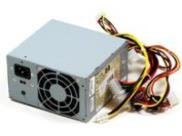
בילד 1: פראָנט view of the HP ATX 300W Power Supply. This image displays the compact form factor and primary connectors of the power supply unit.
Please read this manual thoroughly before attempting any installation or operation. Keep this manual for future reference.
זיכערקייַט אינפֿאָרמאַציע
- עלעקטריקאַל סכנה: מאַכט סאַפּלייז אַנטהאַלטן הויך וואָלומעןtagקאָמפּאָנענטן. עפֿנט נישט די מאַכט צושטעל.asinז. ריזיקע פון עלעקטרישן שאק.
- ווענטילאַטיאָן: Ensure adequate ventilation around the power supply. Do not block air vents. Overheating can cause damage or fire.
- גראָונדינג: שטענדיק פֿאַרבינדן די מאַכט צושטעל צו אַ ריכטיק געערדטע עלעקטרישע ווענטיל.
- נעץ: Do not expose the power supply to water or excessive moisture.
- פאַכמאַן ינסטאַלירונג: If you are unsure about the installation process, seek assistance from a qualified technician.
- קאַמפּאַטאַבילאַטי: Use only with compatible personal computer systems as specified.
סעטאַפּ און ינסטאַלירונג
Follow these steps for proper installation of the HP ATX 300W Power Supply into your personal computer system:
- צוגרייטונג:
- Turn off and unplug your computer from the wall outlet.
- Open the computer case according to your computer's manufacturer instructions.
- לאָזט אַרויס יעדע סטאַטישע עלעקטריע דורך אָנרירן אַ געערדטן מעטאַלן אָביעקט איידער איר האַנדלט מיט קאָמפּאָנענטן.
- אַראָפּנעמען אַלטע מאַכט צושטעלן (אויב אָנווענדלעך):
- Disconnect all cables from the existing power supply to the motherboard, graphics card, hard drives, and other components.
- Unscrew the old power supply from the computer case and carefully remove it.
- Install New Power Supply:
- Carefully place the HP ATX 300W Power Supply into the designated power supply bay in your computer case.
- Secure the power supply to the case using the appropriate screws.
- פאַרבינדן קאַבלעס:
- Connect the main 20+4 pin ATX connector to the motherboard.
- פֿאַרבינדט דעם 4-פּין אָדער 8-פּין סי-פּי-יו מאַכט קאַנעקטאָר צום מאָטהערבאָאַרד.
- Connect SATA power connectors to hard drives, SSDs, and optical drives.
- Connect any necessary PCIe power connectors to graphics cards (if applicable).
- זיכער מאַכן אַז אַלע פֿאַרבינדונגען זענען פֿעסט און ריכטיק אײַנגעזעצט.
- לעצטע סטעפּס:
- Organize cables to improve airflow and prevent interference.
- נאָענט די קאָמפּיוטער קאַסטן.
- Plug the computer's power cord into the power supply and then into a grounded wall outlet.
אָפּעראַציע
Once installed, the HP ATX 300W Power Supply operates automatically with your computer system. When you power on your computer, the power supply will deliver stable and consistent power to all connected components.
- מאַכט אויף / אַוועק: The power supply is controlled by your computer's power button. Ensure the main power switch on the back of the power supply (if present) is in the 'ON' position before powering on the computer.
- קאָאָלינג: The integrated air cooling system will activate automatically to maintain optimal operating temperatures. Ensure the fan intake and exhaust are not obstructed.
- מאַכט רעזולטאַט: This unit provides a maximum output of 300 Watts. Ensure your system's total power requirements do not exceed this limit for stable operation.
וישאַלט
רעגולערע אויפהאלטונג העלפט זיכער מאכן די לאנגעוויטי און אפטימאלע פערפארמאנס פון אייער מאכט צושטעל:
- רייניקונג: Periodically clean the exterior of the power supply and its fan vents to prevent dust buildup. Use compressed air to gently clear dust from the fan and internal components (with the computer powered off and unplugged).
- דורכקוק: Occasionally inspect power cables for any signs of wear, fraying, or damage. Replace damaged cables immediately.
- סוויווע: Operate the computer in a clean, dry, and well-ventilated environment to prevent dust accumulation and overheating.
טראָובלעשאָאָטינג
אויב איר טרעפט פּראָבלעמען מיט אייער מאַכט צושטעלן, באַטראַכט די פאלגענדע געוויינטלעכע טראָובלעשווטינג טריט:
- קיין מאַכט:
- Check if the power cord is securely plugged into both the power supply and the wall outlet.
- Ensure the main power switch on the power supply is in the 'ON' position.
- באַשטעטיקן אַז די וואַנט אַוטלעט אַרבעט דורך אַרײַנשטעקן אַן אַנדער דעוויס.
- Check all internal power connections (motherboard, CPU, peripherals) are firmly seated.
- צייטווייליגע מאַכט/סיסטעם אינסטאַביליטי:
- Ensure the power supply's wattage (300W) is sufficient for all your computer components. Upgrading components may require a higher wattagE מאַכט צושטעלן.
- Check for overheating. Ensure proper airflow and clean any dust from the power supply fan.
- Inspect for loose cable connections.
- ומגעוויינטלעך נויזיז:
- A grinding or loud fan noise may indicate a failing fan. Consider professional inspection or replacement.
If problems persist after attempting these steps, contact HP customer support or a qualified computer technician.
ספּעסאַפאַקיישאַנז
| סאָרט | HP |
| מאָדעל נאָמען / נומער | 366505-001 |
| פאָרם פאַקטאָר | אַטקס |
| רעזולטאַט וואָסtage | 300 וואטס |
| קאַנעקטער טיפּ | אַטקס |
| קאַמפּאַטאַבאַל דעוויסעס | פערזענלעכע קאָמפּיוטער |
| קאָאָלינג אופֿן | לופט |
| פּראָדוקט דימענשאַנז (L x W x H) | 9.5 X 12 X 4 אינטשעס |
| פּונקט וואָג | 5.59 פונט (2.54 קילאָגראַמס) |
| ASIN | B001U0ICS6 |
| ערשטער דאַטע בנימצא | 16 אויגוסט 2010 |
וואָראַנטי און שטיצן
For information regarding the warranty coverage for your HP ATX 300W Power Supply, please refer to the warranty documentation provided with your original computer system or contact HP customer support directly. Warranty terms and conditions may vary based on region and purchase date.
For technical support, service, or further inquiries, please visit the official HP support website or contact their customer service department. Have your product model number (366505-001) and serial number (if applicable) ready when contacting support.
HP שטיצן Webפּלאַץ: www.hp.com/support