1. הקדמה
This manual provides essential information for the safe and efficient use of your Hama USB 7.1 Surround Sound Card, Model 00051620. Please read these instructions carefully before using the device and keep them for future reference. This external sound card allows you to connect headphones, microphones, or speakers with a 3.5mm jack to your computer or tablet via a USB-A port, enhancing your audio experience with simulated 7.1 surround sound.
2. זיכערקייַט אינסטרוקציעס
- Do not open the device. Opening the device voids the warranty and may lead to electric shock.
- באַשיצן די פּראָדוקט פון שמוץ, נעץ און אָוווערכיטינג.
- ניצן די פּראָדוקט בלויז פֿאַר זייַן בדעה ציל.
- Do not drop the product or expose it to severe shocks.
- האַלטן דעם פּראָדוקט, ווי אַלע עלעקטריקאַל פּראָדוקטן, אויס פון די דערגרייכן פון קינדער.
- דיספּאָוזד פון פּאַקקאַגינג מאַטעריאַל מיד לויט לאָוקאַלי אָנווענדלעך רעגיאַליישאַנז.
3. פּעקל אינהאַלט
באַשטעטיקן אַז דיין פּעקל כּולל די פאלגענדע זאכן:
- 1x Hama USB 7.1 Surround Sound Card (Model 00051620)
- 1x ינסטרוקטיאָן מאַנואַל
4. פּראָדוקט איבערview
The Hama USB 7.1 Surround Sound Card is a compact audio adapter designed to provide enhanced sound capabilities for your computer or tablet. It features a USB-A connector for easy plug-and-play functionality and includes dedicated ports for audio input and output.
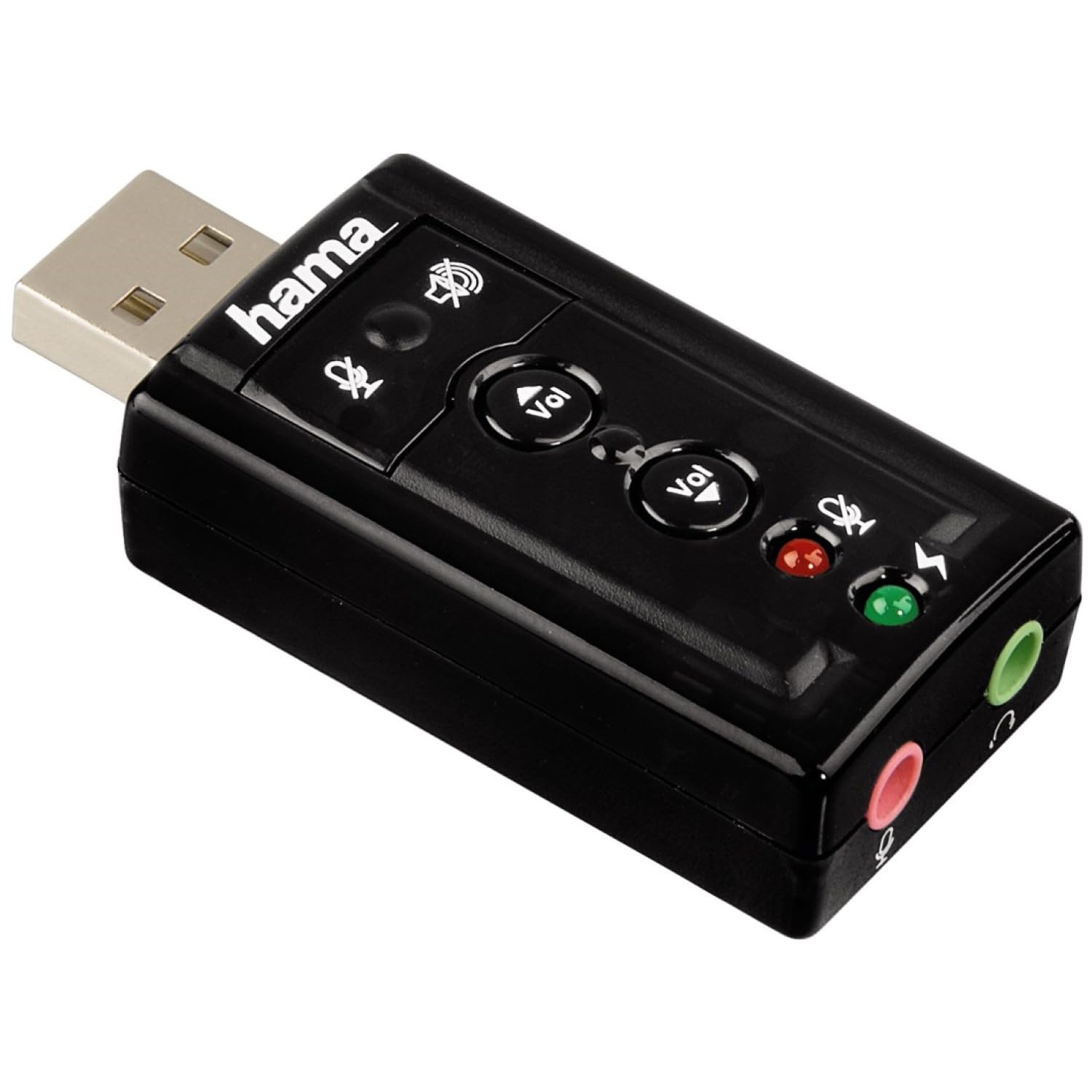
בילד 1: אויבן view of the Hama USB 7.1 Surround Sound Card, showing the USB-A connector, volume control buttons, and mute indicators.
קאָנטראָלס און פּאָרץ:
- יו-עס-בי-א קאַנעקטאָר: For connecting to your computer or tablet.
- באַנד אַרויף / אַראָפּ קנעפּלעך: אַדזשאַסטירט די אַודיאָ אַרויסגאַנג באַנד.
- מיקראָפאָן שטום קנעפּל: Mutes or unmutes the connected microphone.
- רעדנער שטום קנעפּל: Mutes or unmutes the audio output to headphones/speakers.
- 3.5mm Microphone Jack (Red): פֿאַר קאַנעקטינג אַ פונדרויסנדיק מיקראָפאָן.
- 3.5mm Headphone/Speaker Jack (Green): פֿאַר פֿאַרבינדן כעדפֿאָונז אָדער רעדנערס.

בילד 2: ענדע view of the Hama USB 7.1 Surround Sound Card, highlighting the red microphone input jack and the green headphone/speaker output jack.
5. סיסטעם רעקווירעמענץ
- Operating System: Windows, macOS, or compatible tablet OS.
- Available USB-A port.
- Headphones, microphone, or speakers with a 3.5mm jack connector.
6. ייַנמאָנטירונג און סעטאַפּ
- Connect the Sound Card: Plug the USB-A connector of the Hama USB 7.1 Surround Sound Card into an available USB-A port on your computer or tablet.
- דרייווער ינסטאַלירונג: The device is typically plug-and-play, and your operating system should automatically detect and install the necessary drivers. If prompted, follow the on-screen instructions.
- פאַרבינדן אַודיאָ דעוויסעס:
- For headphones or speakers, connect the 3.5mm jack into the גרין port on the sound card.
- For a microphone, connect the 3.5mm jack into the רויט port on the sound card.
- קאָנפיגורירן אַודיאָ סעטטינגס: Access your operating system's sound settings to ensure the Hama USB 7.1 Surround Sound Card is selected as the default playback and recording device.
- ווייכווארג ינסטאַלירונג (אַפּשאַנאַל): For advanced features like XeaR-Sound 7.1 surround simulation, 10-band equalizer, and karaoke functions, install the dedicated software. Refer to the manufacturer's website for software downloads and installation instructions.
7. אָפּעראַציע
Basic Audio Control:
- באַנד אַדזשאַסטמאַנט: Use the 'Vol +' and 'Vol -' buttons on the sound card to increase or decrease the output volume.
- Mute Audio Output: Press the speaker mute button to temporarily silence the audio output. Press again to unmute.
- Mute Microphone Input: Press the microphone mute button to temporarily disable microphone input. Press again to enable.
אַוואַנסירטע ווייכווארג פֿעיִקייטן:
If you have installed the optional software, you can access the following features:
- XeaR-Sound Technology: Enables simulated 7.1 crystal-clear surround sound for stereo speakers or headsets.
- 10-באַנד עקוואַליזער: Customize your audio experience with various presets (e.g., Jazz, Rock, Classic) or create your own.
- Additional Sound Effects: Apply various sound effects to your audio.
- Adjustable Room Acoustics: Modify the perceived acoustic environment.
- Karaoke Recording: Record karaoke performances with original voice suppression and tone adjustment capabilities.
8. וישאַלט
The Hama USB 7.1 Surround Sound Card requires minimal maintenance.
- ריין די מיטל בלויז מיט אַ ביסל דamp, לינט-פֿרייַ שטאָף. דו זאלסט נישט נוצן אַגרעסיוו רייניקונג אגענטן.
- Ensure the USB port and audio jacks are free from dust and debris.
9. טראָובלעשאָאָטינג
קיין סאָונד רעזולטאַט:
- Ensure the sound card is securely plugged into a USB port.
- Check if your headphones/speakers are correctly connected to the green jack.
- Verify that the speaker mute button on the sound card is not active.
- Confirm that the Hama USB 7.1 Surround Sound Card is selected as the default playback device in your operating system's sound settings.
- Adjust the volume using the sound card's buttons and your computer's volume controls.
מיקראָפאָן איז נישט ארבעטן:
- Ensure your microphone is correctly connected to the red jack.
- Verify that the microphone mute button on the sound card is not active.
- Confirm that the Hama USB 7.1 Surround Sound Card is selected as the default recording device in your operating system's sound settings.
- קאָנטראָלירט די מיקראָפאָן פּריוואַטקייט סעטטינגס אין אייער אָפּערייטינג סיסטעם.
געזונט קוואַליטעט ישוז:
- מאַכן זיכער אַז אַלע קאַנעקשאַנז זענען זיכער.
- Try connecting the sound card to a different USB port.
- If using the optional software, check equalizer settings and disable any sound effects that might be causing distortion.
10. ספּעסאַפאַקיישאַנז
| שטריך | דעטאַל |
|---|---|
| סאָרט | חמא |
| מאָדעל נומער | 00051620 (אויך באַקאַנט ווי 51620) |
| קאָליר | שוואַרץ |
| קאַנעקטער | USB A male |
| וסב סטאַנדאַרד | וסב 2.0 |
| רעדנער קאַנעקשאַן | 3.5mm female jack |
| כעדפאָון קאַנעקשאַן | 3.5mm female jack |
| באַנד קאָנטראָל | Yes, with mute function |
| אַודיאָ רעזולטאַט מאָדע | אַרומרינגלען |
| אַרומרינגלען סאָונד קאַנאַל קאַנפיגיעריישאַן | 7.1 (simulated with software) |
| מאַקסימום זampלינג קורס | 48 כז |
| קאַמפּאַטאַבאַל דעוויסעס | USB (PC, Laptop, Tablets) |
| פאַבריקאַנט | Hama EURL |
11. באַזייַטיקונג אינפֿאָרמאַציע
Observe the applicable local regulations for the disposal of electronic devices. The product must not be disposed of with normal household waste. Dispose of the product according to the European Directive 2012/19/EU on waste electrical and electronic equipment (WEEE) at a designated collection point for electrical and electronic equipment.
12. וואָראַנטי
Hama GmbH & Co KG גיט א באגרענעצטע גאראנטיע פאר דעם פראדוקט. פאר דעטאלירטע גאראנטיע באדינגונגען, ביטע זעט די אפיציעלע Hama webזייטל אדער קאָנטאַקט אייער לאקאלן הענדלער. האַלט אייער קויפן-באַווייַז פֿאַר וואָראַנטי-קליימז.
13. קונה שטיצן
If you have any questions about this product or require technical assistance, please contact Hama customer support. You can find contact information on the official Hama webפּלאַץ (www.hama.com) or through your local retailer.