הקדמה
This manual provides detailed instructions for the proper use and maintenance of your Casio AQ164W-1AV Ana-Digi Sport Watch. Please read this manual thoroughly to ensure optimal performance and longevity of your timepiece.
פּראָדוקט איבערview
The Casio AQ164W-1AV is an ana-digi sport watch featuring both analog hands and a digital display. It includes various functions designed for daily use and sports activities.

פראָנט view of the Casio AQ164W-1AV Ana-Digi Sport Watch, showcasing its analog hands and digital display with various indicators.
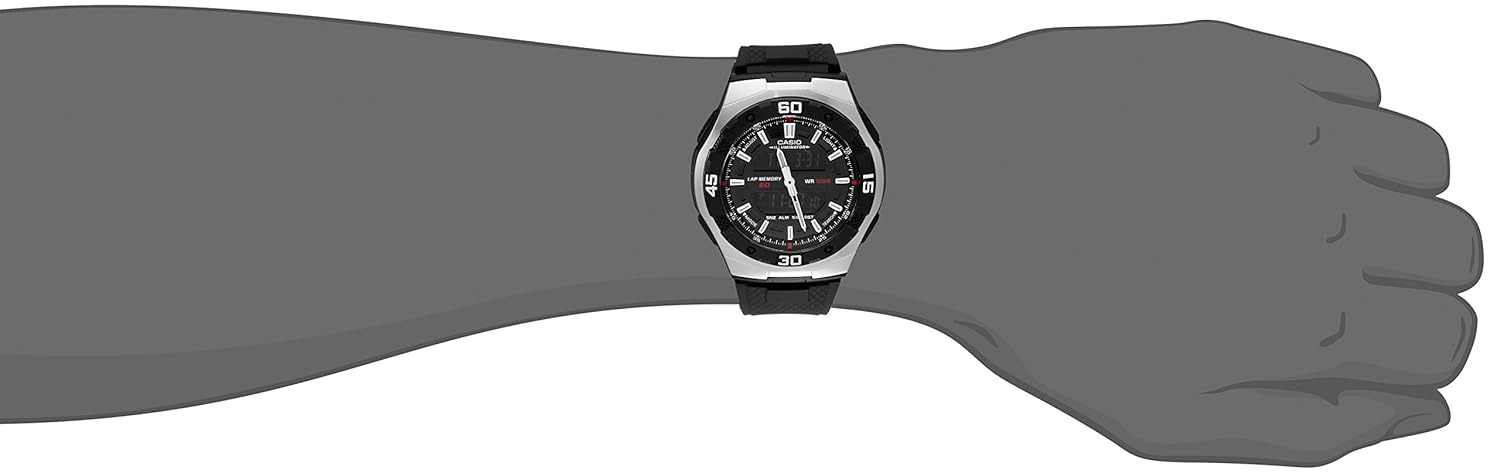
The Casio AQ164W-1AV Ana-Digi Sport Watch as worn on a wrist, illustrating its size and fit.
סעטאַפּ
באַשטעטיקן די אַנאַלאָג צייט
- Pull out the crown located on the right side of the watch.
- דריי די קרוין צו סטרויערן די אנאלאגישע הענט צו דער געוואונטשענער צייט.
- Push the crown back in to start the analog timekeeping.
באַשטעטיקן די דיגיטאַל צייט און דאַטע
The digital display allows for setting the current time, date, day, and month. Specific button operations may vary slightly; refer to the general Casio module instructions for detailed steps. Typically, this involves:
- דרינגלעך די מאָדע button to cycle through different modes until you reach the Time Setting mode.
- ניצן די ADJUST or זוכן buttons to select the digit or setting to change.
- ניצן די פֿאָרווערטס or פאַרקערט buttons (often the same as ADJUST/זוכן in setting mode) to change the value.
- דרינגלעך מאָדע נאכאמאל צו באשטעטיגן און ארויסגיין פון סעט-אפ מאָדוס.
אַפּערייטינג ינסטראַקשאַנז
מאָדע נאַוויגאַציע
דרוק די מאָדע button to cycle through the watch's functions:
- Timekeeping Mode (displays current time, day, date)
- Dual Time Mode (for tracking a second time zone)
- Stopwatch Mode (for measuring elapsed time)
- Countdown Timer Mode (for setting a specific countdown duration)
- Alarm Mode (for setting up to three daily alarms)
ניצן די סטאַפּוואַטש
- נאַוויגירן צו סטאָפּוואַטש מאָדע ניצנדיק די מאָדע קנעפּל.
- דרוק די אָנהייב / האַלטן button (often labeled זוכן or similar) to begin timing.
- דרוק די אָנהייב / האַלטן button again to pause/resume.
- דרוק די באַשטעטיק button (often labeled ADJUST or similar) to clear the stopwatch.
- The watch also features a lap memory function, indicated by "LAP MEMORY" on the display.
ניצן די קאָונטדאָוון טיימער
- Navigate to Countdown Timer Mode.
- ניצן די ADJUST button to enter setting mode and set the desired countdown time.
- דרוק די אָנהייב / האַלטן קנעפּל צו אָנהייבן דעם ציילן.
- אַן אַלאַרם וועט קלינגען ווען דער קאַונטדאַון דערגרייכט נול.
באַשטעטיקן אַלאַרמס
The watch supports up to three independent alarms. You can also activate an hourly צייט סיגנאַל (SIG).
- Navigate to Alarm Mode.
- ניצן די זוכן button to select Alarm 1, 2, 3, or the Hourlי צייט סיגנאַל (סיג).
- ניצן די ADJUST button to enter setting mode for the selected alarm.
- שטעלן די געבעטן שרעק צייט.
- Activate or deactivate the alarm using the appropriate button (often זוכן).
- The watch also features a Snooze (SNZ) function for alarms.
Using the Illuminator Light
דרוק די ליכט button to illuminate the digital display. The light duration can typically be adjusted (e.g., 1.5 seconds or 3 seconds) in the watch's settings mode. Note that pressing other buttons while the light is active may turn it off.
וישאַלט
רייניקן דיין זייגער
- Wipe the watch case and band with a soft, dry cloth.
- פֿאַר שווערן שמוץ, ניצט אַ ווייכן שטאָףampened with water and a mild soap, then wipe dry.
- Avoid using chemical cleaners, as they can damage the watch's materials.
וואַסער קעגנשטעל (WR 100M)
Your Casio AQ164W-1AV watch is water resistant up to 100 meters (WR 100M). This means it is suitable for swimming, showering, and snorkeling. However, it is not recommended for scuba diving.
- Do not operate buttons or pull out the crown while the watch is wet or submerged in water.
- After exposure to saltwater, rinse the watch with fresh water and wipe it dry.
- Water resistance is not a permanent condition and may decrease over time due to wear and tear or impact.
באַטערי פאַרבייַט
The watch is powered by a battery. When the display becomes dim or functions become unreliable, it may be time for a battery replacement. It is recommended to have the battery replaced by an authorized Casio service center to ensure proper sealing and maintain water resistance.
טראָובלעשאָאָטינג
- Digital Display is Hard to Read in Low Light: This model features a dark digital display for a subtle appearance. For optimal readability, ensure sufficient ambient light or use the Illuminator light function. If you require a clearer digital display, consider models with lighter digital displays.
- Analog and Digital Times Do Not Match: Re-synchronize the analog and digital times by following the "Setting the Analog Time" and "Setting the Digital Time" instructions.
- Buttons Are Unresponsive: Ensure the watch is not in a locked mode (if applicable) or that the battery is not depleted. If the watch has been exposed to water, ensure it is completely dry before operating buttons.
- Watch Stops or Time is Inaccurate: This may indicate a low battery. Have the battery checked and replaced by a professional.
ספּעסאַפאַקיישאַנז
| מאָדעל נומער | AQ164W-1AV |
| קאַסע דיאַמעטער | 43.5 מם |
| באַנד מאַטעריאַל | פּלאַסטיק |
| באַנד קאָליר | שוואַרץ |
| באַוועגונג טיפּ | קוואַרץ |
| פּונקט וואָג | 91 גראַמז |
| וואַסער קעגנשטעל | 100 מעטער (WR 100M) |
| דימענשאַנז (LxWxH) | 12.7 x 10.2 x 20.3 Centimeters (Product packaging) |
| פאַנגקשאַנז | Analog/Digital Time, Day/Date/Month, Dual Time, Stopwatch, Countdown Timer, 3 Alarms, Hourly Time Signal, Illuminator Light |

The packaging for the Casio AQ164W-1AV Ana-Digi Sport Watch.
וואָראַנטי און שטיצן
ביטע באַקומען פֿאַר וואָראַנטי אינפֿאָרמאַציע קאָנטאַקטירן דעם פאַרקויפער פון רעקאָרד from whom you purchased the watch. Casio provides general support and service for its products.
For additional product information or to explore other Casio products, visit the official קאַסיאָ קראָם אויף אַמאַזאָן.


