1. הקדמה
The Iwata-Medea Studio Series Smart Jet Pro is a single-piston, oil-less air compressor designed for airbrush applications. This unit features an auto shut-off function, an adjustable air-pressure gauge, and a moisture filter. It is engineered for quiet operation and reliability, making it suitable for both occasional and professional artists.
This manual provides essential information for the safe and efficient operation, setup, and maintenance of your Smart Jet Pro compressor.
2. זיכערקייַט אינפֿאָרמאַציע
Please read and understand all safety instructions before operating the compressor. Failure to follow these instructions may result in electric shock, fire, or serious injury.
- שטענדיק אַרבעטן די קאַמפּרעסער אין אַ געזונט-ווענאַלייטיד געגנט.
- דו זאלסט נישט נוצן לעבן ברענעוודיק ליקווידס אָדער גאַסאַז.
- Ensure the power cord is undamaged and properly grounded.
- אָפּשטעקן די מאַכט איידער איר דורכפירן קיין וישאַלט אָדער רייניקונג.
- האַלט קינדער און חיות אַוועק פון דעם קאָמפּרעסאָר בעת אָפּעראַציע.
- דער פּראָדוקט כּולל קעמיקאַלז באקאנט צו די שטאַט פון קאַליפאָרניאַ צו פאַרשאַפן ראַק און געבורט חסרונות אָדער אנדערע רעפּראָדוקטיווע שאָדן.
3. פּעקל אינהאַלט
באַשטעטיקן אַז אַלע זאכן זענען פאַראַן אין פּעקל:
- Iwata-Medea Studio Series Smart Jet Pro Air Compressor (Model IS 875)
- High-strength polyurethane air hose
- Moisture filter (pre-installed)
- ינסטרוקטיאָן מאַנואַל (דעם דאָקומענט)
4. פּראָדוקט איבערview
The Smart Jet Pro compressor features a compact design with an all-metal protective case and a convenient carrying handle. Key components include the air pressure gauge, pressure regulator knob, and moisture filter.

פיגורע 1: פראָנט view of the Iwata-Medea Smart Jet Pro Air Compressor, showing the pressure gauge, regulator, and included air hose.
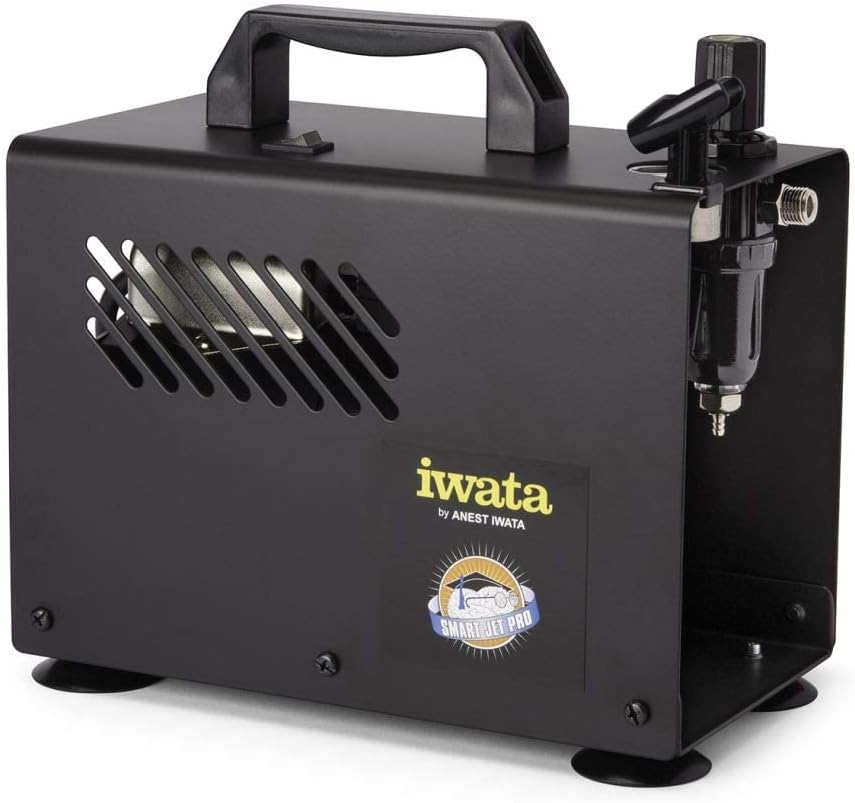
פיגורע 2: זייַט view of the compressor, highlighting the integrated moisture filter and pressure adjustment knob.
5. סעטאַפּ
- אָרט: Place the compressor on a stable, level surface in a clean, well-ventilated area. Ensure adequate space around the unit for air circulation.
- פאַרבינדן לופט שלאַנג: Connect one end of the provided air hose to the air outlet on the compressor. Connect the other end to your airbrush. Ensure connections are secure to prevent air leaks.
- מאַכט קשר: Plug the compressor's power cord into a standard 120V AC electrical outlet.
6. אַפּערייטינג ינסטרוקטיאָנס
- מאַכט אויף: Flip the power switch located on the top of the compressor to the "ON" position. The compressor will start running.
- אַדזשאַסטירן לופט דרוק: Use the pressure regulator knob (typically located near the air outlet and gauge) to adjust the desired air pressure. Turn clockwise to increase pressure and counter-clockwise to decrease. Monitor the air pressure gauge for accurate readings. The maximum operating pressure is 35 PSI.
- אַוטאָ פאַרמאַכן-אוף שטריך: The Smart Jet Pro features an automatic shut-off function. When the airbrush trigger is released and air flow stops, the compressor will automatically turn off to conserve energy and reduce wear. It will restart automatically when the airbrush trigger is pressed again.
- אָנהייבן עירברושינג: Once the desired pressure is set, you can begin your airbrushing work.
- מאַכט אַוועק: After use, flip the power switch to the "OFF" position and unplug the compressor from the power outlet.
7. וישאַלט
Regular maintenance ensures optimal performance and longevity of your compressor.
- Moisture Filter Drainage: The integrated moisture filter collects condensation. Periodically check the filter bowl for accumulated water. To drain, ensure the compressor is off and depress the small valve at the bottom of the filter bowl to release the water.
- רייניקונג: Wipe the exterior of the compressor with a clean, damp cloth. Do not use harsh chemicals or abrasive cleaners. Ensure no liquids enter the internal components.
- לופט פילטער: The compressor is designed with an internal air filter. No user-serviceable air filter replacement is typically required for this model.
8. טראָובלעשאָאָטינג
זעט דעם אָפּטייל פֿאַר געוויינטלעכע פּראָבלעמען און זייערע לייזונגען.
| פּראָבלעם | מעגלעך סיבה | לייזונג |
|---|---|---|
| דער קאמפּרעסאָר טוט זיך נישט אָן. | No power, loose connection, power switch off. | Check power cord connection, ensure outlet is functional, verify power switch is ON. |
| נידעריק אָדער קיין לופט דרוק. | Regulator set too low, air leaks, clogged airbrush. | Adjust pressure regulator, check hose connections for leaks, clean airbrush. |
| קאַמפּרעסער לויפט קעסיידער. | Air leak in system, airbrush trigger stuck open. | Check all connections for leaks, ensure airbrush trigger is fully released. |
| Excessive moisture in air line. | Moisture filter needs draining. | Drain the moisture filter as described in the Maintenance section. |
9. ספּעסאַפאַקיישאַנז
Technical specifications for the Iwata-Medea Studio Series Smart Jet Pro Air Compressor (Model IS 875).

Figure 3: Product dimensions of the Iwata-Medea Smart Jet Pro Air Compressor.
| שטריך | באַשרייַבונג |
|---|---|
| מאָדעל נאָמען | איז 875 |
| סאָרט | Iwata |
| Voltage | 120 וואלטס |
| מאַכט מקור | קאָרדעד עלעקטריק |
| ראַש מדרגה | 50 דעציבעלן |
| מאַקסימום אַפּערייטינג דרוק | 35 PSI (פונט פּער קוואַדראַט אינטש) |
| מאָטאָר כאָרספּאַוער | 0.13 HP (1/8 hp) |
| פּונקט וואָג | 12.67 פונט (5.76 קילאָגראַמס) |
| פּראָדוקט דימענשאַנז (L x W x H) | 6.18" x 8.65" x 2.25" |
| ספּעציעלע שטריך | Moisture Filter, Auto Shut-Off |
| אַרייַנגערעכנט קאַמפּאָונאַנץ | Filter, Air Hose |
10. וואָראַנטי און שטיצן
For warranty information or technical support, please refer to the documentation included with your purchase or contact Iwata customer service. Keep your purchase receipt as proof of purchase for warranty claims.
For further assistance, visit the official Iwata webזייטל אדער קאָנטאַקט זייערע אָטערייזד סערוויס צענטערס.


