1. הקדמה
The Extech EX310 is a compact, manual-ranging digital multimeter designed for a variety of electrical measurements. It features an extra-large 2000-count LCD and a built-in Non-Contact AC Voltage Detector (NCV) for enhanced safety. This device is capable of measuring AC/DC Voltage, AC/DC Current, Resistance, Diode, and Continuity, and includes a battery test function for 1.5V and 9V batteries. Its robust design, including a protective rubber holster and tilt stand, makes it suitable for field use.
2. זיכערקייַט אינפֿאָרמאַציע
Always adhere to safety precautions when using any electrical testing equipment. Failure to do so may result in injury or damage to the meter or equipment under test.
- The Extech EX310 is UL listed with a CAT III – 600 Volt safety rating.
- דו זאלסט נישט צולייגן מער ווי די רייטאַד וואָלtagע, ווי אנגעצייכנט אויפן מעטער, צווישן טערמינאַלן אדער צווישן יעדן טערמינאַל און ערד.
- Always inspect test leads for damage before use. Replace if insulation is compromised.
- זייט זייער פארזיכטיג ווען איר ארבעט מיט לעבעדיגע קרייזן.
- ניצט דעם נישט-קאָנטאַקט וואָלtage (NCV) detector as a preliminary check for live AC voltage, but always verify with direct contact measurements when possible.
- Ensure the function switch is set to the correct range before making measurements.
3. פּראָדוקט פֿעיִקייטן
- 9-Function Manual-Ranging DMM: מיטלען AC/DC וואָלtage, AC/DC current (up to 10 A), resistance, diode, continuity, plus 1.5 V/9 V battery tests.
- נאַן-קאָנטאַקט חלקtage (NCV) Detector: Built-in NCV with red LED and audible beeper alerts to the presence of live AC (100-600 VAC) without probes.
- Extra-Large 2000-Count Display: Clear, easy-to-read 1-inch digits on a high-count LCD ensure readability.
- Rugged, Portable Design: Compact meter (5.7 × 2.9 × 1.6 in, 9 oz) with protective rubber holster, tilt stand, and low-battery indicator.
- Reliable Safety & Accuracy: 0.5% basic accuracy. Designed to UL/CAT II-1000 V & CAT III-600 V safety standards.
4. פּעקל אינהאַלט
The Extech EX310 package includes the following items:
- Extech EX310 Mini Digital Multimeter
- פּרובירן לידז
- 9 וואלט באַטערי
- טילט שטיין
5. פּראָדוקט איבערview (Controls and Display)
Familiarize yourself with the components of your EX310 multimeter:

בילד: פראָנט view of the Extech EX310 Mini Digital Multimeter, showing the large LCD display, function dial, NCV button, and input jacks.
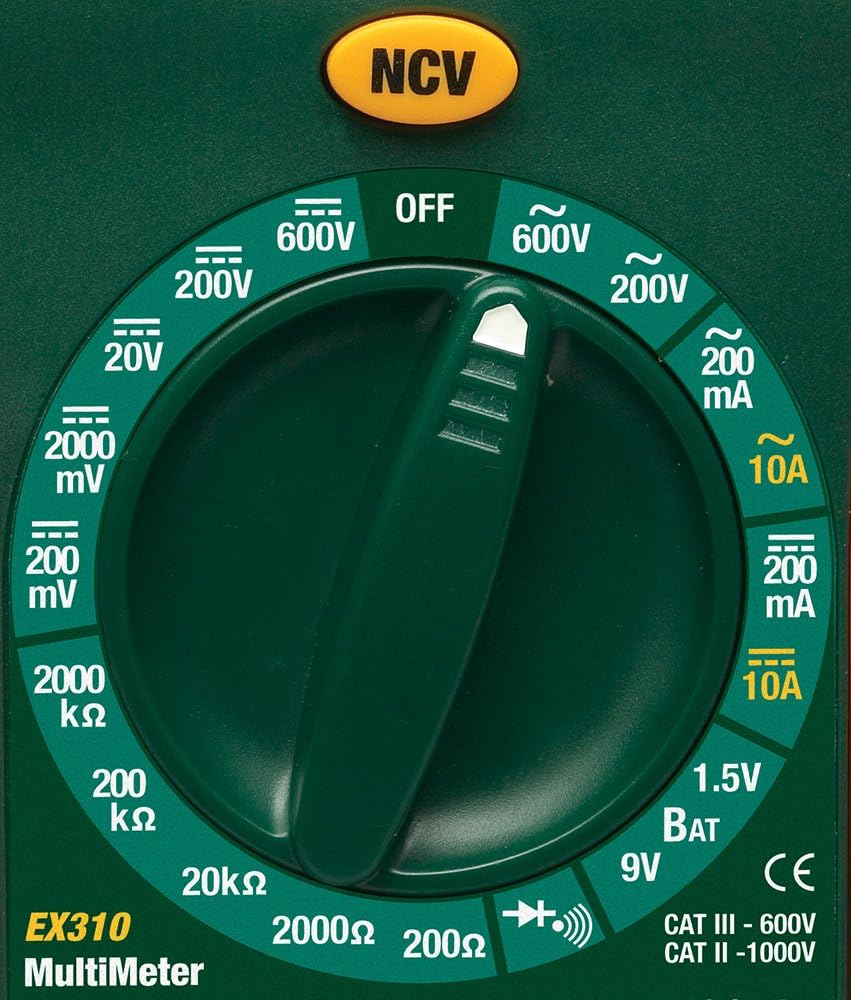
Image: Close-up of the Extech EX310's function dial, illustrating the various measurement ranges and functions such as voltage, current, resistance, diode, continuity, and battery test.
- LCD ווייַז: ווײַזט מעסטונג לייענונגען, איינסן און פונקציע אינדיקאַטאָרן.
- פונקציע באַשטימען: Rotary dial to select the desired measurement function and range.
- NCV קנעפּל: Activates the Non-Contact VoltagE דיטעקשאַן פֿונקציע.
- אַרייַנשרייַב דזשאַקס: Terminals for connecting test leads (COM, VΩmA, 10A).
6. סעטאַפּ
6.1. באַטאַרייע ייַנמאָנטירונג
- זיכער מאַכן אַז דער מולטימעטער איז אויסגעלאָשן.
- געפינט דעם דעקל פון דעם באַטעריע אָפּטייל אויף דער הינטערשטער זייט פונעם מעטער.
- שרויפט ארויס די שרויף(ן) און נעמט אראפ דעם דעקל.
- Insert a new 9V battery, observing correct polarity.
- Replace the cover and secure with the screw(s).
A low battery indicator will appear on the display when the battery needs replacement.
6.2. פֿאַרבינדן טעסט דראָטן
פֿאַרבינדט די טעסט־לידער צו די פּאַסיקע אַרייַנגאַנג־דזשעקס:
- אַרייַנלייגן די שוואַרץ פּרובירן פירן אין די COM (געוויינטלעך) דזשעק.
- פֿאַר רובֿ מעסטונגען (וואָל.tage, Resistance, Diode, Continuity, mA Current), insert the red test lead into the VΩmA דזשאַק.
- פֿאַר הויכע קראַנט מעסטונגען (ביז 10A), שטעקט אַרײַן די רויטע טעסט דראָט אין דעם 10 א דזשאַק.
7. אַפּערייטינג ינסטרוקטיאָנס
Before making any measurement, ensure the test leads are correctly connected and the function switch is set to the desired range.
7.1. אַק / דק חלקtagE מעזשערמאַנט
- Set the function switch to the desired ACV (~) or DCV (---) range (e.g., 200V, 600V).
- פֿאַרבינדט דעם רויטן טעסט־דראָט צום VΩmA דזשעק און דעם שוואַרצן טעסט־דראָט צום COM דזשעק.
- באַרירט די טעסט פּראָובז צו די קרייז פונקטן וואו וואָלומעןtage איז צו מעסטן.
- לייענען דעם חלקtagE ווערט אויף די לקד.
7.2. אַק / דק קראַנט מעזשערמאַנט
וואָרענען: Never attempt to measure current on a circuit with voltage present across the current terminals. This can blow the fuse or damage the meter.
- קער אַוועק מאַכט צו די קרייַז.
- Set the function switch to the desired ACA (~) or DCA (---) range (e.g., 200mA, 10A).
- Connect the red test lead to the appropriate current jack (VΩmA for mA, 10A for 10A) and the black test lead to the COM jack.
- עפֿנט דעם קרייז וואו מען וויל מעסטן דעם שטראָם און פֿאַרבינדט דעם מעטער אין סעריע.
- Apply power to the circuit and read the current value on the LCD.
7.3. קעגנשטעל מעזשערמאַנט
- זיכער מאַכן אַז די קרייַז אָדער קאָמפּאָנענט איז דע-ענערדזשייזד.
- Set the function switch to the desired Resistance (Ω) range (e.g., 200Ω, 20kΩ).
- פֿאַרבינדט דעם רויטן טעסט־דראָט צום VΩmA דזשעק און דעם שוואַרצן טעסט־דראָט צום COM דזשעק.
- Touch the test probes across the component or circuit to be measured.
- Read the resistance value on the LCD.

Image: The Extech EX310 Multimeter displaying a reading while test leads are connected to a circuit board, demonstrating a typical measurement scenario.
7.4. דיאָדע טעסט
- Ensure the component is de-energized.
- Set the function switch to the Diode (→|) position.
- פֿאַרבינדט דעם רויטן טעסט־דראָט צום VΩmA דזשעק און דעם שוואַרצן טעסט־דראָט צום COM דזשעק.
- באַרירט די רויטע פּראָבע צו דער אַנאָדע און די שוואַרצע פּראָבע צו דער קאַטאָדע פון דער דיאָד.
- לייענען די פאָרויס voltage drop on the LCD. Reverse the probes to check for an open circuit (OL).
7.5. קאָנטינויטי טעסט
- זיכער מאַכן אַז די קרייַז אָדער קאָמפּאָנענט איז דע-ענערדזשייזד.
- Set the function switch to the Continuity (→))) position.
- פֿאַרבינדט דעם רויטן טעסט־דראָט צום VΩmA דזשעק און דעם שוואַרצן טעסט־דראָט צום COM דזשעק.
- באַרירט די טעסט פּראָובז אַריבער דעם קרייַז אָדער קאָמפּאָנענט.
- An audible tone will sound if continuity exists (resistance below approximately 30Ω).

בילד: א נאָענטע בילד view of the Extech EX310 Multimeter with its test leads connected to an internal electronic circuit, demonstrating precise measurement capabilities.
7.6. ניט-קאָנטאַקט וואָלtagE (NCV) דעטעקשאַן
- שטעלן די פונקציע באַשטימען צו קיין שטעלע.
- Press and hold the NCV button.
- Move the top of the meter (where the NCV sensor is located) close to the suspected AC voltage source (e.g., wire, outlet).
- A red LED will illuminate and an audible beeper will sound, increasing in intensity as the meter gets closer to the live AC voltage.

Image: A hand holding the Extech EX310 Multimeter near an electrical wall outlet, demonstrating the use of the Non-Contact Voltage (NCV) detection feature to identify live circuits.
7.7. Battery Test (1.5V/9V)
- Set the function switch to the 1.5V BAT or 9V BAT position.
- פֿאַרבינדט דעם רויטן טעסט־דראָט צום VΩmA דזשעק און דעם שוואַרצן טעסט־דראָט צום COM דזשעק.
- Touch the red probe to the positive terminal and the black probe to the negative terminal of the battery.
- לייענען די באַטאַרייע וואָלtagE אויף די לקד.
8. וישאַלט
8.1. באַטערי פאַרבייַט
Refer to Section 6.1 for detailed instructions on replacing the 9V battery when the low battery indicator appears.
8.2. קאָריק פאַרבייַט
If the current measurement functions cease to operate, the internal fuse(s) may need replacement. The fuses are typically located beneath the battery compartment. Refer to the full product manual for specific fuse ratings and replacement procedures. Always replace with fuses of the identical type and rating.
8.3. רייניקונג
פּיריאַדיקלי ווישן די פאַל מיט אַדamp שטאָף און מילדן וואַשפּולווער. ניצט נישט קיין שוואַרצע מאַטעריאַלן אָדער סאָלווענטן. מאַכט זיכער אַז דער מעטער איז גאָר טרוקן איידער נוצן.
9. טראָובלעשאָאָטינג
- קיין ווייַז: Check the 9V battery. Ensure it is correctly installed and has sufficient charge.
- פאַלש רידינגז: Verify that the function switch is set to the correct measurement type and range. Ensure test leads are properly connected and making good contact with the circuit.
- קראַנט מעסטונג אַרבעט נישט: Check the internal fuse(s). Refer to the Maintenance section for fuse replacement.
- NCV נישט דעטעקטירט: Ensure the NCV button is pressed and held. Confirm the presence of AC voltage (100-600 VAC) in the area being tested.
10. ספּעסאַפאַקיישאַנז
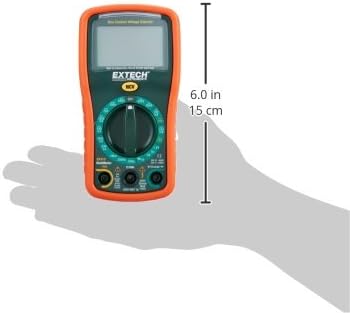
Image: Diagram illustrating the physical dimensions of the Extech EX310 Multimeter, showing a length of 6.0 inches (15 cm).
| באַשרייַבונג | ווערט |
|---|---|
| סאָרט | עקסטעטש |
| מאָדעל נומער | עקסקסנומקס |
| מעזשערמאַנט טיפּ | מולטימעטער |
| סטייל | מאַנואַל ריינדזשינג |
| יקערדיק אַקיעראַסי | +/-0.5% |
| ווייַז | 2000-Count LCD |
| זיכערקייַט רייטינג | UL listed CAT III - 600V, CAT II - 1000V |
| מאַכט מקור | 9 וו באַטאַרייע |
| נומער דימענשאַנז (L X W X H) | 5.7 X 1.6 X 2.9 אינטשעס (14.5 X 4.1 X 7.4 סענטימעטער) |
| פּונקט וואָג | 0.704 אונס (0.02 קילאָגראַמס) |
| אַרייַנגערעכנט קאַמפּאָונאַנץ | Test leads, 9 Volt battery, tilt stand |
11. וואָראַנטי אינפֿאָרמאַציע
The Extech EX310 Mini Digital Multimeter is covered by a 1-יאָר פּאַרץ און אַרבעט וואָראַנטי from the date of purchase. Please retain your proof of purchase for warranty claims. This warranty covers manufacturing defects and workmanship under normal use.
12. קונה שטיצן
For technical assistance, troubleshooting beyond this manual, or warranty service, please contact Extech customer support. Refer to the official Extech webזייטל אדער פּראָדוקט פּאַקאַדזשינג פֿאַר די מערסט אַקטועל קאָנטאַקט אינפֿאָרמאַציע.


