1. הקדמה
Thank you for choosing the Escali Primo Digital Food Scale. This manual provides essential information for the proper setup, operation, and maintenance of your new scale. Designed for accuracy and ease of use, the Escali Primo is ideal for various kitchen tasks, including food preparation, baking, and portion control.
The Escali Primo Digital Food Scale features a simple two-button operation, a sealed control panel for easy cleaning, and an automatic shut-off function to conserve battery life. It measures weights up to 11 lb (5,000 g) with precision.

Image: Escali Primo Digital Food Scale, Metallic.
2. פּראָדוקט קאַמפּאָונאַנץ
The Escali Primo Digital Food Scale consists of the following main components:
- ווייינג פּלאַטפאָרם: The surface where items are placed for measurement.
- דיגיטאַל ווייַז: ווײַזט וואָג לייענונגען און אַפּאַראַט אינדיקאַטאָרן.
- On/Tare/Off Button: Used to power the scale on/off and activate the tare function.
- Unit (g/oz) Button: Used to switch between measurement units (grams, ounces, pounds:ounces).
- באַטערי אָפּטייל: Located on the underside, holds two AA batteries.
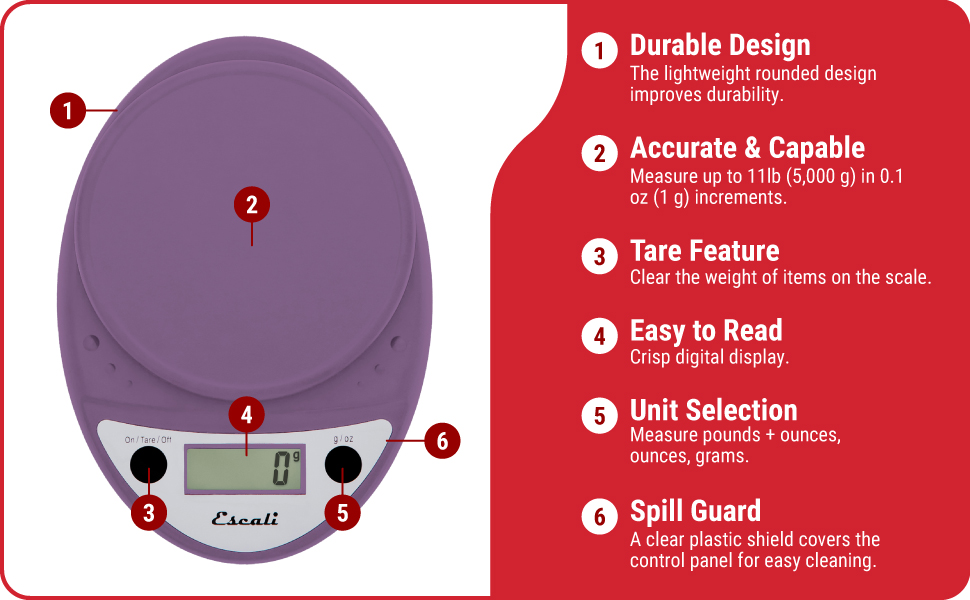
Image: Key features of the Escali Primo Digital Food Scale.
3. סעטאַפּ
3.1 באַטאַרייע ייַנמאָנטירונג
- געפינען די באַטאַרייע אָפּטייל אויף די אַנדערסייד פון די וואָג.
- עפענען די באַטאַרייע אָפּטייל דעקן.
- אַרײַנשטעלן צוויי AA באַטעריעס, און זיכער מאַכן אַז די פּאָלאַריטעט (+/-) איז ריכטיק ווי אָנגעוויזן אין דעם אָפּטייל.
- פאַרמאַכן די באַטאַרייע אָפּטייל דעקן סיקיורלי.
3.2 ערשטע פּלאַצירונג
Place the scale on a flat, stable, and level surface. Avoid placing it on soft or uneven surfaces, which can affect accuracy.
4. אַפּערייטינג ינסטרוקטיאָנס
4.1 מאַכט אויף / אַוועק
- צו מאַכט אויף: דרוק די אן/טארע/אויס button. The display will show "0" when ready.
- צו מאַכט אַוועק: דריקן און האַלטן די אן/טארע/אויס button for approximately 3 seconds. The scale will also automatically shut off after four minutes of inactivity to conserve battery life.
4.2 אַפּאַראַט סעלעקציע
To change the unit of measurement (grams, ounces, pounds:ounces), press the g/oz button while the scale is on. The display will cycle through the available units.

Image: Display and unit selection button.
4.3 טאַרע פֿונקציע
The tare function allows you to subtract the weight of a container or to measure multiple ingredients consecutively.
- שטעלט א ליידיגן קאנטעינער אויף דער וואָג פּלאַטפאָרמע. דער עקראַן וועט ווײַזן זײַן וואָג.
- דרוק די אן/טארע/אויס קנעפל. דער עקראַן וועט זיך צוריקשטעלן צו "0".
- לייג דיין ינגרידיאַנט צו דעם קאַנטיינער. דער אַרויסווייַזן וועט ווייַזן בלויז די וואָג פון די ינגרידיאַנט.
- Repeat the tare process for additional ingredients if needed.

Image: Using the scale for portion control with meal prep.
4.4 וועגן זאכן
Once the scale is on and set to your desired unit, simply place the item(s) to be weighed directly onto the weighing platform or into a tared container. The weight will be displayed instantly.

Image: Weighing ingredients for baking.
5. וישאַלט
5.1 רייניקונג
The sealed control panel and rounded design make the Escali Primo scale easy to clean. Wipe the scale with a damp שטאָף. דו זאלסט נישט ייַנטונקען די וואָג אין וואַסער אָדער נוצן אַברייסיוו קלינערז.
5.2 סטאָרידזש
Store the scale in a dry place at room temperature. Avoid placing heavy objects on the scale when not in use, as this may affect its calibration over time.
6. טראָובלעשאָאָטינג
| פּראָבלעם | מעגלעך סיבה | לייזונג |
|---|---|---|
| וואָג טוט נישט קער אויף | טויטע אדער נישט ריכטיק אינסטאלירטע באַטעריעס. | פאַרבייטן די באַטעריעס מיט נייַע AA באַטעריעס, און זאָרגט אַז די פּאָלאַריטעט איז ריכטיק. |
| ומפּינקטלעך רידינגז | Scale not on a flat, stable surface; scale overloaded; debris under platform. | Place scale on a firm, level surface. Ensure weight does not exceed 11 lb (5000 g). Clean any debris from under the platform. |
| דיספּליי ווייזט "ערר" | די וואָג איז איבערגעלאָדן. | Remove items from the scale. Ensure total weight is within the 11 lb (5000 g) capacity. |
| Automatic shut-off too soon | Normal operation (4 minutes of inactivity). | This is a battery-saving feature. Press the On/Tare/Off button to restart. |
7. ספּעסאַפאַקיישאַנז
- מאָדעל: P115
- קאַפּאַציטעט: 11 לב (5,000 ג)
- ינקראַמאַנץ: 0.05 אַז (1 ג)
- מעזשערמאַנט וניץ: אונס, פונט:אונס, גראַם
- מאַכט: 2 אַאַ באַטעריז (אַרייַנגערעכנט)
- פּראָדוקט דימענשאַנז: 8.5 X 6 X 1.5 אינטשעס (בעערעך)
- ווייַז טיפּ: דיגיטאַל געפירט
- ספּעציעלע פֿעיִקייטן: Auto Shut Off, Tare Function, Sealed Control Panel
8. וואָראַנטי אינפֿאָרמאַציע
די עסקאַלי פּרימאָ דיגיטאַל עסן וואָג קומט מיט אַ לעבן וואָראַנטי. For detailed warranty terms and conditions, please refer to the official Escali webפּלאַץ אָדער קאָנטאַקט קונה שטיצן.
9. קונה שטיצן
For further assistance, product information, or support, please visit the official Escali webזייטל אדער קאנטאקטירן זייער קאסטומער סערוויס דעפארטמענט. קאנטאקט דעטאלן קען מען געווענליך געפינען אויף דער פראדוקט פאקאדזש אדער דעם פאבריקאנט'ס webפּלאַץ.
איר קענט געפֿינען מער אינפֿאָרמאַציע און שטיצע בײַ דער עסקאלי קראָם אויף עמעזאן.


