1. הקדמה
א דאנק פארן קויפןasing the GPX BCD2004 Boombox. This portable audio system features a top-loading CD player and an AM/FM tuner, designed for versatile audio playback. This manual provides essential information for setting up, operating, and maintaining your device to ensure optimal performance and longevity.
2. זיכערקייַט אינפֿאָרמאַציע
- לייענען אינסטרוקציעס: Carefully read all operating instructions before using the unit.
- האַלטן אינסטרוקציעס: האַלטן דעם מאַנואַל פֿאַר צוקונפֿט רעפֿערענץ.
- וואַסער און נעץ: Do not expose this appliance to dripping or splashing water. Do not place objects filled with liquids, such as vases, on the appliance.
- ווענטילאַטיאָן: זיכער מאַכן אַז עס איז דאָ געהעריקע ווענטילאַציע. נישט פֿאַרשטאָפּן קיין ווענטילאַציע עפענונגען.
- היץ: נישט שטעלן לעבן היץ קוועלער ווי ראַדיאַטאָרן, היץ רעגיסטערס, אויוון, אדער אנדערע אַפּאַראַטן (אַרייַנגערעכנט ampליפיערס) וואָס פּראָדוצירן היץ.
- מאַכט קוואלן: Use only the power source indicated on the appliance.
- באַטעריז: Follow battery safety guidelines. Do not mix old and new batteries, or different types of batteries. Remove batteries if the unit is not used for extended periods.
- סערוויס: אָפּשיקן אַלע סערוויסעס צו קוואַלאַפייד סערוויס פּערסאַנעל.
3. פּעקל אינהאַלט
ביטע קאָנטראָלירט אַז די פאלגענדע זאכן זענען אַרייַנגערעכנט אין דיין פּעקל:
- GPX BCD2004 Boombox Unit
- אַק מאַכט שנור
- באַניצער מאַנואַל
4. קאָנטראָלן און פֿעיִקייטן איבערview
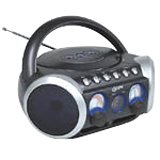
פיגורע 1: פראָנט view of the GPX BCD2004 Boombox. This image shows the overall design of the boombox, including the speaker grilles and the general layout of the front panel.
Familiarize yourself with the main controls and features of your boombox:
- סי-די קאמפארטמענט: Top-loading bay for inserting CDs.
- פונקציע באַשטימען: Selects between CD, AM, FM, and OFF modes.
- באַנד קאָנטראָל: Rotary dial to adjust the audio output level.
- טונינג רעדל: Rotary dial for selecting AM or FM radio frequencies.
- שפּיל / פּויזע קנעפּל: Starts or temporarily stops CD playback.
- האַלטן קנעפּל: סטאַפּס קאָמפּאַקטדיסק פּלייבאַק.
- איבערשפרינגען/זוכן קנעפלעך (◀◀ / ▶▶): Skips to the previous/next track or searches within a track.
- פּראָגראַם קנעפּל: Used to program a sequence of tracks for CD playback.
- איבערחזרן קנעפּל: Repeats the current track or the entire CD.
- AM/FM Antenna: Telescopic antenna for FM reception, internal antenna for AM.
- אַק מאַכט אַרייַנשרייַב: Jack for connecting the AC power cord.
- באַטערי אָפּטייל: Located on the bottom or rear for 'C' batteries.
- Fold-down Carrying Handle: פֿאַר גרינג פּאָרטאַביליטי.
5. סעטאַפּ
5.1 אנשטעלן דעם איינהייט
Your GPX BCD2004 Boombox can be powered by either AC power or batteries.
אַק מאַכט אָפּעראַציע
- Ensure the Function Switch is in the OFF position.
- Insert the small end of the AC power cord into the AC power input jack on the back of the unit.
- Plug the other end of the AC power cord into a standard AC wall outlet (120V ~ 60Hz).
באַטערי מאַכט אָפּעראַציע
For portable use, the boombox requires 8 'C' size batteries (not included).
- Ensure the Function Switch is in the OFF position.
- Open the battery compartment cover located on the bottom or rear of the unit.
- אַרײַנשטעלן 8 'C' גרייס באַטעריעס, אָבסערווירנדיק די ריכטיקע פּאָלאַריטעט (+ און -) ווי אָנגעוויזן אינעווייניק אין דעם אָפּטייל.
- פאַרמאַכן די באַטאַרייע אָפּטייל דעקן סיקיורלי.
- באַמערקונג: When operating on battery power, disconnect the AC power cord from the unit.
6. Operating the CD Player
The GPX BCD2004 is compatible with standard audio CDs, CD-R, and CD-RW discs.
6.1 לאָדן אַ סי-די
- Lift the CD compartment door located on the top of the unit.
- לייגט אַ סי-די אויף דער צענטראַלער שפּינדל מיט דער עטיקעט-זייט אַרויף.
- Gently close the CD compartment door until it clicks shut.
6.2 גרונטלעכע סי-די ווידערשפּיל
- שטעלן די פונקציע סוויטש צו די CD שטעלע.
- The CD player will begin to read the disc. The track number will typically display.
- Press the PLAY/PAUSE (▶/██) button to start playback.
- Adjust the Volume Control to your desired listening level.
- To pause playback, press the PLAY/PAUSE (▶/██) button. Press it again to resume.
- To stop playback, press the STOP (■) button.
6.3 Skipping and Searching Tracks
- האָפּקען שפּור: During playback, press the SKIP/SEARCH FORWARD (▶▶) button to go to the next track. Press the SKIP/SEARCH BACKWARD (◀◀) button to go to the beginning of the current track, or press it twice to go to the previous track.
- Search Within Track: During playback, press and hold the SKIP/SEARCH FORWARD (▶▶) or SKIP/SEARCH BACKWARD (◀◀) button to fast forward or rewind through the current track. Release the button to resume normal playback.
6.4 Program Play
איר קענט פּראָגראַמירן ביז 16 טראַקס צו שפּילן אין אַ ספּעציפֿישער סדר.
- In STOP mode, press the PROGRAM button. The program indicator will flash.
- Use the SKIP/SEARCH buttons (◀◀ / ▶▶) to select your desired first track.
- Press the PROGRAM button again to confirm the selection.
- Repeat steps 2 and 3 to add up to 16 tracks to your program list.
- After programming all desired tracks, press the PLAY/PAUSE (▶/██) button to start programmed playback.
- To clear the program, press the STOP (■) button twice.
6.5 Repeat Play
During CD playback, press the REPEAT button:
- דריק איין מאל פאר איבערחזרן 1 (repeats the current track).
- דריק צוויי מאָל פֿאַר איבערחזרן אַלע (repeats the entire CD or programmed tracks).
- Press a third time to cancel repeat function.
7. Operating the AM/FM Radio
7.1 Tuning to Radio Stations
- Set the Function Switch to either the AM or FM position.
- Adjust the Tuning Dial to select your desired radio station.
- Adjust the Volume Control to your desired listening level.
7.2 Improving Radio Reception
- FM אויפנאַם: Extend the telescopic antenna fully and adjust its position for the best reception.
- פארמיטאג אויפנאמע: The unit has a built-in AM antenna. Rotate the entire boombox for optimal AM reception.
8. וישאַלט
8.1 רייניקונג די אַפּאַראַט
- ווישן די יקסטיריער פון די אַפּאַראַט מיט אַ ווייך, דamp שטאָף. דו זאלסט נישט נוצן אַברייסיוו קלינערז אָדער סאָלוואַנץ.
- For the CD lens, use a specialized CD lens cleaner disc or a soft, lint-free cloth specifically designed for optical lenses.
8.2 באַטערי קער
- אַרויסנעמען באַטעריעס אויב די אַפּאַראַט וועט נישט ווערן גענוצט פֿאַר אַ לענגערע צייט צו פאַרמייַדן ליקאַדזש.
- אָפּזאָגן געוויינט באַטעריז ריספּאַנסאַבלי לויט די היגע רעגיאַליישאַנז.
9. טראָובלעשאָאָטינג
If you experience issues with your boombox, please refer to the following common problems and solutions:
| פּראָבלעם | מעגלעך סיבה | לייזונג |
|---|---|---|
| קיין מאַכט | AC cord not connected; Batteries dead or incorrectly inserted; Function switch OFF. | Check AC cord connection; Replace batteries or check polarity; Set Function switch to CD, AM, or FM. |
| סי-די שפּילט נישט | CD inserted incorrectly; CD dirty or scratched; CD compartment door open; Function switch not on CD. | Insert CD with label side up; Clean or replace CD; Close CD door securely; Set Function switch to CD. |
| נעבעך ראַדיאָ אָפּטראָג | Antenna not extended/adjusted; Weak signal. | Extend and adjust FM antenna; Rotate unit for AM reception; Try a different location. |
| ניט געזונט אָדער נידעריק באַנד | Volume too low; Unit in pause mode. | Increase volume; Press Play/Pause button to resume playback. |
10. ספּעסאַפאַקיישאַנז
- מאָדעל: BCD2004
- סאָרט: גפּקס
- CD קאַמפּאַטאַבילאַטי: קאָמפּאַקטדיסק, קאָמפּאַקטדיסק-ר, קאָמפּאַקטדיסק-רוו
- ראַדיאָ טונער: AM/FM
- מאַכט מקור: AC 120V ~ 60Hz or 8 x 'C' Batteries (not included)
- רעדנער: 2 Full-range speakers
- דימענשאַנז (בעערעך): 33.02 X 27.94 X 17.02 סענטימעטער (L X W X H)
- וואָג (בעערעך): 2.18 קג
- פֿעיִקייטן: 16-track programming, Repeat play, Song skip/search, Fold-down carrying handle
11. וואָראַנטי און שטיצן
This GPX BCD2004 Boombox comes with a 90-טאָג וואָראַנטי פֿון דעם דאַטע פֿון אָריגינעלן קויף. די וואָראַנטי דעקט חסרונות אין מאַטעריאַלן און אַרבעט אונטער נאָרמאַלן באַנוץ.
For warranty service or technical support, please refer to the contact information provided with your purchase documentation or visit the official GPX website. Please have your model number (BCD2004) and proof of purchase ready when contacting support.


