1. הקדמה
This manual provides detailed instructions for the installation, operation, and maintenance of your Clarion MCD360 3-Way 6-Channel Electronic Crossover. Designed to optimize your car audio system, this electronic crossover allows for precise control over audio frequencies, ensuring a balanced and high-quality sound output.
2. שליסל פֿעיִקייטן
- Front/Rear/Subwoofer Level Control
- 6/4/2 קאַנאַל רקאַ ינפּוץ
- 6-קאַנאַל / 5 וואלט RCA אַוטפּוץ (פראָנט / דערציען / סובוואָאָפער)
- סובוואָאָפער עקוואַליזער און בוסט לעוועל קאָנטראָלס
- High-Pass Crossover Frequency Multiplier
- Remote Subwoofer Level Control (Included)
- Gold Plated Terminals
3. וואָס איז אין דער קעסטל
Your Clarion MCD360 package includes the following components:
- Clarion MCD360 Electronic Crossover Unit
- Remote Subwoofer Level Control Knob
- וויירינג כאַרניס
- מאַונטינג ייַזנוואַרג
- ינסטראַקשאַנז מאַנואַל

Image: Clarion MCD360 Electronic Crossover unit with remote bass knob, wiring, and mounting hardware.
4. סעטאַפּ און ייַנמאָנטירונג
4.1. וויירינג קאַנעקשאַנז
Ensure all power, ground, and remote connections are secure and correctly polarized to prevent damage to the unit or your audio system.
- מאַכט (+12V): Connect to a constant +12V power source from your vehicle's battery.
- ערד (GND): Connect to a solid chassis ground point on your vehicle.
- ווײַט (REM): Connect to the remote turn-on lead from your head unit or ignition switch.
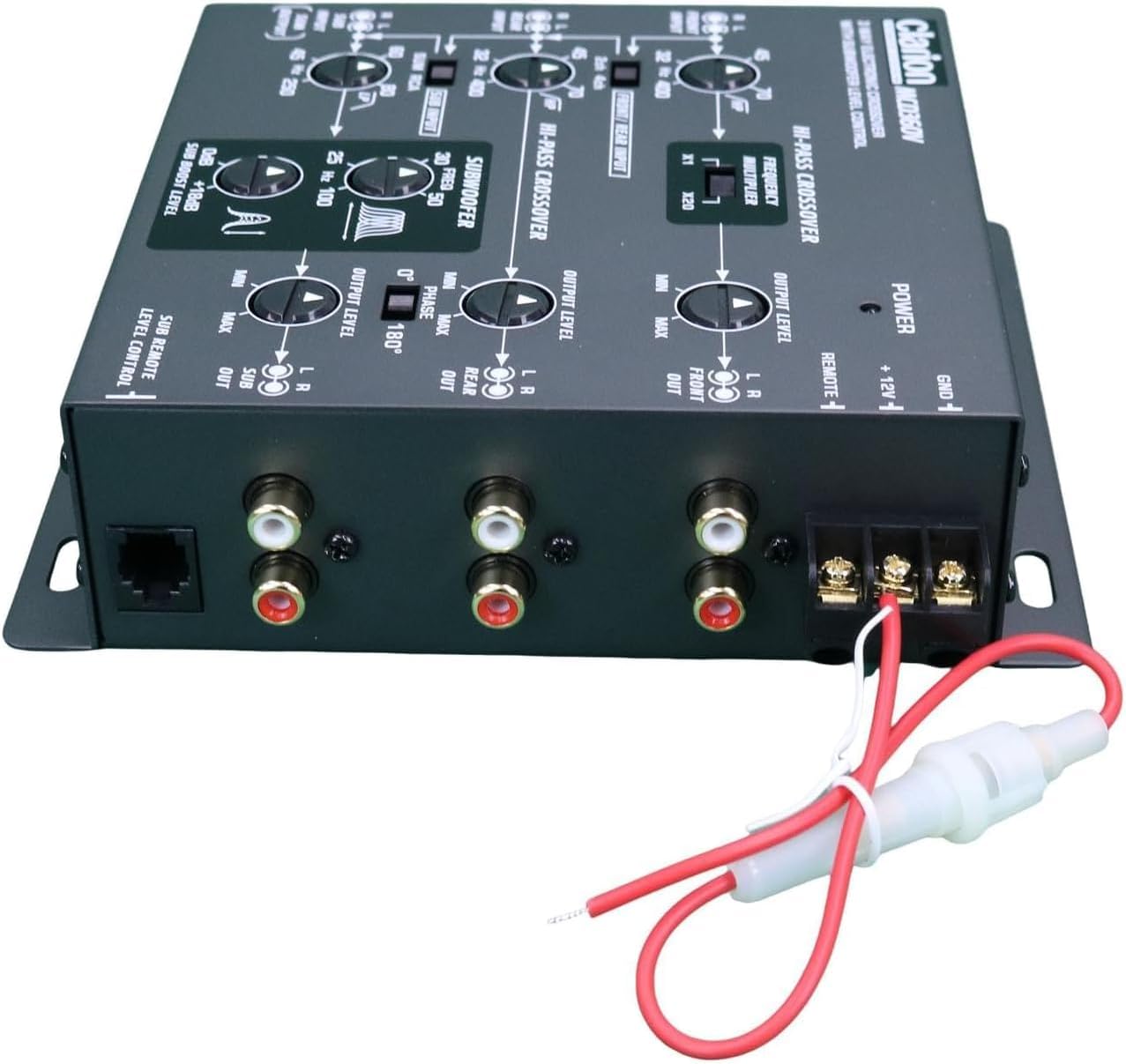
בילד: הינטערשטע view of the Clarion MCD360 showing power, ground, and remote terminals, along with RCA inputs and outputs.
4.2. RCA Input/Output Connections
Connect your head unit's RCA outputs to the corresponding inputs on the MCD360, and then connect the MCD360's outputs to your ampליפערז.
- אַרייַנשרייַבן: The MCD360 features 6/4/2 channel RCA inputs. Connect your head unit's front, rear, and subwoofer RCA outputs to the respective inputs on the crossover.
- אויסגאבעס: The unit provides 6-channel / 5 Volt RCA outputs for Front, Rear, and Subwoofer. Connect these to your external ampליפערז.

בילד: פראָנט view of the Clarion MCD360 showing RCA input connections for front, rear, and subwoofer channels.

בילד: הינטערשטע view of the Clarion MCD360 showing RCA output connections for front, rear, and subwoofer channels.
5. אַפּערייטינג ינסטרוקטיאָנס
The Clarion MCD360 offers extensive control over your audio frequencies. Familiarize yourself with the controls for optimal sound tuning.

Image: Top panel of the Clarion MCD360 showing various control knobs and switches for frequency and level adjustments.
- Front/Rear/Subwoofer Level Control: Adjust the output level for each channel independently to match your amplifier's input sensitivity and achieve desired volume balance.
- High-Pass Crossover Frequency Multiplier: Use this control to set the high-pass filter frequency for your front and rear speakers, preventing low frequencies from reaching them.
- Subwoofer Equalizer and Boost Level Controls: Fine-tune your subwoofer's performance with dedicated equalizer and boost controls. This allows you to enhance bass response at specific frequencies.
- Remote Subwoofer Level Control: The included remote knob allows for convenient adjustment of the subwoofer output level from your driving position.

Image: Clarion MCD360 unit displayed with its remote subwoofer level control and connecting cable.
5.1. Video Guides
For visual guidance on setting up and operating your electronic crossover, please refer to the following videos:
PRV Audio EX4.6 PRO 4 Way Electronic Crossover Overview
באַשרייַבונג: דאָס ווידעאָ גיט אַן איבערבליקview of the PRV Audio EX4.6 PRO 4-Way Electronic Crossover, demonstrating its features and controls. While not the exact MCD360 model, it offers general insights into electronic crossover functionality.
Skar Audio SKEC23 3-Way 6 Channel Electronic Crossover
Description: This video showcases the Skar Audio SKEC23 3-Way 6 Channel Electronic Crossover, highlighting its various adjustments and connections. It can serve as a helpful reference for understanding similar crossover units.
טארamps Big Bass DSP Audio Processor
Description: This video introduces the Taramps Big Bass DSP Audio Processor, focusing on its bass enhancement capabilities. While a different product type, it demonstrates how external processors can refine audio output.
טארamps DSP Pro 2.4s Processor
Description: This video highlights the features of the Taramps DSP Pro 2.4s Processor, including its equalization and crossover functions. It provides a good understanding of digital signal processing in car audio.
טארamps TS 1200X4 2 Ohms multi-channel ampליפער
Description: This video presents the Taramps TS 1200X4 multi-channel amplifier, showing its connections and features. Understanding amplifier connections is crucial for integrating the MCD360 into your system.
CLARION EQS755V 7-Band Car Audio Graphic Equalizer/Crossover
Description: This video features the Clarion EQS755V Graphic Equalizer/Crossover, a related product that demonstrates Clarion's approach to audio processing. It can help users understand the brand's interface and functionality.
Big Bass Restoration module improving deep bass in car audio
Description: This video explains the function of a Big Bass Restoration module, which improves deep bass in car audio systems. This is relevant for users looking to maximize their subwoofer's performance with the MCD360.
6. וישאַלט
To ensure the longevity and optimal performance of your Clarion MCD360, follow these simple maintenance guidelines:
- רייניקונג: ניצט אַ ווייכע, טרוקענע שטאָף צו רייניקן דעם אַפּאַראַט. פֿאַרמייַדט אַברייסיוו רייניגער אָדער סאָלווענטן.
- פֿאַרבינדונגען: קאָנטראָלירט פּעריִאָדיש אַלע וויירינג פֿאַרבינדונגען צו זיכער מאַכן אַז זיי זענען זיכער און פֿרײַ פֿון קעראָוזשאַן.
- סוויווע: Ensure the unit is installed in a location that is free from excessive heat, moisture, and direct sunlight.
7. טראָובלעשאָאָטינג
If you experience issues with your MCD360, consult the following common troubleshooting steps:
| פּראָבלעם | מעגלעך סיבה | לייזונג |
|---|---|---|
| קיין סאָונד רעזולטאַט | Incorrect wiring (power, ground, remote), RCA cables disconnected, gain settings too low. | Check all power, ground, and remote connections. Ensure RCA cables are securely connected. Verify gain levels on the crossover and ampליפערז. |
| פאַרקרימט סאָונד | Gain settings too high, improper crossover settings, faulty speakers/ampליפערז. | Reduce gain levels on the crossover and amplifiers. Adjust crossover frequencies to match speaker capabilities. Test speakers and amplifiers for proper function. |
| Loud Pop on Turn On/Off | Incorrect remote turn-on sequence. | Ensure the head unit turns on before the amplifier and off after the amplifier. The MCD360's remote output sequencing helps prevent this. |
| Subwoofer Not Responding | Subwoofer level control too low, low-pass filter set too high, phase issue. | Increase subwoofer level on the unit and remote. Adjust low-pass filter to appropriate frequency. Check subwoofer phase setting. |
8. ספּעסאַפאַקיישאַנז
| שטריך | דעטאַל |
|---|---|
| אַרייַנשרייַב וואָלtage | 5 וואלטס |
| מאַונטינג טיפּ | פּאָליצע בארג |
| מאַטעריאַל | Gold (for terminals) |
| רעדנער טיפּ | Subwoofer (control) |
| ספּעציעלע שטריך | עקוואַליזער |
| פּראָדוקט דימענשאַנז | 7"ד רענטגענ 6"וו רענטגענ 0.75"ה |
| פּונקט וואָג | 2.2 פונט |
| קאָליר | שוואַרץ |
| קאָנטראָל מעטאָד | ווייַט |
| סיגנאַל-צו-נויז ראַטיאָ | 100 דב |
| אָפטקייַט ענטפער | 50000 הז |
| קאַנעקטיוויטי טעכנאָלאָגיע | ווייערד |
| אַודיאָ רעזולטאַט מאָדע | אַרומרינגלען |
| נומער פון קרייזן | 6 |
9. וואָראַנטי
The Clarion MCD360 comes with a 1 יאָר לימיטעד וואָראַנטי. Please retain your proof of purchase for any warranty claims. For detailed warranty terms and conditions, refer to the documentation included with your product or contact Clarion customer support.
10. שטיצן
For further assistance, technical support, or service inquiries, please visit the official Clarion webזייטל אדער קאנטאקט זייער קאסטומער סערוויס דעפארטמענט. איר קענט אויך זיך ווענדן צו די Clarion Store on Amazon פֿאַר נאָך פּראָדוקט אינפֿאָרמאַציע און רעסורסן.


