1. הקדמה
Thank you for choosing the Rode NT1000 Large-Diaphragm Condenser Microphone. This manual provides essential information for the proper setup, operation, and maintenance of your new microphone. The NT1000 is engineered for superior large-capsule performance, making it ideal for capturing both vocal and instrumental performances with ultra-low noise and true condenser operation.
Please read this manual thoroughly before using the microphone to ensure optimal performance and longevity.
2. זיכערקייַט אינפֿאָרמאַציע
- Always handle the microphone with care. Avoid dropping or subjecting it to strong impacts.
- Do not expose the microphone to moisture, rain, or extreme temperatures.
- Ensure proper ventilation around the microphone during operation.
- Only use the microphone with compatible audio equipment that provides 48V phantom power.
- האַלטן די מיקראָפאָן אַוועק פון שטאַרק מאַגנעטיק פעלדער.
3. פּעקל אינהאַלט
ביטע באַשטעטיקן אַז אַלע זאכן זענען פאַראַן אין דיין פּעקל:
- Rode NT1000 Large-Diaphragm Condenser Microphone
- קלאַפּ בארג
- Protective Pouch/Case
- דעם באַניצער מאַנואַל
4. סעטאַפּ
4.1 מאָנטירן דעם מיקראָפאָן
The Rode NT1000 is designed to be used with a standard microphone stand and the included shock mount. The shock mount helps to isolate the microphone from vibrations and handling noise.
- Securely attach the shock mount to your microphone stand.
- Carefully insert the Rode NT1000 microphone into the shock mount, ensuring it is firmly seated.
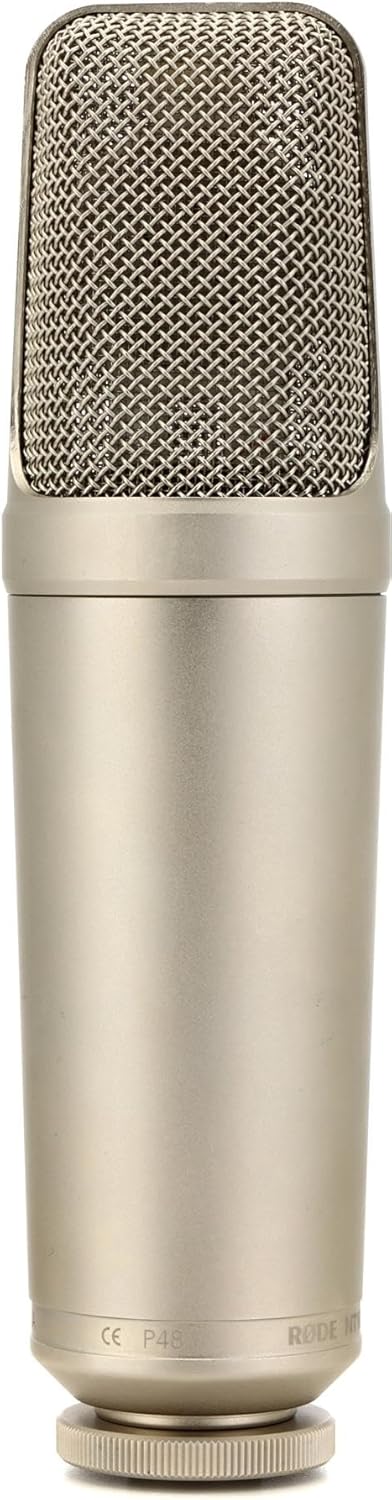
Figure 1: The Rode NT1000 microphone, showcasing its robust silver casing and mesh grille.
4.2 Connecting to an Audio Interface/Mixer
The NT1000 requires 48V phantom power for operation. It connects via a standard XLR cable.
- Connect one end of a high-quality XLR cable to the microphone's XLR output.
- Connect the other end of the XLR cable to an input on your audio interface, mixer, or preampליפער.
- Activate the 48V phantom power on your audio interface or mixer. The microphone will not function without phantom power.
5. אפערירן דעם מיקראָפאָן
5.1 Polar Pattern
The Rode NT1000 features a Unidirectional (Cardioid) polar pattern. This means it is most sensitive to sound coming from the front of the microphone and rejects sound from the sides and rear. This characteristic is beneficial for isolating the desired sound source and minimizing background noise.
5.2 אָפּטימאַלע פּלאַצירונג
For best results, position the microphone directly in front of the sound source. Experiment with distance and angle to achieve the desired tone and clarity. For vocals, a distance of 6-12 inches (15-30 cm) is often a good starting point. For instruments, placement will vary depending on the instrument and desired sound.

Figure 2: The Rode NT1000 positioned to capture the rich sound of a brass instrument, demonstrating its versatility for instrumental recording.
5.3 Gain Staging
געהעריק געווינס זtaging is crucial for achieving a clean recording. Adjust the gain on your audio interface or mixer so that the input signal is strong but does not clip (distort). Monitor your levels carefully during recording.
6. וישאַלט
- רייניקונג: Use a soft, dry cloth to clean the microphone's exterior. Do not use abrasive cleaners or solvents.
- סטאָרידזש: When not in use, store the microphone in its protective pouch or case in a cool, dry place, away from direct sunlight and excessive humidity.
- האַנדלינג: Always handle the microphone by its body, not by the grille or cable.
7. טראָובלעשאָאָטינג
7.1 קיין קלאַנג אַרויסגאַנג
- זיכער מאַכן אַז 48V פאַנטאָם מאַכט איז ענייבאַלד אויף דיין אַודיאָ צובינד/מיקסער.
- Check all cable connections. Ensure the XLR cable is securely plugged into both the microphone and the input device.
- Verify that the input gain on your audio interface/mixer is turned up.
- Test with a different XLR cable or input channel if available.
7.2 Hum or Noise in Audio
- זיכער מאַכן אַז אַלע קייבלס זענען ריכטיק באַשיצט און אין גוטן צושטאַנד.
- Check for ground loops. Try plugging your audio equipment into a different power outlet or using a power conditioner.
- Keep the microphone and cables away from power supplies, monitors, and other electronic devices that may cause interference.
7.3 Distorted Audio
- רעדוצירן די אינפוט געווינס אויף אייער אודיאָ אינטערפייס/מיקסער.
- פֿאַרגרעסערט די דיסטאַנץ צווישן דעם מיקראָפֿאָן און דער קלאַנג-מקור.
- Ensure the microphone is not overloaded by excessively loud sound sources.
8. ספּעסאַפאַקיישאַנז
| שטריך | באַשרייַבונג |
|---|---|
| מאַכט מקור | קאָרדעד עלעקטריק |
| מאַטעריאַל | ניקאַל |
| סיגנאַל-צו-נויז ראַטיאָ | 82 דב |
| נומער פון טשאַנאַלז | 1 |
| אָפטקייַט ראַנגע | 20 הערץ - 20 קילאָהרץ |
| אָפטקייַט ענטפער | 20 KHz |
| ראַש מדרגה | 6 דב |
| פּאָליאַר מוסטער | ונידירעקטיאָנאַל |
| ימפּידאַנס | 100 Ohm |
| פּונקט וואָג | 2.2 פונט |
| פּראָדוקט דימענשאַנז | 11 X 3 X 6 אינטשעס |
9. וואָראַנטי און שטיצן
The Rode NT1000 microphone comes with a manufacturer's warranty. For detailed information regarding warranty terms and conditions, please refer to the official Rode webוועבזייטל אדער די וואָראַנטי קאַרטל וואָס איז אַרייַנגערעכנט מיט דיין פּראָדוקט.
פֿאַר טעכנישע שטיצע, סערוויס, אָדער נאָך רעסורסן, ביטע באַזוכט די Rode Microphones official webפּלאַץ אָדער באַראַטנ זיך די באַניצער גייד (PDF) בנימצא אָנליין.


