הקדמה
This manual provides essential instructions for the safe and efficient operation of your NEC VT670 Value LCD Video Projector. Please read this manual thoroughly before using the projector and keep it for future reference. The NEC VT670 is designed for clear image projection with a native resolution of 1024 x 768 and a brightness of up to 2,100 ANSI lumens.
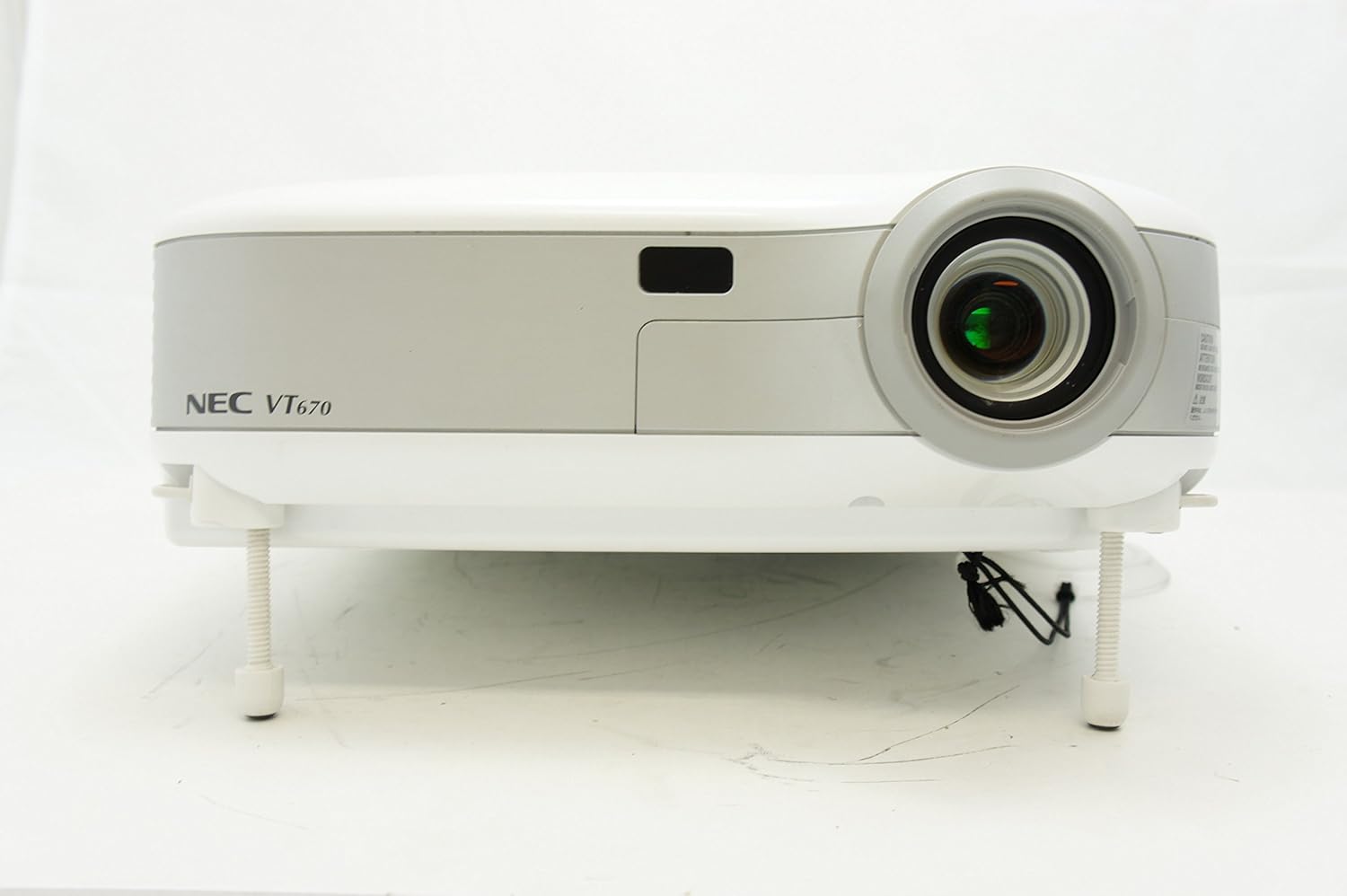
פיגורע 1: פראָנט view of the NEC VT670 projector, showing the lens and front panel.
סעטאַפּ
Follow these steps to set up your NEC VT670 projector:
- אָרט: Position the projector on a stable, flat surface or mount it according to the instructions for your specific mounting solution. Ensure adequate ventilation around the unit. The projector is designed for tabletop mounting.
- מאַכט קשר: Connect the power cord to the projector's power inlet and then to a grounded electrical outlet.
- מקור קשר: Connect your video source (e.g., computer, DVD player) to the appropriate input port on the projector. The VT670 supports VGA (D-Sub), S-Video, and composite video inputs. Use the color-coded connections for ease of setup.
- קאַבלע קאַנעקשאַנז: Ensure all necessary cables, such as the VGA cable for computer input, are securely connected to both the projector and the source device.
- אַודיאָ קאַנעקשאַן: If your source provides audio, connect it to the projector's audio input ports. The projector features built-in speakers.
- ערשט מאַכט אויף: דריק דעם מאַכט קנעפּל אויף דעם פּראָיעקטאָר אָדער ווײַטקאָנטראָל צו אַנצינדן דעם אַפּאַראַט.

פיגורע 2: Rear panel of the NEC VT670 projector, illustrating various input and output ports including VGA, S-Video, and audio connections.

פיגורע 3: Example of a VGA cable (left) and a power cable (right) used for connecting the projector.
אַפּערייטינג ינסטראַקשאַנז
This section details the basic operation of your projector.
מאַכט אויף / אַוועק
- צו מאַכט אויף, דריקן די מאַכט button once. The power indicator will illuminate.
- צו מאַכט אַוועק, דריקן די מאַכט button twice. The projector will enter a cooling cycle before shutting down completely.
אַרייַנשרייַב מקור סעלעקציע
- ניצן די אַרייַנשרייַב or dedicated source buttons (e.g., קאָמפּיוטער 1, VIDEO) on the control panel or remote to cycle through available input sources.

פיגורע 4: Top control panel of the NEC VT670 projector, showing power, input selection, and navigation buttons.
פאָקוס און פארגרעסער אַדזשאַסטמאַנט
- סטרויערן די פאָקוס רינג אויף דער לינזע ביז די בילד איז שאַרף און קלאָר.
- ניצן די ZOOM lever on the lens to adjust the image size to fit your screen.
מעניו נאַוויגאַציע
- דרוק די MENU button to access the on-screen display (OSD) menu.
- ניצן די פייַל קנעפּלעך (UP, אַראָפּ, לינקס, רעכט) to navigate through menu options.
- דרוק אַרייַן or אויסקלייַבן צו באַשטעטיקן אַ סעלעקציע.
- דרוק אַרויסגאַנג or MENU again to close the OSD menu.
וישאַלט
רעגולערע אויפהאלטונג גאראנטירט אפטימאלע פאָרשטעלונג און פארלענגערט די לעבנסדויער פון אייער פּראָיעקטאָר.
Lamp פאַרבייַט
די פּראַדזשעקטער לamp האט א באגרענעצטע לעבנס-צייט. ווען די לamp אינדיקאַטאָר צינדט זיך אָן אָדער דאָס בילד ווערט טונקל, די לamp may need replacement. Refer to the full service manual for detailed lamp אויסטויש פּראָצעדורן. לאָזט שטענדיק דעם פּראָיעקטאָר גאָר אָפּקילן איידער איר פּרוּווטamp פאַרבייַט.
לופט פילטער רייניקונג
Dust accumulation on the air filter can reduce cooling efficiency and affect projector performance. Clean the air filter regularly (e.g., every 100 hours of operation) by removing it and gently brushing off dust or using a vacuum cleaner. Replace the filter if it is damaged.
לענס רייניקונג
ווישט אָפּ די פּראָיעקטאָר לינז מיט אַ ווייכן, לינט-פֿרײַעם שטאָף ספּעציעל דיזיינד פֿאַר אָפּטישע פֿלאַכן. ניצט נישט קיין שרײַבנדיקע רייניגערס אָדער איבערגעטריבענע קראַפֿט.
טראָובלעשאָאָטינג
די סעקציע גיט לייזונגען צו געוויינטלעכע פראבלעמען וואָס איר קענט באַגעגענען.
| פּראָבלעם | מעגלעך סיבה | לייזונג |
|---|---|---|
| קיין בילד געוויזן |
|
|
| די בילד איז בלערי |
|
|
| קיין געזונט |
|
|
ספּעסאַפאַקיישאַנז
Key technical specifications for the NEC VT670 Value LCD Video Projector:
- מאָדעל נאָמען: VT670
- ווייַז טיפּ: לקד
- געבוירן רעזאלוציע: 1024 X 768 (XGA)
- מאַקסימום ברייטנאַס: 2,100 ANSI לומאַנז
- קאַנטראַסט פאַרהעלטעניש: 400:1
- קאַנעקטיוויטי טעכנאָלאָגיע: VGA (D-Sub), S-Video, Composite Video
- האַרדוואַרע קאַנעקטיוויטי: D-Sub, VGA
- מאַקסימום בילד גרייס: 300 אינטשעס
- פאָרם פאַקטאָר: פּאָרטאַטיוו
- מאַונטינג טיפּ: טאַבלעטאָפּ בארג
- קאָנטראָללער טיפּ: קנעפּל קאָנטראָל
- נומער וואָג: 9.2 פונט
- נאָך פֿעיִקייטן: געבויט-אין ספּיקערז
- שטיצט סיגנאַלז: PC, NTSC, PAL, SECAM, HDTV
וואָראַנטי אינפֿאָרמאַציע
The NEC VT670 Value LCD Video Projector comes with a 2 יאָר וואָראַנטי. This warranty covers defects in materials and workmanship under normal use. For specific terms and conditions, please refer to the warranty card included with your product or contact NEC customer support.
שטיצן
For further assistance, technical support, or service inquiries regarding your NEC VT670 projector, please visit the official NEC website or contact their customer service department. Keep your product model number (VT670) and serial number ready when contacting support.
אָנליין רעסורסן: www.nec.com


