1. Introduction to Puyo Pop Fever
Welcome to Puyo Pop Fever, the exciting puzzle game for the Nintendo GameCube. This manual provides essential information to help you get started and master the game's mechanics. Puyo Pop Fever introduces new gameplay elements, including Fever Mode, new puzzle piece types, and a cast of unique characters.
The core objective involves matching four or more Puyos of the same color to make them pop. Strategically creating chains and combos is key to sending Nuisance Puyos to your opponent's screen, aiming to fill their board and achieve victory.
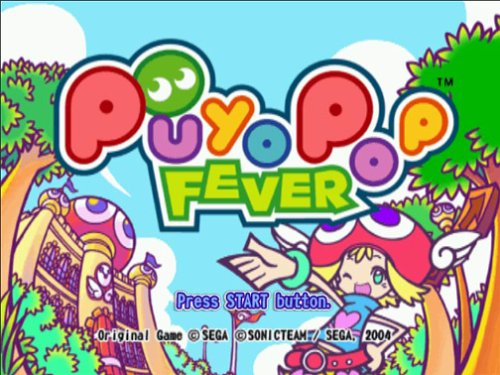
Image 1.1: The Puyo Pop Fever title screen, displaying the game logo and a character.
2. סעטאַפּ און ייַנמאָנטירונג
- אַרײַנשטעלן שפּיל דיסק: Gently insert the Puyo Pop Fever GameCube disc into your Nintendo GameCube console's disc tray. Ensure the disc is clean and free of scratches.
- פֿאַרבינדן קאַנסאָול: Ensure your Nintendo GameCube console is properly connected to your television or display device, and that the power adapter is securely plugged in.
- קאָננעקט קאָנטראָללער: Plug your Nintendo GameCube controller into one of the controller ports on the front of the console.
- מאַכט אויף: Turn on your television and select the correct input source. Then, press the POWER button on your GameCube console. The game should load automatically.
3. יקערדיק אַפּערייטינג ינסטרוקטיאָנס
3.1 Core Gameplay
Puyo Pop Fever is a falling-block puzzle game. Puyos, which are colorful, gelatinous creatures, fall from the top of the screen in pairs or larger formations. Your goal is to rotate and drop these Puyos to create groups of four or more of the same color. When a group of four or more identical Puyos connect horizontally, vertically, or diagonally, they pop and disappear from the board.

Image 3.1: A typical gameplay screen showing two player boards and falling Puyos.
3.2 קאָנטראָללער פונקציעס
- קאָנטראָל שטעקן: Move falling Puyos left or right.
- א קנעפּל: Drop Puyos quickly.
- ב קנעפּל: Rotate Puyos counter-clockwise.
- X/Y קנעפּלעך: Rotate Puyos clockwise.
- אָנהייב / פּויזע קנעפּל: Pause the game and access the options menu.
3.3 Chaining and Nuisance Puyos
The primary strategy in Puyo Pop Fever is to create chains. A chain occurs when popping Puyos cause other Puyos to fall and form new groups that also pop. Longer chains send more 'Nuisance Puyos' (gray, unpoppable Puyos) to your opponent's screen, hindering their progress. The game ends when Puyos stack up to the top of your playing field, specifically past the 'X' marks in the center columns.

Image 3.2: A chain reaction in progress, showing multiple Puyos popping sequentially.
3.4 Saving Game Progress
Game progress, including replay data, is not saved automatically. To save your game or replay data, you must access the options menu and manually select the save function. Ensure you save regularly to avoid losing progress.
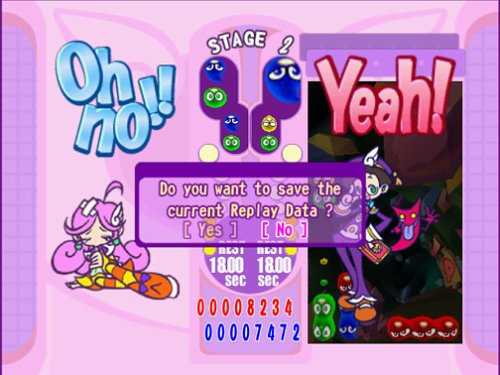
Image 3.3: The in-game prompt asking to save replay data.
4. שפּיל מאָדעס
- מעשה מאָדע: Embark on an adventure with Amitie and other characters through various stages, each with unique challenges and opponents.
- מולטיפּלייַער מאָדע: Challenge friends in head-to-head Puyo battles. Up to four players can participate, offering competitive and chaotic fun.
- Fever Mode: This special mode activates after clearing specific patterns or chains. During Fever Time, pre-arranged chains appear on your board, allowing you to quickly execute powerful combos and send massive amounts of Nuisance Puyos to your opponent. Mastering Fever Mode is crucial for high-level play.
- פּראַקטיסיז מאָדע: Hone your skills without the pressure of opponents or time limits. This mode is ideal for experimenting with chain building and understanding Puyo physics.
- Tutorial Mode: Learn the fundamental and advanced techniques of Puyo Pop Fever through guided lessons. This is highly recommended for new players.
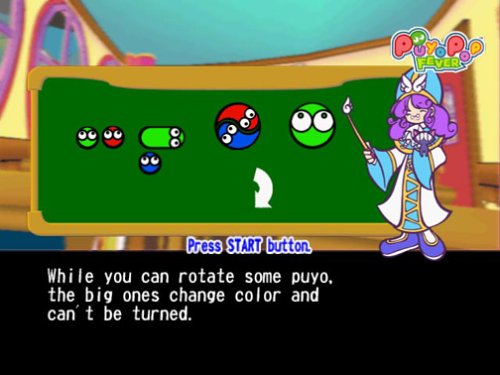
Image 4.1: A tutorial screen explaining different Puyo types and their properties.
5. Advanced Techniques
To excel in Puyo Pop Fever, consider these advanced strategies:
- Chain Building: Focus on setting up complex, multi-stage chains. This involves carefully stacking Puyos so that when one group pops, it triggers a cascade of subsequent pops.
- Countering Nuisance Puyos: When Nuisance Puyos fall onto your board, try to clear them by popping adjacent colored Puyos. Activating Fever Mode can also help clear your board quickly.
- Fever Mode Optimization: During Fever Time, identify the pre-built chains quickly and execute them efficiently. The goal is to complete as many chains as possible before Fever Time ends to maximize damage to your opponent.
- Big Puyo Strategy: Some puzzle pieces include a 'Giant Puyo' which changes color. Use this to your advantage to create large groups or extend chains.

Image 5.1: Gameplay showing a large Puyo in action, which can change color to assist in chain building.
6. וישאַלט
Proper care of your game disc and console will ensure long-lasting enjoyment:
- דיסק באַהאַנדלונג: Always handle the game disc by its edges. Store it in its original case when not in use to prevent scratches and dust accumulation. Clean the disc with a soft, lint-free cloth, wiping from the center outwards if necessary.
- Console Care: Keep your GameCube console in a clean, dust-free environment. Ensure proper ventilation to prevent overheating.
- קאָנטראָללער באַהאַנדלונג: Keep your controller clean and avoid exposing it to liquids.
7. טראָובלעשאָאָטינג
- שפּיל לאָודט זיך נישט: Ensure the disc is clean and correctly inserted. Check all console connections (power, video). If the issue persists, try another GameCube game to determine if the problem is with the disc or the console.
- קאָנטראָללער רעאַגירט נישט: Verify the controller is securely plugged into the correct port. Try a different controller if available.
- Saving Issues: Remember that saving is manual. Always navigate to the options menu and select the save function to record your progress or replay data.
- אַודיאָ/ווידעאָ פּראָבלעמען: Check your TV's input selection and volume settings. Ensure all A/V cables are firmly connected between the GameCube and your television.
- Voice Acting Volume: If the in-game voice acting is distracting, you can often adjust its volume or switch to original Japanese voices via the game's audio settings menu.
8. ספּעסאַפאַקיישאַנז
| שטריך | דעטאַל |
|---|---|
| פּלאַטפאָרמע | נינטענדאָו גאַמעקובע |
| מאָדעל נומער | 010086610307 |
| מעלדונג טאָג | יולי 21, 2004 |
| פּראָדוקט דימענשאַנז | 7.75 X 5.5 X 0.75 אינטשעס |
| פּונקט וואָג | 4.8 אונסעס |
| ESRB ראַנג | אַלעמען |
| פאַבריקאַנט | SEGA |
9. וואָראַנטי און שטיצן
For technical assistance, warranty information, or customer support regarding Puyo Pop Fever for GameCube, please refer to the official SEGA website or contact SEGA customer service directly. Specific warranty terms may vary based on region and purchase date.


