הקדמה
א דאנק פארן קויפןasing the Nyko AirFlo EX Controller for PlayStation 2. This controller is designed to enhance your gaming experience with its unique airflow feature, providing comfort during extended gameplay sessions. Please read this manual thoroughly before use to ensure proper setup and operation.
פּעקל אינהאַלט
- Nyko AirFlo EX Controller for PlayStation 2
- באַניצער מאַנואַל (דעם דאָקומענט)
קאָנטראָללער פֿעיִקייטן
The Nyko AirFlo EX Controller integrates several features for an optimized gaming experience:
- AirFlo Cooling System: An integrated fan provides airflow to help keep hands dry and comfortable during intense gaming.
- ערגאָנאָמיק פּלאַן: Shaped for comfortable grip and extended play.
- Standard PlayStation 2 Controls: Includes directional pad, action buttons (Triangle, Circle, Cross, Square), L1/R1/L2/R2 shoulder buttons, START, SELECT, and analog sticks (L3/R3 functionality).
- ווייבריישאַן באַמערקונגען: Supports in-game vibration effects for enhanced immersion.
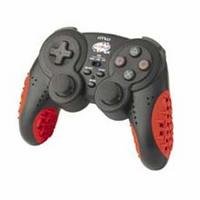
Image: Nyko AirFlo EX Controller for PlayStation 2. This image displays the front view of the controller, highlighting its button layout and ergonomic shape.
סעטאַפּ
- פֿאַרבינדן זיך צו פּלייסטיישאַן 2: Locate an available controller port on your PlayStation 2 console.
- אַרייַנלייגן קאַנעקטער: Firmly insert the controller's connector cable into the chosen port. Ensure it is fully seated.
- מאַכט אויף קאַנסאָול: Turn on your PlayStation 2 console. The controller should be automatically recognized.
- טעסט פאַנגקשאַנאַליטי: Navigate the PlayStation 2 menu or start a game to confirm all buttons and analog sticks are responsive.
אַפּערייטינג ינסטראַקשאַנז
The Nyko AirFlo EX Controller operates similarly to standard PlayStation 2 controllers, with the added AirFlo feature.
- יקערדיק קאָנטראָלס: Use the directional pad or left analog stick for movement, and the action buttons (Triangle, Circle, Cross, Square) for in-game actions.
- אנאַלאָג שטעקן פאַנגקשאַנאַליטי: Pressing the analog sticks down activates L3 and R3 functions, if supported by the game.
- AirFlo Fan Activation: The AirFlo fan is typically activated by a switch or button on the controller itself. Refer to the controller's physical layout for the exact location of the fan control. Toggle this control to turn the fan on or off.
- ווייבריישאַן באַמערקונגען: Vibration effects will automatically engage during gameplay when supported by the software.
וישאַלט
- רייניקונג: ניצט אַ ווייכע, טרוקענע שטאָף צו רייניקן די קאָנטראָללער'ס ייבערפלאַך. פֿאַר שווערע שמוץ, ניצט אַ ביסל טרוקן שטאָף.amp cloth can be used, ensuring no moisture enters openings. Do not use harsh chemicals or abrasive cleaners.
- סטאָרידזש: Store the controller in a cool, dry place away from direct sunlight and extreme temperatures. Avoid wrapping the cable tightly around the controller to prevent damage.
- ויסמיידן טראפנס: באַשיצן דעם קאָנטראָללער פֿון פֿאַלן און קלאַפּן, וואָס קענען שעדיקן אינעווייניקסטע קאָמפּאָנענטן.
טראָובלעשאָאָטינג
| פּראָבלעם | מעגלעך לייזונג |
|---|---|
| קאָנטראָללער רעאַגירט נישט. |
|
| AirFlo fan not working. |
|
| Buttons or analog sticks are unresponsive or stiff. |
|
ספּעסאַפאַקיישאַנז
- מאָדעל: AirFlo EX
- קאַמפּאַטאַבילאַטי: פּלייסטיישאַן 2
- נומער וואָג: 9.6 אונסעס (בעערעך 272 גראַמז)
- פּעקל דימענשאַנז: 6 X 4.8 X 2.7 אינטשעס (בעערעך 15.2 X 12.2 X 6.9 סענטימעטער)
- קאַנעקטיוויטי: ווייערד
- ספּעציעלע פֿעיִקייטן: Integrated AirFlo cooling fan
וואָראַנטי און שטיצן
For warranty information, technical support, or service inquiries regarding your Nyko AirFlo EX Controller, please contact Nyko customer support directly. Details can typically be found on the official Nyko webזייטל אדער פּראָדוקט פּאַקאַדזשינג.
Nyko Official Webפּלאַץ: www.nyko.com (באַמערקונג: דאָס איז אַ פּלאַץ האָלדער URL. Please refer to your product packaging or official Nyko documentation for the most current support information.)