הקדמה
This manual provides essential instructions for the setup, operation, maintenance, and troubleshooting of your Trust Soundwave 1000P PC Speaker system. Please read this manual thoroughly before using the product to ensure proper functionality and longevity.
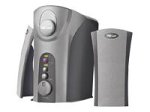
Image: The Trust Soundwave 1000P PC Speaker system, featuring a central subwoofer unit and two compact satellite speakers, designed for computer audio. The subwoofer is typically placed on the floor, while the satellite speakers are positioned on a desk.
סעטאַפּ אינסטרוקציעס
Follow these steps to correctly set up your Trust Soundwave 1000P PC Speaker system.
- אויספּאַקן: Carefully remove all components from the packaging. Ensure you have the subwoofer, two satellite speakers, and all necessary cables.
- רעדנער אָרט:
- Place the subwoofer on the floor, preferably near your computer desk, to optimize bass response. The vertical bass reflex design benefits from clear space around it.
- Position the two satellite speakers on your desk, equidistant from your listening position, for optimal stereo sound.
- פֿאַרבינדן סאַטעליט רעדנערס: Connect the cables from the satellite speakers to the corresponding output ports on the subwoofer unit. Ensure a secure connection.
- Connecting to Audio Source (PC): Connect the 3.5mm audio jack cable from the subwoofer to the audio output port (usually green) on your computer's sound card.
- מאַכט קשר: Plug the power cable from the subwoofer into a standard electrical outlet.
- ערשט מאַכט אויף: Turn on the speaker system using the power control, typically located on the subwoofer or a wired remote.
אַפּערייטינג די ספּיקערז
Once set up, you can begin using your Soundwave 1000P speakers.
- מאַכט אויף / אַוועק: Use the main power switch or button to turn the system on or off. An indicator light may confirm the power status.
- באַנד קאָנטראָל: Adjust the overall volume using the dedicated volume knob or controls. Start with a low volume and gradually increase it.
- באַס אַדזשאַסטמאַנט: The subwoofer features an adjustable bass control. Rotate the bass knob to achieve your desired level of deep bass.
- 3D Sound Switch: Activate or deactivate the 3D sound feature using the designated switch. Experiment with this setting to find your preferred audio experience for different content.
- אַודיאָ אַרייַנשרייַב: The system primarily uses an AUX connection. Ensure your audio source is playing sound through its 3.5mm audio output.
וישאַלט און זאָרג
געהעריקע אויפהאלטונג גאראנטירט די לאנגעוויטי און אפטימאלע פאָרשטעלונג פון אייער רעדנער סיסטעם.
- רייניקונג:
- דיסקאַנעקט די מאַכט איידער רייניקונג.
- Use a soft, dry cloth to wipe down the speaker surfaces.
- ניצט נישט פליסיקע רייניגער, אַעראָסאָלן, אדער אַברייסיוו מאַטעריאַלן, ווײַל די קענען שעדיקן די ענדיקונג אדער אינעווייניקסטע קאָמפּאָנענטן.
- אָרט: Avoid placing speakers in direct sunlight, near heat sources, or in areas with high humidity. Ensure adequate ventilation around the subwoofer.
- קאַבלע פאַרוואַלטונג: האַלט די קאַבלען אָרדנטלעך און פֿאַרמייַדט שאַרפֿע בייגן אָדער קנייטשן צו פֿאַרמייַדן שאָדן.
- סטאָרידזש: If storing the speakers for an extended period, disconnect them from power, clean them, and store them in a dry, cool place, preferably in their original packaging.
טראָובלעשאָאָטינג גייד
If you encounter issues with your Trust Soundwave 1000P speakers, refer to the following common problems and solutions.
| פּראָבלעם | מעגלעך סיבה | לייזונג |
|---|---|---|
| קיין געזונט פון ספּיקערז. |
|
|
| פארדרייטער אדער אומקלארער קלאַנג. |
|
|
| Subwoofer not producing bass. |
|
|
פּראָדוקט ספּעסאַפאַקיישאַנז
Key technical details for the Trust Soundwave 1000P PC Speaker system.
- מאָדעל נומער: 12616
- סאָרט: צוטרוי
- רעדנער טיפּ: Subwoofer (2.1 system)
- מאַקסימום פּיק רעזולטאַט מאַכט: 1000 וואט
- רמס וואטtage: 7 Watt (5 + 2 x 1 Watt RMS)
- קאַנעקטיוויטי טעכנאָלאָגיע: AUX (3.5mm jack)
- אַודיאָ רעזולטאַט מאָדע: סטערעאָ
- מאַכט מקור: ווייערד עלעקטריק
- נומער וואָג: 10 ג
- מאַונטינג טיפּ: Tabletop Mount (for satellites), Floor (for subwoofer)
- קאָנטראָל אופֿן: ריר
וואָראַנטי אינפֿאָרמאַציע
דער פּראָדוקט קומט מיט אַ לימיטעד וואָראַנטי. For specific terms and conditions, including warranty duration and claim procedures, please refer to the warranty card included with your purchase or visit the official Trust webזייטל. האַלט דיין קויפן באַווייַז פֿאַר וואָראַנטי קליימז.
קונה שטיצן
For further assistance, technical support, or inquiries not covered in this manual, please visit the official Trust support webזייטל אדער קאנטאקט זייער קאסטומער סערוויס דעפארטמענט. קאנטאקט דעטאלן קען מען געווענליך געפינען אויף די פאבריקאנט'ס webזייטל אדער פּראָדוקט פּאַקאַדזשינג.
אפיציעלע טראסט Webפּלאַץ: www.trust.com


