הקדמה
This manual provides detailed instructions for the setup, operation, and maintenance of your Audiovox CE-122 Personal CD Player with Car Kit. Please read this manual thoroughly before using your device to ensure proper functionality and to maximize your listening experience.
The Audiovox CE-122 is a portable CD player designed for versatile use, featuring a Digital Anti-Shock System (DASS) for uninterrupted playback during movement, a 22-track programmable memory, and a bass boost function. It includes a complete car kit for in-vehicle use.
פּעקל אינהאַלט
באַשטעטיקט אַז אַלע זאכן וואָס זענען אויסגערעכנט אונטן זענען אַרייַנגערעכנט אין אייער פּעקל:
- Audiovox CE-122 Portable CD Player
- כעדפאָונז
- אַק אַדאַפּטער
- מאַשין אַדאַפּטער
- קאַסעט אַדאַפּטער
- באַניצערס מאַנואַל (דאָס דאָקומענט)
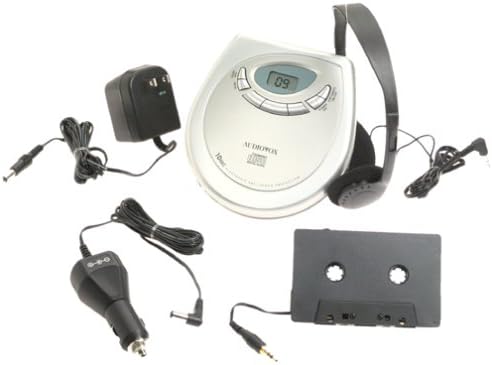
בילד: The Audiovox CE-122 portable CD player shown with all its accessories, including headphones, AC adapter, car adapter, and cassette adapter.
פּראָדוקט פֿעיִקייטן
- Plays audio CD and CD-R/RW discs.
- AC/DC operation for home and portable use.
- Complete car kit included for in-vehicle audio.
- Digital Anti-Shock System (DASS) provides up to 20 seconds of skip protection.
- 22-track programmable memory for custom playback sequences.
- Bass boost feature for enhanced audio.
- Forward and reverse search functions.
- Repeat and pause functions.
- Key hold switch to prevent accidental button presses.
- Line out jack for connecting to external audio systems.
- Auto power off function to conserve battery life.
- Dual stereo headphone jack for shared listening.
- Built-in charger for rechargeable batteries (rechargeable batteries not included).
סעטאַפּ
1. ינסערטינג באַטעריז
The CD player operates on 4 AA batteries (included). For rechargeable batteries (not included), ensure they are inserted correctly for charging.
- עפֿענען די דעקן פון די באַטאַרייע אָפּטייל אויף די דנאָ פון די אַפּאַראַט.
- אַרײַנשטעלן 4 AA באַטעריעס, אָבסערווירנדיק די ריכטיקע פּאָלאַריטעט (+/-) ווי אָנגעוויזן אינעווייניק אין דעם אָפּטייל.
- פאַרמאַכן די באַטאַרייע אָפּטייל דעקן סיקיורלי.
2. Connecting Power (AC Adapter)
For home use or to charge rechargeable batteries:
- Plug the small end of the AC adapter into the DC IN 4.5V jack on the CD player.
- צאַפּן די אנדערע סוף פון די אַק אַדאַפּטער אין אַ נאָרמאַל וואַנט ווענטיל.
- If using rechargeable batteries, select the 'charge' function (if available on your model) to begin charging.
3. קאַנעקטינג כעדפאָונז
Plug the headphones into one of the two headphone jacks on the side of the CD player.

בילד: אַ נאָענט-אַרויף view of the headphones included with the Audiovox CE-122 CD player.
4. Car Kit Setup
To use the CD player in your vehicle:
- Plug the car adapter into your vehicle's cigarette lighter or 12V power outlet.
- Connect the small end of the car adapter to the DC IN 4.5V jack on the CD player.
- Insert the cassette adapter into your vehicle's cassette player.
- Connect the audio cable from the cassette adapter to the LINE OUT jack on the CD player.
- Ensure your car stereo is set to the cassette function to hear the CD player's audio.
אַפּערייטינג ינסטראַקשאַנז
1. Inserting a CD
- Press the OPEN button to open the CD compartment lid.
- Place a CD (audio CD or CD-R/RW) onto the center spindle with the label side facing up.
- דריק די סי-די אראפ מיט א גוטן טון ביז זי קליקט אריין אין פלאץ.
- פֿאַרמאַכט דעם דעקל פֿון דעם סי-די אָפּטייל פֿעסט ביז עס פֿאַרשליסט זיך.

בילד: The Audiovox CE-122 portable CD player with its lid open, revealing the disc compartment where a CD is placed.
2. גרונטלעכע ווידערשפּיל
- שפּיל: דרוק די שפּיל / פּויזע button to start playback. The track number will appear on the display.
- פּויזע: דרוק די שפּיל / פּויזע button during playback to pause. Press again to resume.
- אָפּשטעל: דרוק די האַלטן קנעפּל צו האַלטן פּלייבאַק.
3. שפּור נאַוויגאַציע
- האָפּקען שפּור: דרוק די האָפּקען פאָרויס (►►) or האָפּקען צוריק (◄◄) buttons to move to the next or previous track.
- זוכן: דריקן און האַלטן די האָפּקען פאָרויס (►►) or האָפּקען צוריק (◄◄) buttons during playback to fast forward or rewind within a track.
4. איבערחזרן פֿונקציע
דרוק די איבערחזרן button to cycle through repeat modes:
- איבערחזרן 1: ריפּיץ די קראַנט שפּור.
- איבערחזרן אַלע: Repeats all tracks on the disc.
- איבערחזרן אַוועק: Disables repeat function.
5. Programmable Memory
You can program up to 22 tracks to play in a specific order:
- מיט די סי-די אפגעשטעלט, דריק די פּראָגראַם קנעפּל.
- ניצן די האָפּקען פאָרויס (►►) or האָפּקען צוריק (◄◄) buttons to select the desired track.
- דרוק פּראָגראַם again to add the track to the memory.
- Repeat steps 2 and 3 for up to 22 tracks.
- דרוק שפּיל / פּויזע to start playback of the programmed sequence.
6. באַס בוסט
דרוק די באַס בוסט button to activate or deactivate the bass enhancement feature.
7. Key Hold Switch
רוק די האַלטן switch to the ON position to disable all buttons, preventing accidental operation during transport.
8. Digital Anti-Shock System (DASS)
The DASS provides up to 20 seconds of skip protection. This feature is automatically active during playback to ensure smooth audio even during movement.
9. אַוטאָ פּאָווער אַוועק
The unit will automatically power off after a period of inactivity or when a CD finishes playing to conserve battery life.

בילד: The Audiovox CE-122 portable CD player, a silver-colored device with a digital display and control buttons, shown alongside its black over-ear headphones.
וישאַלט
1. Cleaning the CD Player
- ווישט אָפּ די אויסערלעכע זייט פון דער איינהייט מיט אַ ווייכן, טרוקענעם שטאָף. ניצט נישט קיין שרײַבנדיקע רייניגער אָדער סאָלווענטן.
- To clean the lens, use a specialized CD lens cleaner disc. Do not touch the lens directly.
2. באַטערי קער
- אַרויסנעמען באַטעריעס אויב די אַפּאַראַט וועט נישט ווערן גענוצט פֿאַר אַ לענגערע צייט צו פאַרמייַדן ליקאַדזש.
- Replace all batteries at the same time; do not mix old and new batteries or different types of batteries.
3. סטאָרידזש
Store the CD player in a cool, dry place away from direct sunlight and extreme temperatures.
טראָובלעשאָאָטינג
If you encounter issues with your Audiovox CE-122, please refer to the following common problems and solutions:
- קיין מאַכט:
• Check if batteries are inserted correctly and are not depleted. Replace if necessary.
• Ensure the AC adapter or car adapter is securely connected and the power source is active. - CD Not Playing / Disc Error:
• Ensure the CD is inserted correctly with the label side up.
• Check if the CD is scratched or dirty. Clean the CD with a soft, lint-free cloth.
• Make sure the CD compartment lid is fully closed.
• The disc format may not be supported (e.g., data CD instead of audio CD or CD-R/RW). - Skipping During Playback:
• While the DASS provides protection, severe shocks or vibrations can still cause skipping. Try to keep the player stable.
• Ensure the CD is clean and free of scratches.
• Low battery power can sometimes affect anti-shock performance. Replace or recharge batteries. - קיין קול:
• Check headphone connection and ensure they are fully plugged in.
• סטרויערן די באַנד.
• If using the car kit, ensure the car stereo is set to the correct input (cassette function) and volume is up. - קנעפּלעך ניט ריספּאַנדינג:
• קוק צי די האַלטן switch is in the ON position. Slide it to OFF to enable buttons.
ספּעסאַפאַקיישאַנז
| מאָדעל נומער | CE-122 |
| שטיצט דיסק פֿאָרמאַטירונגען | Audio CD, CD-R/RW (MP3 compatible) |
| אַנטי-שאַק פּראַטעקשאַן | 20 seconds (Digital Anti-Shock System) |
| פּראָגראַממאַבלע זכּרון | 22 טראַקס |
| מאַכט מקור | 4 x AA batteries, AC adapter (4.5V DC), Car adapter (12V DC) |
| קאַנעקטיוויטי | Auxiliary (Line Out), Dual Headphone Jacks |
| דימענסיעס (בעערעך) | 11.1 x 7.8 x 3.2 אינטשעס (פּאַקעט) |
| וואָג (בעערעך) | 1.5 פונט |
וואָראַנטי און שטיצן
For warranty information and customer support, please refer to the documentation provided at the time of purchase or contact Audiovox customer service. Keep your proof of purchase for warranty claims.


