

Xnbada C01W סעריע RGB LED קאָנטראָללער אינסטרוקציע מאַנואַל

Please download Smart Life APP or Tuya Smart APP to control C01W N COSW
פֿעיִקייטן

פּאַראַמעטערס
איין קאָליר געפירט קאָנטראָללער
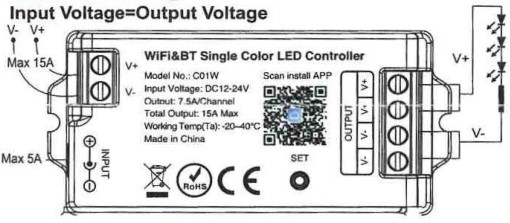
Model No.:C01W
אַרייַנשרייַב וואָלtage: DC12-24V(5.5•2.1 mm) 0-Co–(J)
Output: 7.5A/Channel; Total 15A Max
Working Temperature(Ta): -20-4o•c
Support: WiFi&2.4GHz RF
גרייס: 74.5 * 35.5 * 16.5 מם
קאָנטראָל דיסטאַנסע: 30 ם
Connection Diagram;
אַרייַנשרייַב וואָלtage = רעזולטאַט וואָלtage
Dual White CCT LED Controller
Model No.:C02W
אַרייַנשרייַב וואָלtage: DC12-24V(5.5•2.1mm) 0-Co–(J)
Output: 7.5A/Channel; Total 1SA Max
Working Temperature(Ta): -20-40•c
Support: WiFi&2.4GHz RF
גרייס: 74.5 * 35.5 * 16.5 מם
קאָנטראָל דיסטאַנסע: 30 ם
קשר דיאַגראַמע:
אַרייַנשרייַב וואָלtage = רעזולטאַט וואָלtage

RGB געפירט קאָנטראָללער
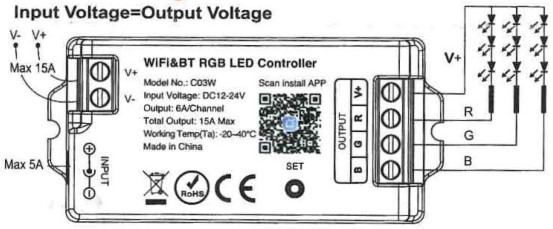
Model No.:C03W
אַרייַנשרייַב וואָלtage: DC12-24V(s.s•2.1mm) 0-Co–(J)
Output: GA/Channel; Total 15A Max
Working Temperature(Ta): -20-4o •c
Support: WiFi&2.4GHz RF
גרייס: 74.5 * 35.5 * 16.5 מם
קאָנטראָל דיסטאַנסע: 30 ם
קשר דיאַגראַמע:
אַרייַנשרייַב וואָלtage = רעזולטאַט וואָלtage
RGBW געפירט קאָנטראָללער
Model No .: C04W
אַרייַנשרייַב וואָלtage: DC12-24VCs.s•2.1mm) 0-Co–(J)
Output: 6A/Channel; Total 15A Max •
Working Temperature( Ta ): -20-4o•c
Support: WiFi&2.4GHz RF
גרייס: 74.5 * 35.5 * 16.5 מם
קאָנטראָל דיסטאַנסע: 30 ם
קשר דיאַגראַמע:
אַרייַנשרייַב וואָלtage = רעזולטאַט וואָלtage

RGBCCT געפירט קאָנטראָללער
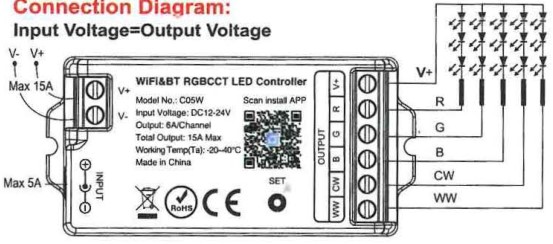
Model No.:C05W
אַרייַנשרייַב וואָלtage: DC12-24V(s.s•2.1mm) 0-Co–(J)
Output: 6A/Channel; Total 15A Max
Working Temperature(Ta): -20-40•c
Support: WiFi&2.4GHz RF
גרייס: 74.5 * 35.5 * 16.5 מם
קאָנטראָל דיסטאַנסע: 30 ם
קשר דיאַגראַמע:
אַרייַנשרייַב וואָלtage = רעזולטאַט וואָלtage
Compatible Remote Controller:
Work with RF Remote, LM remote

באַמערקונג: 007 is compatible with C01W and C02W.
096&091 is compatible with C03W, C04W and C05W.

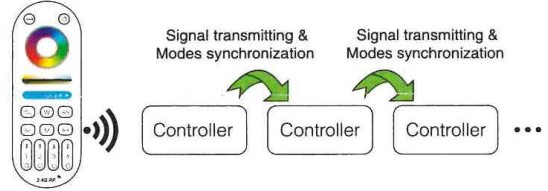
סיגנאַל טראַנסמיטינג
איין פּאַס קאָנטראָללער קענען יבערשיקן די סיגנאַלז פון די ווייַט קאָנטראָל צו אן אנדער קאָנטראָללער ין 30 ם, ווי לאַנג ווי עס איז אַ פּאַס קאָנטראָללער ין 30 ם, די ווייַט קאָנטראָל דיסטאַנסע קענען זיין לימאַטלאַס.
מאָדע סינגקראַנאַזיישאַן
פאַרשידענע קאַנטראָולערז קענען אַרבעטן סינטשראָנאָוסלי ווען זיי זענען סטאַרטעד אין פאַרשידענע צייט, קאַנטראָולד דורך דער זעלביקער ווייַט, אונטער דער זעלביקער דינאַמיש מאָדע און מיט דער זעלביקער גיכקייַט.
סמאַרטפאָנע אַפּ וויפי קאָנטראָל לימעד
1. Download and install [Smart Life] or [Tuya Smart] APP
זוכן פֿאַר [Smart Life] in Apple or Google store or scan following QR code to download and install the app.
Please click” Register” button to create account while using it in the first time, Log in directly if you already had account.


2. Link to Smartphone & Reset Devices
- מאַכן זיכער אַז Smartphone איז ארבעטן אויף די WLAN נעץ.
- Long press “SET” button, or switch ON-OFF power 4 times (ON-OFF-ON-OFF-ON-OFF-ON),when the white light blink, the device come into link or reset mode.
- Open the sign-in APP, it will discover the devices automatically, (If it’s not discovered, please click”+” on the top right corner, and select “add new device” manually) follow the steps and complete linking;

- Added devices will be displayed on homepage after linking successfully, then click the device and go into the control interface for more operation.
 באַמערקונג: Please complete. the linking within, 3 minutes, after 3 minutes, the devices will not on linking mode, you have to do above “2)” step, and link again.
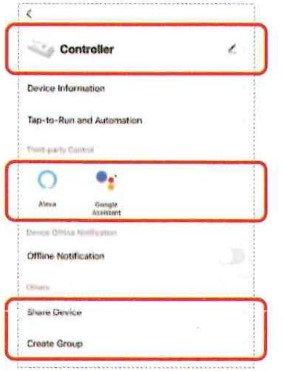
 - Device name editing, third-party control, device sharing, group
קאָנטראָל.- דריקט "
 "אין דער אויבערשטער רעכט ווינקל פון קאָנטראָל בלאַט צו אַרייַן די רעדאַגירן בלאַט, ווו איר קענען מאָדיפיצירן די נאָמען פון די מיטל, ייקאַן, עטק.
 - דריקט בילדל אונטער דריט-פּאַרטיי קאָנטראָל צו view דיטיילד באַשרייַבונג פון דריט-פּאַרטיי קאָנטראָל.
- דריקט "ייַנטיילן מיטל" צו טיילן די מיטל מיט משפּחה און פרענדז.
- Click” Create Group • and follow APP prompt after setting is completed, the device can be controlled by group.
- דריקט "
בלועטאָאָטה קאָנטראָל:
While the WiFi router disconnected, you can open the Bluetooth on your smartphone and control the linked device directly at a shorter distance(within 20M).
באַשטימען בלועטאָאָטה קאָנטראָל סטעפּס:
- Complete the network configuration of the devices on your smartphone first.
- Disconnect the WiFi router connected to the device, close WiFi signal and 4G signal on your smartphone, then open the Bluetooth, wait for some minutes to control.
ופמערקזאַמקייַט
- ביטע טשעק צי די אַרייַנשרייַב וואָלtagE פון די קעסיידערדיק וואָלtagדי מאַכט צושטעלן איז אין לויט מיט די קאָנטראָללער, און ביטע טשעק די קשר פון ביידע די קאַטאָוד און אַנאָוד.
- די אַרבעט וואָלtage is DC12-24V,t he controller will be broken if the voltagE איז העכער ווי 24V.
- ניט-פאַכמאַן באַניצער קענען נישט דיסמאַנאַל די קאָנטראָללער גלייַך, אַנדערש עס קען פאַרשאַפן פייַער און עלעקטריש קלאַפּ.
- The working temperature(Ta) is-25-45 ‘C ; Do not use the device to direct sunlight, moist and other high temperature area.
- Please do not use controller around the mental area and high magnetic field, otherwise.it will badly affect the control distance.
- When the device load to 15A,wire diameter must be over 1.5mm 2 .
- When the device load over 1 0A , the connecting cable must be shorter than 40cm long from DC port to LED strip.
- ביטע ינסטאַלירן די מיטל אויף אַ גוט דיסיפּיישאַן געגנט.
- קאָנטאַקט@btf-lighting.com Welcome to consult
- www.btf-lighting.com

דאָקומענטן / רעסאָורסעס
 |
Xnbada C01W Series RGB LED Controller [pdf] אינסטרוקציע מאַנואַל C01W, C02W, C03W, C01W Series RGB LED Controller, C01W Series, RGB LED Controller, LED Controller, Controller |