
1. הקדמה
This manual provides instructions for the proper setup, operation, and maintenance of your BCZWLWCND Air Conditioner Remote Control. Please read this manual thoroughly before using the remote control to ensure optimal performance and longevity. This remote is designed to be compatible with various air conditioner models, including YR-M10, YR-M02, YR-M05, YR-M07, YR-M09, and YL-M10.
2. פּראָדוקט איבערview
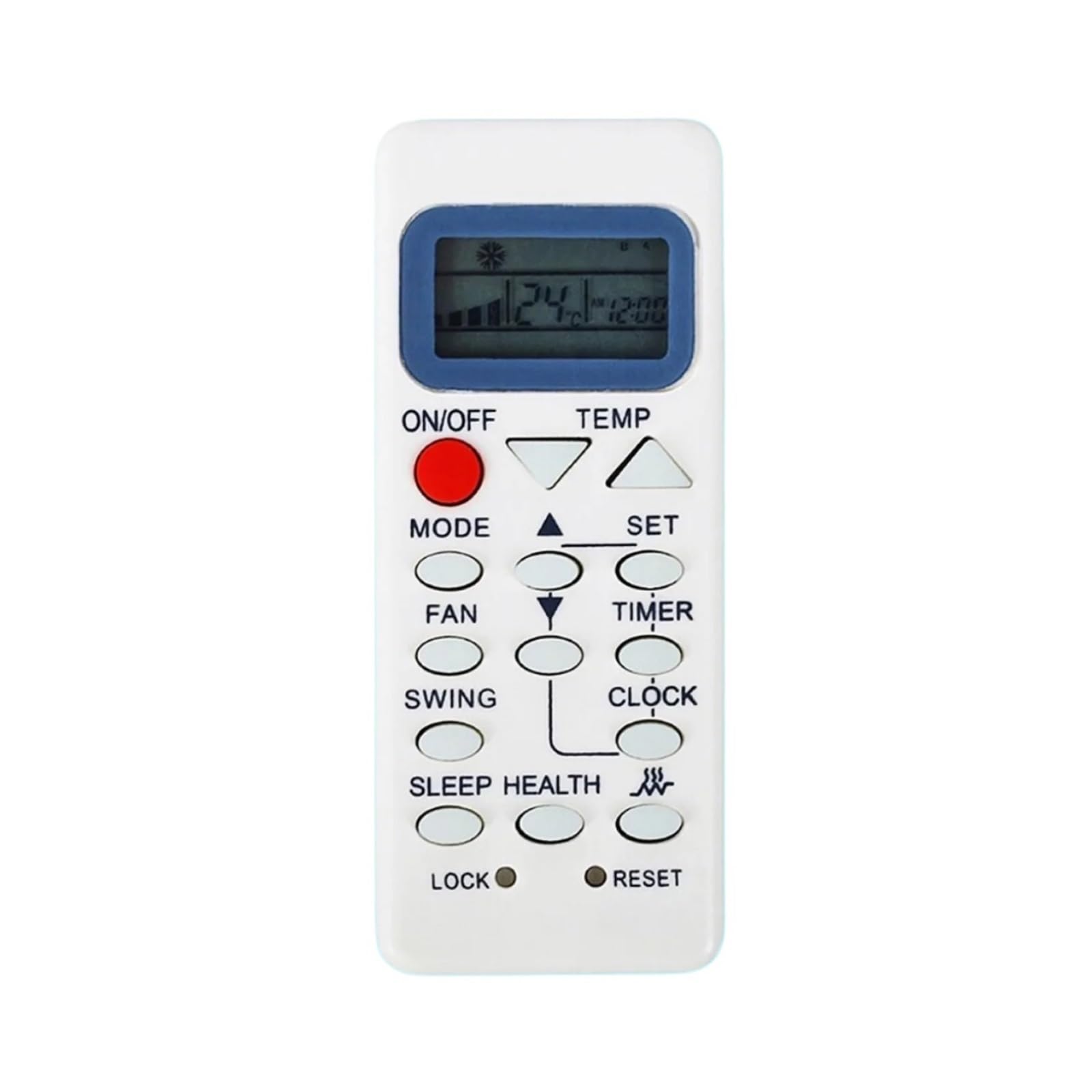
The BCZWLWCND remote control is a replacement unit designed for specific air conditioner models. It features a simple, ergonomic design for comfortable handling and ease of use. The primary function is to control your air conditioner's settings, including power, mode, temperature, and fan speed.
This image displays the back of the BCZWLWCND air conditioner remote control. The design is simple and ergonomic, featuring a removable cover for the battery compartment located at the bottom half of the remote. The top half shows a smooth, slightly recessed area, possibly for grip or internal components. The overall color is white.
3. סעטאַפּ
3.1 באַטאַרייע ייַנמאָנטירונג
- געפֿינען די דעקן פון די באַטאַרייע אָפּטייל אויף די צוריק פון די ווייַט קאָנטראָל.
- שלעפּט דעם דעקל אַראָפּ אָדער דריק דעם לאַטש (אויב פֿאַראַן) צו עפֿענען דעם אָפּטייל.
- אַרײַנשטעלן צוויי נײַע AAA באַטעריעס (נישט אַרײַנגערעכנט), און זיכער מאַכן אַז די פּאָזיטיוו (+) און נעגאַטיוו (-) טערמינאַלן פּאַסן צו די דיאַגראַמען אין דעם אָפּטייל.
- שטופּט צוריק דעם דעקל פון דעם באַטעריע־אָפּטייל ביז עס קליקט זיכער.
באַמערקונג: Always replace both batteries at the same time with new ones. Do not mix old and new batteries or different types of batteries.
4. אַפּערייטינג ינסטרוקטיאָנס
Point the remote control directly at the air conditioner's receiver when operating.
4.1 יקערדיק פאַנגקשאַנז
- מאַכט אויף / אַוועק: דרוק די ON/OFF קנעפּל צו דרייען דעם לופטקילונג אן אדער אויס.
- מאָדע סעלעקציע: דרוק די מאָדע button repeatedly to cycle through available modes: Auto, Cool, Dry, Fan, Heat (if applicable).
- טעמפּעראַטור אַדזשאַסטמאַנט: ניצן די TEMP UP (▲) און TEMP DOWN (▼) קנעפּלעך צו פאַרגרעסערן אָדער פאַרמינערן די געוואונטשענע טעמפּעראַטור.
- פאַן גיכקייַט: דרוק די פאָכער קנעפּל צו סטרויערן די ווענטילאַטאָר גיכקייט (למשל, נידעריק, מיטל, הויך, אויטאָ).
- סווינג פֿונקציע: If your air conditioner supports it, press the מאַך button to activate or adjust the louver swing.
Refer to your air conditioner's original manual for specific functions and their corresponding remote control buttons if this remote has additional features.
5. וישאַלט
5.1 רייניקונג די רימאָוט קאָנטראָל
To clean the remote control, wipe it gently with a soft, dry cloth. Do not use liquid cleaners, sprays, or chemical solvents, as these may damage the remote's surface or internal components.
5.2 באַטערי פאַרבייַט
Replace the batteries when the remote control's range decreases significantly or if the air conditioner does not respond to commands. Follow the battery installation steps outlined in Section 3.1.
6. טראָובלעשאָאָטינג
- ווייַט ניט ארבעטן:
- קאָנטראָלירט צי די באַטעריעס זענען ריכטיק אַרײַנגעשטעלט מיט דער ריכטיקער פּאָלאַריטעט.
- פאַרבייַטן אַלט באַטעריז מיט נייַע.
- זיכער מאַכן אַז עס זענען נישטאָ קיין שטערונגען צווישן דעם ווײַטקאָנטראָל און דעם לופטקילונג־רעסיווער.
- לימיטירטע קייט:
- פאַרבייַטן די באַטעריז.
- Ensure you are within the effective operating range (typically 8-10 meters) and pointing directly at the unit.
- לופטקילונג רעאַגירט נישט אויף ספּעציפֿישע פֿונקציעס:
- Verify that your air conditioner model supports the specific function you are trying to use.
- Some advanced functions may require specific programming or may not be supported by a universal replacement remote.
7. ספּעסאַפאַקיישאַנז
| סאָרט | BCZWLWCND |
| קאַמפּאַטאַבאַל מאָדעלס | YR-M10, YR-M02, YR-M05, YR-M07, YR-M09, YL-M10 |
| קאָליר | One Color (White) |
| נומער פון זאכן | 1 |
8. וואָראַנטי און שטיצן
For warranty information or technical support, please refer to the retailer or platform where the product was purchased. Keep your purchase receipt as proof of purchase.


