
1. הקדמה
Thank you for choosing the Thomson 24HQG3S15C Smart TV. This manual provides essential information for the safe and efficient operation of your new television. Please read these instructions thoroughly before using the product and retain them for future reference.
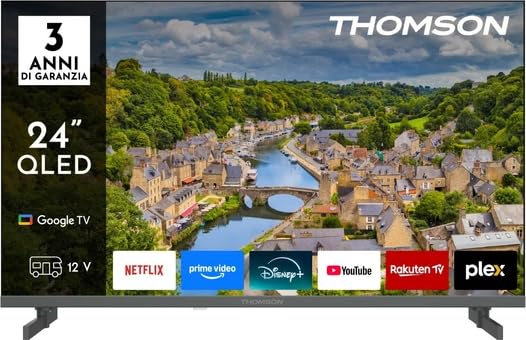
פיגורע 1: פראָנט view of the Thomson 24HQG3S15C Smart TV.
2. זיכערקייַט אינפֿאָרמאַציע
שטענדיק האַלטן די פאלגענדע זיכערהייט מיטלען צו ויסמיידן עלעקטרישע קלאַפּ, פייַער אָדער שעדיקן צו די טעלעוויזיע.
- מאַכט מקור: פאַרזיכערן די מאַכט צושטעלן וואָלtage matches the rating label on the TV.
- ווענטילאַטיאָן: בלאָקירט נישט די ווענטילאַציע עפענונגען. לאָזט גענוג פּלאַץ אַרום דעם טעלעוויזאָר פֿאַר געהעריקן לופטפלוס.
- וואַסער און נעץ: שטעלט נישט אויס דעם טעלעוויזאר צו רעגן אדער פייכטקייט. שטעלט נישט קיין זאכן פול מיט פליסיקייטן, ווי למשל וואזאנעס, אויף דעם טעלעוויזאר.
- רייניקונג: נעמט ארויס דעם טעלעוויזאר פון שטעקער איידער איר רייניגט. ניצט א ווייכן, טרוקענעם טוך. ניצט נישט קיין פליסיגע רייניגער אדער אייראזאל רייניגער.
- אָרט: שטעלט דעם טעלעוויזאר אויף א סטאבילן, גלייכן אויבערפלאך. פארמיידט עס צו שטעלן אין דירעקטן זונשייַן אדער לעבן היץ-קוועלער.
- קינדער: היט אויף קינדער צו זיכער מאַכן אַז זיי קריכן נישט אויף אָדער שפּילן נישט מיטן טעלעוויזאָר.
- סערוויס: פרובירט נישט צו סערוויסן דעם טעלעוויזאר אליין. לאָזט איבער אלע סערוויסינג צו קוואַליפֿיצירטע סערוויס פּערסאָנעל.
3. פּעקל אינהאַלט
Carefully unpack your Thomson 24HQG3S15C Smart TV and check that all the following items are included:
- Thomson 24HQG3S15C Smart TV
- ווייַט קאָנטראָל
- מאַכט קאַבלע
- באַניצער מאַנואַל (דעם דאָקומענט)
- TV Stand (if applicable, check packaging)
- שרויפן פֿאַר טעלעוויזיע שטאַנד (אויב אָנווענדלעך)
אויב עס פעלט אדער זענען געשעדיגט עפעס, ביטע קאנטאקטירט גלייך אייער הענדלער.
4. סעטאַפּ
4.1 Attaching the Stand (Optional)
If you are not wall-mounting the TV, you will need to attach the included stand. Follow these steps:
- לייגט דעם טעלעוויזאר מיטן פנים אראפ אויף א ווייכער, ריינער אויבערפלאך כדי צו פארמיידן שאדן צום עקראן.
- גלייכט אויס דעם שטאַנד מיט די מאָנטירונג לעכער אויף דער אונטערשטער טייל פֿון דער טעלעוויזיע.
- באַפעסטיקט דעם שטאַנד מיט די צוגעשטעלטע שרויפן. מאַכט זיכער אַז זיי זענען פעסט אָנגעצויגן.
4.2 וואַנט מאָונטינג (אָפּציאָנאַל)
The TV supports VESA standard mounting (100 x 100 mm). Use a compatible wall-mount bracket (not included) and follow the instructions provided with the bracket. Ensure the wall can support the weight of the TV.
Note: Remove the stand before wall mounting.
4.3 קאַנעקטינג פונדרויסנדיק דעוויסעס
Refer to the following connection options:
- HDMI (x3): Connect Blu-ray players, game consoles, or set-top boxes. The TV supports HDMI 1.4 and Audio Return Channel (ARC) on one port.
- וסב 2.0 (קס 2): פֿאַרבינדט USB סטאָרידזש דעוויסעס פֿאַר מעדיע ווידערשפּיל.
- אַנטענע/קאַבל אַרייַנגאַנג: Connect an antenna for DVB-T/T2 or a cable for DVB-C.
- סאַטעליט אַרייַנשרייַב: Connect a satellite dish for DVB-S/S2.
- עטהערנעט (לאַן): פֿאַרבינדט אַן עטערנעט קאַבל פֿאַר אַ דראָטיקער אינטערנעט פֿאַרבינדונג.
- CI+ שפּעלטל: Insert a Common Interface Plus module for encrypted channels.
4.4 ערשטע איינשטראָם און ערשטע אויפשטעל
- פֿאַרבינדט דעם מאַכט קאַבל צום טעלעוויזיע און דערנאָך צו אַ מאַכט ווענטיל.
- דריק דעם מאַכט קנעפּל אויף דער ווײַטקאָנטראָל אָדער אויף דער טעלעוויזיע.
- The TV will guide you through the initial setup process, including language selection, network connection (Wi-Fi or Ethernet), channel scanning, and Google TV account setup.
5. אפערירן אייער סמאַרט טעלעוויזיע
5.1 רימאָוט קאָנטראָל איבערview
The included remote control allows you to access all functions of your TV. Familiarize yourself with the buttons for power, volume, channel, input selection, and Smart TV navigation.
Note: Insert two AAA batteries (not included) into the remote control, observing polarity.
5.2 גרונטלעכע טעלעוויזיע פונקציעס
- מאַכט אויף / אַוועק: דרוק די מאַכט קנעפּל.
- באַנד קאָנטראָל: ניצן די וואָל +/- קנעפּלעך.
- קאַנאַל סעלעקציע: ניצן די טש +/- קנעפּלעך אדער נומערן־טאַבלען.
- אַרייַנשרייַב מקור: דרוק די מקור קנעפּל צו באַשטימען צווישן HDMI, טעלעוויזיע, USB, אאז"וו.
- מעניו: אַקסעס די טעלעוויזיע סעטטינגס מעניו.
5.3 סמאַרט טעלעוויזיע פֿעיִטשערז (גוגל טעלעוויזיע)
Your Thomson 24HQG3S15C runs on Google TV, offering a personalized entertainment experience.
- היים פאַרשטעלן: Access recommended content, installed apps (e.g., Disney+), and settings.
- קול קאָנטראָל: Use the Google Assistant feature (if available on your remote) to search for content, control smart home devices, and more.
- אַפּ סטאָר: Download additional apps from the Google Play Store.
- HbbTV: Access interactive services from broadcasters (if supported in your region).
- סמאַרט מאָדעס: Select from various picture and sound modes like Energy Saving, Game, Movie, Sport, Standard, and Vivid.
6. קאַנעקטיוויטי
The TV offers various connectivity options for seamless integration with your home network and devices.
- ווי-פי: Built-in Wi-Fi allows wireless connection to your home network for internet access and streaming.
- בלועטאָאָטה 5.1: פֿאַרבינדט וויירלעסע כעדפאָונז, סאַונדבאַרס, אָדער אַנדערע בלועטוט-ענייבאַלד דעוויסעס.
- עטהערנעט לאַן: Provides a stable wired internet connection.
- HDMI (x3): High-Definition Multimedia Interface for digital audio and video. One port supports ARC (Audio Return Channel) for simplified audio connections to compatible sound systems.
- וסב 2.0 (קס 2): Universal Serial Bus ports for connecting external storage devices to play media files (3GP, AVI, FLV, MKV, MOV, MP4, MPG, WEBM for video; AAC, FLAC, MP3, WAV for audio; BMP, GIF, JPG, PNG for images).
- Digital Tuners: Supports DVB-C, DVB-S, DVB-S2, DVB-T, DVB-T2 for various digital broadcast standards.
7. וישאַלט
7.1 רייניקן דעם טעלעוויזאר
- פאַרשטעלן: ווישט אָפּ דעם עקראַן מיט אַ ווייכן, לינט-פֿרײַעם שטאָף. פֿאַר שווערע פֿלעקן, ווישט אַ ביסלampווישט דעם שטאָף מיט וואַסער אָדער אַ ספּעציאַליזירטן עקראַן רייניגער (שפּריצט קיינמאָל נישט גלייך אויף דעם עקראַן).
- קאַבינעט: ניצט אַ ווייכן, טרוקענעם שטאָף צו ווישן דעם טעלעוויזיע קאַבינעט.
- נישט נוצן: Abrasive cleaners, waxes, or solvents like alcohol, benzene, or thinners, as these can damage the TV's finish or screen.
- שטענדיק אויסשטעקן דעם טעלעוויזאר איידער איר רייניגט.
7.2 ווייכווארג דערהייַנטיקונגען
Your Smart TV may receive software updates to improve performance and add new features. Ensure your TV is connected to the internet. Updates can usually be checked and installed via the TV's settings menu (System > About > System update).
8. טראָובלעשאָאָטינג
If you encounter problems with your TV, refer to the following common issues and solutions:
| פּראָבלעם | מעגלעך סיבה / לייזונג |
|---|---|
| קיין מאַכט |
|
| קיין בילד נישט, אבער סאונד איז דא |
|
| קיין קלאַנג, אָבער בילד איז דאָ |
|
| ווייַט קאָנטראָל נישט ארבעטן |
|
| קענען ניט פאַרבינדן צו ווי-פי |
|
אויב די פראבלעם בלייבט, ביטע קאנטאקטירט קאסטומער סופארט.
9. ספּעסאַפאַקיישאַנז
| שטריך | דעטאַל |
|---|---|
| מאָדעל | Thomson 24HQG3S15C |
| ווייַז גרייס | 24 אינטשעס (61 ס״מ דיאַגאָנאַל) |
| האַכלאָטע | 1366 רענטגענ 768 בילדצעלן (HD) |
| ווייַז טעכנאָלאָגיע | QLED |
| דערפרישן קורס | 60 הז |
| סמאַרט טעלעוויזיע פּלאַטפאָרם | גוגל טעלעוויזיע |
| דיגיטאַל טונער | DVB-C, DVB-S, DVB-S2, DVB-T, DVB-T2 |
| ווי-פי | יא |
| בלועטאָאָטה | ווערסיע 5.1 |
| עטהערנעט לאַן | יא |
| HDMI פּאָרץ | 3 (HDMI 1.4, one with ARC) |
| וסב 2.0 פּאָרץ | 2 |
| אַודיאָ רעזולטאַט (RMS) | 6 וואט (2 רעדנערס) |
| HDR שטיצן | HDR10 |
| וועסאַ מאָונטינג | 100 רענטגענ 100 מם |
| דימענשאַנז (מיט שטיין) | 53.5 סענטימעטער (וו) רענטגענ 15.1 סענטימעטער (ד) רענטגענ 35.3 סענטימעטער (ה) |
| וואָג (מיט שטיין) | 2.4 קג |
| ענערגיע עפעקטיווקייַט קלאַס (SDR) | E |
| ענערגיע קאנסומאציע (SDR) | 17 קוו / 1000 שעה |
10. וואָראַנטי און שטיצן
For warranty information, please refer to the warranty card included in your product packaging or contact your retailer. Thomson provides customer support for technical assistance and service inquiries.
Please visit the official Thomson website or refer to your purchase documentation for contact details and further support resources.