
1. הקדמה
This manual provides detailed instructions for the safe and effective use of your BOIFUN Baby 2TM 5" 2K Smart Baby Monitor. Please read this manual thoroughly before operating the device and retain it for future reference. The BOIFUN Baby 2TM offers advanced monitoring capabilities, including 2K video resolution, invisible night vision, smart detection features, and dual connectivity options (Wi-Fi and local FHSS mode).
2. וואָס איז אין דער קעסטל
- 1 x אַפּאַראַט
- 1 x Display (Monitor)
- 2 רענטגענ מאַכט אַדאַפּטערז
- 2 רענטגענ מאַכט קאָרדס
- 3 רענטגענ סקרוז
- 3 רענטגענ שרויף קאַפּס
- 1 x Needle (for reset)
- 1 x פּראָדוקט מאַנואַל
- 1 x Video Instruction Card

Image: All components included in the BOIFUN Baby 2TM package.
3. פּראָדוקט איבערview
The BOIFUN Baby 2TM consists of a camera unit and a 5-inch display monitor. It offers flexible monitoring options via the dedicated monitor or a smartphone application.
3.1 שליסל פֿעיִקייטן
- 2K אולטרא HD ווידעא: Provides clear and detailed images.
- Invisible Infrared Night Vision: Monitors your baby without visible red light, ensuring undisturbed sleep.
- אויטאָמאַטישע טראַקינג: The camera can automatically follow your baby's movements.
- קלוג דעטעקשאַן: Alerts for crying, movement, temperature, and humidity changes.
- קוסטאָמיזאַבלע דעטעקשאַן זאָנעס: Define specific areas for alerts.
- צוויי-וועג אַודיאָ: Communicate with your baby remotely.
- 8 לולאַביעס: Soothe your baby with built-in melodies.
- סד קאָרט שטיצן: פֿאַר לאָקאַלע ווידעאָ סטאָרידזש.
- צווייענדיק קאַנעקטיוויטי: Use with the monitor (FHSS) or via the mobile app (Wi-Fi).

Image: The BOIFUN Baby 2TM camera and its 5-inch monitor in use.
4. סעטאַפּ אינסטרוקציעס
4.1 מאַכט אויף
- Connect the camera and monitor to power outlets using the provided adapters and USB cables.
- Press and hold the power button on both the camera and the monitor until they turn on.
4.2 פּלאַצירונג אָפּציעס
The camera can be placed in various locations to best suit your monitoring needs:
- טאַבלעטאָפּ: Place on a flat surface near the baby's crib.
- וואנט בארג: Use the included screws and caps to mount the camera on a wall for an elevated view.
- Tripod/Stand: Attach to a compatible tripod or stand for flexible positioning.

Image: Versatile placement options for the camera, including tabletop, wall, and crib attachment.
4.3 קאָנעקטיוויטי אָפּציעס
The BOIFUN Baby 2TM offers two main connectivity modes:
- Local Mode (FHSS): For direct, secure connection between the camera and monitor without Wi-Fi. Ideal for home use and quick setup.
- Wi-Fi Mode (2.4 GHz): For remote monitoring via the "BonRunCam" mobile application on your smartphone (iOS & Android). This mode requires a 2.4 GHz Wi-Fi network.

Image: Local FHSS connection for reliable and secure monitoring at home.

Image: Remote monitoring via the BonRunCam app, compatible with iOS and Android.
5. אַפּערייטינג ינסטרוקטיאָנס
5.1 מאָניטאָר קאָנטראָלס
The 5-inch monitor provides intuitive controls for camera movement, settings, and features. Use the directional buttons and "OK" button to navigate the menu.
5.2 Camera Movement and Zoom
- Use the directional buttons on the monitor to pan (left/right) and tilt (up/down) the camera.
- דער אַפּאַראַט אָפפערס אַ 360-גראַד view and 4x optical zoom for detailed observation.
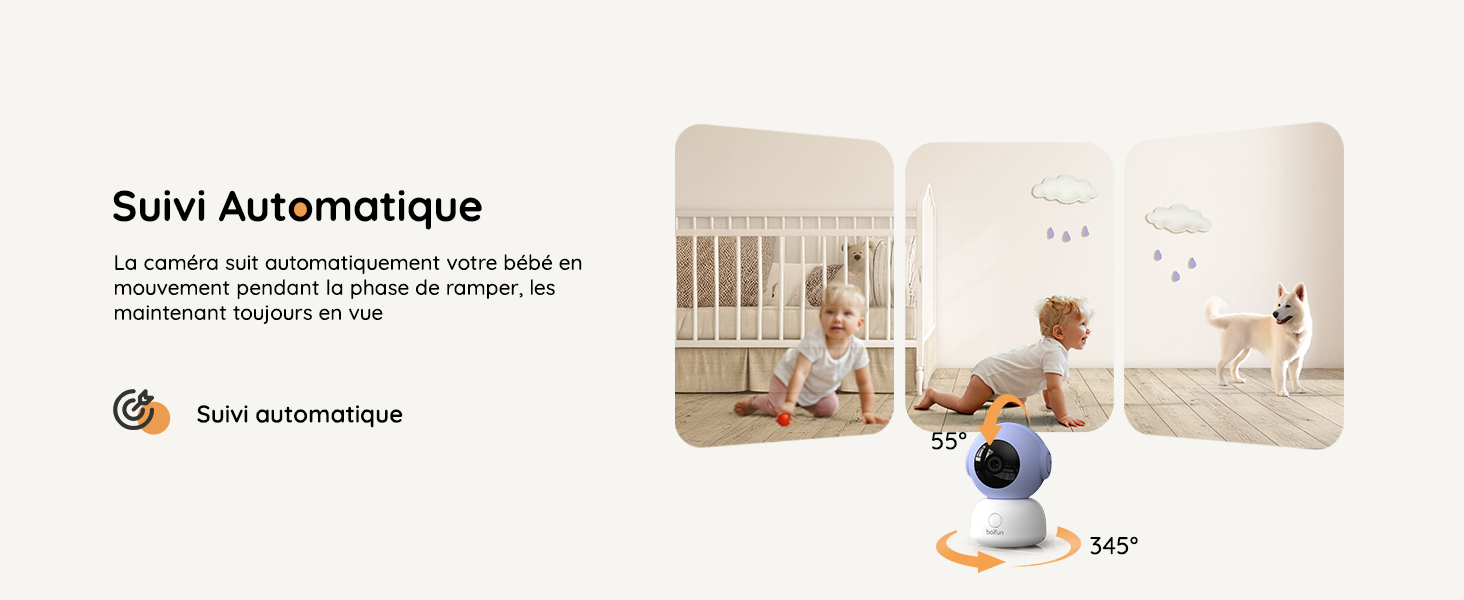
Image: The camera's automatic tracking feature keeps your baby in view as they move.
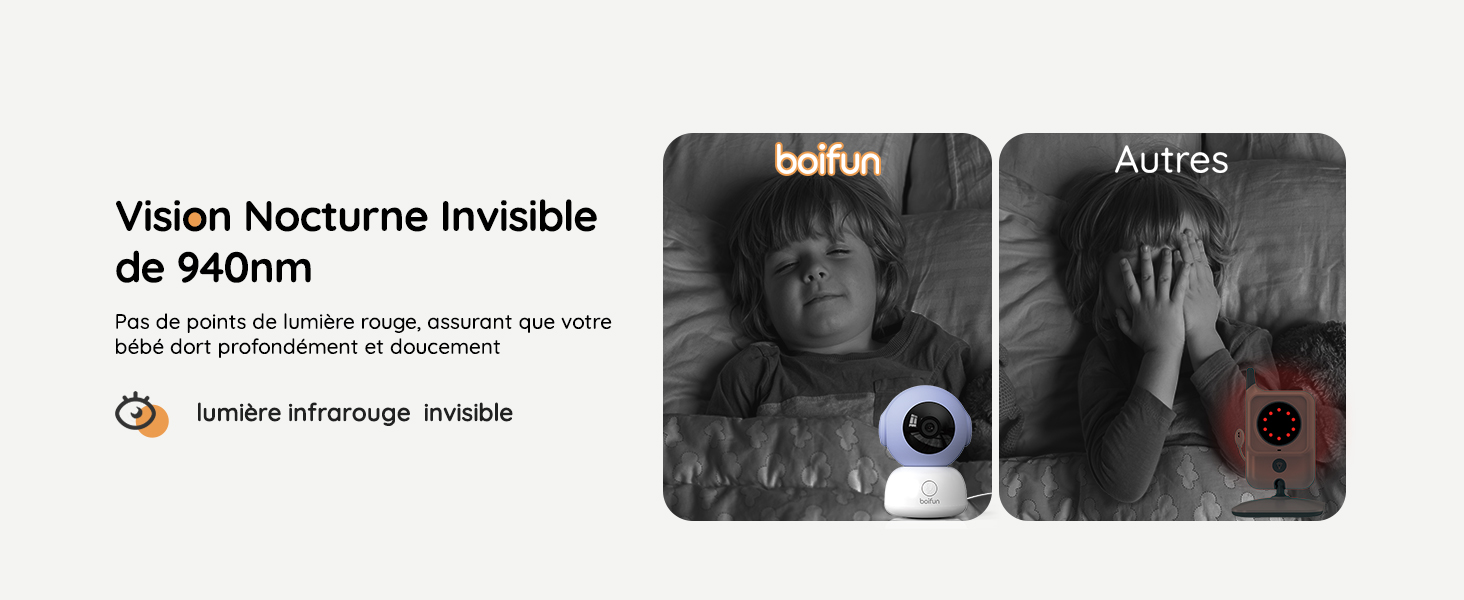
Image: Invisible 940nm infrared night vision ensures your baby sleeps undisturbed.
5.3 צוויי-וועג אַודיאָ
Press and hold the microphone button on the monitor to speak to your baby. Your voice will be transmitted through the camera's speaker.

Image: Use two-way audio to comfort your baby from another room or remotely via the app.
5.4 לולאַביעס
The monitor includes 8 pre-programmed lullabies. Access the music menu to select and play lullabies to help soothe your baby to sleep.
5.5 Mobile App Usage (BonRunCam)
- Download the "BonRunCam" app from your smartphone's app store (iOS or Android).
- Follow the in-app instructions to connect your camera to your 2.4 GHz Wi-Fi network.
- אַמאָל קאָננעקטעד, איר קענען view live video, control camera movement, and access smart features remotely.
6. סמאַרט פֿעיִקייטן
6.1 אינטעליגענטע דעטעקציע
The BOIFUN Baby 2TM is equipped with five intelligent detection functions:
- וויינען דעטעקשאַן: Alerts you when your baby cries.
- באַוועגונג דעטעקשאַן: Notifies you of any movement in the monitored area.
- טעמפּעראַטור מאָניטאָרינג: Displays the room temperature and alerts if it goes outside a set range.
- הומידיטי מאָניטאָרינג: Displays the room humidity and alerts if it goes outside a set range.
- געזונט דעטעקטיאָן: Alerts you to general sounds.

בילד: איבערview of the five intelligent detection features available through the app.

Image: Rapid smart detection provides alerts within 0.7 seconds for crying or movement.
6.2 Automatic Tracking
The camera can automatically track your baby's movements within its 360-degree field of view, ensuring they are always visible on the monitor or app.
6.3 Customizable Alert Zones
Using the mobile app, you can define specific "danger zones" within the camera's view. You will receive instant notifications if your baby enters these predefined areas.
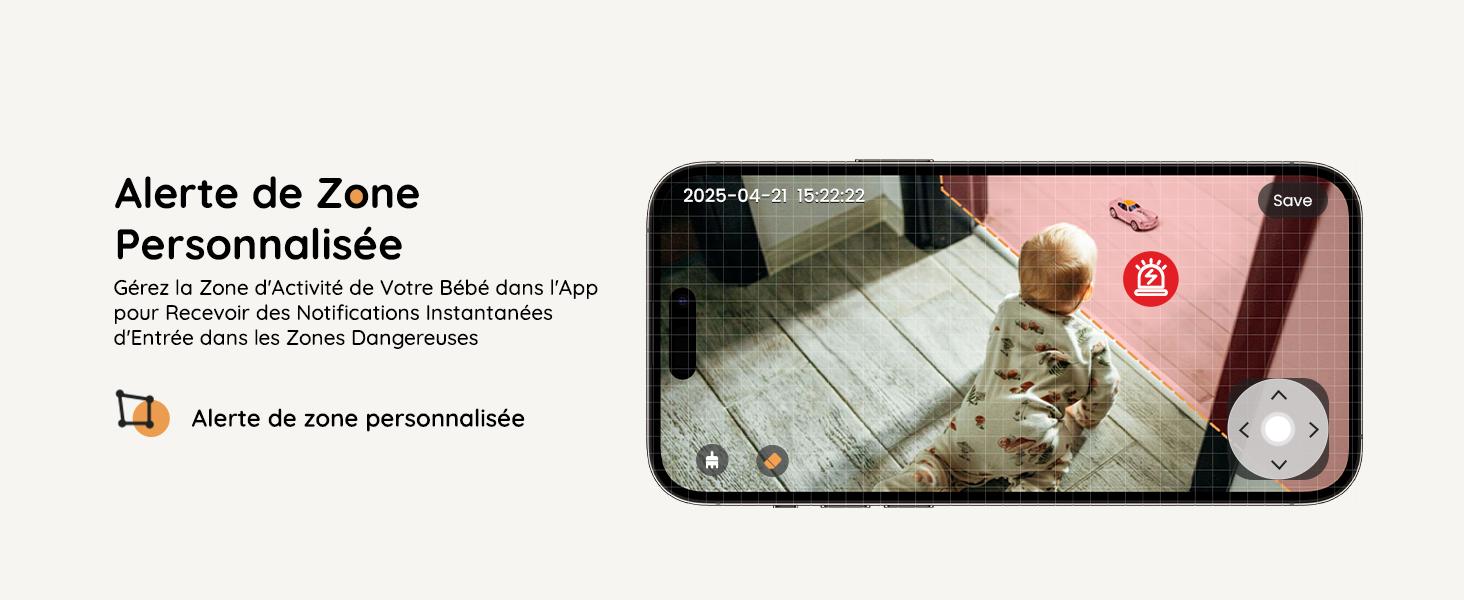
Image: Set custom alert zones in the app to receive notifications if your baby enters specific areas.
6.4 פידינג דערמאָנונג
Set programmed feeding reminders through the monitor's menu to help maintain a consistent feeding schedule for your baby.
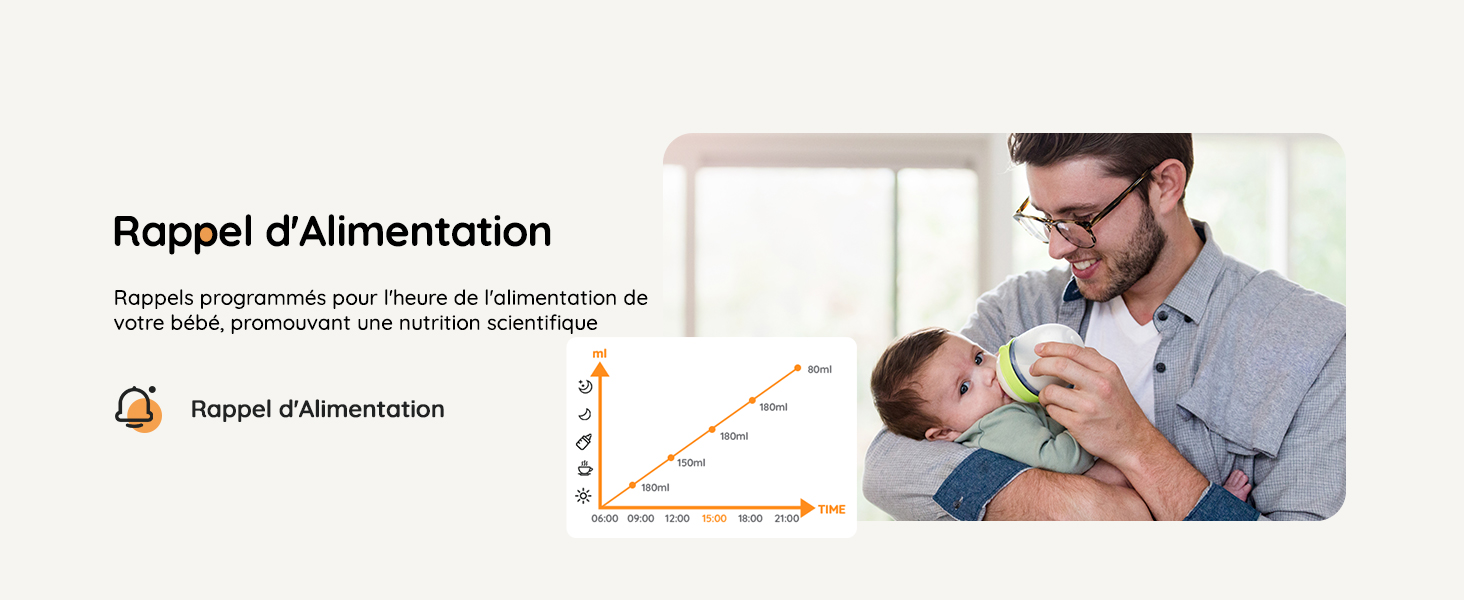
Image: The feeding reminder feature helps parents track and manage feeding times.
7. Privacy and Security
Your privacy is a top priority. The BOIFUN Baby 2TM incorporates advanced security measures:
- AES128 Bank-Level Encryption: Ensures the confidentiality of your video and audio data.
- Camera On/Off Switch: Physically disable the camera when not in use for complete privacy.
- App Access Pause: Temporarily pause app access to the camera feed.

Image: Triple privacy protection features ensure your data remains secure.
8. וישאַלט
- רייניקונג: Use a soft, dry cloth to clean the camera lens and monitor screen. Avoid abrasive cleaners.
- באַטערי זאָרגן: The monitor has a 3000mAh rechargeable battery. For optimal battery life, avoid extreme temperatures and fully charge before first use.
- סטאָרידזש: ווען נישט אין באַנוץ פֿאַר לענגערע פּעריאָדן, האַלט די מיטל אין אַ קיל, טרוקן אָרט.

Image: The 3000mAh battery provides long-lasting monitoring, with different modes for power saving.
9. טראָובלעשאָאָטינג
| פּראָבלעם | מעגלעך לייזונג |
|---|---|
| No image on monitor/app. | Ensure both camera and monitor are powered on and within range. Check Wi-Fi connection for app viewing. Verify camera lens is not physically covered or turned off. |
| Poor signal/connection. | Move the camera and monitor closer to each other. Reduce obstacles (walls, large furniture). Ensure your Wi-Fi router is functioning correctly if using app mode. |
| קיין קלאַנג אָדער שלעכטע אַודיאָ קוואַליטעט. | Check volume settings on the monitor/app. Ensure no obstructions are blocking the microphone or speaker on either unit. |
| Temperature/Humidity alerts not working. | Verify that the temperature and humidity ranges are correctly set in the Smart Care settings. Ensure the alert reminder method is enabled. |
| Camera not tracking automatically. | Check the auto-tracking setting in the camera menu on the monitor or app. Ensure the camera has a clear view פון דער געגנט. |
10. ספּעסאַפאַקיישאַנז
- מאָדעל נאָמען: Baby 2TM
- סאָרט: BOIFUN
- קאַנעקטיוויטי טעכנאָלאָגיע: Wi-Fi (2.4 GHz) for app, FHSS for local monitor
- ווידעא האַכלאָטע: 2K Ultra HD (3 Megapixels)
- מאָניטאָר פאַרשטעלן גרייס: 5 אינטשעס
- נאַכט זעאונג: Invisible Infrared (940nm), up to 15 meters range
- פּאַן / טילט ווינקל: 360 degrees (horizontal)
- אָפּטיש פארגרעסער: 4x
- מאַכט מקור: קריקאָנלאָדלעך באַטאַרייע (3000 מאַה)
- Voltage: 5 וואלטס
- וואָסtage: 3 וואטס
- מאַטעריאַל: אַקרילאָניטרילע בוטאַדיענע סטירענע (אַבס)
- נומער דימענשאַנז: 13 X 7.6 X 7.6 סענטימעטער
- נומער וואָג: 770 גראַמז
- געשטיצט סטאָרידזש: SD קאָרט (אַרויף צו 128 גיגאבייט)
- קאַמפּאַטאַבאַל דעוויסעס: Baby Monitor, Smartphone (iOS/Android)
11. וואָראַנטי און שטיצן
BOIFUN is committed to providing reliable products and excellent customer service.
- פּראָדוקט וואָראַנטי: 2 יאָר.
- Brand Warranty: 9 יאָר.
- קונה שטיצן: פֿאַר קיין פראגעס אָדער הילף, ביטע קאָנטאַקט admin@boifun.net.

Image: BOIFUN customer support and warranty information.