
1. הקדמה
Thank you for choosing the FLEXISPOT CylineX Pro Electric Standing Desk Frame. This manual provides essential information for the safe and efficient assembly, operation, and maintenance of your new adjustable height desk. Please read these instructions carefully before use and retain them for future reference.
The CylineX Pro features a robust dual-motor system, a user-friendly piano-style control panel, and a wide height adjustment range to support a healthy and productive workspace.
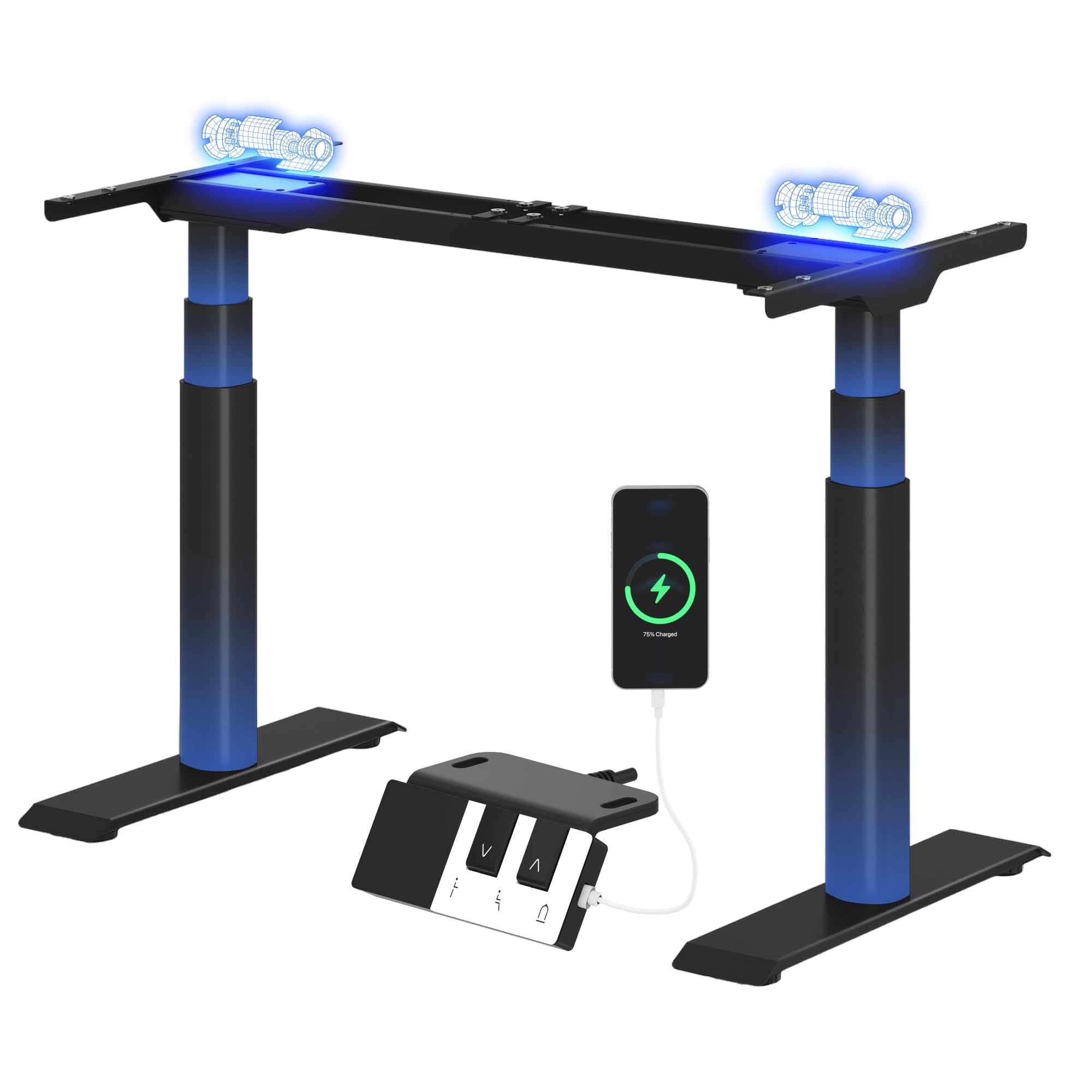
Image: The FLEXISPOT CylineX Pro Electric Standing Desk Frame with a black tabletop in a home office environment.
2. זיכערקייַט אינפֿאָרמאַציע
כדי צו זיכער מאַכן זיכערע אָפּעראַציע און פאַרמייַדן שאָדן אָדער שאָדן, ביטע אָבסערווירן די פאלגענדע זיכערהייט מיטלען:
- פאַרזיכערן אַלע קאַמפּאָונאַנץ זענען סיקיורלי פאַסאַנד איידער נוצן.
- האַלט קינדער און חיות אַוועק פון דעם טיש בעת אָפּעראַציע.
- Do not place hands or other objects near moving parts.
- פֿאַרמײַדט איבערלאָדן דעם טיש איבער זײַן ספּעציפֿיצירטן וואָג קאַפּאַציטעט.
- דו זאלסט נישט זיצן אָדער שטיין אויף די שרייַבטיש ראַם.
- דיסקאַנעקט מאַכט איידער רייניקונג אָדער וישאַלט.
- ניצן בלויז די צוגעשטעלט מאַכט אַדאַפּטער און אַקסעסעריז.
- If any unusual noise, smell, or malfunction occurs, immediately unplug the desk and contact customer support.
- The anti-collision system is designed to prevent damage, but users should still exercise caution during height adjustments.

Image: The integrated anti-collision system provides safer movement by automatically reversing if an obstacle is detected.
3. אַסעמבלי אינסטרוקציעס
The FLEXISPOT CylineX Pro desk frame is designed for straightforward assembly. It typically takes about 20 minutes to assemble. Please ensure you have received all packages, as the desk frame may be shipped in multiple boxes.
3.1 פּעקל אינהאַלט
Verify that all parts listed in the included user manual are present before beginning assembly. Contact customer support if any parts are missing or damaged.
3.2 שריט-ביי-שריט צוזאַמענשטעלונג
- אָפּלייגן קאַמפּאָונאַנץ: פֿאָרזיכטיק אַרויסנעמען אַלע טיילן פֿון דער פֿאַרפּאַקונג און לייגן זיי אויס אויף אַ ווייכער, ריינער ייבערפֿלאַך כּדי צו פֿאַרמייַדן קראַצן.
- צוזאַמענשטעלן די קראָסבאַר: Connect the two halves of the crossbar (if applicable) and secure them according to the detailed instructions in your physical manual.
- צוטשעפּען ליפטינג קאָלומס: Securely attach the lifting columns (legs) to the assembled crossbar.
- אינסטאַלירן פֿיס: Attach the foot supports to the bottom of each lifting column.
- קאָנעקט קאָנטראָל קעסטל: Mount the control box to the designated area on the frame and connect the motor cables and power cable.
- צובינדן קאָנטראָל פּאַנעל: Mount the piano-style control panel to the desired location on the desk frame or tabletop.
- מאָנטירן טישפּלאַט: Carefully place your chosen tabletop onto the assembled frame. Ensure it is centered and aligned, then secure it using the provided screws.
- קאַבלע פאַרוואַלטונג: Organize and secure all cables using the included cable ties or management accessories.

Image: Components of the desk frame laid out, illustrating the ease of assembly.
4. אַפּערייטינג ינסטרוקטיאָנס
The CylineX Pro features an intuitive piano-style control panel for easy height adjustment and personalized settings.

Image: The piano-style control panel offers simple and intuitive control with memory functions, sit/stand reminder, child lock, and a USB port.
4.1 גרונטלעכע הייך אַדזשאַסטמענט
- דרוק די אַרויף (^) קנעפּל צו הייבן דעם טיש.
- דרוק די אַראָפּ (v) קנעפּל צו נידעריקערן דעם טיש.
- Release the button to stop the desk at the desired height.
4.2 שטעלן זכּרון פּרעסעטס
The control panel allows you to save up to three preferred height settings:
- שטעל דעם טיש צו אייער געוואונטשענע הייך מיט די אַרויף/אַראָפּ קנעפּלעך.
- דרוק די "מ" button (Memory) followed by one of the numbered preset buttons (1, 2, or 3). The display will show "S-" followed by the number to confirm the setting is saved.
- צו צוריקרופן א געראַטעוועטע הייך, דריק פשוט דעם קאָרעספּאָנדירנדיקן נומערירטן פּרעסעט קנעפּל.
4.3 Sit/Stand Reminder
Activate the sit/stand reminder to prompt you to change positions at regular intervals:
- דרוק די טיימער button (often depicted as a clock icon) to cycle through reminder intervals (e.g., 30, 45, 60 minutes).
- The desk will beep or vibrate when it's time to change position.
4.4 קינד לאַק פונקציע
To prevent accidental adjustments, activate the child lock:
- דריקן און האַלטן די שלאָס button (often depicted as a padlock icon) for a few seconds until "LOC" appears on the display.
- To unlock, press and hold the Lock button again until "LOC" disappears.
4.5 וסב טשאַרדזשינג פּאָרט
The control panel includes a USB port for convenient charging of your mobile devices.
5. וישאַלט
Regular maintenance ensures the longevity and optimal performance of your FLEXISPOT CylineX Pro desk frame.
- רייניקונג: ווישט דעם טיש ראַם מיט אַ ווייכן, דamp cloth. Avoid abrasive cleaners or solvents that could damage the finish. Ensure no liquid enters the electrical components.
- קאַבלע פאַרוואַלטונג: Periodically check and tidy up cables to prevent tangling or damage, which could interfere with desk movement.
- פאַסטענער טשעק: Every few months, check all screws and bolts to ensure they are tight. Re-tighten if necessary.
- שמירן: The lifting columns are pre-lubricated and generally do not require additional lubrication. If you notice any unusual friction, contact customer support.
6. טראָובלעשאָאָטינג
If you encounter any issues with your desk, please refer to the following common troubleshooting steps:
| פּראָבלעם | מעגלעך סיבה | לייזונג |
|---|---|---|
| טיש רירט זיך נישט / קיין עלעקטריע | Power cable disconnected, power outlet issue, control box malfunction. | Check power connections. Ensure the outlet is working. Try a different outlet. If still no power, contact support. |
| דער טיש באוועגט זיך אומגלייך אדער שטעלט זיך אפ | Overload, obstruction, uneven weight distribution, synchronization issue. | Reduce weight on the desk. Check for obstructions. Ensure weight is evenly distributed. Perform a reset (see below). |
| Error code displayed (e.g., E01, E02) | Motor fault, sensor issue, overheating. | Refer to your physical manual for specific error code meanings. Often, a reset or power cycle can resolve temporary errors. If persistent, contact support. |
| Anti-collision system triggers too easily/not at all | Sensitivity setting, obstruction. | Check for obstructions. Consult your physical manual for instructions on adjusting anti-collision sensitivity. |
| אומגעוויינטלעכער גערויש אדער שמעק | Internal component issue, motor strain. | Immediately unplug the desk. Do not use. Contact FLEXISPOT customer support. |
6.1 באַשטעטיק פּראָצעדור
A reset can often resolve minor operational issues. The exact procedure may vary slightly, but a common method is:
- דריקן און האַלטן די אַראָפּ (v) button until the desk reaches its lowest position and then slightly rises and lowers again.
- Alternatively, some models require holding the "מ" קנעפּל און אַראָפּ (v) button simultaneously, or a specific combination of buttons. Refer to your physical manual for the precise reset sequence for your CylineX Pro model.
7. ספּעסאַפאַקיישאַנז
Key technical specifications for the FLEXISPOT CylineX Pro Electric Standing Desk Frame:

Image: Detailed dimensions and performance specifications of the CylineX Pro desk frame.
| שטריך | באַשרייַבונג |
|---|---|
| מאָדעל | CylineX Pro |
| הייך אַדדזשוסטמענט ראַנגע | 60 ס״מ - 125 ס״מ (23.6" - 49.2") |
| ליפטינג ספּיד | 35 מם/ס |
| סטאַטיק לאָדן קאַפּאַציטעט | אַרויף צו 200 קג (440 £) |
| דינאַמישע לאָד קאַפּאַציטעט | אַרויף צו 160 קג (352 £) |
| מאָטאָר טיפּ | צווייענדיק מאָטאָר סיסטעם |
| ראַש מדרגה | ווייניקער ווי 50 דב |
| סטאַנדביי מאַכט קאַנסאַמשאַן | ווייניקער ווי 0.5 וו |
| קאָמפּאַטיבלע טישפּלאַט ברייט | 120 ס״מ - 200 ס״מ (47.2" - 78.7") |
| קאָמפּאַטיבלע טישפּלאַט טיפקייט | 60 ס״מ - 80 ס״מ (23.6" - 31.5") |
| קאָנטראָל פּאַנעל | Piano-style with Memory Presets, Sit/Stand Reminder, Child Lock, USB Charging Port |
| זיכערקייַט פֿעיִקייטן | אַנטי-צושטויסן סיסטעם |

Image: The desk's robust construction supports a maximum static load of 200 kg and a dynamic load of 160 kg.
8. וואָראַנטי און שטיצן
פלעקסיספּאָט איז מחויב צו צושטעלן הויך-קוואַליטעט פּראָדוקטן און ויסגעצייכנט קונה סערוויס.
8.1 וואָראַנטי אינפֿאָרמאַציע
The FLEXISPOT CylineX Pro desk frame comes with a 10 יאָר וואָראַנטי. This warranty covers defects in materials and workmanship under normal use. Please retain your proof of purchase for warranty claims. For full warranty terms and conditions, please refer to the official FLEXISPOT webפּלאַץ אָדער קאָנטאַקט קונה דינסט.
8.2 קונה שטיצן
If you have any questions, require assistance with assembly, or encounter any issues not covered in this manual, please do not hesitate to contact FLEXISPOT customer support. Our team is available to help you.
- אָנליין שטיצן: באַזוכט דעם אָפיציעלן FLEXISPOT webזייטל פֿאַר אָפֿט געשטעלטע פֿראַגעס, שטיצע אַרטיקלען, און קאָנטאַקט פֿאָרמען.
- E- בריוו שטיצן: Refer to your purchase documentation for the appropriate email address.
- טעלעפאָן שטיצן: Check the FLEXISPOT webפּלאַץ פֿאַר רעגיאָנאַל קאָנטאַקט נומערן.