
1. הקדמה
The QCY MeloBuds A30 are advanced wireless earbuds designed to deliver a superior audio experience. They feature active noise cancellation, high-resolution audio support, and a robust wireless connection, making them suitable for various listening environments.
2. פּראָדוקט איבערview
Familiarize yourself with the components of your QCY MeloBuds A30 earbuds.

Image: QCY MeloBuds A30 earbuds and charging case.
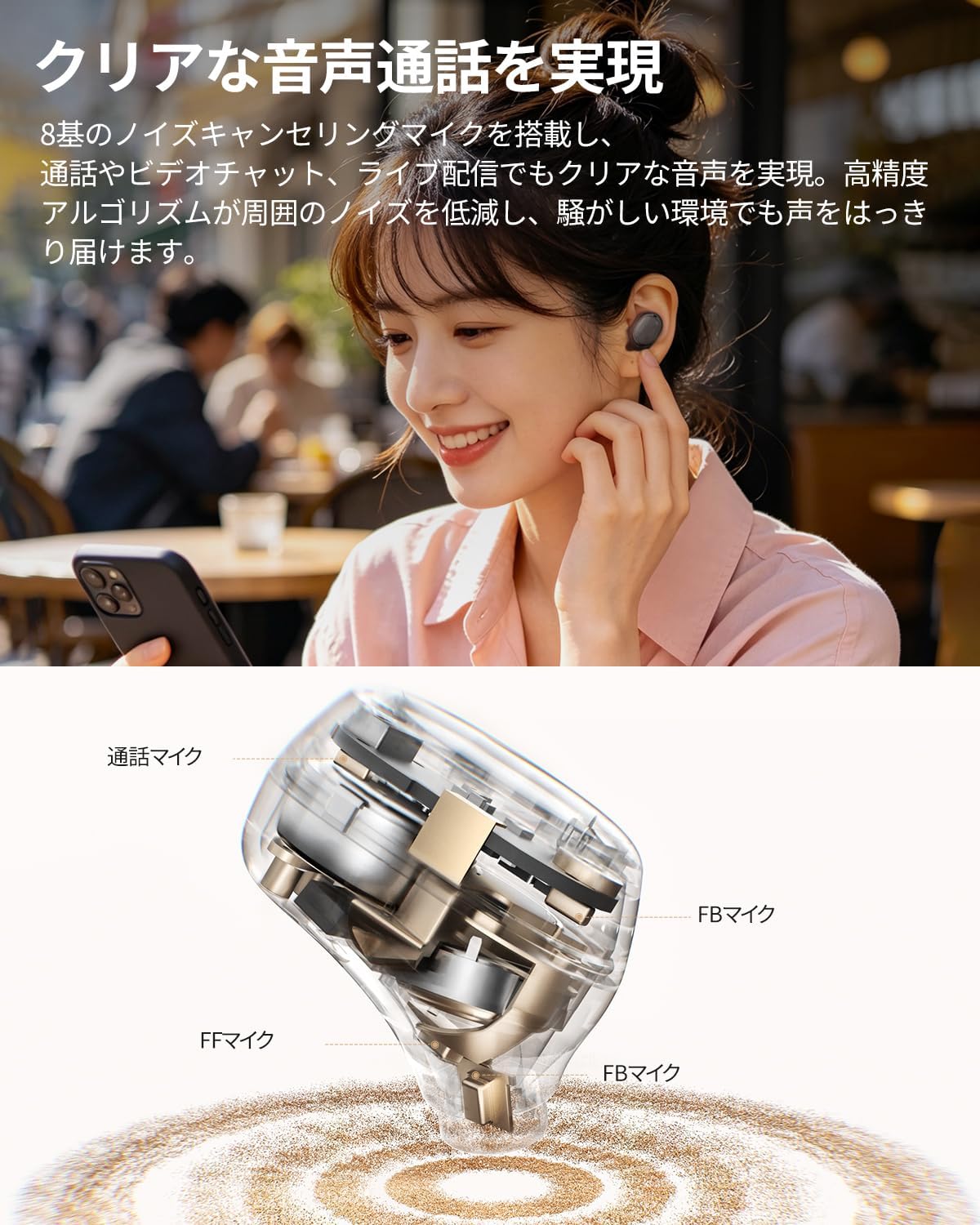
Image: Detailed internal view of a QCY MeloBuds A30 earbud, highlighting microphone components.
3. סעטאַפּ
3.1 ערשטע פּאָרינג
- עפֿנט דעם טשאַרדזשינג קעסטל. די אויערקנעפּלעך וועלן אויטאָמאַטיש אַרײַן אין פּערינג מאָדע.
- אויף אייער דעווייס (סמאַרטפאָן, טאַבלעט, פּיסי), אַקטיווירט בלועטוט.
- זוכן פֿאַר "QCY MeloBuds A30" in the list of available Bluetooth devices and select it to connect.
- אַמאָל פארבונדן, וועט אַ קול פּראָמפּט באַשטעטיקן די געראָטן פּאָרינג.
3.2 פֿאַרבינדונג צווישן פֿאַרשידענע דעווייסעס
The MeloBuds A30 supports simultaneous connection with up to 3 devices. To switch between connected devices, simply play audio on the desired device. The earbuds will automatically switch to the active audio source.

Image: Man playing game with phone and QCY MeloBuds A30 earbuds, illustrating multi-device connection.
3.3 QCY אַפּ אינסטאַלאַציע
For full customization and advanced features, download the dedicated QCY app from your device's app store. The app allows for EQ adjustments, firmware updates, and personalized control settings.

Image: Smartphone displaying the QCY app interface for MeloBuds A30, showing various customization options and settings.
4. אַפּערייטינג ינסטרוקטיאָנס
4.1 ריר קאָנטראָלס
The MeloBuds A30 feature intuitive touch controls on each earbud. You can customize these controls via the QCY app.
- שפּיל / פּויזע: צאַפּן צוויי מאָל אויף איינעם פֿון די אויערקנעפּלעך.
- ווייַטער שפּור: צאַפּן דריי מאָל אויף די רעכט עאַרבוד.
- פֿריִערדיקע שפּור: צאַפּן דריי מאָל אויף די לינקס עאַרבוד.
- ענטפֿערן / סוף רופן: צאַפּן צוויי מאָל אויף איינעם פֿון די אויערקנעפּלעך.
- אָפּוואַרפן רופן: דריקן און האַלטן יעדער עאַרבוד פֿאַר 1.5 סעקונדעס.
- שטימע אַססיסטאַנט: צאַפּן דריי מאָל אויף די לינקס עאַרבוד.
- ANC Mode Cycle: Press and hold the right earbud for 1.5 seconds to cycle through ANC ON → ANC OFF → Transparency Mode.

Image: Diagram illustrating touch controls for QCY MeloBuds A30 earbuds.
4.2 אַקטיוו ראַש קאַנסאַליישאַן (ANC)
The MeloBuds A30 feature up to 60dB hybrid ANC and 5.5kHz wideband noise cancellation. Adaptive ANC automatically adjusts to your environment and wearing conditions. AI scene-adaptive ANC and wind noise-adaptive ANC provide optimal noise cancellation, ensuring a clear listening experience even in windy conditions.

Image: Person wearing QCY MeloBuds A30 earbuds, demonstrating active noise cancellation.

Image: Diagram illustrating the effect of Active Noise Cancellation (ANC) on and off with sound waves around a person wearing QCY MeloBuds A30.
4.3 רופן פאַנגקשאַנז
Equipped with 8 noise-cancelling microphones and a high-precision algorithm, the MeloBuds A30 effectively reduce ambient noise during calls, video chats, and live streaming. This ensures your voice is clearly transmitted even in noisy environments.

Image: Woman talking on phone while wearing QCY MeloBuds A30 earbuds in an outdoor setting.
5. טשאַרדזשינג
The earbuds provide approximately 11 hours of continuous playback on a single charge (ANC off), and up to 50 hours with the charging case. With ANC on, the earbuds offer about 6 hours of playback, extending to 27 hours with the charging case.

Image: QCY MeloBuds A30 earbuds and charging case, illustrating battery life with and without ANC.
To charge the earbuds, place them back into the charging case. To charge the case, connect it to a power source using the provided USB-C cable.
6. וישאַלט
- רייניקט רעגולער די אויערקנעפּלעך און די טשאַרדזשינג קעסטל מיט אַ ווייכן, טרוקענעם שטאָף.
- ויסמיידן ניצן אַברייסיוו מאַטעריאַלס אָדער האַרב קעמיקאַלז.
- Ensure the charging contacts on both the earbuds and case are clean and dry to prevent charging issues.
- לייגט די אויערן-קנעפּלעך אין זייער טשאַרדזשינג קעסטל ווען זיי ווערן נישט גענוצט, כדי זיי צו באַשיצן פון שטויב און שאָדן.
6.1 וואַסער קעגנשטעל
The MeloBuds A30 are IPX5 water resistant, protecting them from sweat and water splashes. This makes them suitable for workouts and commuting. However, they are not designed for submersion in water.

Image: QCY MeloBuds A30 earbuds with water droplets, demonstrating IPX5 water resistance.
7. טראָובלעשאָאָטינג
- אויערקנעפּלעך נישט פּערינג: זיכער מאַכן אַז ביידע אויערקנעפּלעך זענען אין דער טשאַרדזשינג קעסטל, און דערנאָך עפֿענען דעם דעקל צו אַקטיווירן פּערינג מאָדע. קאָנטראָלירט די בלועטוט סעטטינגס פֿון אייער מיטל און פּרוּווט זיך ווידער פֿאַרבינדן.
- קיין קלאַנג פֿון איין אויערקנעפּל: לייגט צוריק ביידע אויערקנעפּלעך אין דעם טשאַרדזשינג קעסטל, מאַכט צו דעם דעקל, וואַרט אַ פּאָר סעקונדעס, און עפֿנט עס ווידער. דאָס סינקראָניזירט אָפֿט די אויערקנעפּלעך ווידער.
- טשאַרדזשינג ישוז: Clean the charging contacts on both earbuds and the case. Ensure the charging cable is securely connected and the power source is working.
- נעבעך רופן קוואַליטעט: Ensure the microphones are not obstructed. Try adjusting the earbuds' position in your ears.
- אַפּ קאַנעקשאַן פּראָבלעמען: Ensure Bluetooth is enabled and the earbuds are connected to your device. Restart the QCY app or reinstall it if problems persist.
8. ספּעסאַפאַקיישאַנז
| סאָרט | QCY |
| מאָדעל נאָמען | MeloBuds A30 |
| מאָדעל נומער | BH26HT22A |
| קאָליר | שוואַרץ |
| קאַנעקטיוויטי טעכנאָלאָגיע | ווירעלעסס |
| בלועטאָאָטה ווערסיע | 6.0 |
| בלועטאָאָטה קייט | 10 מעטער |
| ראַש קאָנטראָל | Active Noise Cancellation, Adaptive Noise Cancellation, Environmental Noise Cancellation |
| אַודיאָ קאָדעקס | LDAC, הויך-רעז אַודיאָ וויירלעס |
| מיקראָפאָן | 8-mic system with AI Call Noise Cancelling |
| שפּיל צייט (אויערקנעפּלעך) | Approx. 11 hours (ANC off), Approx. 6 hours (ANC on) |
| גאַנץ שפּיל צייט (מיט קעסטל) | Up to 50 hours (ANC off), Up to 27 hours (ANC on) |
| וואַסער קעגנשטעל | IPX5 |
| קאָנטראָל מעטאָד | ריר קאָנטראָל |
| קאַמפּאַטאַבאַל דעוויסעס | Windows/Macbook Air/Pro PCs, iPads, iPhones, Android devices (Galaxy, Huawei, Xiaomi, OPPO, Xperia, Nexus, ASUS, Fujitsu, etc.) |
9. וואָראַנטי און שטיצן
QCY products come with a standard manufacturer's warranty. For detailed warranty information, please refer to the warranty card included in your product packaging or visit the official QCY webפּלאַץ.
For technical support, troubleshooting assistance, or any product-related inquiries, please contact QCY customer service through their official webזייטל אדער די קאָנטאַקט אינפֿאָרמאַציע וואָס איז צוגעשטעלט אין אייער פּראָדוקט דאָקומענטאַציע.