
1. הקדמה
Thank you for choosing the DATOUBOSS 6300W Solar Hybrid Inverter. This all-in-one unit integrates a pure sine wave inverter, a dual MPPT solar charge controller, and a battery charger, designed to provide reliable power for homes, RVs, cabins, and off-grid applications. This manual provides essential information for the safe installation, operation, and maintenance of your inverter. Please read it thoroughly before installation and keep it for future reference.
The DATOUBOSS 6300W Hybrid Solar Inverter (Model 4863U) is compatible with 48V battery systems, including Lithium-ion, LiFePO4, AGM, Gel, and Flooded batteries, and supports high PV input voltage up to 500V DC for efficient energy management.
2. וויכטיק סאַפעטי אינסטרוקציעס
ביטע ליינט אלע אינסטרוקציעס און ווארענונג מארקירונגען אויפן איינהייט און אין דעם מאנואל איידער די אינסטאלאציע און באניץ. נישט נאכפאלגן די אינסטרוקציעס קען רעזולטירן אין עלעקטרישן שאק, פייער, אדער ערנסטע שאדן.
- עלעקטריקאַל זיכערקייַט: אַלע עלעקטרישע אינסטאַלאַציעס מוזן דורכגעפירט ווערן דורך קוואַליפֿיצירטע פּערסאָנעל אין לויט מיט די לאָקאַלע עלעקטרישע קאָודן.
- באַטערי זיכערקייַט: Work with batteries can be hazardous. Wear appropriate personal protective equipment (PPE) including eye protection and gloves. Do not short-circuit battery terminals.
- ווענטילאַטיאָן: זיכערט גענוג ווענטילאציע ארום דעם אינווערטער צו פארמיידן איבערהיצונג. בלאקירט נישט די ווענטילאציע עפענונגען.
- סוויווע: Install the inverter in a dry, well-ventilated area, away from direct sunlight, heat sources, and flammable materials. Avoid exposure to moisture or corrosive substances.
- גראָונדינג: דער ינווערטער מוז זיין ריכטיק געערדעט.
- דיסקאַנעקשאַן: Before performing any maintenance or wiring, ensure all power sources (PV, utility, battery) are disconnected.
3. פּראָדוקט איבערview
The DATOUBOSS 6300W Solar Hybrid Inverter is designed for efficient energy conversion and management. It combines multiple functions into a single compact unit.
שליסל פֿעיִקייטן:
- Integrated 6300W pure sine wave inverter, dual MPPT solar charge controller, and battery charger.
- הויך פּוו אַרייַנשרייַב וואָלtage support up to 500V DC.
- Stable 110V/120V AC pure sine wave output for sensitive electronics.
- Advanced dual MPPT technology with up to 98% conversion efficiency.
- Compatible with 48V Lithium-ion, LiFePO4, AGM, Gel, and Flooded batteries.
- Supports operation with or without battery during daytime (PV start voltage ≥120V DC).
- Large LCD screen for real-time monitoring and easy configuration.
- Multiple charging and output modes (Solar First, Utility First, Hybrid Charging, SBU Priority, Utility Priority, Solar Priority).
- Comprehensive protection systems: overload, over-temperature, short circuit, over-voltagE, נידעריק-וואָלtage.
פּראָדוקט דיאַגראַמע:
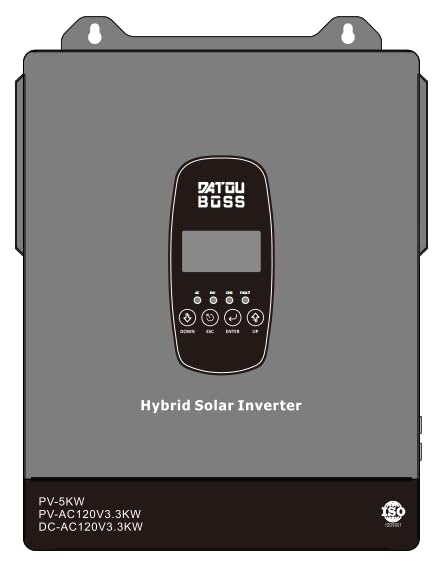
פיגורע 3.1: פראָנט view of the DATOUBOSS 6300W Solar Hybrid Inverter, showing the LCD display and various connection ports. This image illustrates the compact design of the integrated unit.
4. סעטאַפּ און ייַנמאָנטירונג
Proper installation is crucial for the safe and efficient operation of your inverter. Ensure all safety precautions are followed.
4.1 אַנפּאַקינג און דורכקוק
- Carefully unpack the inverter and check for any shipping damage.
- Verify that all accessories are included as per the packing list.
- If any damage or missing parts are found, contact your dealer immediately.
4.2 מאַונטינג די ינווערטער
- Choose a suitable mounting location: vertical wall mount, indoors, well-ventilated, protected from direct sunlight and moisture.
- Ensure sufficient clearance (at least 20 cm) around the inverter for proper airflow.
- Use appropriate screws and anchors to securely mount the inverter to a sturdy surface.
4.3 וויירינג קאַנעקשאַנז
ווארענונג: Before making any connections, ensure all power sources (PV array, utility grid, battery) are disconnected and secured against accidental reconnection.
- באַטערי קשר:
- Connect the 48V battery bank to the inverter's battery terminals. Ensure correct polarity (+ to + and - to -).
- Use appropriately sized cables and fuses/breakers for battery protection.
- PV אַרעי קאַנעקשאַן:
- Connect the solar panel array to the PV input terminals. Observe correct polarity.
- פאַרזיכערן די PV אַרייַנשרייַב וואָלtage (Voc) גייט נישט אריבער דעם אינווערטער'ס מאקסימום PV אינפוט וואָל.tagE (500V DC).
- AC Input (Utility/Generator) Connection:
- Connect the utility grid or generator AC input to the inverter's AC input terminals.
- Install an external AC breaker for protection.
- AC אַרויסגאַנג (לאָוד) פֿאַרבינדונג:
- פֿאַרבינדט אייערע AC לאָודז צו די ינווערטער'ס AC אַוטפּוט טערמינאַלס.
- Ensure the total load does not exceed the inverter's rated output power.
- גראָונדינג:
- פֿאַרבינדט דעם אינווערטער'ס גראַונד טערמינאַל צו אַ פֿאַרלעסלעכן ערד־פּאָסטן.
5. אַפּערייטינג ינסטרוקטיאָנס
Once installed, the inverter can be powered on and configured for optimal performance.
5.1 ערשט סטאַרטאַפּ
- זיכער מאַכן אַז אַלע וויירינג קאַנעקשאַנז זענען זיכער און ריכטיק.
- Turn on the battery breaker first.
- Turn on the AC input breaker (if connected to utility/generator).
- Turn on the PV array breaker (if connected to solar panels).
- Press and hold the ON/OFF button on the inverter for a few seconds to power it on.
- דער LCD דיספּלעי וועט זיך באַלויכטן, ווײַזנדיק דעם סיסטעם סטאַטוס.
5.2 LCD Display and Button Functions
The large LCD screen provides real-time monitoring of system parameters. Use the function buttons to navigate menus and configure settings.
- ווייַז: Shows input/output voltage, power, battery status, charging current, operating mode, and error codes.
- קנעפּלעך: Typically include UP, DOWN, ENTER, and ESC/ON/OFF for navigation and selection. Refer to the on-screen menu for specific button functions in different modes.
5.3 קאַנפיגיעריישאַן סעטטינגס
The inverter allows customization of various parameters to optimize performance for your specific setup.
- טשאַרדזשינג קראַנט: Adjust the maximum charging current for your battery type (up to 100A/120A+).
- אויסגאַנג פּריאָריטעט: Set the priority for AC output source (e.g., Solar First, Utility First, SBU Priority).
- טשאַרדזשינג מאָדע: Select how batteries are charged (e.g., Solar First, Utility First, Hybrid Charging).
- באַטערי טיפּ: Configure settings for Lithium-ion, LiFePO4, AGM, Gel, or Flooded batteries.
Detailed instructions for navigating the menu and adjusting these settings are available on the inverter's LCD display. Consult the on-screen prompts for precise parameter adjustments.
5.4 אַפּערייטינג מאָדעס
The inverter supports various operating modes to manage power flow efficiently:
- זונ - ערשט: Prioritizes solar power for loads and battery charging. Utility power is used only when solar is insufficient.
- נוצלעכקייט ערשט: Prioritizes utility power for loads and battery charging. Solar power is used as a secondary source.
- SBU פּריאָריטעט (זונ-באַטעריע-נוצבאַרקייט): לאָודז ווערן געטריבן דורך זונ - ענערגיע, דערנאָך באַטעריע, און דערנאָך נוצן.
- היבריד טשאַרדזשינג: Combines solar and utility charging for batteries.
6. וישאַלט
Regular maintenance ensures the longevity and optimal performance of your DATOUBOSS inverter.
- רייניקונג: רייניקן פּעריִאָדיש די אויסערלעכע זייט פון דעם ינווערטער מיט אַ טרוקענעם שטאָף. זיכער מאַכן אַז די ווענטילאַציע עפענונגען זענען פריי פון שטויב און שמוץ.
- פֿאַרבינדונגען: Annually inspect all wiring connections for tightness and corrosion. Re-tighten if necessary.
- באַטערי דורכקוק: For lead-acid batteries, check electrolyte levels and terminal condition regularly. Follow battery manufacturer's maintenance guidelines.
- סוויווע: זיכער מאַכן אַז די אינסטאַלאַציע סביבה בלייבט אין די ספּעציפֿישע טעמפּעראַטור און הומידיטי ריינדזשאַז.
7. טראָובלעשאָאָטינג
די סעקציע גיט לייזונגען צו געוויינטלעכע פראבלעמען וואָס איר קענט באַגעגענען. אויב די פּראָבלעם בלייבט, קאָנטאַקטירט קונה שטיצע.
| סימפּטאָם | מעגלעך סיבה | לייזונג |
|---|---|---|
| Inverter does not power on. | באַטערי וואָלtage too low; battery disconnected; power button not pressed correctly. | קוק די באַטאַרייע קאַנעקשאַנז און וואָלtage; ensure battery breaker is on; press and hold ON/OFF button. |
| קיין אַק רעזולטאַט. | Overload; short circuit; battery low; inverter in fault mode. | Reduce load; check for short circuits; charge battery; check LCD for error codes and clear fault. |
| PV טשאַרדזשינג אַרבעט נישט. | PV panels disconnected; PV voltage too low/high; MPPT fault. | טשעק PV קאַנעקשאַנז און וואָלומעןtage; ensure panels are receiving sunlight; check LCD for PV-related errors. |
| אָווערלאָאַד ווארענונג. | Connected loads exceed inverter's capacity. | Disconnect some loads immediately. The inverter may automatically restart after a cool-down period. |
8. טעכניש ספּעסאַפאַקיישאַנז
Below are the key technical specifications for the DATOUBOSS 6300W Solar Hybrid Inverter (Model 4863U).
| פּאַראַמעטער | ווערט |
|---|---|
| סאָרט | DATOUBOSS |
| מאָדעל נומער | 4863U |
| מאַכט מקור | זונ - און באַטעריע געטריבן |
| וואָסtage | 6300 וואטס |
| רעזולטאַט חלקtage | 110V/120V AC Pure Sine Wave |
| באַטערי וואָלtage | 48V DC |
| מאַקס פּוו ינפּוט וואָלtage | 500V DC |
| MPPT עפעקטיווקייַט | אַרויף צו 98% |
| מאַקסימום טשאַרדזשינג קראַנט | 80A (Dual MPPT) / 100A-120A+ (overall) |
9. וואָראַנטי אינפֿאָרמאַציע
The DATOUBOSS 6300W Solar Hybrid Inverter (Model 4863U) comes with a 1 יאָר וואָראַנטי פון די דאַטע פון קויפן. די וואָראַנטי קאָווערס חסרונות אין מאַטעריאַלס און ווערקמאַנשיפּ אונטער נאָרמאַל נוצן.
The warranty does not cover damage caused by improper installation, misuse, neglect, unauthorized modifications, or acts of nature. Please retain your proof of purchase for warranty claims.
10. קונה שטיצן
For technical assistance, troubleshooting, or warranty inquiries, please contact DATOUBOSS customer support. You can find contact information on the official DATOUBOSS webוועבזייטל אדער דורך אייער קויפן-פונקט.
For more information, you may also visit the דאַטובאָסס קראָם אויף אַמאַזאָן.