
1. הקדמה
This manual provides instructions for the Re-Flix Light Remote Control, specifically designed for use with the BLAUPUNKT 40FGC5500S television. This remote offers immediate functionality without complex programming, serving as an ideal replacement or secondary remote.
שליסל פֿעיִקייטן אַרייַננעמען:
- Immediate Use (Plug & Play): No complicated programming or code entry is required; simply insert batteries and immediately use all functions.
- Smart TV Control: Designed for modern smart TVs, it may include dedicated buttons for popular streaming services like Netflix and YouTube. Please verify the presence of these specific buttons on your remote.
- ערגאָנאָמיק פּלאַן: Engineered for comfortable handling and ease of use.
2. סעטאַפּ
2.1 באַטאַרייע ייַנמאָנטירונג
To begin using your Re-Flix Light Remote Control, you must first install the batteries.
- געפֿינען די באַטאַרייע אָפּטייל אויף די צוריק פון די ווייַט קאָנטראָל.
- רוקט דעם דעקל פונעם באַטעריע־אָפּטייל אַראָפּ אָדער דריק דעם לאַטש און הייבט אויף צו עפֿענען.
- Insert two AAA batteries (not included), ensuring the positive (+) and negative (-) terminals align correctly with the indicators inside the compartment.
- לייגט צוריק דעם דעקל פונעם באַטעריע־אָפּטייל דורך עס צוריקצורוקן אין פּלאַץ ביז עס קליקט זיכער.

פיגורע 1: צוריק view of the remote control, illustrating the battery compartment location.
2.2 ערשט נוצן
Once batteries are installed, the remote control is ready for immediate use with your BLAUPUNKT 40FGC5500S TV. No additional pairing or programming steps are required. Point the remote control towards your television and press any button to confirm functionality.
3. אַפּערייטינג די רימאָוט קאָנטראָל
The Re-Flix Light Remote Control provides full functionality for your BLAUPUNKT 40FGC5500S TV. Familiarize yourself with the button layout for optimal use.
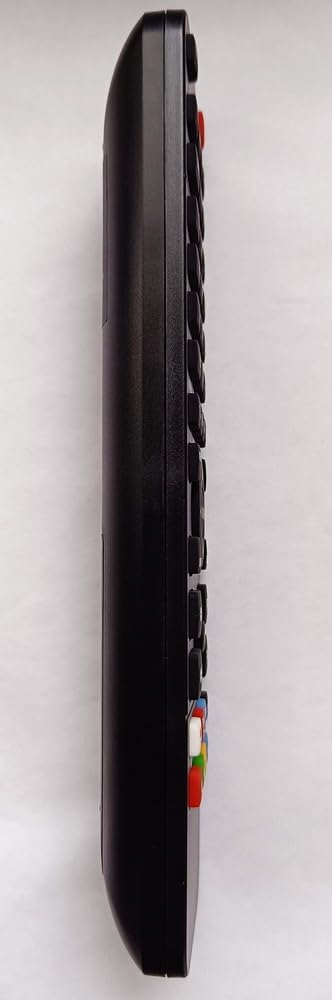
פיגורע 2: זייַט view פון דער ווײַטקאָנטראָל, אונטערשטרייַכנדיק דעם ערגאָנאָמישן פּלאַן און קנעפּל פּלאַצירונג.
3.1 יקערדיק פאַנגקשאַנז
- מאַכט קנעפּל: טורנס די טעלעוויזיע אויף אָדער אַוועק.
- באַנד אַרויף / אַראָפּ: אַדדזשוסץ די געזונט מדרגה.
- קאַנאַל אַרויף / אַראָפּ: טוישט טעלעוויזיע קאַנאַלן.
- שטיל קנעפּל: שטילט דעם טעלעוויזיע אַודיאָ.
- נומער קנעפּלעך (0-9): גלייך אויסקלייבן קאַנאַלן.
- אַרייַנגאַנג/מקור קנעפּל: טוישט צווישן פארשידענע אינפוט קוועלער (HDMI, AV, אאז"וו).
3.2 סמאַרט טעלעוויזיע פונקציעס
If your BLAUPUNKT 40FGC5500S TV is a Smart TV, this remote may include dedicated buttons for quick access to streaming services and smart features. Look for buttons labeled with service logos such as Netflix, YouTube, or a 'Smart Hub' button. Pressing these buttons will launch the corresponding application directly.
Note: The availability and functionality of Smart TV buttons depend on your specific TV model and its installed applications.
4. וישאַלט
4.1 רייניקונג
כדי צו אויפהאלטן דעם אויסזען און פונקציאנאליטעט פון דער ווײַטקאָנטראָל, רייניקט עס רעגולער:
- ניצן אַ ווייך, טרוקן שטאָף צו ווישן די ייבערפלאַך.
- פֿאַר שווערן שמוץ, אַ ביסל דampyi די שטאָף מיט וואַסער אָדער אַ מילד, ניט-אַברייסיוו רייניקונג.
- Avoid using harsh chemicals, solvents, or abrasive materials, as these can damage the remote's finish or internal components.
4.2 באַטערי פאַרבייַט
Replace the batteries when the remote control's response becomes sluggish or stops working. Always replace both batteries at the same time with new AAA batteries. Do not mix old and new batteries, or different types of batteries.
5. טראָובלעשאָאָטינג
If you experience issues with your Re-Flix Light Remote Control, refer to the following common solutions:
- ווייַט ניט ריספּאַנדינג:
- קאָנטראָלירט צי די באַטעריעס זענען ריכטיק אַרײַנגעשטעלט מיט דער ריכטיקער פּאָלאַריטעט.
- פאַרבייַטן די באַטעריז מיט פריש אָנעס.
- זיכער מאַכן אַז עס זענען נישטאָ קיין שטערונגען צווישן דער ווײַטקאָנטראָל און דעם טעלעוויזיע'ס אינפֿראַרעד סענסאָר.
- זייט זיכער אז איר זענט אין דער עפעקטיווער ראַנגע פון דעם טעלעוויזיע'ס IR ריסיווער.
- ספעציפישע קנעפּלעך ארבעטן נישט:
- רייניקט די ווײַטקאָנטראָל, ספּעציעל אַרום די פּראָבלעמאַטישע קנעפּלעך, צו באַזײַטיקן יעדן שמוץ אָדער דעבריס וואָס קען פאַרהיטן קאָנטאַקט.
- If it's a Smart TV button, ensure your TV model supports that specific function or streaming service.
- TV not responding to any remote:
- Check if the TV's power is on.
- Try using the manual controls on the TV itself to rule out a TV issue.
6. ספּעסאַפאַקיישאַנז
| סאָרט | Re-Flix |
| מאָדעל נומער | 747516 |
| קאָליר | שוואַרץ |
| קאַמפּאַטאַבאַל דעוויסעס | Television (BLAUPUNKT 40FGC5500S) |
| קאַנעקטיוויטי טעכנאָלאָגיע | ינפרערעד |
| מאַקסימום געשטיצטע דעוויסעס | 1 |
7. וואָראַנטי און שטיצן
For information regarding warranty coverage or technical support, please refer to the documentation provided with your purchase or contact the retailer. Keep your proof of purchase for any warranty claims.